❓🤔 ref는 어떤 상황에서 사용해야 할까?
👉 특정 DOM에 작업을 해야 할 때
❓🤔 대체 ‘어떤’ 작업을 할 때 ref를 사용해야 하는 걸까?
👉 DOM을 꼭 직접적으로 건드려야 할 때
- 일반 HTML 예제 코드 (http://jsbin.com/qawucezuci/edit)
- 일반 순수 자바스크립트 및 jQuery로 만든 웹 사이트에서 input을 검증할 때는 다음과 같이 특정 id를 가진 input에 클래스를 설정한다.
<html>
<head>
  <meta charset="utf-8">
  <meta name="viewport" content="width=device-width">
  <title>Example</title>
  <style>
    .success {
      background-color: green;
    }

    .failure {
      background-color: red;
    }
  </style>
  <script>
    function validate() {
      var input = document.getElementById('password');
      input.className = '';
      if(input.value === '0000') {
        input.className = 'success';
      } else {
        input.className = 'failure';
      }
    }
  </script>
</head>
<body>
  <input type="password" id="password"></input>
  <button onclick="validate()">Validate</button>
</body>
</html>
하지만 리액트에서 이런 작업은 굳이 DOM에 접근하지 않아도 state로 구현할 수 있다!
-
예제 컴포넌트
-
src 디렉터리 안에 ValidationSample.css와 ValidationSample.js 파일 만들기
/* ValidationSample.css */
.success {
background-color: lightgreen;
}
.failure {
background-color: lightcoral;
}
// ValidationSample.jsx import React, { Component } from 'react'; import './ValidationSample.css'; class ValidationSample extends Component { state = { password: '', clicked: false, validated: false } handleChange = (e) => { this.setState({ password: e.target.value }); } handleButtonClick => () => { this.setState({ clicked: true, validated: this.state.password === '0000' }) } render() { return ( <div> <input type="password" value={this.state.password} onChange={this.handleChange} className={this.state.clicked ? (this.state.validated ? 'success' : 'failure') : ''} /> <button onClick={this.handleButtonClick}>검증하기</button> </div> ); } } export default ValidationSample;
-

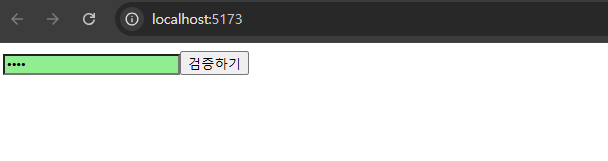
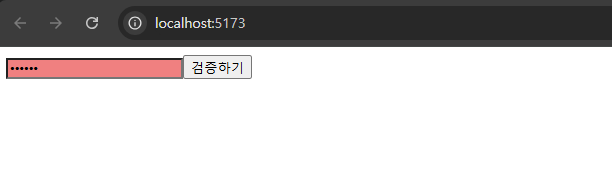
-
input에서 onChange 이벤트 발생 시
→ handleChange를 호출해 state의 password 값을 업데이트 함. -
button에서는 onClick 이벤트가 발생 시
→ handleButtonClick을 호출해 clicked 값을 참으로 설정, validated 값을 검증 결과로 설정함. -
input의 className 값은 버튼을 누르기 전
→ 비어 있는 문자열을 전달함. -
버튼을 누른 후
→ 검증 결과에 따라 success 값 또는 failure 값을 설정함. 그리고 이 값에 따라 input 색상이 초록색 또는 빨간색으로 나타남.
(+) input에 ref 달기
import React, { Component } from 'react';
import './ValidationSample.css';

class ValidationSample extends Component {
  state = {
    password: '',
    clicked: false,
    validated: false,
  };

  handleChange = (e) => {
    this.setState({
      password: e.target.value,
    });
  };

  handleButtonClick = () => {
    this.setState({
      clicked: true,
      validated: this.state.password === '0000',
    });
    // ref 작성 후 )
    // 버튼에서 onClick 이벤트가 발생할 때  input에 포커스 주기
    this.input.focus();
  };

  render() {
    return (
      <div>
        <input
          // (ref 달아보기)
          ref={(ref) => (this.input = ref)}
          type="password"
          value={this.state.password}
          onChange={this.handleChange}
          className={
            this.state.clicked
              ? this.state.validated
                ? 'success'
                : 'failure'
              : ''
          }
        />
        <button onClick={this.handleButtonClick}>검증하기</button>
      </div>
    );
  }
}

export default ValidationSample;
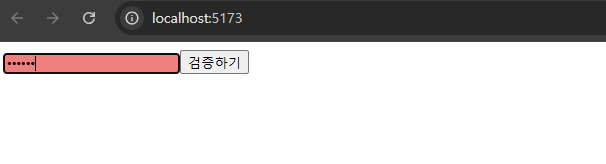
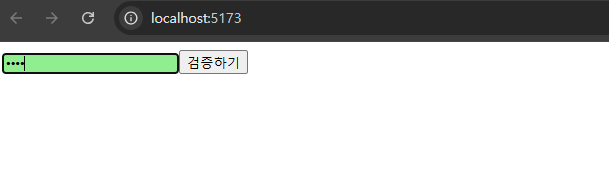

호떡 신문지에서 개발자로 환생