내가 사용한 폰트는 Pretendard이다.
React 프로젝트에서 tailwind를 사용중인데, 이때 가장 간단하게 폰트를 적용할 수 있는 법을 작성해볼려 한다.
🤍 적용법
1. 프로젝트 폴더 내에 ttf 파일 넣기
나는 /src/style/fonts 폴더 내에 폰트 파일을 넣었다.
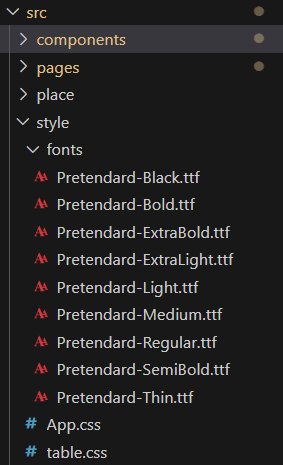
폰트를 다운받고 /public/static 폴더 내에 있는 ttf 파일 중, 사용할 파일만 넣으면 된다.
2. index.css에 코드 작성
@font-face {
  font-family: 'Pretendard';
  font-weight: 400;
  font-display: swap;
  src: local('Pretendard Medium'), url('./style/fonts/Pretendard-Medium.ttf') format('truetype');
}

@font-face {
  font-family: 'Pretendard';
  font-weight: 300;
  font-display: swap;
  src: local('Pretendard Light'), url('./style/fonts/Pretendard-Light.ttf') format('truetype');
}- font-family : 폰트의 이름을 정의
- font-weight : 폰트의 굵기를 지정 (400이 Regular로 기본 크기다.)
- font-display: 브라우저가 폰트를 로드할 때 폰트를 표시하는 방식을 제어
- swap : 시스템 글꼴을 사용하다가 폰트 로딩이 완료되면 웹 글꼴을 적용
- src : 폰트 파일의 위치를 지정
- local() : 사용자의 시스템에 설치된 폰트를 먼저 검색 (빠르게 로드 가능)
- url() : 로컬 또는 서버에서 폰트 파일을 가져옴
- format() : 폰트의 형식을 명시
- truetype: TTF형식을 의미
3. App.css에 font-family 적용
body {
  font-family: 'Pretendard'
}
이렇게까지 하면 기본 폰트로 내가 정의한 Pretendard 폰트가 적용 된다!
이제 폰트의 굵기 (weight)를 바꿀려면 어떻게 해야될까?
🩵 폰트 굵기 변경법
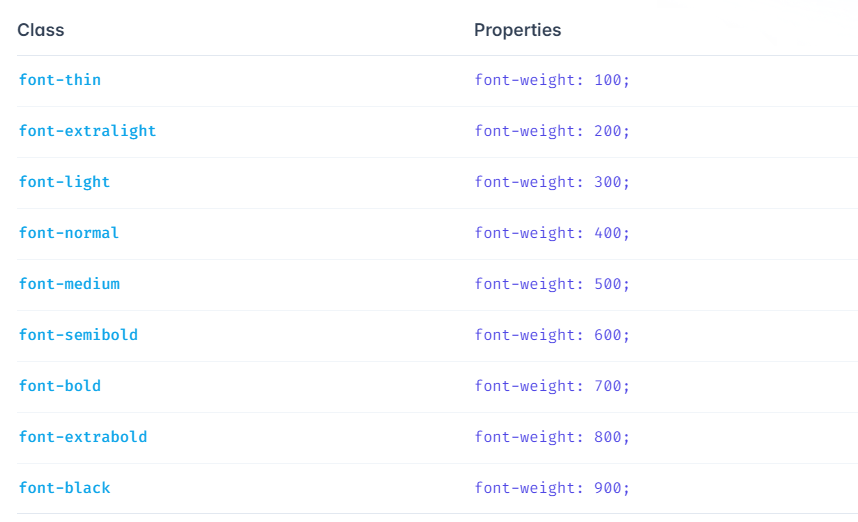
...
return (
  <div className='font-light'>
  	안녕하세요
  </div>
)
...
아까 index.css에 font-wieght: 300인 경우를 정의해줬기 때문에
className에 font-light를 작성해주면 Pretendard-Light가 적용된다!

감씨의 프론트엔드 공부 '~'