근 한 달만에 작성하는데, 정처기 공부를 병행하고 있어서 글 작성을 잊고 있었다.
현재까지 제대로된 실습 프로젝트를 들어가지는 않았으나,
API를 작성하는 방법이나 API를 활용할 수 있는 방법을 간단히 익히고 있었다.
현시점에서는 REST API를 이용한 간단한 CRUD 요청을 학습할 것이다.
REST API - GET
리소스를 취득하는 메소드이다.
@RestController
@RequestMapping("/api")
public class RestApiController {
    @GetMapping(path = "/hello")
    public String hello(){
        return "Hello World";
    }

}
해당 코드는 가장 기초적인 GET Method를 보이고 있다.
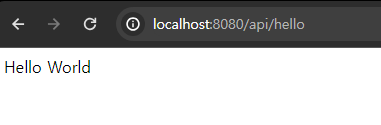
로컬호스트에서 작성한 코드대로 요청을 날리면 해당 이미지처럼 문자열을 반환하고
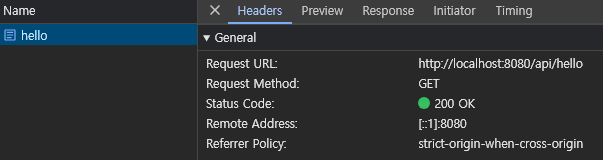
GET Method인 것과 요청된 URL을 확인할 수 있다.
전달하는 URL을
public String hello(){
        var html = "<html> <body> <h1> Hello World </h1> </body> </html>";

        return html;
    }
이와같이 수정하면
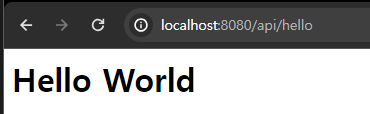
요청된 주소는 같지만, response로는 html 태그가 내려오는 것이다.
GET Method의 간단한 동작방식을 알 수 있다.
@GetMapping(path = "/echo/{message}")
    public String echo(@PathVariable String message){
        System.out.println("echo message : " + message);
        return message;
    }
PathVariable을 통해서 요청한 주소에 입력한 메세지를 볼 수 있다.
public String echo(@PathVariable(name = "message") String msg)name을 어떤 주소값과 매칭할지 명시해주면 변수와 다르더라도 요청과 변수가 매칭될 수 있다.
public String echo(@PathVariable(name = "message") String msg, @PathVariable int id)와 같이 변수를 여러 타입으로 받을 수 있다.
Integer 타입은 null이 가능하므로 주소에는 default가 0인 int 타입이 어울린다.
http://localhost:8080/echo/{message}/id/{id}
요청을 보낼 때에는 물론 어노테이션을 어떻게 작성하느냐에 따라서 다를 수 있다.
http://localhost:8080/echo/{message}/{id}
위와 같이 작성할 경우에는 요청을 보낼 때 /id/1 과 같이 매핑될 변수 이름을 적을 필요가 없다.
@GetMapping(path = "/book")
    public void queryParam(
            @RequestParam String category,
            @RequestParam String issuedYear,
            @RequestParam(name = "issued-month") String issuedMonth,
            @RequestParam String issued_day
    ){
        System.out.println(category);
        System.out.println(issuedYear);
        System.out.println(issuedMonth);
        System.out.println(issued_day);
    }
query parameter 방식으로 get 요청을 보내는 메소드는 위와 같은데,
http://localhost:8080/book?category=IT&issuedYear=2023&issued-month=01&issued_day=31
이 주소로 요청하면 에러가 뜬다. 해당 클래스가 /api 라는 루트를 가지고 있기 때문에 /book 앞에 /api를 붙여줘야한다.
 @RequestParam(name = "issued-month") String issuedMonth,
 @RequestParam(name = "issued_day") String issuedDay
물론 다음과 같이 snake 케이스를 제거하고 원칙을 따르는 컨벤션을 지켜주는 것이 좋다.
QueryParameter로 받는 방법도 있다.
@GetMapping(path = "/book2")
    public void queryParamDto(
            BookQueryParam bookQueryParam
    ){
        System.out.println(bookQueryParam);
}http://localhost:8080/api/book2?category=IT&issuedYear=2023&issued-month=01&issued_day=31위 주소를 요청하면 issued-month와 issued_day를 받을 수 없다.
@Data
@NoArgsConstructor
@AllArgsConstructor
public class BookQueryParam {
    private String category;
    private String issuedYear;
    private String issuedMonth;
    private String issuedDay;
}
위 컨벤션은 camel 케이스로 이루어져 있는데, 변수 선언시 issued_day로 선언하여 예외를 줄 수 있지만, 추천하는 방식은 아니므로
http://localhost:8080/api/book2?category=IT&issuedYear=2023&issuedMonth=01&issuedDay=31주소를 요청할 때 케이스를 맞추는 것이 좋을 것이다.