1주차 과제 APM 소스설치
📒Apache 설치
여기서 핵심은 소스설치이다.소스설치란 linux에서 소스를 직접 다운받아 컴파일하여 설치하는 것을 말한다.
💻필수 패키지 설치
$ sudo su
apt-get install make
apt-get install build-essential
apt-get install gcc
apt-get install --reinstall make
apt-get install libexpat1-dev
apt-get install g++
apt-get install net-tools
apt-get install curl
💡여기서 sudo su란?
sudo(superuser do)라는 명령어로 현재 계정에서 root권한을 이용하여 명령어를 실행할 떄 사용 된다.
su(switch user)명령어로 현재 계정을 로그아웃하지 않고 다른 계정으로 전환하는 명령어 이다.
$ sudo su
라고 입력시 root계정을 반영구적으로 빌릴수 있게 되는것이다.
💾소스설치 파일 다운로드 및 압축해제
소스설치는 /usr/local에 설치하는것이 관례라고 하여
/usr/local로 이동후 Apache를 설치하면 된다.
설치하기 전 기본적으로 apr,apr-util,pcre를 설치해줘야한다.
그리고 아파치의 버전은 최신버전을 깔아야 오류가 나지 않는다.
https://httpd.apache.org/download.cgi에서 최신버전을 확인하자
	/usr/local# mkdir apache
	/usr/local# wget http://mirror.navercorp.com/apache//apr/apr-1.7.0.tar.gz
	/usr/local# wget http://mirror.navercorp.com/apache//apr/apr-util-1.6.1.tar.gz
	/usr/local# wget https://sourceforge.net/projects/pcre/files/pcre/8.45/pcre-8.45.tar.gz/
	/usr/local# wget https://dlcdn.apache.org/httpd/httpd-2.4.54.tar.gz
압축해제
	/usr/local# tar xvfz apr-1.7.0.tar.gz
	/usr/local# tar xvfz apr-util-1.6.1.tar.gz
	/usr/local# tar xvfz pcre-8.45.tar.gz
	/usr/local# tar xvfz httpd-2.4.53.tar.gz
APR(Apache Portable Runtime)-Apache가 설치된 플렛폼(OS)에 관계 없이 일정한 동작을 하기 위해 필요한 라이브러리이다.
wget-웹 서버로 파일을 다운받는다.
PCRE-(Perl Compatible Regular Expressions)는
💻 apr 설치
/usr/local/apr-1.7.0# ./configure --prefix=/usr/local/apr
/usr/local/apr-1.7.0# make
/usr/local/apr-1.7.0# make install
💡configure란 소스파일에 대한 환경설정을 해주는 명령어 이다. 서버환경에 맞쳐 makefile을 생성해주는 과정이다. ./configure --prefix=/usr/local/apr 하게 되면 어떤 파일을 /usr/local/apr 이라는 곳에 설치하겠다는 뜻이다.
💡make란 소스를 컴파일 하는것이다. 컴파일이란 것은 소스파일을 사용자가 실행 가능한 파일로 만들어 주는 과정을 말한다.make 과정이 끝나고 나면 설치파일이 생성된 상태라고 볼 수 있다.
💡make install은 make를 통해 만들어진 설치파일을 설치하는 과정이다. build된 프로그램을 실행 할 수 있게 파일들을 알맞은 위치에다가 복사를 한다.
💻 apr-util 설치
/usr/local/apr-util-1.6.1# ./configure --prefix=/usr/local/apr-util --with-apr=/usr/local/apr
/usr/local/apr-util-1.6.1# make
/usr/local/apr-util-1.6.1# make install
💻 pcre 설치
/usr/local# cd pcre-8.45
/usr/local/pcre-8.43# ./configure --prefix=/usr/local/pcre
/usr/local/pcre-8.43# make
/usr/local/pcre-8.43# make install
💻 Apache 설치
/usr/local# cd httpd-2.4.54
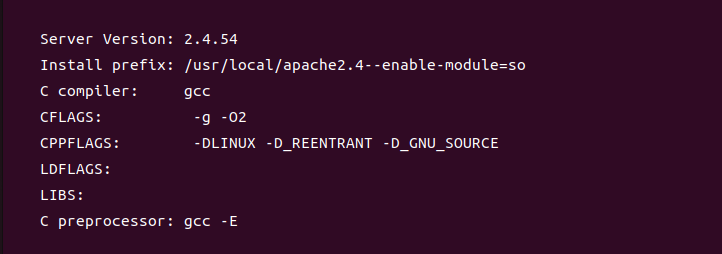
/usr/local/httpd-2.4.54# ./configure --prefix=/usr/local/apache2.4 \
--enable-module=so --enable-rewrite --enable-so \
--with-apr=/usr/local/apr \
--with-apr-util=/usr/local/apr-util \
--with-pcre=/usr/local/pcre/bin/pcre-config
--enable-mods-shared=all
/usr/local/httpd-2.4.46# make
/usr/local/httpd-2.4.46# make install
pcre(2)-config for libpcre not found 오류가 자주 나타나는것 같아 처음부터 --with-pcre=/usr/local/pcre/bin/pcre-config 이렇게 설정하여 경로를 직접 지정해 주었다.
💻 Apache 실행
실행전 sudo apt-get update
sudo apt-get install net-tools
sudo apt install curl
을 입력하여 오류를 줄이기를 추천한다.또한 바로 시작시 AH00558 에러가 발생하기 때문에 /usr/local/apache2.4/conf로 들어가 httpd.conf 파일을 열어
위와 같이 ServerName localhost:80을 입력해준다.
이제 시작해본다
실행: httpd -k start 종료: httpd -k stop
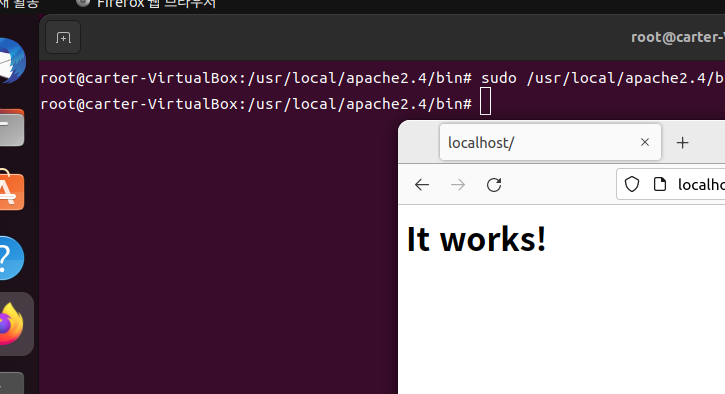
sudo /usr/local/apache2.4/bin/httpd -k start
웹브라우저를 열고 localhost를 입력하여 it works!가 나오면 성공이다.