App 로그인 시 자주 사용하는 SNS 로그인!
SNS 로그인을 사용한 앱을 출시하려면 Apple 로그인을 반드시 사용해야 합니다. 이건 모두 알고 있을 내용이니 빠르게 본문을 말하자면,,,🧐
Apple 로그인을 제공하는 경우에 계정 탈퇴를 요청하는 경우 Apple REST API를 호출하여 사용자 토큰을 해지하여야 합니다. 이게 무엇이냐...! 아이폰의 설정 앱 -> Apple로 로그인에서 Apple ID 사용 중단과 같은 것입니다.
문서에 따르면 사용자의 Token을 Revoke하기 위해선 Client_Secret이 필요합니다!
(저는 해당 과정을 서버 쪽에서 처리하여서 아래의 관련 코드들은 Python 코드입니다. )
alg : ES256 사용
kid : Key ID
iss : Team ID
iat : 현재 시간 (client secret 생성된 시간)
exp : client secret 만료될 시간 (저는 현재시간으로부터 1시간으로 설정하였습니다.)
sub : App Bundle ID
Client Secret 생성
def create_client_secret():
    headers = {
        "alg": "ES256",
        "kid": Key_ID
    }

    iat = int(time.time())
    exp = iat + 3600

    claims = {
        "iss": Team_ID,
        "iat": iat,
        "exp": exp,
        "aud": "https://appleid.apple.com",
        "sub": Client_ID,
    }

    with open('키_파일_경로', 'r') as key_file:
        private_key = key_file.read()

    client_secret = jwt.encode(
        claims,
        private_key,
        algorithm="ES256",
        headers=headers
    )

    return client_secret
여기서 잠깐! 🖐️ 주의해야 할 점이 있습니다. Apple Developer 에서 Key File을 다운받을 때 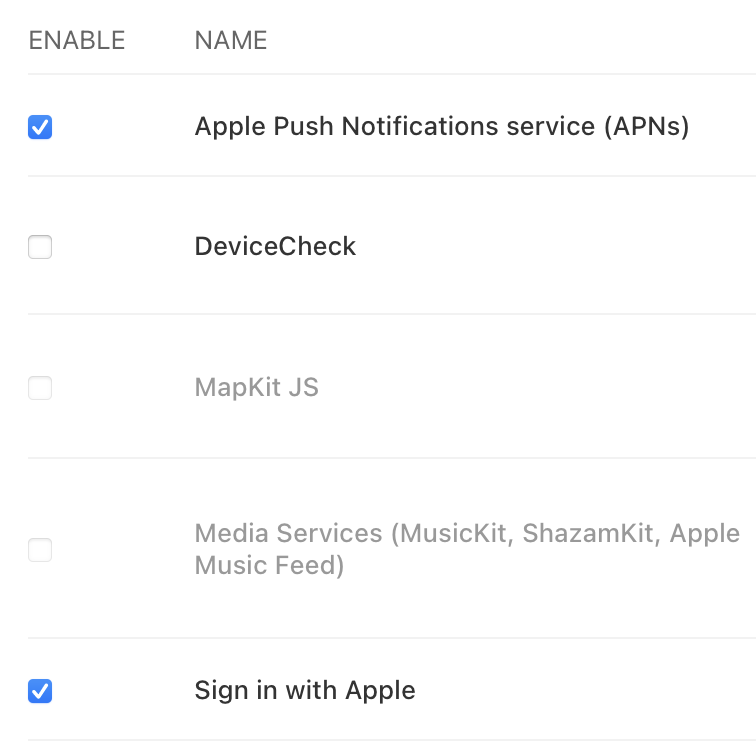
Sign in with Apple 목록을 반드시 체크하셔야 합니다. 저는 체크하지 않은 오류로 인해 몇 시간 동안 삽질을 하였습니다....
Revoke Token
revoke_url = "https://appleid.apple.com/auth/revoke"

    headers = {
        "Content-Type": "application/x-www-form-urlencoded"
    }

    data = {
        "client_id": Client_ID,
        "client_secret": client_secret,
        "token": token,
        "token_type_hint": "refresh_token"
    }

    response = requests.post(revoke_url, headers=headers, data=data)
저는 토큰을 해지시킬 때 refresh token을 사용하였습니다. refresh token은 authorization code를 이용하여 발급받을 수 있습니다. authorization code는 애플 로그인을 하였을 때 발급되는 것으로, 유효 기간이 5분입니다. 그렇다면, 회원가입을 한 이후에 탈퇴를 하려면 authorization code를 다시 발급받아야 하는데.... 저는 그게 조금 번거롭다는 생각이 듭니다.
저는 사용자가 Apple 로그인을 통해 발급된 authorization code를 사용하여 refresh token을 발급받은 후, refresh token을 따로 저장해 놓습니다. (서버 측 데이터베이스에!) 그 후 회원이 탈퇴를 할 경우 이때 저장해 놓은 refresh token을 사용하여 토큰을 해지해 줍니다.
Authorization Code로 Refresh Token 발급받기
client_secret = create_client_secret()
    request_url = f"https://appleid.apple.com/auth/token"

    data = {
        "client_id": Client_ID,
        "client_secret": client_secret,
        "code": auth_code,
        "grant_type": "authorization_code"
    }

    headers = {
        "Content-Type": "application/x-www-form-urlencoded"
    }

    response = requests.post(request_url, data=data, headers=headers)

    if response.status_code == 200:
        token_data = response.json()
        refresh_token = token_data.get("refresh_token")
        ...(생략)