셀프주유소는 정말 저렴할까?
🤔
- 해당 과제는 수업시간에 이미 같은 내용을 다뤘던 적이 있었다.
- 기존 수업내용과 달라진 점은 아래와 같다
- 기존에는 엑셀 데이터를 받아서 진행했지만, 이번에는 과제1차와 같이 웹크롤링을 통해서 자료를 가져와야 함(생각보다 어려웠고 시간이 많이 들었다..😂)
- 기존 내용에서 column 추가(부가정보 데이터)
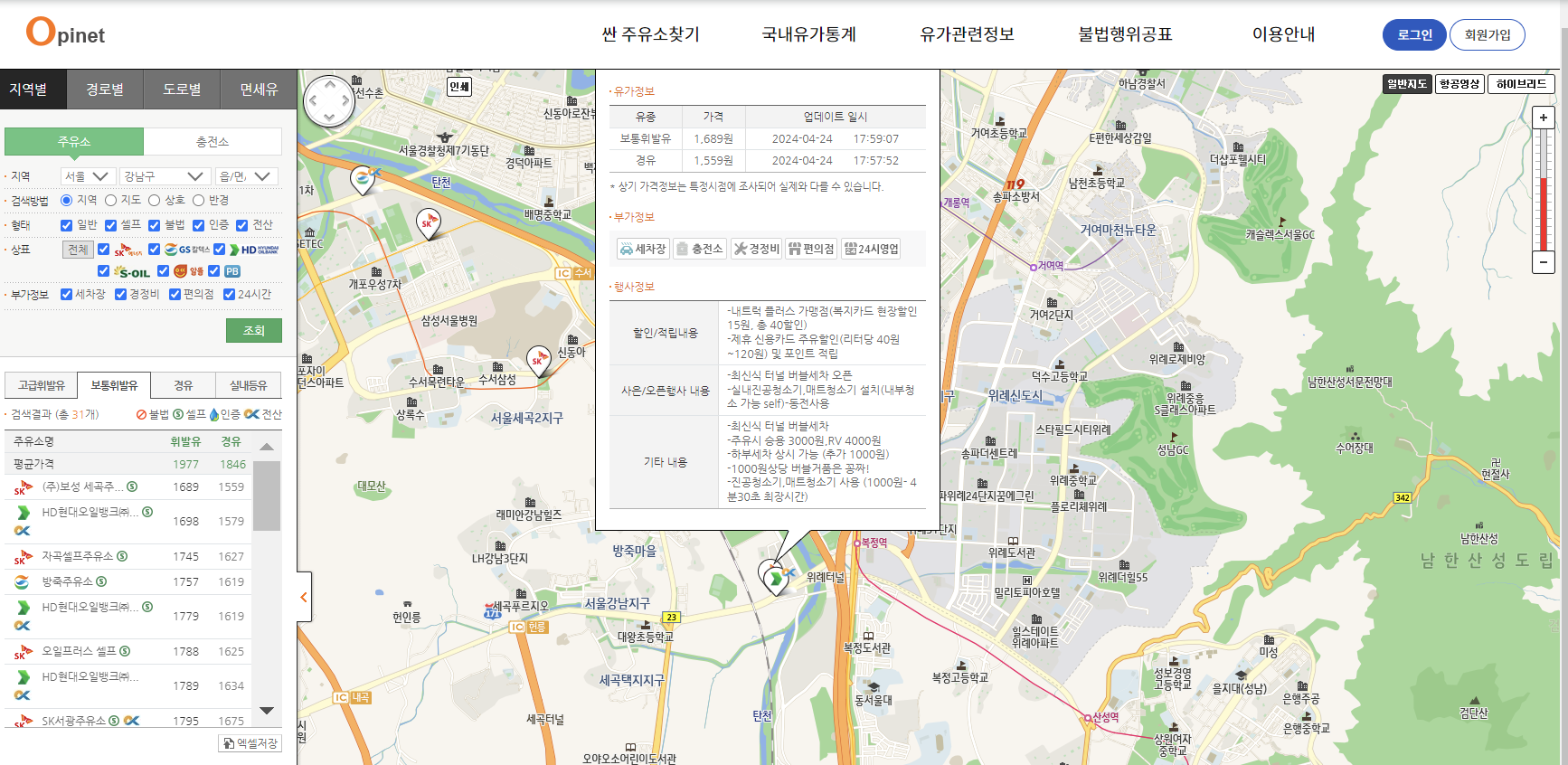
[사용한 자료 출처] : https://www.opinet.co.kr/user/main/mainView.do
import pandas as pd
from bs4 import BeautifulSoup
from urllib.request import Request, urlopen
from selenium import webdriver
from selenium.webdriver.common.by import By
from selenium.webdriver import ActionChains
I. 데이터 가져오기
1. 페이지 접근 & 싼주유소(지역별) 클릭
url = "https://www.opinet.co.kr/user/main/mainView.do"
driver = webdriver.Chrome()
driver.get(url)

# 싼주유소 클릭
search_tag = driver.find_element(By.CSS_SELECTOR, '#header > div > ul > li:nth-child(1) > a')
action = ActionChains(driver)
action.click(search_tag)
action.perform()

# 지역별 클릭
btn_click = driver.find_element(By.CSS_SELECTOR, '#header > div > ul > li:nth-child(1) > ul > li:nth-child(1) > a > span')
btn_click.click()
2. 부가정보 체크
driver.find_element(By.CSS_SELECTOR, '#CWSH_YN').click()
driver.find_element(By.CSS_SELECTOR, '#MAINT_YN').click()
driver.find_element(By.CSS_SELECTOR, '#CVS_YN').click()
driver.find_element(By.CSS_SELECTOR, '#SEL24_YN').click()
3. 지역 & 서울 클릭
# 지역 클릭
prov_click = driver.find_element(By.CSS_SELECTOR, '#SIDO_NM0')
prov_click.click()

# 서울 클릭
seoul_click = driver.find_element(By.CSS_SELECTOR, '#SIDO_NM0 > option:nth-child(2)')
seoul_click.click()
4. 구 list 가져오기
gu_raw = driver.find_element(By.CSS_SELECTOR,"#SIGUNGU_NM0")
gu = gu_raw.find_elements(By.TAG_NAME,"option")

gu[0].text # 시/군/구
gu = gu[1:]
gu[0].text	# 강남구

gu_list = []

from tqdm import tqdm_notebook

for option in tqdm_notebook(gu) :
    gu_list.append(option.get_attribute("value"))

gu_list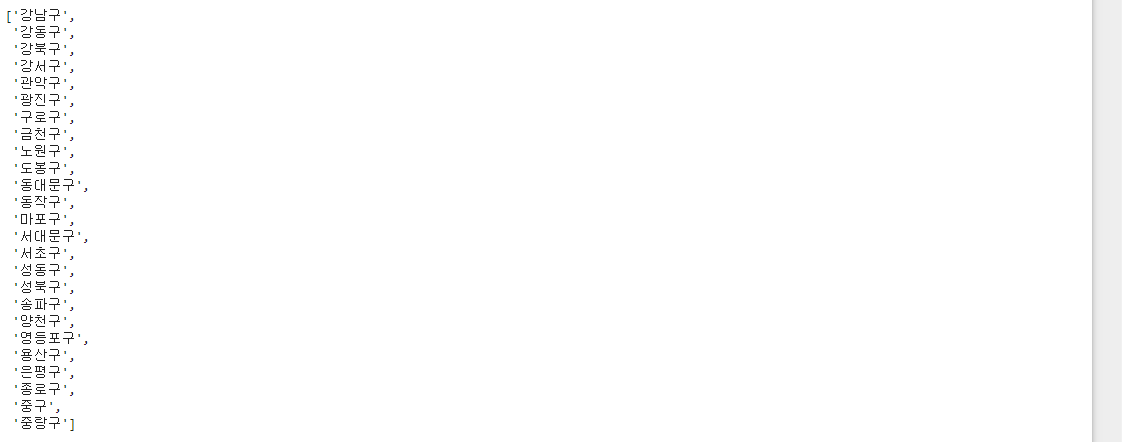
5. 전체 데이터 가져오기
from tqdm import tqdm_notebook

from bs4 import BeautifulSoup
import time

# 구 이름 넣기
for gu in tqdm_notebook(gu_list) :
    gu_raw = driver.find_element(By.CSS_SELECTOR,"#SIGUNGU_NM0")
    gu_raw.send_keys(gu)

    html = driver.page_source
    soup = BeautifulSoup(html,"html.parser")
    cnt = int(soup.find(id = "totCnt").text)


    for n in range(1,cnt+1) :
        driver.find_element(By.CSS_SELECTOR,f'#body1 > tr:nth-child({n}) > td.rlist > a').click()
        html = driver.page_source
        soup = BeautifulSoup(html,"html.parser")

        # 1. 주유소 명
        name = soup.find(id = "os_nm").text

        # 2. 주유소 주소
        address = soup.find(id = "rd_addr").text

        # 3. 브랜드
        brand = soup.find(id = "poll_div_nm").text

        # 4. 휘발유가격
        gasoline = soup.find(id = "b027_p").text

        # 5. 경유가격
        diesel = soup.find(id = "d047_p").text

        # 6. 셀프여부
        if soup.find('img', {'alt': '셀프주유소', 'class': 'bul'}):
            self = "Y"
        else:
            self = "N"

        # 7. 세차장여부
        if "off" in soup.find(id = "cwsh_yn").get("src")  :
            wash = "N"
        else:
            wash = "Y"

        # 8. 충전소여부
        if "off" in soup.find(id = "lpg_yn").get("src")  :
            charging = "N"
        else:
            charging = "Y"

        # 9. 경정비여부
        if "off" in soup.find(id = "maint_yn").get("src"):
            center = "N"
        else:
            center = "Y"

        # 10. 편의점여부
        if "off" in soup.find(id = "cvs_yn").get("src")  :
            store = "N"
        else:
            store = "Y"

        # 11. 24시여부
        if "off" in soup.find(id = "sel24_yn").get("src")  :
            night = "N"
        else:
            night = "Y"

        # 12. 구
        gu = gu

        time.sleep(0.2)
        data.append({
                'name' : name,
                'address' : address,
                'brand' : brand,
                'gasoline' : gasoline,
                'diesel' : diesel,
                'self' : self,
                'wash' : wash,
                'charging' : charging,
                'center' : center,
                'store' : store,
                'night' : night,
                'gu' : gu
})🤦♂️
여기서 정말 많이 헤멨다.. 주유소 이름을 불러와야하는데 a태그 안에서 주유소 이름만 어떻게 추출을 해야하지..?
그렇게 계속 페이지만 주구장창 보다가..!
생각보다 간단한 문제였단 것을 알았다😂
그치만 또 하나의 난관..바로 상위 1~2개 데이터를 클릭하면 화면 윗부분이 잘려 데이터가 나오지 않았다
- 이 해답은 구글링을 통해 찾을수 있었다
- 결론은 => 'innerText'를 사용하면 되었다
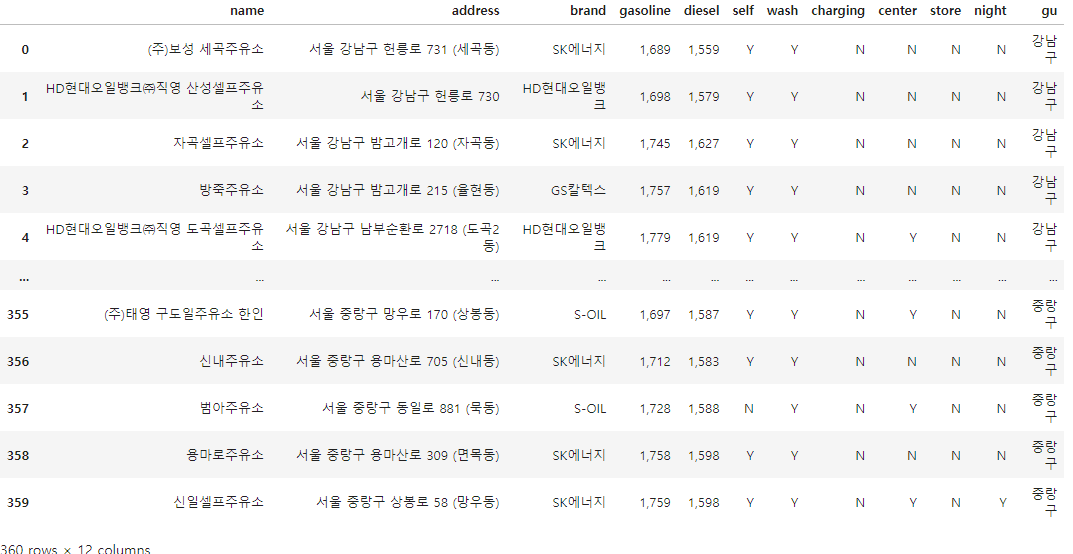
그렇게 우여곡절 끝에 나온 DataFrame

6. 위도, 경도 추가
import googlemaps
gmaps_key = "개인키"
gmaps = googlemaps.Client(key=gmaps_key)

lat_list = []
lng_list = []

for data in tqdm_notebook(oil_data_df['address']):

    tmp_list = gmaps.geocode(data, language = 'ko')
    lat = tmp_list[0].get("geometry")["location"]["lat"]
    lng = tmp_list[0].get("geometry")["location"]["lng"]
    lat_list.append(lat)
    lng_list.append(lng)


oil_data_df["lat"] = lat_list
oil_data_df["lng"] = lng_list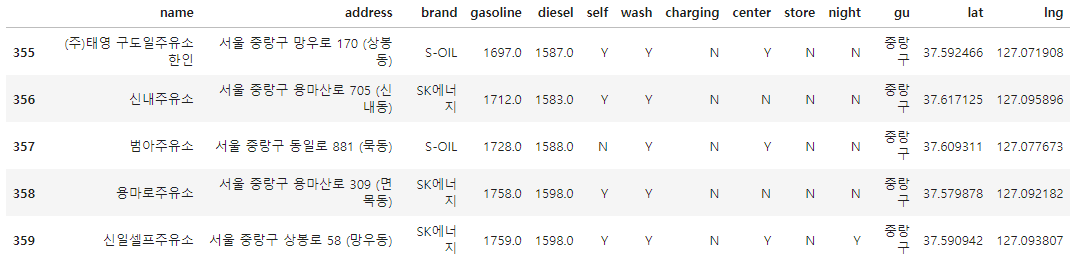
II. 데이터 시각화(셀프주유소는 저렴할까?)
import matplotlib.pyplot as plt
import seaborn as sns
import platform
import numpy as np
from matplotlib import font_manager, rc

get_ipython().run_line_magic("matplotlib", "inline")
# %matplotlib inline

path = "C:/Windows/Fonts/malgun.ttf"

if platform.system() == "Darwin":
    rc("font", family = "Arial Unicode MS")
elif platform.system() == "Windows":
    font_name = font_manager.FontProperties(fname = path).get_name()
    rc("font", family = font_name)
else:
    print("Unknown system")
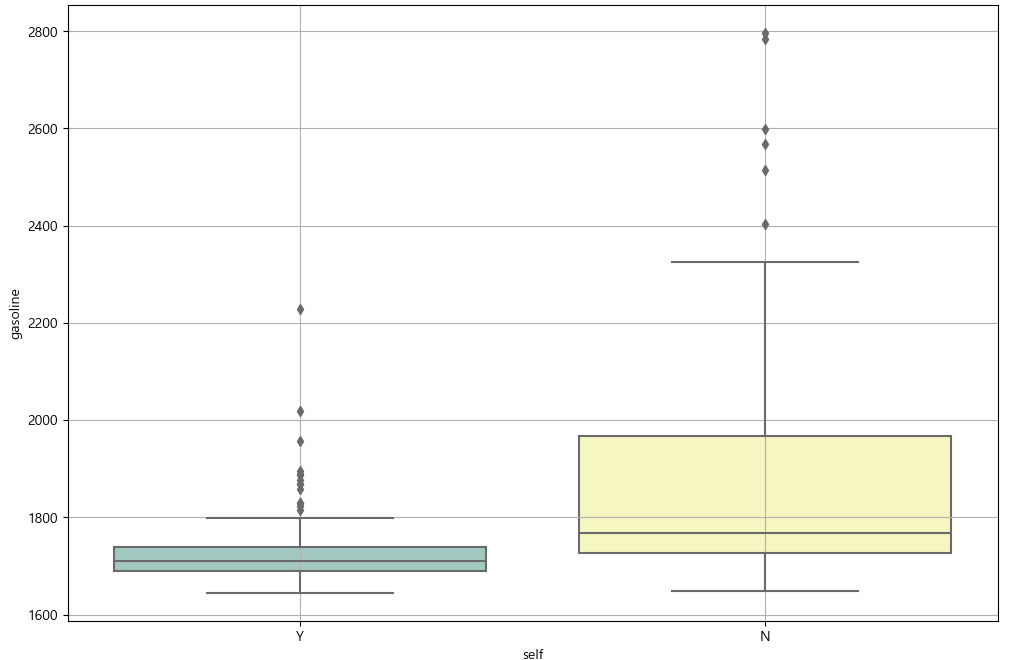
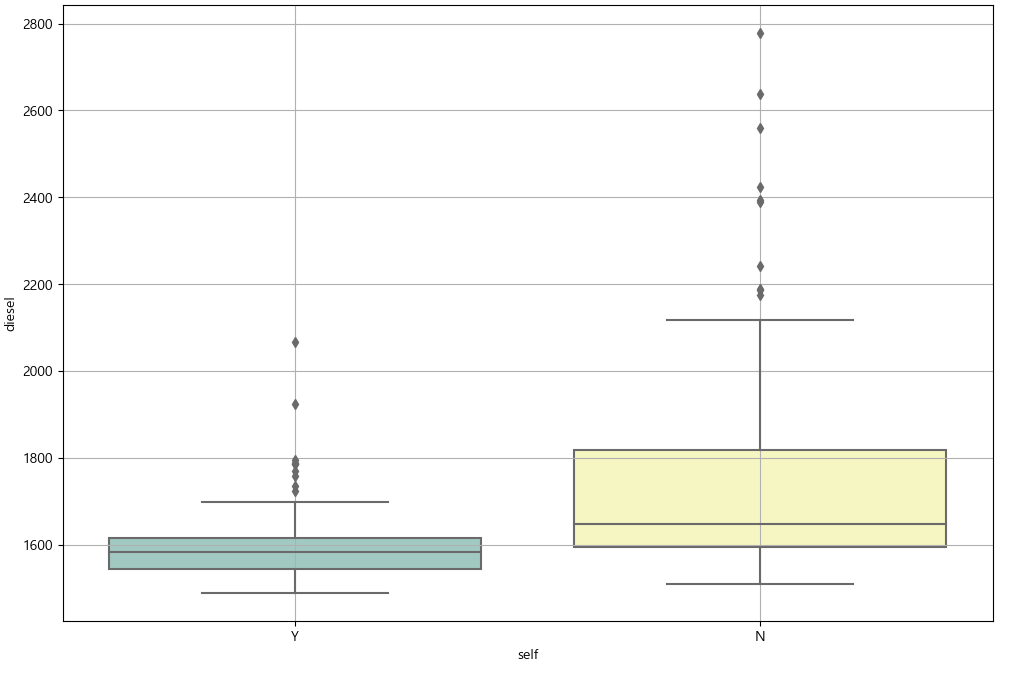
1. boxplot 사용하여 가격 check
# 1. 휘발유
plt.figure(figsize = (12, 8))
sns.boxplot(x ="self", y="gasoline", data=oil_data_df, palette="Set3")
plt.grid(True)
plt.show()

# 2. 경유
plt.figure(figsize = (12, 8))
sns.boxplot(x ="self", y="diesel", data=oil_data_df, palette="Set3")
plt.grid(True)
plt.show()
gasoline diesel
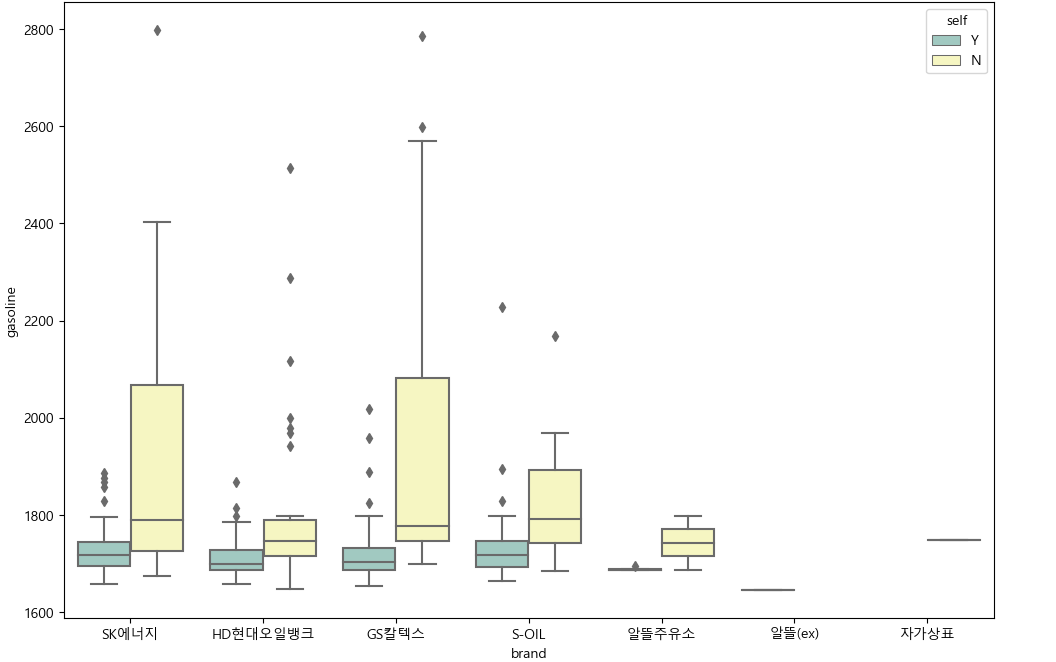
2. 브랜드별 비교
# 1) gasoline
plt.figure(figsize = (12, 8))
sns.boxplot(x="brand", y="gasoline", hue="self", data = oil_data_df, palette="Set3")
plt.show()

# 2) diesel
plt.figure(figsize = (12, 8))
sns.boxplot(x="brand", y="diesel", hue="self", data = oil_data_df, palette="Set3")
plt.show()
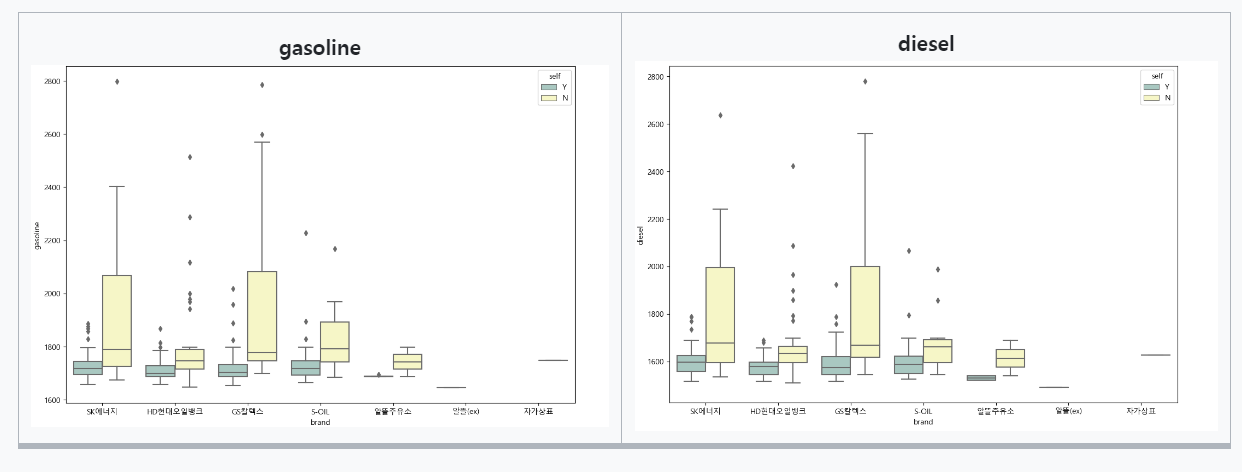
gasoline diesel
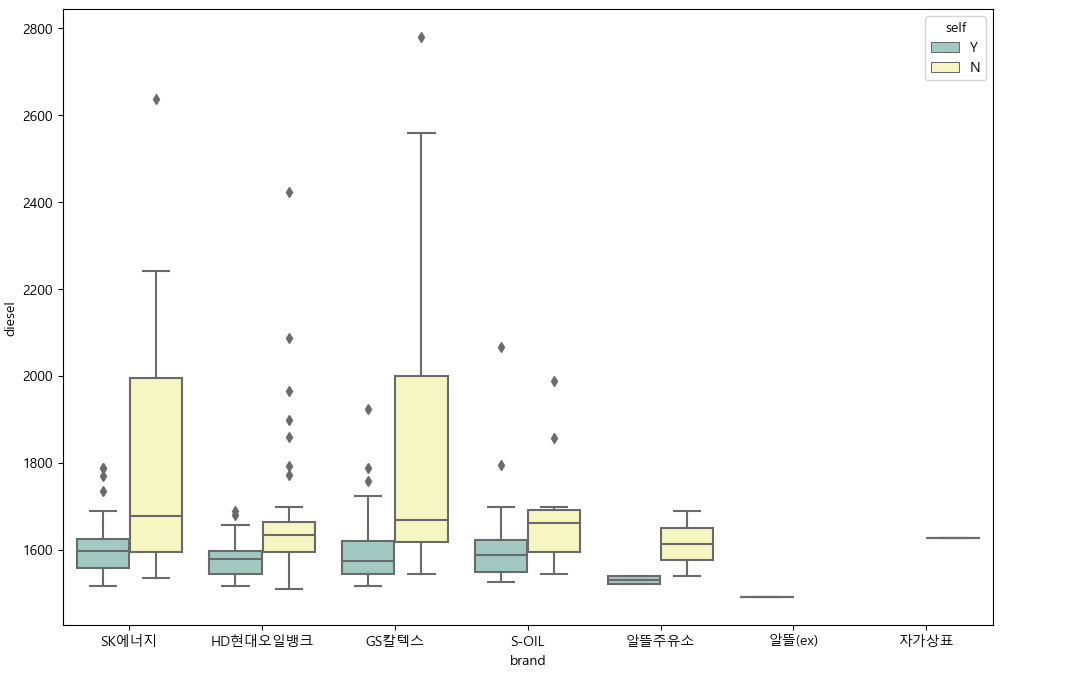
결론
- 모든 셀프 주유소가 일반 주유소보다 더 저렴한 것은 아니지만, 대부분의 셀프 주유소들의 휘발유 와 경유 가격이 일반 주유소보다 더 저렴한 경향이 있음.
- 브랜드별로 확인했을 때도, 셀프 주유소의 가격이 비교적 낮게 형성되어있는 경향을 확인할 수 있다.
[자료 출처] 제로베이스 데이터 스쿨

할 거면 제대로 하자