2주차 강의 주요 내용
- 함수
- 모듈
- 객체
- 클래스 상속
- 예외
- 텍스트 파일
I. 함수
1. 함수
- 파이썬의 함수는 수학의 함수와 동일하다
- 내장 함수: 파이썬에서 기본으로 제공하는 함수
- 사용자 함수: 사용자가 직점 선언
- 함수는 특정기능을 재사용하기 위해 사용
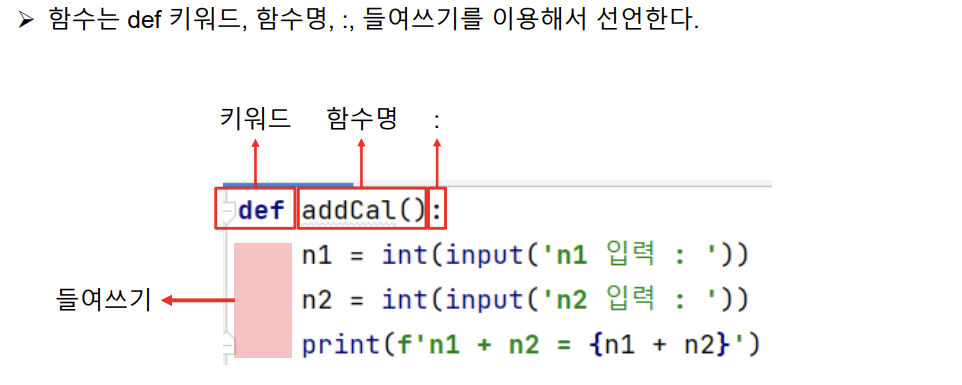
2. 함수 선언
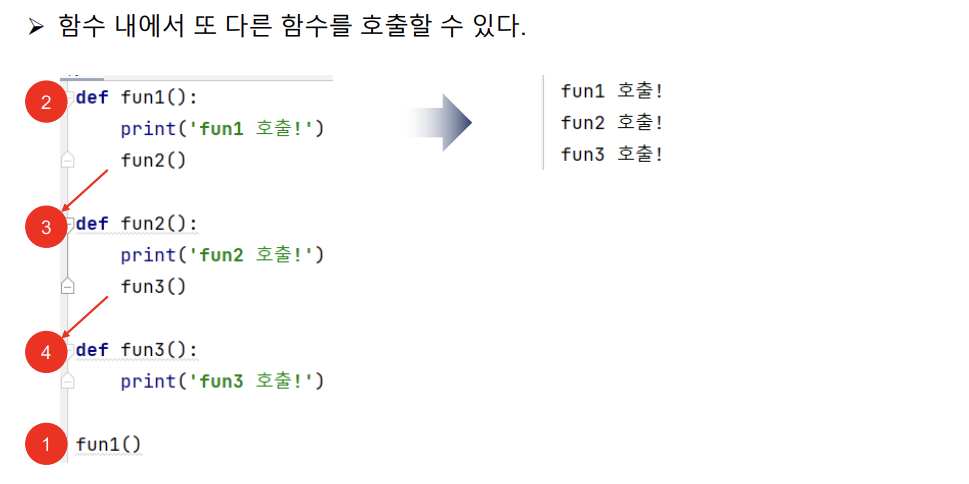
3. 함수 내에서 또 다른 함수 호출
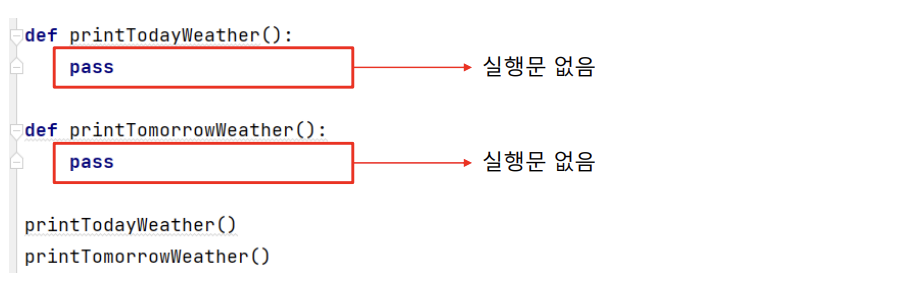
- pass를 이욯하여 실행문을 생략할 수 있다
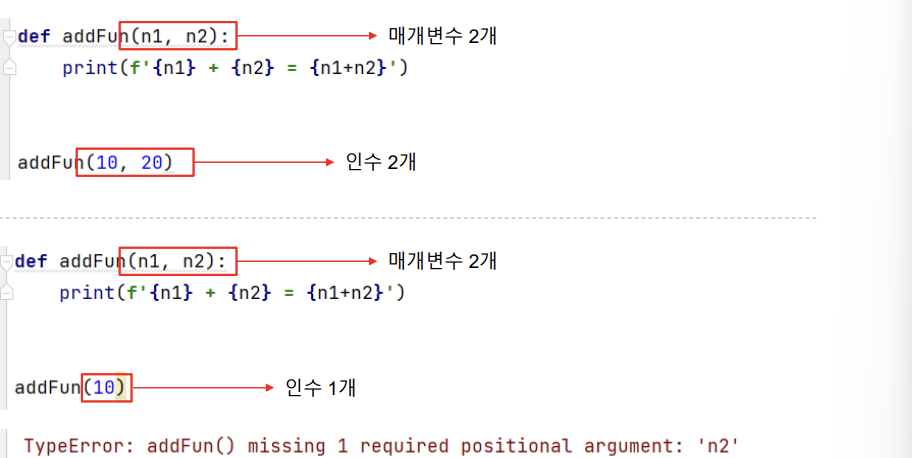
4. 인수와 매개변수
- 함수 호출 시 함수에 데이터를 전달 할 수 있다
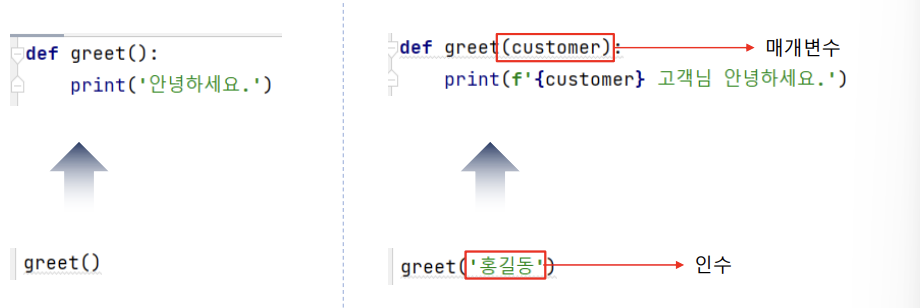
인수와 매개변수는 짝을 이루어야하기 때문에, 갯수가 항상 일치해야 한다.
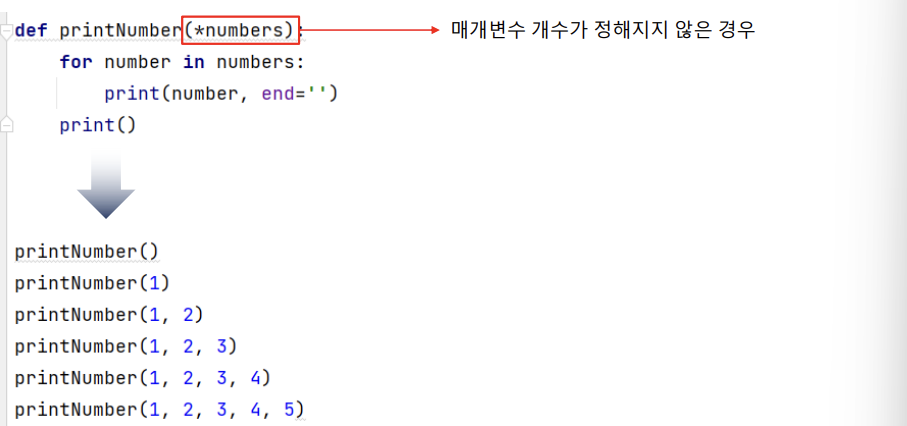
매개변수 개수가 정해지지 않은 경우 '*'를 사용
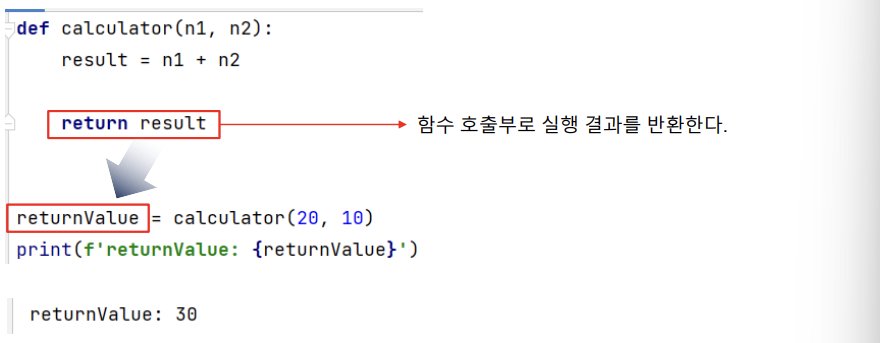
5. 데이터 반환
- return 키워드를 이용하면, 함수 실행 결과를 호출부로 반환할 수 있다
6. 전역 변수, 전역 변수
-
전역 변수: 함수 밖에서 선언된 변수로 어디서나 사용은 가능하지만 함수 안에서 수정 불가능
- global 함수 사용시, 수정 가능
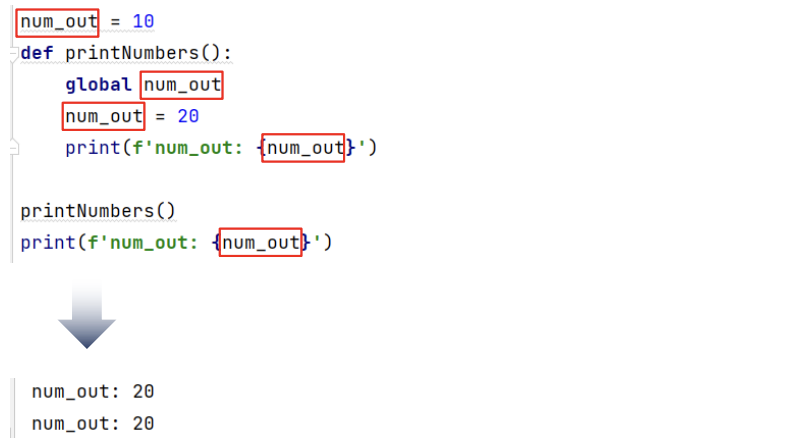
- global 함수 사용시, 수정 가능
-
지역 변수: 함수 안에서 선언된 변수로, 내부에서만 사용 가능
7. 중첩 함수
- 함수 안에 또 다른 함수가 있는 형태
- 내부 함수를 함수 밖에서 호출 할 수 없다
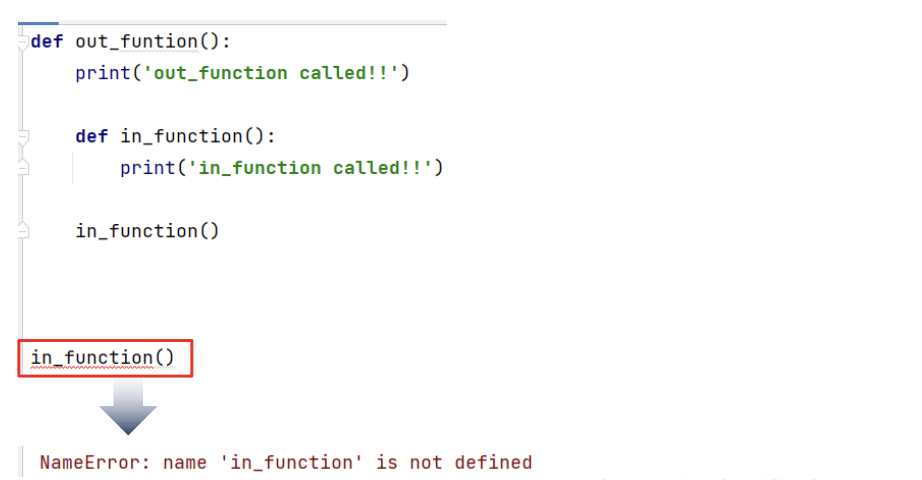
- 내부 함수를 함수 밖에서 호출 할 수 없다
8. lambda
-
lambda 키워드를 이용하면 함수 선언을 보다 간단하게 할 수 있다
기존 방법
def calculator(n1, n2):
	result = n1 + n2
    return result
returnValue = calculator(10, 20)
print(f'returnValue: {returnValue}')
lambda 사용
calculator = lambda n1, n2: n1 + n2   # 함수 생성 및 calculator에 할당
returnValue = calculator(10, 20)
print(f'returnValue: {returnValue}')
II. 모듈
1. 모듈이란?
- 특정 기능을 가지고 있는 파이썬 파일으로, 사용자는 마치 '내것'처럼 쉽게 사용 가능
- 내부 모듈: 파이썬 설치 시 기본적으로 사용할 수 있는 모듈
- 외부 모듈: 별도 설치 후 사용할 수 있는 모듈
- 사용자 모듈: 사용자가 직접 만든 모듈
2. import, from, as 키워드
- import 키워드를 이용하여 모듈울 임포트 한다
- as 키워드를 이용해서 모듈 이름을 단축 시킬 수 있다
import calculator as cal - from ~ as 키워드를 이용해서 모듈의 특정 기능만 사용 가능
from calculator import add
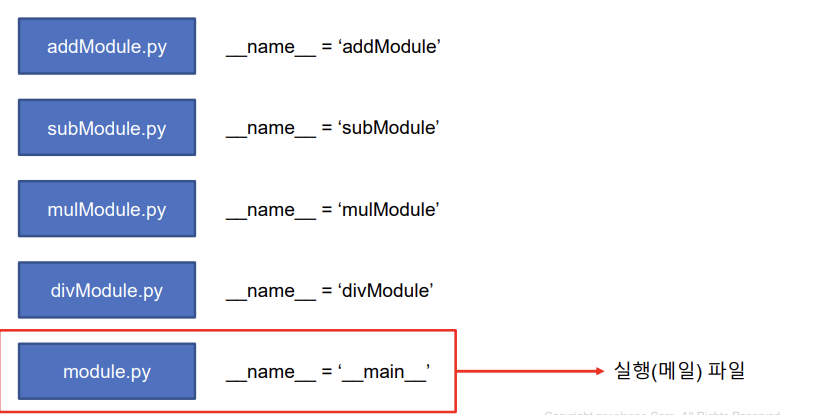
3. __name__ 전역 변수
- __name__에는 모듈 이름이 저장되거나 '__main__'이 저장된다
4. 패키지
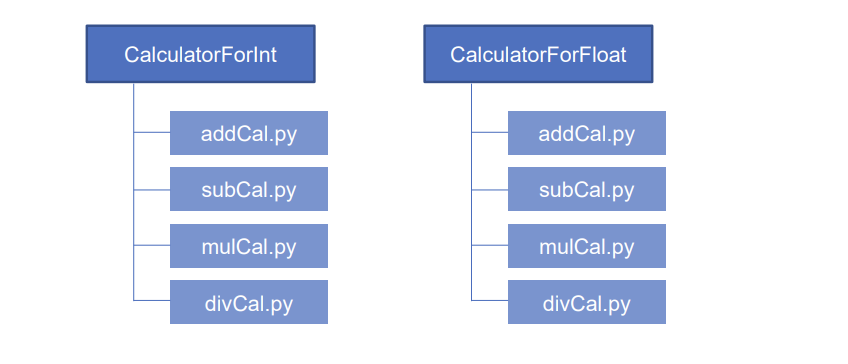
- 패키지를 이용하면 관련 있는 모듈을 그룹으로 관리할 수 있다
5. site-packages
- site-packages에 있는 모듈은 어디서나 사용할 수 있다
6. 자주 사용하는 모듈
- math 모듈: 수학 관련 모듈
- random 모듈: 난수 관련 모듈
- time 모듈: 시간 관련 모듈
III. 객체
1. 객체란
- 객체 지향 programming: 객체를 이용한 program으로 객체는 속성과 기능으로 구성된다
- 객체(object) = 속성(attribute) + 기능(function)
- 코드 재사용, 모듈화에 좋다
- 객체는 클래스에서 생성된다
2. 클래스와 객체 생성
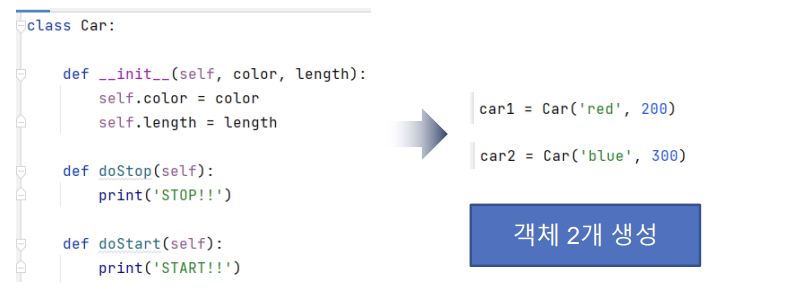
- 클래스는 class 키워드와 속성(변수) 그리고 기능(함수)를 이용해서 만든다
- 객체는 클래스의 생성자를 호출한다
3. 객체의 속성값 변경
-
객체 속성은 변경할 수 있다
class NewGenerationPC:
	def __init__(self, name, cpu, memory, ssd):
        self.name = name
        self.cpu = cpu
        self.memory = memory
        self.ssd = ssd
    def printPCInfo(self):
        print(f'self.name: {self.name}')
        print(f'self.cpu: {self.cpu}')
        print(f'self.memory: {self.memory}')
        print(f'self.ssd: {self.ssd}')
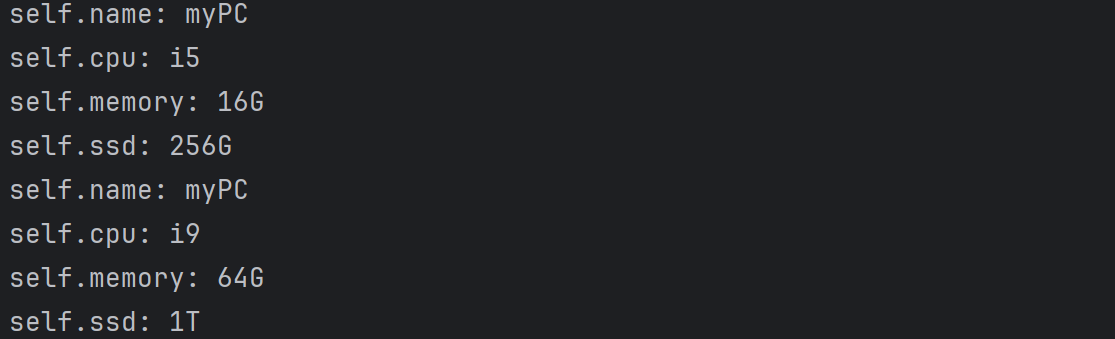
myPC = NewGenerationPC('myPC', 'i5', '16G','256G')
myPC.printPCInfo()
myPC.cpu = 'i9'  # 속성 변경
myPC.memory = '64G'
myPC.ssd = '1T'
myPC.printPCInfo()
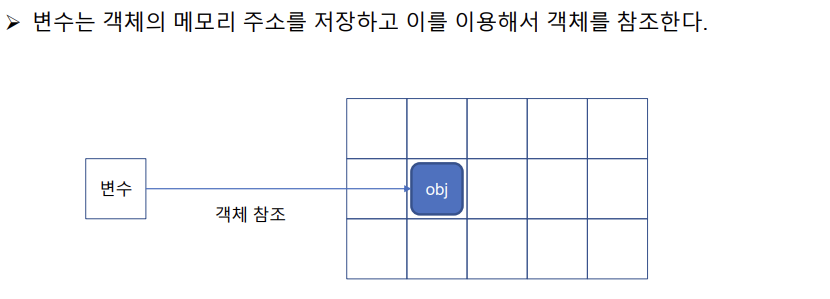
4. 객체와 메모리
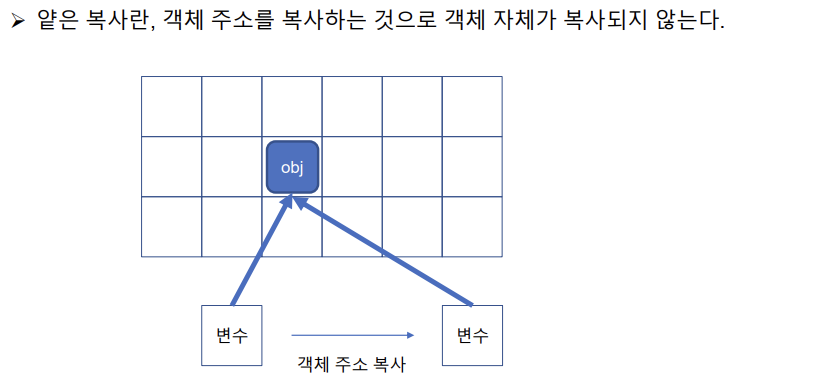
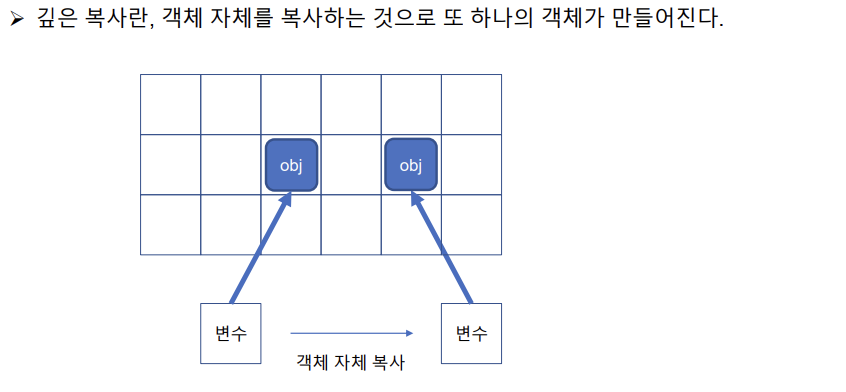
5. 얕은 복사, 깊은 복사
IV 클래스 상속
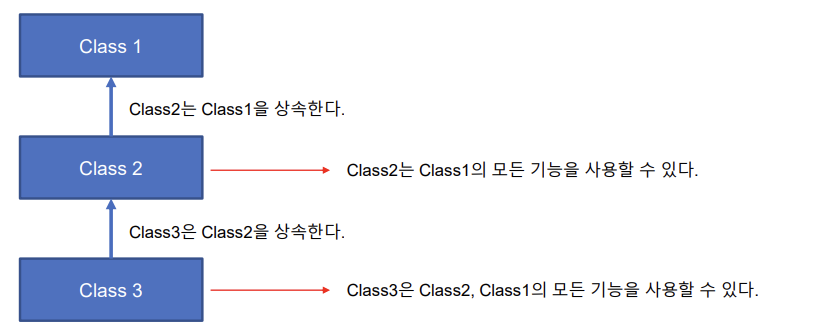
1. 상속이란?
- 다른 클래스를 내 것처럼 사용할 수 있게 해주는 것
- 다중 상속을 너무 많이 쓰면, 헷갈릴 수 있으므로 자제해서 사용해야 함
2. 객체 생성
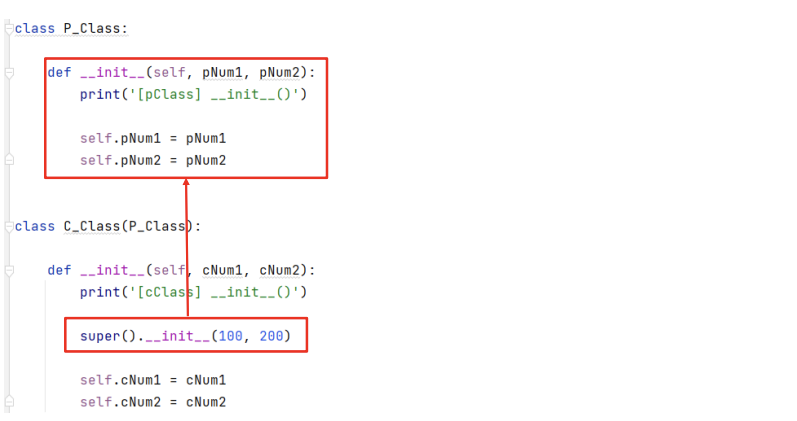
- 객체가 생성될 때 생성자를 호출하면 __init__()가 자동 호출된다
- __init__는 속성을 초기화 한다
- 상위 클래스의 속성을 초기화하기 위해서는 super()를 이용한다
3. 다중 상속
-
다중 상속: 2개 이상의 클래스를 상속하는 것
class BasicCalculator:
    def add(self, n1, n2):
        return n1 + n2
    def sub(self, n1, n2):
        return n1 - n2
    def mul(self, n1, n2):
        return n1 * n2
    def div(self, n1, n2):
        return n1 / n2
class DeveloperCalculator:
    def mod(self, n1, n2):
        return n1 % n2
    def flo(self, n1, n2):
        return n1 // n2
    def exp(self, n1, n2):
        return n1 ** n2
class Calculator(BasicCalculator, DeveloperCalculator):
    def __init__(self):
        pass
cal = Calculator()
print(f'cal.add(10,20) : {cal.add(10,20)}')
print(f'cal.sub(10,20) : {cal.sub(10,20)}')
print(f'cal.mul(10,20) : {cal.mul(10,20)}')
print(f'cal.div(10,20) : {cal.div(10,20)}')
print(f'cal.mod(10,20) : {cal.mod(10,20)}')
print(f'cal.flo(10,20) : {cal.flo(10,20)}')
print(f'cal.exp(2,5): {cal.exp(2,5)}')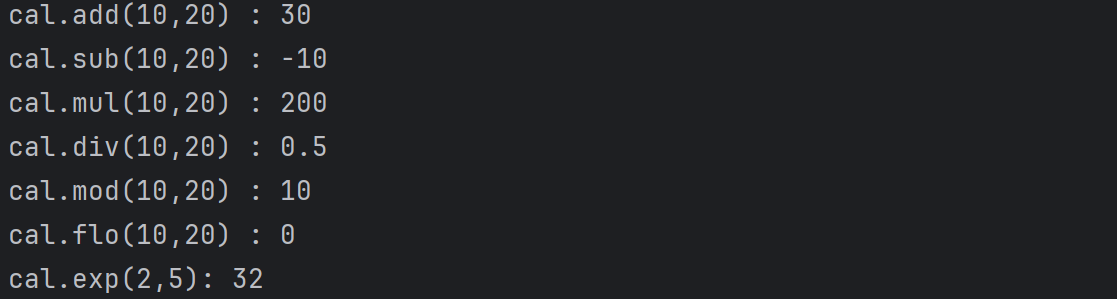
4. 오버라이딩
- 오버라이딩: 하위 클래스에서 상위 클래스의 메서드를 재정의(override)하는 것
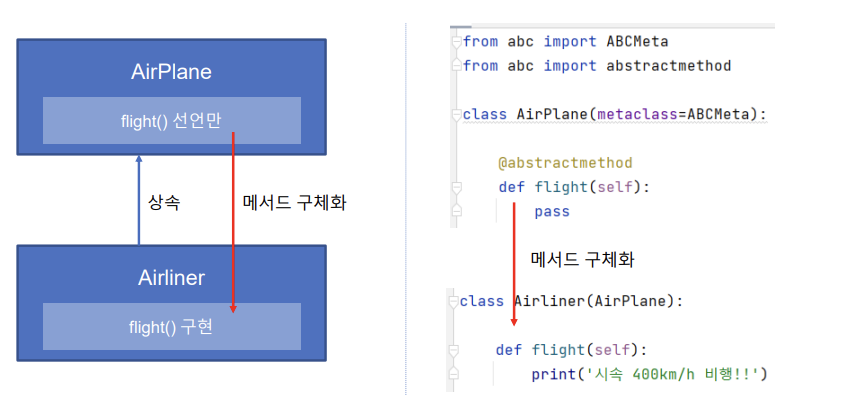
5. 추상클래스
- 상위 클래스에서 하위 클래스에 메서드 구현을 강요하는 것
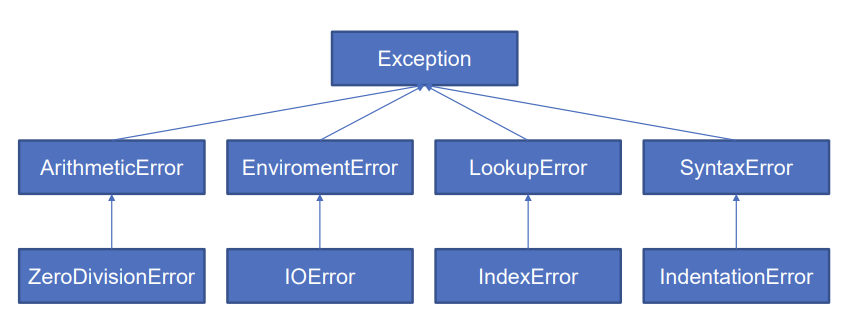
V. 예외
1. 예외란?
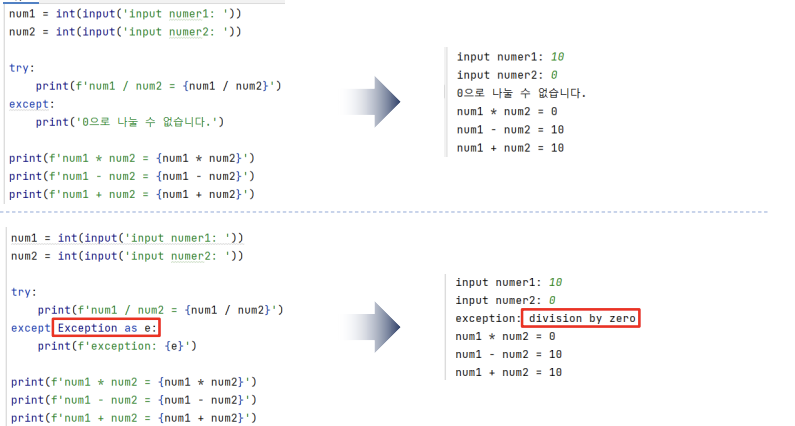
- 예외: 문법적인 문제는 없으나, 실행 중 발생하는 예상치 못한 문제
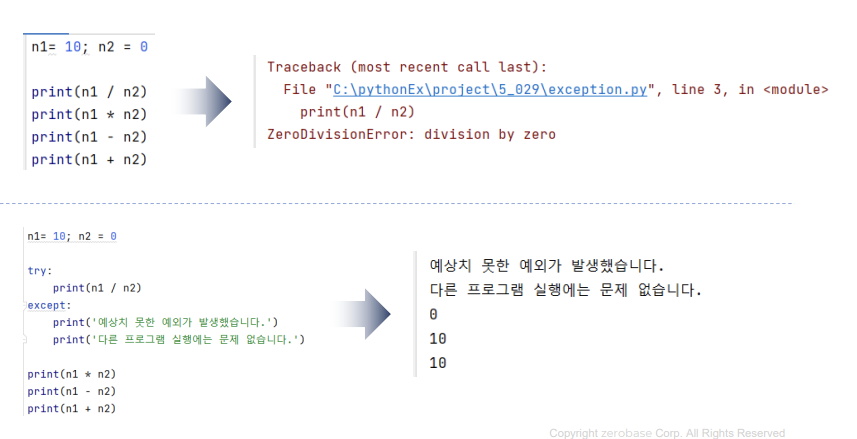
2. 예외처리
- 발생된 예외를 별도 처리함으로써 프로그램 전체의 실행에 문제가 없도록 함
- try~except
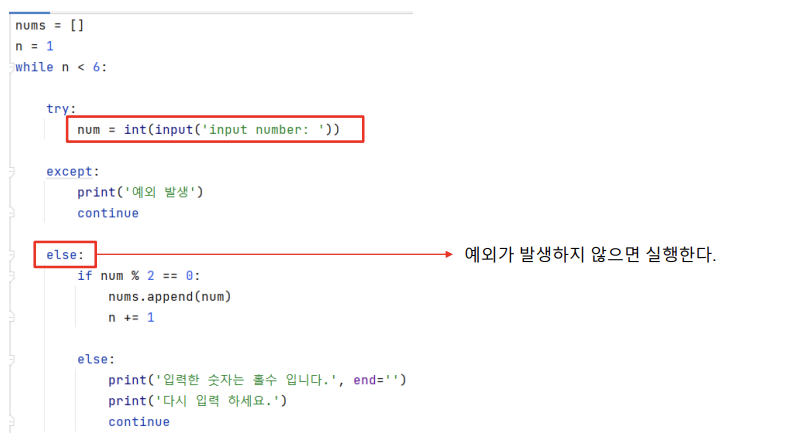
3. 예외가 발생하지 않은 경우
- ~else
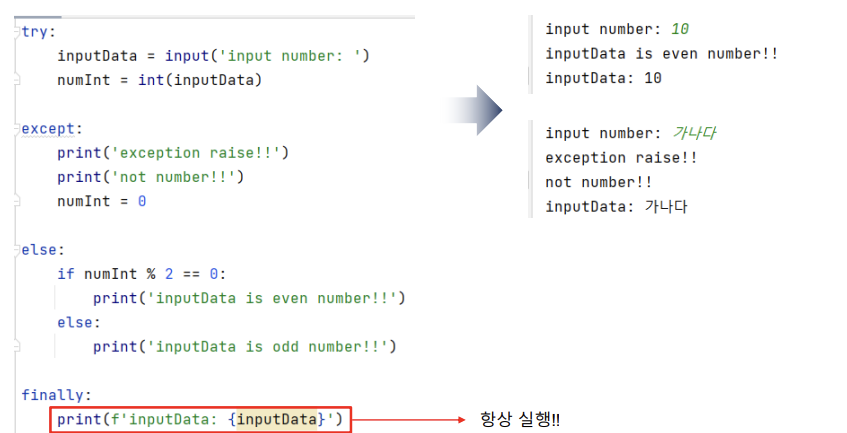
4. 예외 발생과 상관없이 항상 실행하는 경우
- finally
5. 예외 담당 클래스(Exception)
except Exception as e:
- raise 키워드를 이용하면 예외를 발생시킬 수 있다
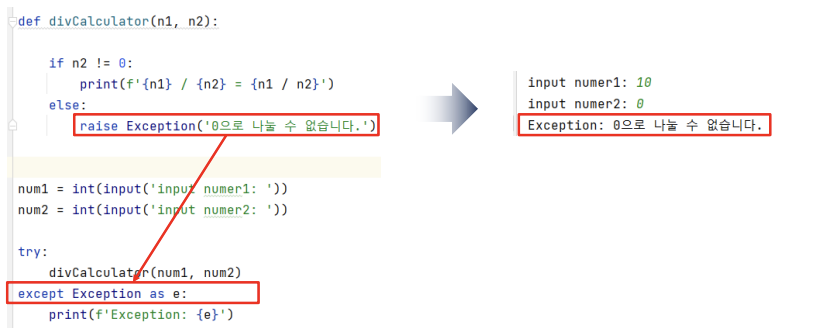
6. 사용자 예외 클래스
- Exception 클래스를 상속해서 사용자 예외 클래스를 만들 수 있다
class NotUseZeroException(Exception):
    def __init__(self, n):
        super().__init__(f'{n}은(는) 사용할 수 없습니다.')  # 시스템에서 뜨는 exception창에 띄울 수 있음
def divCalculator(n1, n2):
    if n2 == 0:
        raise NotUseZeroException(n2)
    else:
        print(f'{n1} / {n2} = {n1/n2}')
num1 = int(input('Input Number1 : '))
num2 = int(input('Input Number2 : '))
# 실제 처리 방법
try:
    divCalculator(num1, num2)
except NotUseZeroException as e:
    print(f'NotUseZeroException : {e}')

VI. 텍스트파일
1. 텍스트 파일 쓰기, 읽기, 열기
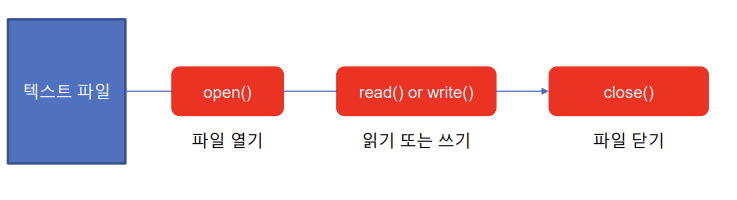
- open()
- file 오픈 시, '\' → /
- read()
- file을 읽을 때는, 문자/숫자 상관없이 str로 읽혀야함
r: 파일이 없으면 에러 발생
- file을 읽을 때는, 문자/숫자 상관없이 str로 읽혀야함
- write()
- 만약 파일이 없을 경우, 작성한 이름대로 새로 생성 됨
- w: 파일이 있으면 덮어씌움
- a: 파일이 있으면 덧붙임
- x: 파일이 있으면 에러 발생
- 만약 파일이 없을 경우, 작성한 이름대로 새로 생성 됨
- close()
- 마지막에 항상 닫아줘야 함
with~as문 사용 시, 파일 닫기 생략 가능
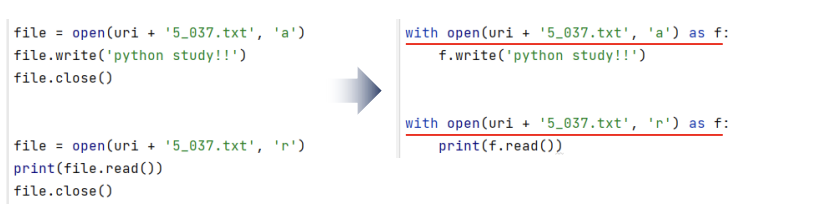
- 마지막에 항상 닫아줘야 함
2. writelines()
-
writelines()는 리스트(List) 또는 튜플 데이터를 파일에 쓰기 위한 함수이다
languages = ['c/c++', 'java', 'c#', 'python', 'javascript']
uri = 'C:/pythonTxt/'
#기존 방법
with open(uri + 'languages.txt', 'a') as f:
     f.write('item')
     f.write('\n')
     f.write(str(languages))
writelines()
with open(uri + 'languages.txt', 'a') as f:
    f.writelines(item + '\n' for item in languages)
#languages 에서 하나의 item을 넣어주는데,
#그 아이템을 그대로 쓰는 것이 아닌 개행을 넣어서 사용
with open(uri + 'languages.txt', 'r') as f:
    str = f.read()
print(f'str : {str}')
3. readlines(), readline()
- readlines(): 파일의 모든 데이터를 읽어서 리스트 형태로 반환한다
- readline(): 한 행을 읽어서 문자열로 반환 한다
uri = 'C:/pythonTxt/'
with open(uri + 'lans.txt', 'r') as f:
    lanLists = f.readlines()
print(f'Lists : {lanLists}')
print(f'Lists type : {type(lanLists)}')
with open(uri + 'lans.txt', 'r') as f:
    lan = f.readline()
    while lan != '':
        print(f'Lan: {lan}', end='')
        lan = f.readline()
자료 출처: 제로베이스 데이터 스쿨 강의

할 거면 제대로 하자