이전에 조회를 했으니, 이제는 추가를 해 볼 것이다.
참고로
추가, 삭제는 DB에 연결되는 것이 아니고 Dataset에 값을 넣어 주고 Dataset에 값을 삭제하는 것이다.
Dataset에 반영된 데이터 변경사항을 서버로 전달하려면, 다시 transaction을 사용해 서버와 동기화해야한다.
추가
Add 버튼 이벤트 : 행 추가
this.btn_add_onclick = function(obj:nexacro.Button,e:nexacro.ClickEventInfo)
{
	//ds_emp 에 행추가
	this.ds_emp.addRow();
	//ds_emp 초기화 : ds_emp의 해당 ROW위치에 , "GENDER" 컬럼의 Default를 "W"로 초기화)
	this.ds_emp.setColumn(this.ds_emp.rowposition,"GENDER","W");
};
1. .setColumn(row, columnID, value)
- Dataset의 특정 행(Row)의 특정 컬럼(Column)에 값을 설정하는 함수
- 매개변수:
row: 값을 설정할 행(Row)의 인덱스 (0부터 시작).
columnID: 값을 설정할 컬럼의 ID (컬럼 이름).
value: 해당 컬럼에 설정할 값.
2. this.ds_emp.rowposition
- rowposition은 현재 Dataset에서 선택된 행(Row)의 인덱스를 반환
- 즉, 사용자가 Grid 등에서 선택한 행의 인덱스
- 일반적으로 새로운 행이 추가되면, 해당 행이 자동으로 선택됨
삭제
Delete 버튼 이벤트 : 행 삭제
this.btn_del_onclick = function(obj:nexacro.Button,e:nexacro.ClickEventInfo)
{
	this.ds_emp.deleteRow(this.ds_emp.rowposition);
};
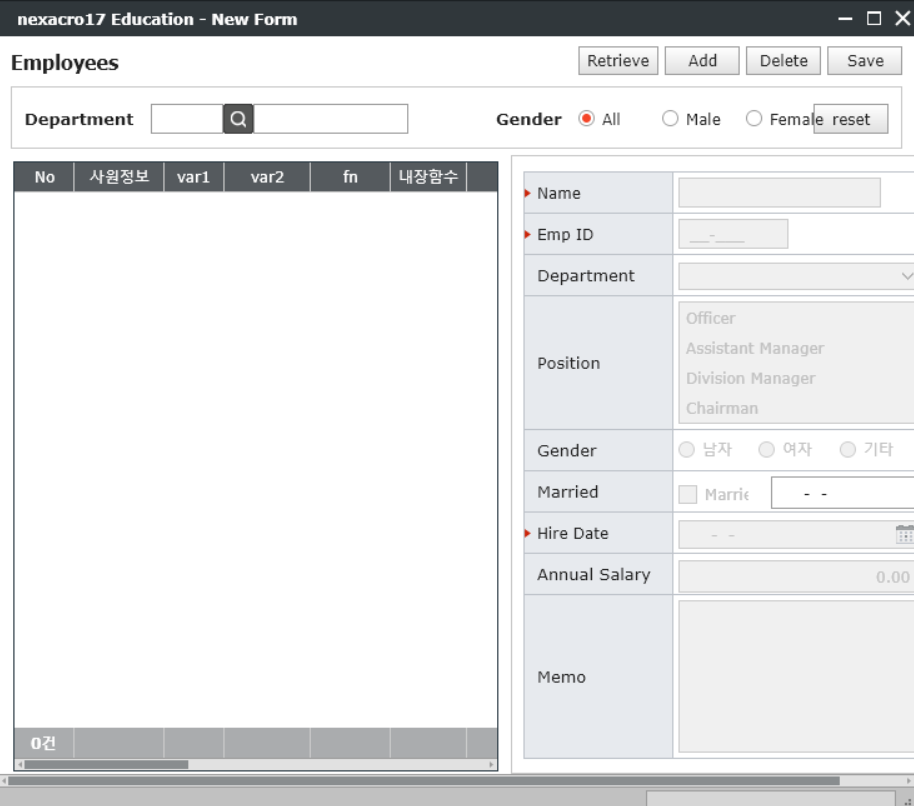
한 개의 데이터(row)라도 있어야 바인딩이 된다. 데이터가 없다면 컴포넌트는 enable false 상태가 된다.
저장
저장은 dataset에서 변경된 내용을 서버에 보내 DB에 저장하는 것이다.
그래서 조회할 때와 마찬가지로 transaction함수를 사용한다.
그리고 조회는 모든 데이터를 다 가져와야 화면에 렌더링 할 수 있었다.
하지만, 저장할 때는 변경 된 값만 저장하면 된다.
불필요한 데이터를 넘길 필요는 없으니까.(성능저하)
방법은 간단하다. 서버로 보낼 데이터셋에 :U를 붙이면 됨. (update의 준말)
:U
만일 전체(All)를 넘긴다면
:A
하지만, 타당한 이유가 없다면 웬만하면 :U가 맞다.
그래서 save버튼을 클릭했을 때 이벤트는 다음과 같다.
//save button
this.btn_save_onclick = function(obj:nexacro.Button,e:nexacro.ClickEventInfo)
{
		this.transaction(
		"strSave",
		"SvcURL::save_emp.jsp",
		"in_emp=ds_emp:U", //client -> server 저장 (server ds = client ds)
		"", //server -> client 조회 (client ds = server ds)
		"arg1=1 arg2=2", //조회 조건 parameter , 변수와 변수 구분은 ""(space)
		"fn_callBack");
};
그리고 콜백함수 영역에 다음과 같은 내용을 추가한다.
this.fn_callBack = function(strSvcId, nErrorCode, strErrorMsg)
{
	//nErrorCode >= 0 면 성공, nErrorCode < 0 면 실패 인데
	// 0 : 성공 / 그 외 : 실패
	if(nErrorCode != '0') {
		//실패 : errorCode와 errorMsg 보여줌
		alert("Error"+ nErrorCode + ":" + strErrorMsg);
	} else {
		//성공 :
		switch (strSvcId) {
        	//조회
			case "strSelect":
			alert(this.ds_emp.getRowCount() + " 건 조회");
			break;

            //저장 시, 추가된 코드
			case "strSave":
			alert("저장 성공!");
            break;
		}
	}
}
개발새발