최종 프로젝트로 티켓 통합 사이트를 만들기 위해 인터파크 티켓 데이터를 크롤링해서 airflow에 태우고 s3에 적재하는 중인데 정말 많이 헤맸다...
내가 크롤링한 페이지는 '오픈공지'와 오픈공지 페이지의 예매하기 버튼을 클릭하면 넘어가는 '예매하기' 2개 였다. 크로링하는 코드는 다른 브랜치에서 pythonvirtualenvoperator로 불러와서 사용하게 구성되어 있다.
먼저 오픈공지 html을 크롤링해서 airflow로 s3에 적재하는 dag 코드를 공유해 보자면 아래와 같다.
from datetime import datetime
from datetime import timedelta
from airflow import DAG
from airflow.operators.python import PythonVirtualenvOperator
import os

def upload_to_s3():
    from interpark.raw_open_page import extract_open_html
    from airflow.providers.amazon.aws.hooks.s3 import S3Hook
    import io
    get_data = extract_open_html()
    for data in get_data:
        if data is None:
            raise ValueError("extract_open_html()에서 None이 반환되었습니다.")
        hook = S3Hook(aws_conn_id='interpark')
        bucket_name = 't1-tu-data'
        print(data["num"])
        key = f'interpark/{data["num"]}.html'
        try:
            # 데이터를 문자열로 가정하고 io.StringIO로 처리
            soup = data["data"]  # 크롤링 데이터의 HTML 내용

            # BeautifulSoup 객체를 HTML 문자열로 변환
            if hasattr(soup, "prettify"):
                html_content = soup.prettify()  # 예쁘게 정리된 HTML
            else:
                html_content = str(soup)  # 일반 문자열로 변환

            if not html_content.strip():  # HTML 데이터가 비어 있는지 확인
                raise ValueError("HTML 데이터가 비어 있습니다.")

            file_obj = io.BytesIO(html_content.encode('utf-8'))

            # S3에 업로드
            hook.get_conn().put_object(
                Bucket=bucket_name,
                Key=key,
                Body=file_obj
            )
            print(f"S3에 업로드 완료: {bucket_name}/{key}")
        except Exception as e:
            print(f"S3 업로드 실패: {e}")
            raise

with DAG(
'open_interpark_to_S3',
default_args={
'depends_on_past': False,
'email_on_failure': False,
'email_on_retry': False,
'retries': 3,
'retry_delay':timedelta(minutes=1),
},
description='interpark DAG',
schedule_interval='@daily',
start_date=datetime(2024, 11, 25),
catchup=False,
tags=['interpark','s3']
) as dag:

    upload_to_s3 = PythonVirtualenvOperator(
            task_id='upload_to_s3',
            python_callable=upload_to_s3,
            requirements=[
                "git+https://github.com/hahahellooo/interpark.git@0.4/s3"
                ],
            system_site_packages=True,
            )


    upload_to_s3
트러블 슈팅
1. 크롬 드라이버와 크롬 버전의 호환성 문제
위 dag 코드로 airflow를 돌렸더니 아래와 같은 문제가 발생했다.
chromedriver(114.0.5735.90 version might not be compatible with the detected chrome version(131.0.677.85)
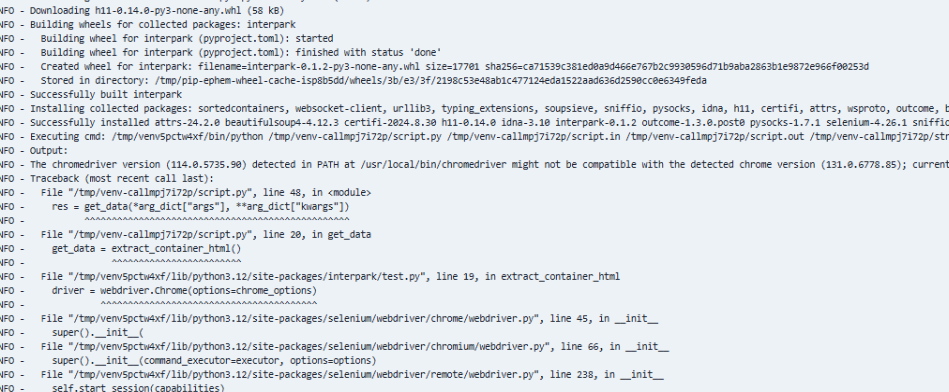
크롬 드라이버와 구글 크롬이 서로 호환되어야 크롤링을 해올 수 있는데 호환되지 않는 버전이 설치되어 발생하는 오류였다.
해결
install.sh을 만들어서 Dockerfile에서 실행시키고 Dockerfile은 yaml로 빌드하게 구성해놨는데 install.sh에서 크롬 드라이버 설치 명령어를 삭제하고 가상환경으로 가져오는 패키지 코드에 chromedrivermanager를 추가했더니 문제를 해결할 수 있었다.
install.sh - Chromedriver 설치 코드 삭제
#!/bin/bash
set -e  # 에러 발생 시 즉시 종료

# 패키지 업데이트 및 필수 라이브러리 설치
apt update && apt install -y \
    wget curl unzip libglib2.0-0 libnss3 libgconf-2-4 libfontconfig1 \
    libxrender1 libxi6 libxtst6 libx11-xcb1 x11-utils git

# Google Chrome 설치
wget -q https://dl.google.com/linux/direct/google-chrome-stable_current_amd64.deb
apt install -y ./google-chrome-stable_current_amd64.deb
rm google-chrome-stable_current_amd64.deb

# Chromedriver 설치 - 삭제
#wget -O /tmp/chromedriver.zip #"http://chromedriver.storage.googleapis.com/`curl -sS #chromedriver.storage.googleapis.com/LATEST_RELEASE`/chromedriver_linux64.zip"
#unzip /tmp/chromedriver.zip -d /usr/local/bin/
#chmod +x /usr/local/bin/chromedriver
#rm /tmp/chromedriver.zip

# AWS CLI 설치
curl "https://awscli.amazonaws.com/awscli-exe-linux-x86_64.zip" -o "awscliv2.zip"
unzip awscliv2.zip
./aws/install
rm -rf awscliv2.zip aws

# 불필요한 파일 정리
apt-get clean
rm -rf /var/lib/apt/lists/*
코드에 chromedrivermanager 추가
from webdriver_manager.chrome import ChromeDriverManager

ef extract_open_html():
    # ChromeOptions 객체 생성
    options = Options()
    options.add_argument("--no-sandbox")  # 추가한 옵션
    options.add_argument("--headless")
    options.add_argument("--disable-dev-shm-usage")
    options.add_argument("--disable-gpu")  # 추가한 옵션
    options.add_argument("--ignore-ssl-errors=yes")
    options.add_argument("--ignore-certificate-errors")
    options.add_argument("--start-maximized")

    # WebDriver 객체 생성
    driver = webdriver.Chrome(service=Service(ChromeDriverManager().install()), options=options)
ChromeDriverManager가 구글 크롬에 호환되는 크롬 드라이버를 자동으로 설치해주는 역할을 해서 sh 파일에서 크롬 드라이버 설치 부분을 삭제해도 동작이 되는 것을 확인 할 수 있었다.
위 패키지에서 필요한 의존성은 당연히 pythonvirtualenvoperator로 불러오는 브랜치에 설치되어 있다. 잊지 말자 의존성!!!
➕ 추가

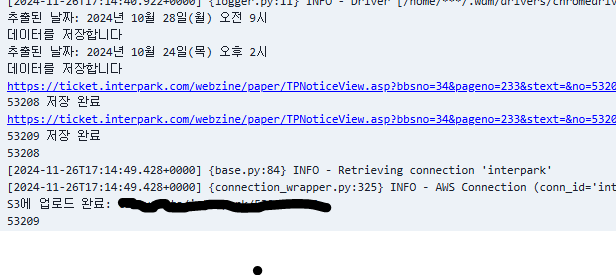
위의 이미지를 보면 airflow를 실행할 때 캐시가 로컬에서 읽혀져서 driver가 실행되는 것을 확인할 수 있다. 호스트 머신과 컨터이너 간의 캐시가 왜 공유되는지 궁금해서 찾아봤는데 이유는 아래와 같다고 한다.
driver-manager는 기본적으로 ~/.wdm/drivers/ 디렉토리에 chromedriver를 다운로드하고 이를 캐시한다. 만약 로컬에서 driver-manager를 처음 실행하고 chromedriver를 다운로드한 후, 컨테이너 실행 전에 로컬 머신에서 캐시를 저장했다면, driver-manager가 해당 캐시를 컨테이너 안에서도 참조할 수 있다.
이는 호스트 머신의 캐시가 이미 생성되어 있기 때문에, 컨테이너가 실행되었을 때 캐시된 chromedriver가 컨테이너 내에서 재사용되는 방식으로 동작한다.
컨테이너와 로컬 머신 간의 파일 시스템을 공유하여 캐시를 명시적으로 참조하게 하려면 볼륨 마운트를 사용해야 한다.
  airflow-worker:
    <<: *airflow-common
    command: celery worker
    environment:
      <<: *airflow-common-env
      GOOGLE_CHROME_BIN: "/usr/bin/google-chrome"
      CHROMEDRIVER_PATH: "/usr/local/bin/chromedriver"
      ...
    volumes: # 마운트 경로 추가
      - ~/.wdm/drivers:/home/airflow/.wdm/drivers
    restart: always
    env_file:
      - .env
    depends_on:
      - kafka1
      - kafka2
      - kafka3
      - airflow-init
    networks:
      - kafka-network
결과
2. 셀레니움으로 크롤링할 때 클릭 코드가 포함되어 있는 경우 발생할 수 있는 문제: --headless 옵션
예약하기 페이지 크롤링 코드 구성이 오픈공지 페이지에서 예약하기 버튼이 있으면 클릭하여 페이지를 예약하기로 변경 후 html을 크롤링하도록 구성했다.
동적 페이지에서 크롤링하는 경우 또는 클릭 코드가 포함되어 있는 경우 --headless 옵션을 사용하면 크롤링이 잘 안될 수 있다는 글을 읽어서 healess 옵션없이 크롤링 코드를 구성했고 로컬에서 테스트 했을때 문제가 없었다.
하지만 airflow로 실행했을 때는 아래와 같은 문제가 나타났다.
ChromeDriver is assuming that Chrome has crashed.
[2024-11-26, 15:04:35 UTC] {process_utils.py:194} INFO - [2024-11-26T15:04:35.656+0000] {logger.py:11} INFO - Driver [/home/***/.wdm/drivers/chromedriver/linux64/131.0.6778.85/chromedriver-linux64/chromedriver] found in cache
[2024-11-26, 15:04:35 UTC] {process_utils.py:194} INFO - Traceback (most recent call last):
[2024-11-26, 15:04:35 UTC] {process_utils.py:194} INFO -   File "/tmp/venv-call96y8u1do/script.py", line 81, in <module>
[2024-11-26, 15:04:35 UTC] {process_utils.py:194} INFO -     res = upload_to_s3(*arg_dict["args"], **arg_dict["kwargs"])
[2024-11-26, 15:04:35 UTC] {process_utils.py:194} INFO -           ^^^^^^^^^^^^^^^^^^^^^^^^^^^^^^^^^^^^^^^^^^^^^^^^^^^^^
[2024-11-26, 15:04:35 UTC] {process_utils.py:194} INFO -   File "/tmp/venv-call96y8u1do/script.py", line 22, in upload_to_s3
[2024-11-26, 15:04:35 UTC] {process_utils.py:194} INFO -     get_data = extract_ticket_html()
[2024-11-26, 15:04:35 UTC] {process_utils.py:194} INFO -                ^^^^^^^^^^^^^^^^^^^^^
[2024-11-26, 15:04:35 UTC] {process_utils.py:194} INFO -   File "/tmp/venvww7vmh4o/lib/python3.12/site-packages/interpark/raw_ticket_page.py", line 26, in extract_ticket_html
[2024-11-26, 15:04:35 UTC] {process_utils.py:194} INFO -     driver = webdriver.Chrome(service=Service(ChromeDriverManager().install()), options=options)
[2024-11-26, 15:04:35 UTC] {process_utils.py:194} INFO -              ^^^^^^^^^^^^^^^^^^^^^^^^^^^^^^^^^^^^^^^^^^^^^^^^^^^^^^^^^^^^^^^^^^^^^^^^^^^^^^^^^^^
[2024-11-26, 15:04:35 UTC] {process_utils.py:194} INFO -   File "/tmp/venvww7vmh4o/lib/python3.12/site-packages/selenium/webdriver/chrome/webdriver.py", line 45, in __init__
[2024-11-26, 15:04:35 UTC] {process_utils.py:194} INFO -     super().__init__(
[2024-11-26, 15:04:35 UTC] {process_utils.py:194} INFO -   File "/tmp/venvww7vmh4o/lib/python3.12/site-packages/selenium/webdriver/chromium/webdriver.py", line 66, in __init__
[2024-11-26, 15:04:35 UTC] {process_utils.py:194} INFO -     super().__init__(command_executor=executor, options=options)
[2024-11-26, 15:04:35 UTC] {process_utils.py:194} INFO -   File "/tmp/venvww7vmh4o/lib/python3.12/site-packages/selenium/webdriver/remote/webdriver.py", line 241, in __init__
[2024-11-26, 15:04:35 UTC] {process_utils.py:194} INFO -     self.start_session(capabilities)
[2024-11-26, 15:04:35 UTC] {process_utils.py:194} INFO -   File "/tmp/venvww7vmh4o/lib/python3.12/site-packages/selenium/webdriver/remote/webdriver.py", line 329, in start_session
[2024-11-26, 15:04:35 UTC] {process_utils.py:194} INFO -     response = self.execute(Command.NEW_SESSION, caps)["value"]
[2024-11-26, 15:04:35 UTC] {process_utils.py:194} INFO -                ^^^^^^^^^^^^^^^^^^^^^^^^^^^^^^^^^^^^^^^
[2024-11-26, 15:04:35 UTC] {process_utils.py:194} INFO -   File "/tmp/venvww7vmh4o/lib/python3.12/site-packages/selenium/webdriver/remote/webdriver.py", line 384, in execute
[2024-11-26, 15:04:35 UTC] {process_utils.py:194} INFO -     self.error_handler.check_response(response)
[2024-11-26, 15:04:35 UTC] {process_utils.py:194} INFO -   File "/tmp/venvww7vmh4o/lib/python3.12/site-packages/selenium/webdriver/remote/errorhandler.py", line 232, in check_response
[2024-11-26, 15:04:35 UTC] {process_utils.py:194} INFO -     raise exception_class(message, screen, stacktrace)
[2024-11-26, 15:04:35 UTC] {process_utils.py:194} INFO - selenium.common.exceptions.SessionNotCreatedException: Message: session not created: Chrome failed to start: exited normally.
[2024-11-26, 15:04:35 UTC] {process_utils.py:194} INFO -   (session not created: DevToolsActivePort file doesn't exist)
[2024-11-26, 15:04:35 UTC] {process_utils.py:194} INFO -   (The process started from chrome location /usr/bin/google-chrome is no longer running, so ChromeDriver is assuming that Chrome has crashed.)
[2024-11-26, 15:04:35 UTC] {process_utils.py:194} INFO - Stacktrace:
[2024-11-26, 15:04:35 UTC] {process_utils.py:194} INFO - #0 0x55cae91d131a <unknown>
[2024-11-26, 15:04:35 UTC] {process_utils.py:194} INFO - #1 0x55cae8ce76e0 <unknown>
[2024-11-26, 15:04:35 UTC] {process_utils.py:194} INFO - #2 0x55cae8d1edc8 <unknown>
[2024-11-26, 15:04:35 UTC] {process_utils.py:194} INFO - #3 0x55cae8d1a926 <unknown>
[2024-11-26, 15:04:35 UTC] {process_utils.py:194} INFO - #4 0x55cae8d666f6 <unknown>
[2024-11-26, 15:04:35 UTC] {process_utils.py:194} INFO - #5 0x55cae8d65d46 <unknown>
[2024-11-26, 15:04:35 UTC] {process_utils.py:194} INFO - #6 0x55cae8d5a203 <unknown>
[2024-11-26, 15:04:35 UTC] {process_utils.py:194} INFO - #7 0x55cae8d28cc0 <unknown>
[2024-11-26, 15:04:35 UTC] {process_utils.py:194} INFO - #8 0x55cae8d29c9e <unknown>
[2024-11-26, 15:04:35 UTC] {process_utils.py:194} INFO - #9 0x55cae919ed0b <unknown>
[2024-11-26, 15:04:35 UTC] {process_utils.py:194} INFO - #10 0x55cae91a2c92 <unknown>
[2024-11-26, 15:04:35 UTC] {process_utils.py:194} INFO - #11 0x55cae918bb3c <unknown>
[2024-11-26, 15:04:35 UTC] {process_utils.py:194} INFO - #12 0x55cae91a3807 <unknown>
[2024-11-26, 15:04:35 UTC] {process_utils.py:194} INFO - #13 0x55cae91710df <unknown>
[2024-11-26, 15:04:35 UTC] {process_utils.py:194} INFO - #14 0x55cae91c0578 <unknown>
[2024-11-26, 15:04:35 UTC] {process_utils.py:194} INFO - #15 0x55cae91c0740 <unknown>
[2024-11-26, 15:04:35 UTC] {process_utils.py:194} INFO - #16 0x55cae91d0196 <unknown>
[2024-11-26, 15:04:35 UTC] {process_utils.py:194} INFO - #17 0x7f4ce6040144 <unknown>
[2024-11-26, 15:04:35 UTC] {process_utils.py:194} INFO -
[2024-11-26, 15:04:36 UTC] {taskinstance.py:3311} ERROR - Task failed with exception
Traceback (most recent call last):
  File "/home/airflow/.local/lib/python3.12/site-packages/airflow/models/taskinstance.py", line 767, in _execute_task
    result = _execute_callable(context=context, **execute_callable_kwargs)
             ^^^^^^^^^^^^^^^^^^^^^^^^^^^^^^^^^^^^^^^^^^^^^^^^^^^^^^^^^^^^^
  File "/home/airflow/.local/lib/python3.12/site-packages/airflow/models/taskinstance.py", line 733, in _execute_callable
    return ExecutionCallableRunner(
           ^^^^^^^^^^^^^^^^^^^^^^^^
  File "/home/airflow/.local/lib/python3.12/site-packages/airflow/utils/operator_helpers.py", line 252, in run
    return self.func(*args, **kwargs)
           ^^^^^^^^^^^^^^^^^^^^^^^^^^
  File "/home/airflow/.local/lib/python3.12/site-packages/airflow/models/baseoperator.py", line 417, in wrapper
    return func(self, *args, **kwargs)
           ^^^^^^^^^^^^^^^^^^^^^^^^^^^
  File "/home/airflow/.local/lib/python3.12/site-packages/airflow/operators/python.py", line 505, in execute
    return super().execute(context=serializable_context)
           ^^^^^^^^^^^^^^^^^^^^^^^^^^^^^^^^^^^^^^^^^^^^^
  File "/home/airflow/.local/lib/python3.12/site-packages/airflow/models/baseoperator.py", line 417, in wrapper
    return func(self, *args, **kwargs)
           ^^^^^^^^^^^^^^^^^^^^^^^^^^^
  File "/home/airflow/.local/lib/python3.12/site-packages/airflow/operators/python.py", line 238, in execute
    return_value = self.execute_callable()
                   ^^^^^^^^^^^^^^^^^^^^^^^
  File "/home/airflow/.local/lib/python3.12/site-packages/airflow/operators/python.py", line 870, in execute_callable
    result = self._execute_python_callable_in_subprocess(python_path)
             ^^^^^^^^^^^^^^^^^^^^^^^^^^^^^^^^^^^^^^^^^^^^^^^^^^^^^^^^
  File "/home/airflow/.local/lib/python3.12/site-packages/airflow/operators/python.py", line 588, in _execute_python_callable_in_subprocess
    raise AirflowException(error_msg) from None
airflow.exceptions.AirflowException: Process returned non-zero exit status 1.
Message: session not created: Chrome failed to start: exited normally.
  (session not created: DevToolsActivePort file doesn't exist)
  (The process started from chrome location /usr/bin/google-chrome is no longer running, so ChromeDriver is assuming that Chrome has crashed.)
해결
오픈공지 크롤링 코드는 headless 옵션 여부에 관계없이 실행이 되고 airflow에서도 잘 돌아가서, 예매하기 크롤링 코드도 이와 같게 만들면 해결할 수 있을 것 같았다.
try1. 크롤링 코드를 다른 브랜치에서 가져와서 그 브랜치와 도커 컨테이너간의 의존성 충돌이 있을 수 있다는 의견을 듣고, 로컬과 도커 컨테이너 내부의 구글 크롬과 크롬 드라이버 버전을 맞춰줬다.
# 구글 크롬 버전 확인
$ google-chrome --version

# 구글 크롬 설치
$ sudo apt update
$ sudo apt install wget
$ wget https://dl.google.com/linux/direct/google-chrome-stable_current_amd64.deb
$ sudo apt install ./google-chrome-stable_current_amd64.deb

# 크롬 드라이버 버전 확인
$ chromedriver --version

# 구글 드라이버 설치
$ wget https://chromedriver.storage.googleapis.com/curl -sS https://chromedriver.storage.googleapis.com/LATEST_RELEASE/chromedriver_linux64.zip
$ unzip chromedriver_linux64.zip
$ sudo mv chromedriver /usr/local/bin/
$ sudo chmod +x /usr/local/bin/chromedriver
로컬은 구글 버전이 아래와 같았고 airflow 컨테이너는 크롬 드라이버가 한 단계 높은 버전으로 설치되어 있어서 로컬의 크롬 드라이버 버전도 한 단계 높였다.

try2. --headless 옵션을 사용해도 동적 페이지 크롤링할 수 있는 코드를 찾았다.
def extract_ticket_html():
    # ChromeOptions 객체 생성
    options = Options()
    options.add_argument("user-agent=Mozilla/5.0 (Windows NT 10.0; Win64; x64) AppleWebKit/537.36 (KHTML, like Gecko) Chrome/87.0.4280.20 Safari/537.36"); # 추가
    options.add_argument("--headless") # 추가
    options.add_argument("--no-sandbox")  # headless 있으면 동작안됌
    options.add_argument("--disable-dev-shm-usage")
    options.add_argument("--disable-gpu")
    options.add_argument("--ignore-ssl-errors=yes")
    options.add_argument("--ignore-certificate-errors")
    options.add_argument("--window-size=1920,1080") # 추가

    # WebDriver 객체 생성
    driver = webdriver.Chrome(service=Service(ChromeDriverManager().install()), options=options)
앞서 말했듯, 코드에 클릭이 포함되어 있거나 동적 페이지인 경우 페이지가 보여야 동작이 되서 화면 크기를 고정하는 명령어를 추가해주어야 한다.
user-agent를 추가해주는 이유는 일부 웹사이트에서 봇이나 스크립트의 접근을 차단할 수 있기 때문이다. user-agent를 추가해줌으로써 크롤러나 스크립트가 웹 브라우저처럼 동작하게 보여 차단을 우회할 수 있다.
사실 try2는 확실한 해결방법이라고 생각하는데 try1은 꼭 필요한 과정인지는 잘 모르겠다.
추가
try1은 필요한 과정이 아니다. 로컬의 크롬드라이버도 삭제해버렸다.. ㅎ
아무래도 구글크롬과 chromedrivermanager만 있으면 구글크롬에 호환되는 크롬드라이버가 자동으로 설치되서 1번 에러는 위 두가지만 있으면 해결가능한 것 같다.
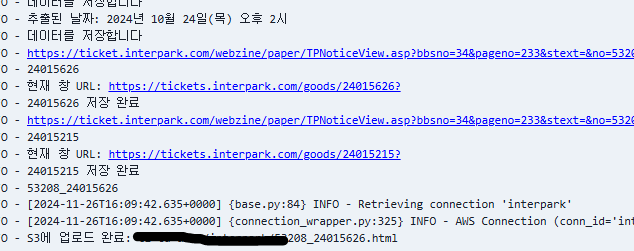
결과
MongoDB에서 데이터를 조회했을 때 반환되는 _id는 기본적으로 항상 존재하는 필드이기 때문에, ticket["_id"]처럼 딕셔너리 인덱싱으로 접근해도 문제가 없습니다. 반면, 다른 필드들은 존재하지 않을 수도 있으므로 get() 메서드를 사용해 안전하게 접근하는 것입니다.
MongoDB _id 필드를 Pydantic이 처리할 수 있도록 해주는 역할을 합니다.
_id를 문자열로 변환해 FastAPI의 JSON 응답에서 사용 가능하게 만듭니다.
class ObjectIdStr(ObjectId):
    @classmethod
    def __get_validators__(cls):
        yield cls.validate

    @classmethod
    def validate(cls, v):
        if isinstance(v, ObjectId):
            return str(v)  # ObjectId를 문자열로 변환
        return str(ObjectId(v))
get_validators 메서드
Pydantic이 입력값을 검증할 때 사용할 검증 함수(validator)를 등록하는 역할을 합니다.
yield cls.validate를 통해 validate 메서드를 검증 함수로 지정합니다.
이렇게 하면 Pydantic이 해당 필드를 처리할 때 validate 메서드를 호출합니다.
similar_performances 처리
문서에서 similar_performances 필드를 가져옵니다. 필드가 없으면 빈 리스트를 반환합니다.
각 항목의 _id 필드를 문자열로 변환해 id 필드에 저장하고 _id 필드는 제거합니다.
list_objects_v2**는 기본적으로 최대 1000개의 객체만 반환합니다. 따라서 S3 버킷에 있는 파일이 1000개를 초과하는 경우 Paginator를 사용해서 모든 객체를 읽어와야 합니다.
코드 수정 전
def get_logs(bucket_name: str = "t1-tu-data", directory: str = 'view_detail_log/') -> List[dict]:
    try:
        # S3에서 디렉토리 내 파일 목록 가져오기
        response = s3_client.list_objects_v2(Bucket=bucket_name, Prefix=directory)

        # 파일 목록을 가져왔는지 확인
        if 'Contents' not in response:
            print("No files found in the specified directory.")
            return []

        # Parquet 파일만 필터링
        parquet_files = [obj['Key'] for obj in response['Contents'] if obj['Key'].endswith('.parquet')]

        if not parquet_files:
            print("No Parquet files found.")
            return []

        # Parquet 파일을 읽어 pandas DataFrame으로 결합
        logs = []
        for file_key in parquet_files:
            try:
            # S3에서 Parquet 파일을 읽기
                print(f"Reading file: s3://{bucket_name}/{file_key}")
                obj = s3_client.get_object(Bucket=bucket_name, Key=file_key)
                # BytesIO를 사용하여 Parquet 파일을 pandas로 읽기
                parquet_data = BytesIO(obj['Body'].read())
                df = pd.read_parquet(parquet_data)  # pyarrow 또는 fastparquet 필요
                logs.append(df)
            except Exception as e:
                print(f"Error reading file {file_key}: {e}")

         # 전체 로그 데이터 결합
        all_logs = pd.concat(logs, ignore_index=True)

        # ticket_id 컬럼만 추출하여 리스트로 반환
        ticket_ids = all_logs['ticket_id'].tolist()

        return ticket_ids

    except Exception as e:
        print(f"Error reading from S3: {e}")
        return []
수정후
def get_logs(bucket_name: str = "t1-tu-data", directory: str = 'view_detail_log/') -> List[dict]:
    try:
        # Paginator 설정
        paginator = s3_client.get_paginator('list_objects_v2')
        operation_parameters = {'Bucket': bucket_name, 'Prefix': directory}

        # 전체 Parquet 파일 키를 저장할 리스트
        parquet_files = []

        # Paginator를 사용하여 여러 페이지에서 파일 키 가져오기
        for page in paginator.paginate(**operation_parameters):
            if 'Contents' in page:
                # Parquet 파일만 필터링
                page_files = [obj['Key'] for obj in page['Contents'] if obj['Key'].endswith('.parquet')]
                parquet_files.extend(page_files)

        if not parquet_files:
            print("No Parquet files found.")
            return []

        # Parquet 파일을 읽어 pandas DataFrame으로 결합
        logs = []
        for file_key in parquet_files:
            try:
                # S3에서 Parquet 파일 읽기
                print(f"Reading file: s3://{bucket_name}/{file_key}")
                obj = s3_client.get_object(Bucket=bucket_name, Key=file_key)
                # BytesIO를 사용하여 Parquet 파일을 pandas로 읽기
                parquet_data = BytesIO(obj['Body'].read())
                df = pd.read_parquet(parquet_data)  # pyarrow 또는 fastparquet 필요
                logs.append(df)
            except Exception as e:
                print(f"Error reading file {file_key}: {e}")

        # 전체 로그 데이터 결합
        all_logs = pd.concat(logs, ignore_index=True)

        # ticket_id 컬럼만 추출하여 리스트로 반환
        ticket_ids = all_logs['ticket_id'].tolist()

        return ticket_ids

    except Exception as e:
        print(f"Error reading from S3: {e}")
        return []