11. Hello 서블릿
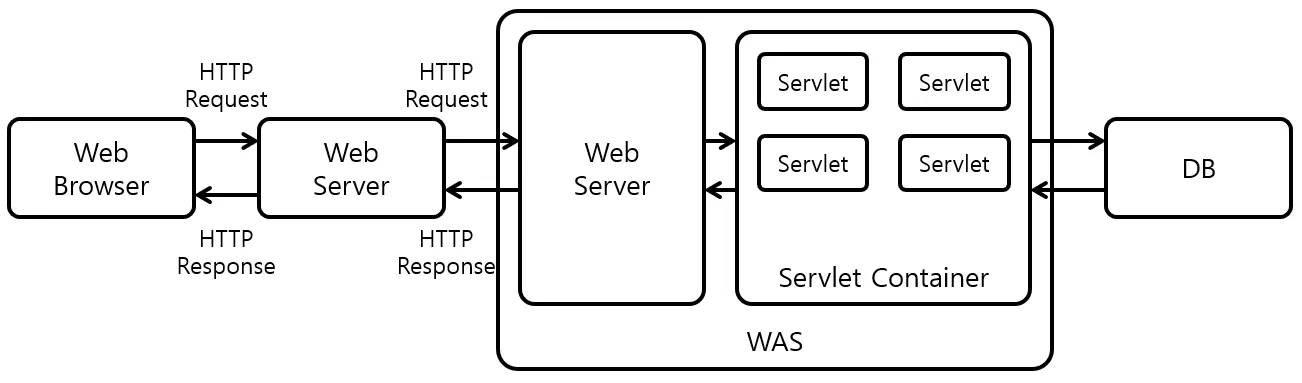
스프링 부트 환경에서도 톰캣을 별도로 설치하지 않아도 서블릿을 사용할 수 있다.
스프링 부트는 내장 톰캣(Embedded Tomcat)을 내장하고 있기 때문이며,
서블릿을 등록하면 자동으로 서블릿 컨테이너가 초기화된다.
11.1 스프링 부트 서블릿 환경 구성
@WebServlet 애노테이션을 통해 서블릿 등록 가능.
- name: 서블릿 이름
- urlPatterns: 어떤 URL을 서블릿과 매핑할지 결정
예시:
@WebServlet(name = "helloServlet", urlPatterns = "/hello")
public class HelloServlet extends HttpServlet { ... }
Spring Boot는 @ServletComponentScan이 붙은 패키지에서 @WebServlet 등을 자동 스캔해준다.
HttpServletRequest 활용
String username = request.getParameter("username");→ GET 쿼리 파라미터, POST form 모두 이 방식으로 조회 가능.
톰캣 내부 요청 로그 보기
logging.level.org.apache.coyote.http11=trace→ HTTP 요청/응답이 내부에서 어떻게 처리되는지 확인할 수 있다.
11.2 서블릿 컨테이너 동작 방식 핵심
- WAS(톰캣)는 Http 요청이 오면 Request/Response 객체를 만들어 서블릿에게 전달한다.
- 개발자는 서블릿 내부에서 요청 객체를 조회하면서 응답을 작성한다.
- WAS는 서블릿이 만든 Response 내용을 바탕으로 HTTP 응답 메시지를 최종 조립하여 클라이언트에게 보낸다.
즉, WAS는 HTTP 요청/응답 메시지를 대신 만들어주고,
서블릿은 그 안의 비즈니스 로직을 실행하는 코드이다.
11.3 welcome 페이지 추가
static 폴더에 index.html을 두면 자동으로 welcome 페이지로 매핑된다.
12. HttpServletRequest
12.1 역할
HTTP 메시지를 개발자가 직접 파싱하지 않도록
서블릿 컨테이너가 HTTP 요청 메시지를 해석하여
start-line, header, body 정보를 HttpServletRequest 객체에 담아 제공한다.
즉, HTTP 스펙을 더 쉽게 사용하도록 만들어주는 추상화 계층이다.
12.2 Http 요청 메서드 예시
POST /save HTTP/1.1
Host: localhost:8080
Content-Type: application/x-www-form-urlencoded

username=kim&age=20
request 객체는 다음과 같은 정보 조회를 지원한다.
request.getMethod()request.getRequestURL(),getRequestURI()request.getHeader("Host")request.getParameter("username")
부가기능 – 임시 저장소
요청 단위로 유지되는 저장소 기능
request.setAttribute("key", value);
request.getAttribute("key");
Filter → Controller 등 여러 계층에서 데이터를 공유할 때 유용하다.
세션 관리 기능
request.getSession()을 통해 세션 생성/조회 가능
→ 로그인, 장바구니 등 사용자 상태 유지에 사용
핵심
HttpServletRequest와 HttpServletResponse는 HTTP 메시지를 다루기 쉽게 도와주는 도구일 뿐이다.
따라서 HTTP 메시지 구조(start-line, header, body)를 정확히 이해하는 것이 더 중요하다.
12.3 기본 사용법 확인
요청 라인(start-line) 및 header를 읽는 예:
request.getMethod() = GET
request.getProtocol() = HTTP/1.1
request.getRequestURL() = http://localhost:8080/request-header
request.getRequestURI() = /request-header
request.getQueryString() = null
request.isSecure() = false
HTTP 요청 데이터 종류
서버로 데이터를 전달하는 방식은 3가지이다.
1) GET – 쿼리 파라미터
- URL 뒤에
?username=hello&age=20 - message body 없음
- 검색, 필터링에 자주 사용
2) POST – HTML Form
- Content-Type:
application/x-www-form-urlencoded - message body 안에
key=value&key2=value2형태 - 회원가입, 로그인 등 form 기반 요청
3) HTTP Message Body(raw body)
- JSON, XML, text 등
- Content-Type:
application/json등 - API 서버에서 가장 많이 쓰는 방식
19. HttpServletResponse
19.1 기본 사용법
서버가 클라이언트에게 HTTP 응답 메시지를 작성해서 보내는 객체
HTTP 응답 메시지 구성 요소
-
status line
response.setStatus(200)
-
header
response.setHeader("Content-Type", "text/plain")
-
body
response.getWriter().write("ok")
편의 기능
- Content-Type 지정
response.setContentType("text/html") - Character Encoding
response.setCharacterEncoding("utf-8") - 쿠키 생성
response.addCookie(cookie) - 리다이렉트
response.sendRedirect("/new-url")
19.2 Http 응답 데이터 형태
1) 단순 텍스트
response.getWriter().write("Hello");2) HTML 응답
response.setContentType("text/html");
response.getWriter().write("<html>...</html>");
3) JSON 응답
response.setContentType("application/json");
response.getWriter().write(objectMapper.writeValueAsString(obj));
※ application/json은 charset 파라미터를 지원하지 않으므로,
문자 인코딩은 response의 CharacterEncoding으로 지정한다.
✨ 서블릿 핵심 요약
-
서블릿은 WAS 내부에서 실행되는 자바 클래스
→ HTTP 요청/응답을 처리하기 위한 기반 기술 -
HttpServletRequest는 HTTP 요청 메시지를 자동으로 파싱하여 제공
→ 쿼리 파라미터, header, body, 세션 등 -
HttpServletResponse는 HTTP 응답 메시지를 쉽게 생성하도록 도와줌
-
GET/POST 차이의 본질은 데이터 전달 위치 (URL vs Body)
-
JSON 기반 API는 Message Body를 직접 읽고 객체로 변환하여 사용
출처
- 김영한의 스프링 MVC 1편 - 백엔드 웹 개발 핵심 기술
- ServletContainer와 SpringContainer는 무엇이 다른가?
Controller 1개는 어떻게 수십 만개의 요청을 처리하는가