
📖 커맨드 패턴(Command Pattern) 이란?
커맨드 패턴(Command Pattern)은 행동 디자인 패턴 중 하나로, 요청을 객체로 캡슐화하여 각기 다른 기능을 매개 변수화 할 수 있는 패턴이다.
요청하는 객체와 요청을 수행하는 객체를 분리하여, 서로 독립적으로 변화할 수 있도록 한다.
⚠ 문제점
- 요청 할 오퍼레이션이나 요청 수신자에 대해 몰라도, 객체에 대한 요청을 해야 함!
💡 해결책
- Command 인터페이스를 사용하여, 어떤 작업을 요청하는 쪽과 그 작업을 처리하는 쪽을 분리한다
🚩 CommandPattern 의 구조
- Command 인터페이스: 실행할 명령을 정의
- ConcreteCommand 클래스: 리시버 객체를 알고 있으며, 명령을 실행할 때 리시버 객체의 메서드를 호출
- Receiver 클래스: 실제 작업을 수행
- Invoker 클래스: 리모컨 역할. 메서드를 통해 명령을 실행
💬 UML 및 동작 원리
✔ 햄버거 가게 UML
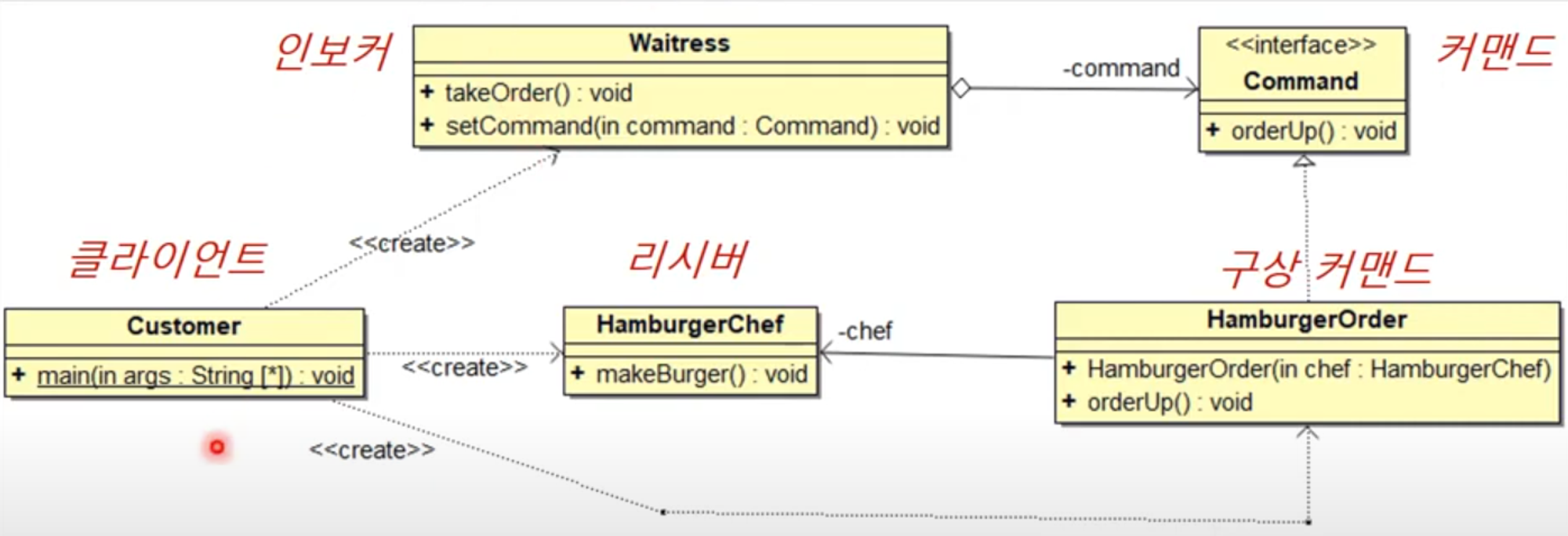
- 클라이언트에서 커맨드 객체(주문서) 생성
- 인보커(웨이트리스)는 커맨드를 가져와서 리시버에게 일을 하도록 시킴
- 리시버(주방장)는 실제 일을 수행 후, 클라이언트에 제공
Customer: 클라이언트. 햄버거를 만드는 주문서를 만들어 웨이트리스에게 알려준다Waitress: 인보커.setCommand메서드를 통해Command객체를 설정하고, 명령을 실행.
인보커는Command인터페이스에 의존하여 코딩.Command와의 연관은 여러개 일 수 있음
💡 인보커인 웨이트리스는 무엇을 만드는지 구체적으로 몰라도,
커맨드에 있는orderUp()메소드만 호출하면 리시버에서 알아서 일을 하도록 한다!
Command: 커맨드 인터페이스. 실행할 명령을 정의. ex)execute()HamburgerOrder: 구상커맨드. 리시버 객체를 알고 있으며, 명령을 실행할 때 리시버 객체의 메서드를 호출 (바인딩)HamburgerChef: 리시버. 실제 작업을 수행
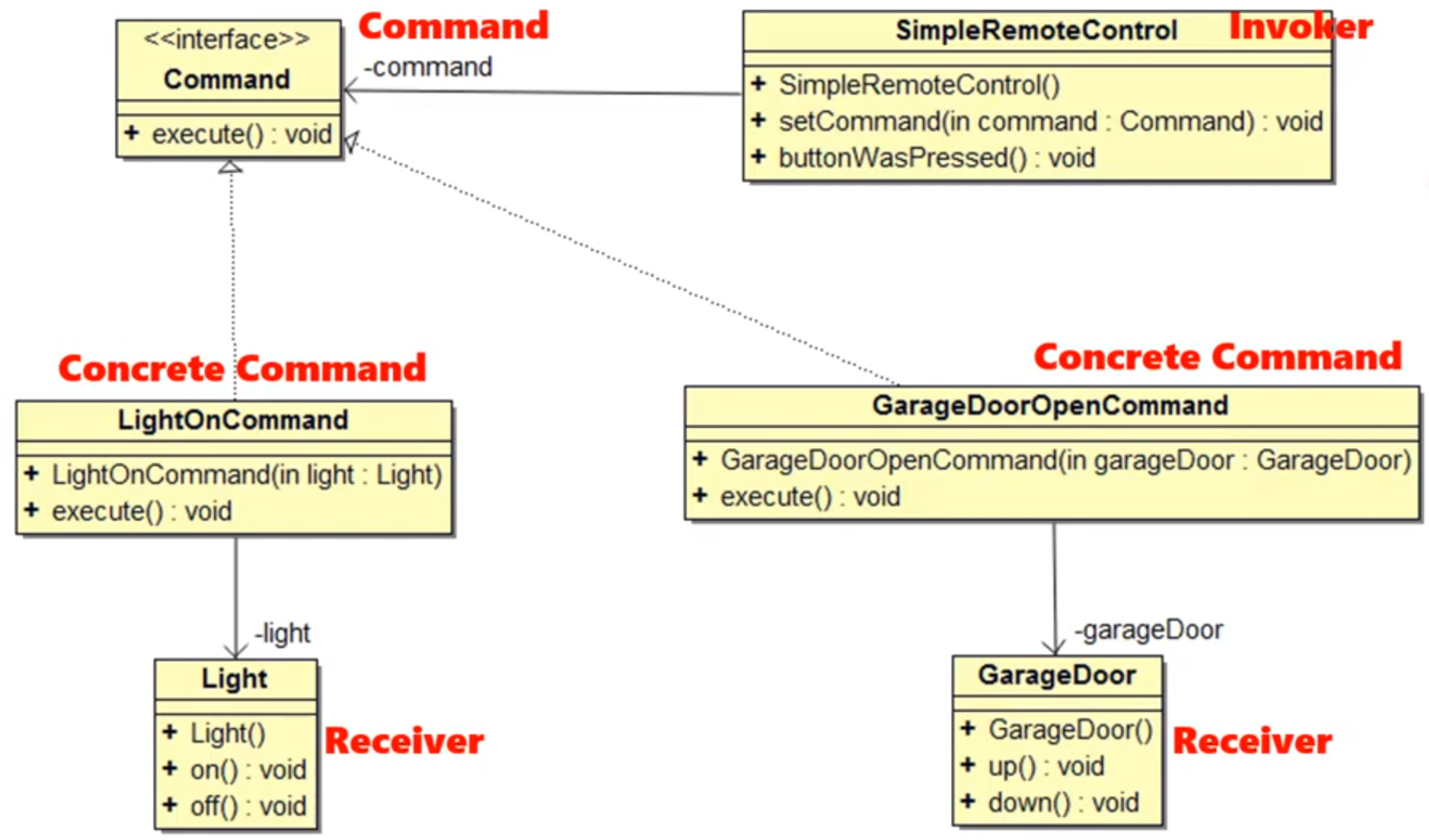
✔ 홈 오토메이션 리모컨 UML
-
Command
🚩Command: 커맨드 인터페이스 -
ConcreteCommand
🚩LightOnCommand,GarageDoorOpenCommand: 구상 클래스. 호출 시 각자의 리시버Light,GarageDoor가 호출되도록 함.
구상 커맨드 클래스는 리시버 객체를 필드로 가지고 있으며, 이 리시버 객체를 이용해execute메서드에서 특정 행동을 수행합니다.
📃lightOnCommand예시public class LightOnCommand implements Command { private Light light; // 리시버 객체 public LightOnCommand(Light light) { this.light = light; // 리시버 객체를 구상 커맨드에 설정 } @Override public void execute() { light.on(); // execute 메서드에서 리시버 객체의 메서드를 호출 } } -
Receiver(Light, GarageDoor)
🚩 실제 작업을 수행하는 클래스 -
Invoker (SimpleRemoteControl)
🚩setCommand()를 통해command와lightOncommand,GarageDoorOpenCommand객체를 연결
⚠setCommand(): 어떤 커맨드 객체가 어떤 구상 클래스(ConcreteCommand)와 연결되는지를 설정해주는 역할 (동적으로 변경 가능) → 이를 인보커 로딩이라고 한다!
※ 인보커 로딩
1. 클라이언트에서 커맨드 객체 생성
2. setCommand() 를 호출해서 인보커에 커맨드 객체를 저장
3. 나중에 클라이언트에서 인보커에게 해당 명령 실행 요청
📃Invoker코드 예시public class SimpleRemoteControl { private Command command; // 현재 설정된 커맨드 객체 public void setCommand(Command command) { // 내가 사용할 커맨드를 알아야 함 (ConcreteCommand) // 커맨드 객체를 설정 (인보커 로딩) this.command = command; } public void buttonWasPressed() { command.execute(); } } // 메인 클래스 public class Main { public static void main(String[] args) { SimpleRemoteControl remote = new SimpleRemoteControl(); Light light = new Light(); LightOnCommand lightOn = new LightOnCommand(light); // (구상커맨드 - 리시버 간 연결) GarageDoor garageDoor = new GarageDoor(); GarageDoorOpenCommand garageOpen = new GarageDoorOpenCommand(garageDoor); // (구상커맨드 - 리시버 간 연결) // 리모컨에 LightOnCommand 설정 remote.setCommand(lightOn); // 인보커 로딩 remote.buttonWasPressed(); // 리모컨에 GarageDoorOpenCommand 설정 remote.setCommand(garageOpen); // 인보커 로딩 remote.buttonWasPressed(); } }💡 위와 마찬가지로, 인터페이스인
Command에 의존하여 구현을 했기 때문에, 인보커는 하위 구상클래스를 몰라도 됨
→setCommand()에 따라서 어떤 클래스의execute()가 호출될지 정해짐
⚠ Invoker 와 ConcreteCommand 의 차이점
- 구상 커맨드(Concrete Command):
LightOnCommand는 리시버 객체Light를 필드로 가지고 있으며, 생성자를 통해 리시버 객체를 설정. 그리고execute()에서 리시버 객체의 메서드를 호출한다. 이 과정에서 커맨드와 리시버가 연결된다
📌 구상커맨드 객체 - 리시버 객체 간 연결구상 커맨드는
execute()메서드에서 리시버 객체의 메서드를 호출하여 실제 작업을 수행
- 인보커(Invoker):
SimpleRemoteControl은 커맨드 객체를 설정하고, 설정된 커맨드 객체의execute메서드를 호출. 인보커는 커맨드 객체를 실행하는 역할만 한다!
📌 커맨드 객체 - 구상커맨드 객체 간 연결
→execute()실행 시 어떤 구상커맨드의execute()를 수행할지 결정 (인보커 로딩)인보커는
setCommand()를 통해 커맨드 객체와 구상 커맨드의execute()를 연결
※ 따라서, 커맨드 객체와 리시버 객체를 연결하는 과정은 구상 커맨드에서 이루어진다.
📃 코드
Command코드public interface Command { public void execute(); }
LightOnCommand코드 - ConcreteCommandpublic class LightOnCommand implements Command { private Light light; // 리시버 객체 boolean lightFlag = true; public LightOnCommand(Light light) { // 구상 커맨드 - 리시버간 연결 this.light = light; } @Override public void execute() { if (lightFlag == true) { light.on(); } else { light.off(); } lightFlag = !lightFlag; } }
Light코드 - Receiverpublic class Light { public Light() { } public void on() { System.out.println("전등을 켭니다... ON"); } public void off() { System.out.println("전등을 끕니다... OFF"); } }
SimpleRemoteControl코드 - Invokerpublic class SimpleRemoteControl { private Command command; // 현재 설정된 커맨드 객체 public SimpleRemoteControl() { } public void setCommand(Command command) { // 커맨드 객체를 설정 (인보커 로딩) this.command = command; } public void buttonWasPressed() { command.execute(); } }
TestDriver코드public class TestDriver { public static void main(String[] args) { SimpleRemoteControl remote = new SimpleRemoteControl(); Light light = new Light(); // 리시버 LightOnCommand lightOn = new LightOnCommand(light); // 구상 커맨드 - 리시버 간 연결 remote.setCommand(lightOn); // 인보커 로딩 remote.buttonWasPressed(); remote.buttonWasPressed(); } }
💻 실행결과
전등을 켭니다... ON
전등을 끕니다... OFF
-----------------------------------------------------------------------
BUILD SUCCESS
-----------------------------------------------------------------------