1. 설치.

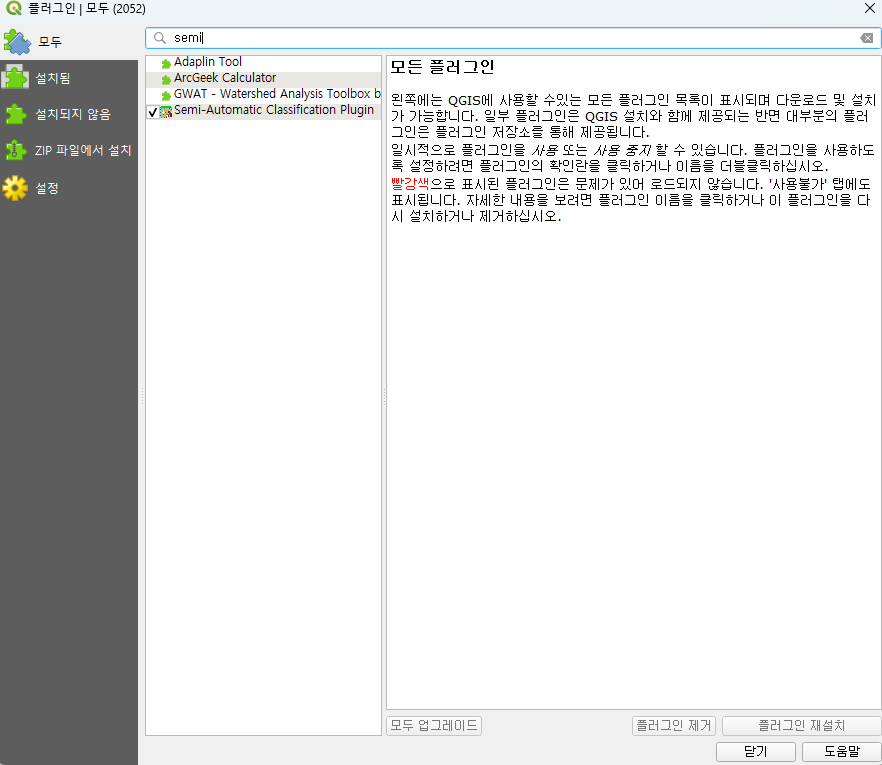
- 위와 같은 경로를 통해
Semi-Automatic Classification Plugin을 설치하면 됨.
2. 오류.

- 정상적으로 설치를 마쳤음에도 불구하고 상단 네비게이션바에
SCP가 보이지 않음.
Semi-Automatic Classification Plugin: Error starting Remotior Sensus
Semi-Automatic Classification Plugin: Warning. Python library Remotior Sensus is outdated.This could cause errors, please update Remotior Sensus.-
또한 위와 같은 에러 메시지가 뜨는 것을 확인.
-
SCP(Semi-Automatic Classification Plugin) 플러그인의 핵심 엔진인
Remotior Sensus라는 파이썬 라이브러리가 제대로 설치되지 않았거나 버전이 맞지 않아 발생한 문제.
- QGIS Python 콘솔에서
Remotior Sensus 직접 업데이트를 해서 해결 하였음.

- 파이썬 콘솔을 열어줌.
- 아래 파이썬 코드를 한 문장씩 실행.
import pip
pip.main(['install','--upgrade','remotior_sensus'])
c:\progra~1\qgis33~1.0\apps\python312\lib\site-packages (0.3.5) Collecting remotior_sensus Downloading remotior_sensus-0.6.2-py3-none-any.whl.metadata (6.8 kB)
Downloading remotior_sensus-0.6.2-py3-none-any.whl (347 kB) ---------------------------------------- 347.4/347.4 kB 4.3 MB/s eta 0:00:00
Installing collected packages: remotior_sensus
Successfully installed remotior_sensus-0.6.2
[notice] A new release of pip is available: 24.0 -> 26.0.1
[notice] To update, run: qgis-bin.exe -m pip install --upgrade pip
0- 마지막으로
0이 표시되었는데
파이썬에서의0(False)가 아니라
pip 실행의 반환값(return code)이 출력된 것.
일반적인 CLI 프로그램 규칙
| 코드 | 의미 |
|---|---|
| 0 | 성공 |
| 1 이상 | 오류 |

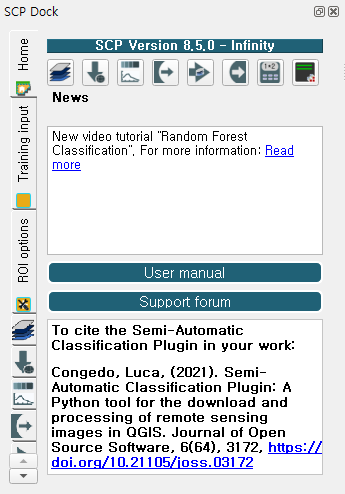
- 네비게이션바에
SCP가 정상적으로 나타났고, QGIS 7시 방향에SCP Dock창이 열렸음.

Every cloud has a silver lining.ㅤㅤㅤㅤㅤㅤㅤㅤㅤhttps://blog.naver.com/ha_jju_