1. scrollIntoView()란?
scrollIntoView()는 브라우저에서 특정DOM 요소가 화면에 보이도록 자동으로 스크롤시키는 JavaScript 메서드임.- UX(사용자 경험)를 향상 시킬때 자주 사용함.
element.scrollIntoView({
    behavior: 'auto' | 'smooth', 					// 스크롤
    block: 'start' | 'center' | 'end' | 'nearest',	// 수직 위치
    inline: 'start' | 'center' | 'end' | 'nearest'	// 수평 위치
});
element는 사용할 DOM 요소.behavior(스크롤)- auto : 즉시 이동. (기본값)
- smooth : 부드럽게 이동.
block(수직 위치),inline(수평 위치)- start : 위쪽.
- center : 가운데.
- end': 아래쪽.
- nearest : 현재 화면에 가장 가까운 위치.
1-1. Ex.
const element = document.getElementById("content");
element.scrollIntoView();id="content"인 요소를 브라우저 창의 표시 영역으로 자동스크롤 해줌.
2. 적용&개선.
- 댓글 등록의 경우
<form>태그를 이용해서 요청을 보내고 있음. - 백엔드에서는 Spring MVC에서 BindingResult를 이용하여 폼 데이터를 검증할 때 발생한 오류 정보를 담고 있음.
- BindingResult란?
- Spring MVC에서 데이터 바인딩(Data Binding) 및 유효성 검사(Validation)의 결과를 담아두는 객체.
- 즉, @Valid로 유효성 검사를 수행한 뒤, 그 검증 결과(에러 목록)를 담는 역할.
- 또한 BindingResult는 단순히
검증 에러 정보를 담는 객체가 아니라 Thymeleaf 템플릿에서 에러 메시지를 표시하거나 컨트롤러에서 흐름 제어할 때 직접 사용할 수도 있음.
- BindingResult란?
if (bindingResult.hasErrors())- 댓글 작성 요청을 처리하는 메서드 구현부에서 if문을 통해 BindingResult에 에러가 담겨 있을 경우
- 댓글을 작성할 수 있는 글 상세페이지로 리턴함.
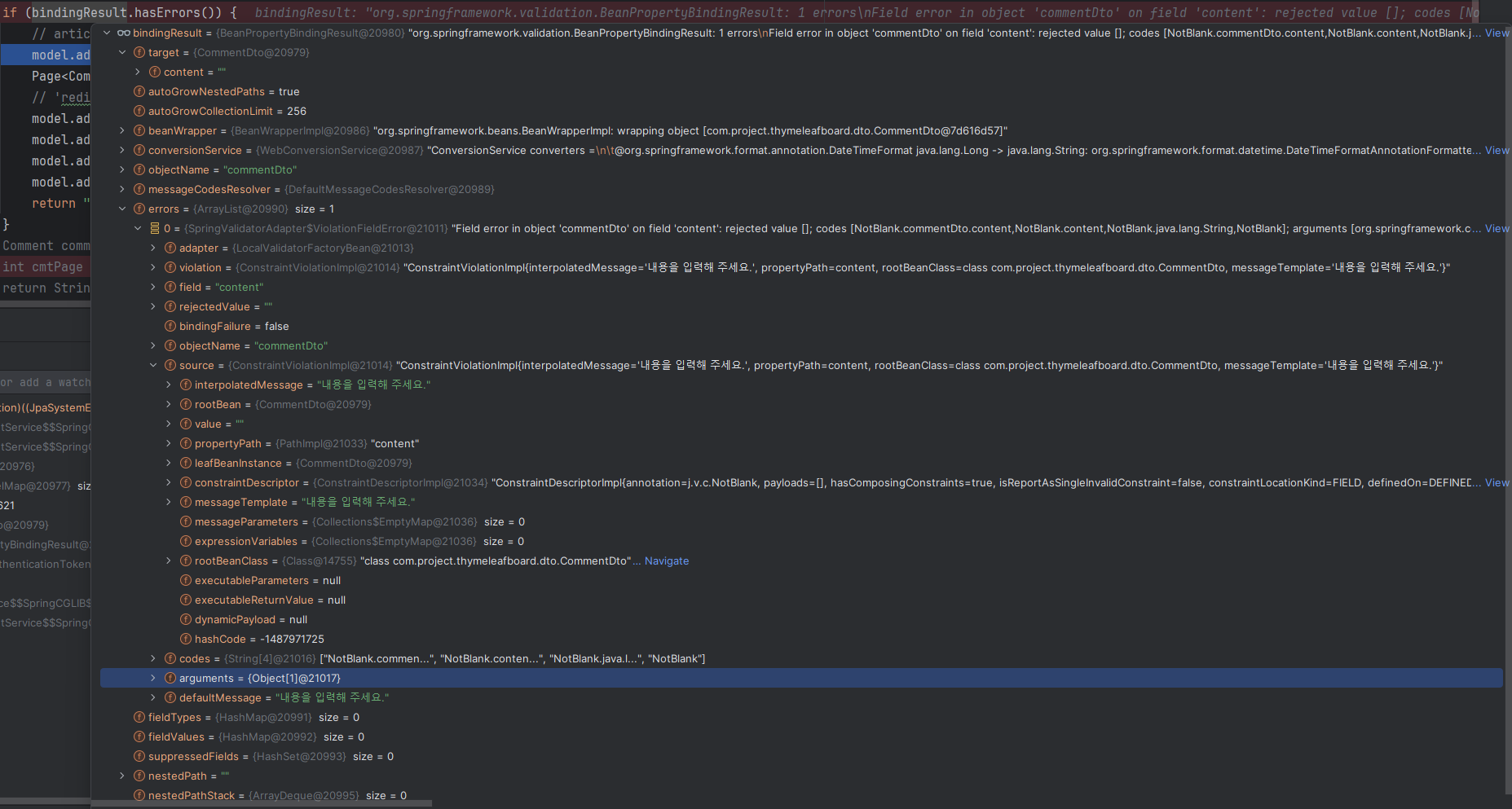
- 디버깅을 통해 확인해보면 위와 같은 값들이 들어가 있는 것을 확인할 수 있음.
<form th:action="@{|/comment/create/${article.id}|}"
      method="post"
      th:object="${commentDto}"
      class="my-3" id="commentForm"
th:attr="data-error=${#fields.hasErrors('content')}">id="commentForm"<form>태그의 id 속성을 부여.- 댓글 작성 폼(form element) 자체에 붙여진 고유 식별자 역할을 함.
- 이를 이용해서 자바스크립트 코드로 접근 할 수 있음.
th:attr="data-error=${#fields.hasErrors('content')}"- 서버 검증 결과를 HTML 속성으로 전달.
- th:attr은 HTML 속성을 동적으로 생성하는 Thymeleaf 문법.
- 서버가 HTML의 data-error 속성을 만들어 줌.
- ${#fields.hasErrors('content')}는 현재 폼(commentDto)의 content 필드에 에러가 있는지 확인하는 기능.
- BindingResult의 content 필드에
에러가 없으면th:attr="data-error=${#fields.hasErrors('content')}=>data-error="false"로 동적 렌더링 됨.
에러가 있다면th:attr="data-error=${#fields.hasErrors('content')}=>data-error="true"로 렌더링.
- BindingResult의 content 필드에
const commentFormEl = document.getElementById('commentForm');

			...

    if (commentFormEl != null && commentFormEl.dataset.error === "true") {
      commentFormEl.scrollIntoView({ behavior: 'smooth', block: 'start' });
      commentFormEl.querySelector('textarea').focus();
}- HTML 코드에서
id="commentForm"인 요소(= 댓글 작성 폼)를 가져옴.- commentFormEl은
댓글 작성 폼을 가리키는JavaScript 객체
- commentFormEl은
commentFormEl.dataset.error를 통해data-error="..."에 접근 가능.
2-1. 흐름 요약.
- 댓글 작성 후 서버로 요청.
↓
@Valid CommentDto로 폼 데이터 유효성 검사.
↓
검증시 발생한 에러를 BindingResult에 저장.
↓
뷰로 다시 돌아올 때 Thymeleaf가 #fields.hasErrors('content')를 동적으로 렌더링.
↓
폼 태그에 data-error="true" 속성이 붙음.
↓
JavaScript에서 이 속성을 감지 → 자동 스크롤 및 포커스 처리.
2-2. 결과
2-2-1. 기존.
- 사용자가 수동으로 스크롤 내려야됨.
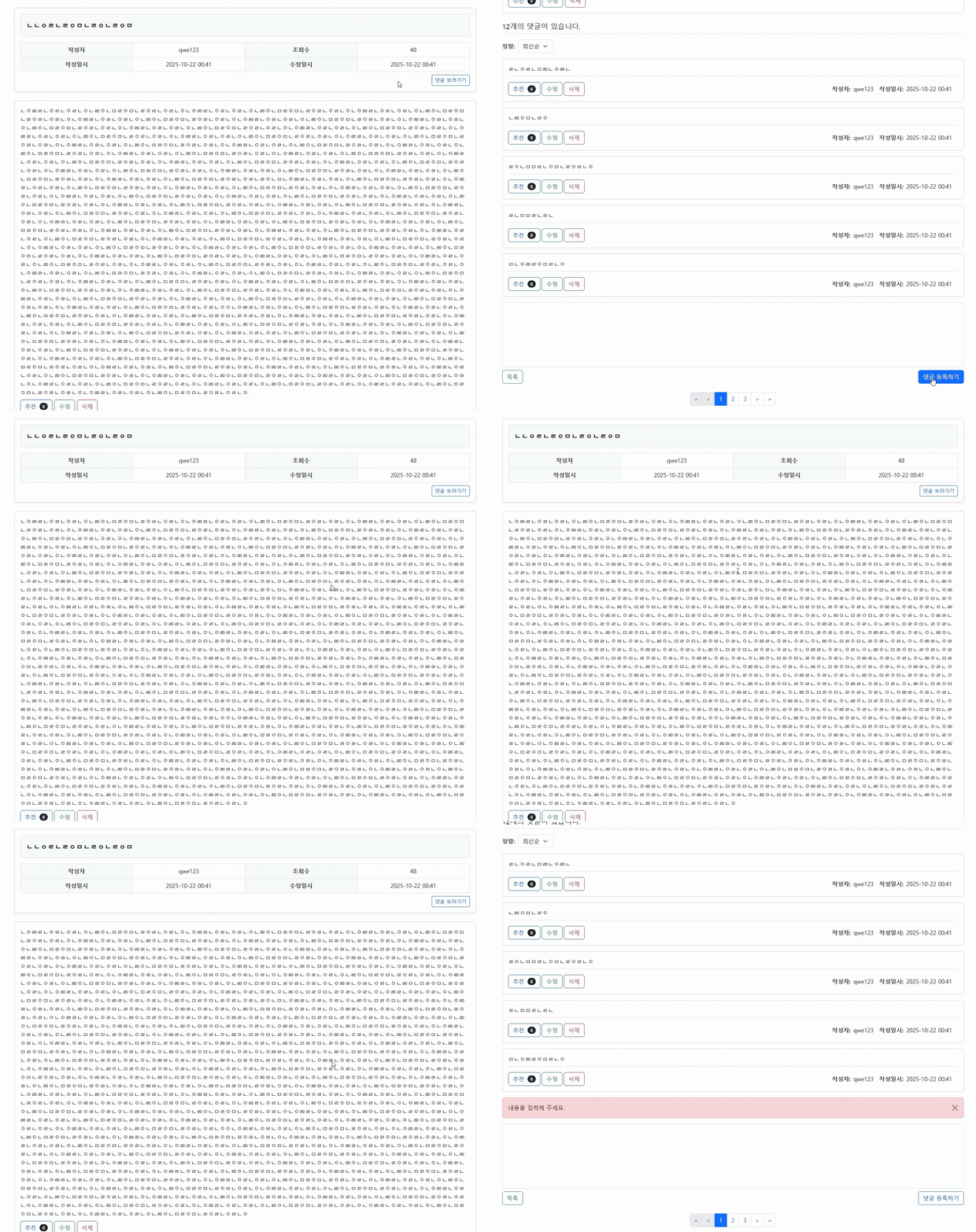
2-2-2. scrollIntoView() 적용 후
- 자동으로 스크롤이 작동됨.

3. 참고.

Every cloud has a silver lining.ㅤㅤㅤㅤㅤㅤㅤㅤㅤhttps://www.instagram.com/ha_jju