Spring Security - 12. UsernamePasswordAuthenticationFilter
1. UsernamePasswordAuthenticationFilter
-
UsernamePasswordAuthenticationFilter는 Security 의존성을 추가하면 자동으로 등록되는SecurityFilterChain에서 여덟 번째에 위치함.
UsernamePasswordAuthenticationFilter가 등록되는 목적은POST : “/login”경로에서Form기반의 인증을 수행할 수 있도록multipart/form-data형태의username/password데이터를 받아서 인증을 수행하는 클래스에게 값을 넘겨주는 역할을 함.UsernamePasswordAuthenticationFilter는Form형태의 데이터만 받기 때문에JSON이나다른 형식의 데이터를 받기 위해서는 다른 방식으로 수정이 필요함.
@Configuration
@EnableWebSecurity
public class SecurityConfig {
    @Bean
    public SecurityFilterChain filterChain(HttpSecurity httpSecurity) throws Exception {
        httpSecurity

        		....

                .formLogin(Customizer.withDefaults());

        return httpSecurity.build();
    }
}- 개발자가
커스텀 SecurityFilterChain을 생성하면 자동 등록이 안되기 때문에 위 코드로 필터를 활성화시켜야됨.
1-1. 코드로 보기.
- 아래의 코드를 살펴보면 앞서 봤던 다른 필터들과는 다르게
doFilter메서드가 안 보임.- 부모 클래스인 AbstractAuthenticationProcessingFilter에
doFilter메서드가 있음.
- 부모 클래스인 AbstractAuthenticationProcessingFilter에
Why?UsernamePasswordAuthenticationFilter는Form로그인 방식에 대한 필터임.- 과정.
- 사용자로부터 데이터를 받아서 인증.
인증 결과에 따라서시큐리티컨텍스트를 만들고- 그 이후에
성공 or 실패 핸들러를 동작시킴.
- 과정.
- 만약 사용자가 보낸 데이터 방식이
Form이 아니라JSON방식으로 보낸다고 해서위 과정이 달라질까?No 아님. 즉, 위 과정에 대한 추상 클래스인AbstractAuthenticationProcessingFilter를 정의하고 각각의 방식에 따라필터를 구현해서 사용함.
package org.springframework.security.web.authentication;

import jakarta.servlet.http.HttpServletRequest;
import jakarta.servlet.http.HttpServletResponse;
import org.springframework.lang.Nullable;
import org.springframework.security.authentication.AuthenticationManager;
import org.springframework.security.authentication.AuthenticationServiceException;
import org.springframework.security.authentication.UsernamePasswordAuthenticationToken;
import org.springframework.security.core.Authentication;
import org.springframework.security.core.AuthenticationException;
import org.springframework.security.web.util.matcher.AntPathRequestMatcher;
import org.springframework.util.Assert;

public class UsernamePasswordAuthenticationFilter extends AbstractAuthenticationProcessingFilter {
    public static final String SPRING_SECURITY_FORM_USERNAME_KEY = "username";
    public static final String SPRING_SECURITY_FORM_PASSWORD_KEY = "password";
    private static final AntPathRequestMatcher DEFAULT_ANT_PATH_REQUEST_MATCHER = new AntPathRequestMatcher("/login", "POST");
    private String usernameParameter = "username";
    private String passwordParameter = "password";
    private boolean postOnly = true;

    public UsernamePasswordAuthenticationFilter() {
        super(DEFAULT_ANT_PATH_REQUEST_MATCHER);
    }

    public UsernamePasswordAuthenticationFilter(AuthenticationManager authenticationManager) {
        super(DEFAULT_ANT_PATH_REQUEST_MATCHER, authenticationManager);
    }

    public Authentication attemptAuthentication(HttpServletRequest request, HttpServletResponse response) throws AuthenticationException {
        if (this.postOnly && !request.getMethod().equals("POST")) {
            throw new AuthenticationServiceException("Authentication method not supported: " + request.getMethod());
        } else {
            String username = this.obtainUsername(request);
            username = username != null ? username.trim() : "";
            String password = this.obtainPassword(request);
            password = password != null ? password : "";
            UsernamePasswordAuthenticationToken authRequest = UsernamePasswordAuthenticationToken.unauthenticated(username, password);
            this.setDetails(request, authRequest);
            return this.getAuthenticationManager().authenticate(authRequest);
        }
    }

    @Nullable
    protected String obtainPassword(HttpServletRequest request) {
        return request.getParameter(this.passwordParameter);
    }

    @Nullable
    protected String obtainUsername(HttpServletRequest request) {
        return request.getParameter(this.usernameParameter);
    }

    protected void setDetails(HttpServletRequest request, UsernamePasswordAuthenticationToken authRequest) {
        authRequest.setDetails(this.authenticationDetailsSource.buildDetails(request));
    }

    public void setUsernameParameter(String usernameParameter) {
        Assert.hasText(usernameParameter, "Username parameter must not be empty or null");
        this.usernameParameter = usernameParameter;
    }

    public void setPasswordParameter(String passwordParameter) {
        Assert.hasText(passwordParameter, "Password parameter must not be empty or null");
        this.passwordParameter = passwordParameter;
    }

    public void setPostOnly(boolean postOnly) {
        this.postOnly = postOnly;
    }

    public final String getUsernameParameter() {
        return this.usernameParameter;
    }

    public final String getPasswordParameter() {
        return this.passwordParameter;
    }
}
2. AbstractAuthenticationProcessingFilter
GenericFilterBean을 상속 받고 있음.
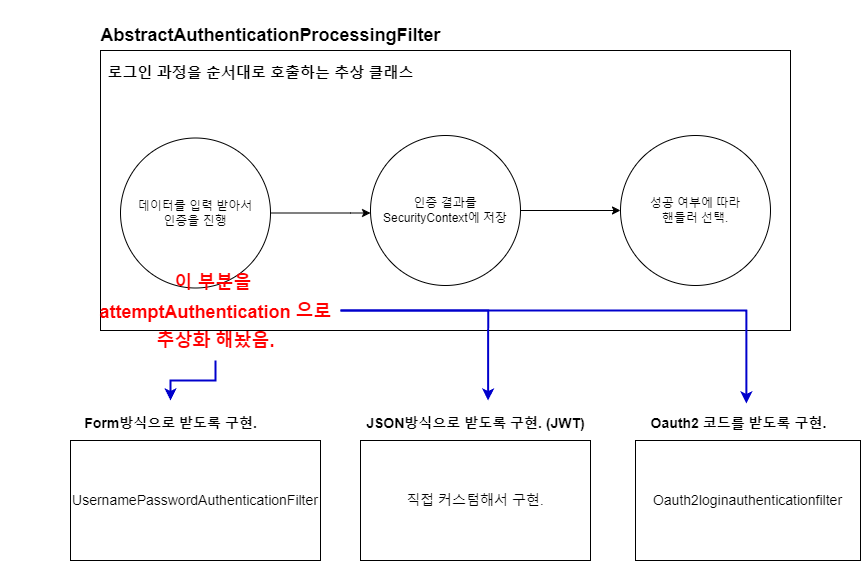
public abstract Authentication attemptAuthentication(HttpServletRequest request, HttpServletResponse response)-
아래의 코드에서
doFilter메서드 내부, 그리고 제일 하단에 보면 위와 같은 추상 메서드를 확인할 수 있음. -
AbstractAuthenticationProcessingFilter를 상속 받아 구현한 클래스들.- CasAuthenticationFilter
- OAuth2LoginAuthenticationFilter
- Saml2WebSsoAuthenticationFilter
- UsernamePasswordAuthenticationFilter
- WebAuthnAuthenticationFilter
package org.springframework.security.web.authentication;

import java.io.IOException;

import jakarta.servlet.FilterChain;
import jakarta.servlet.ServletException;
import jakarta.servlet.ServletRequest;
import jakarta.servlet.ServletResponse;
import jakarta.servlet.http.HttpServletRequest;
import jakarta.servlet.http.HttpServletResponse;

import org.springframework.context.ApplicationEventPublisher;
import org.springframework.context.ApplicationEventPublisherAware;
import org.springframework.context.MessageSource;
import org.springframework.context.MessageSourceAware;
import org.springframework.context.support.MessageSourceAccessor;
import org.springframework.core.log.LogMessage;
import org.springframework.security.authentication.AuthenticationDetailsSource;
import org.springframework.security.authentication.AuthenticationManager;
import org.springframework.security.authentication.InternalAuthenticationServiceException;
import org.springframework.security.authentication.event.InteractiveAuthenticationSuccessEvent;
import org.springframework.security.core.Authentication;
import org.springframework.security.core.AuthenticationException;
import org.springframework.security.core.SpringSecurityMessageSource;
import org.springframework.security.core.context.SecurityContext;
import org.springframework.security.core.context.SecurityContextHolder;
import org.springframework.security.core.context.SecurityContextHolderStrategy;
import org.springframework.security.web.authentication.session.NullAuthenticatedSessionStrategy;
import org.springframework.security.web.authentication.session.SessionAuthenticationStrategy;
import org.springframework.security.web.context.RequestAttributeSecurityContextRepository;
import org.springframework.security.web.context.SecurityContextRepository;
import org.springframework.security.web.util.matcher.AntPathRequestMatcher;
import org.springframework.security.web.util.matcher.RequestMatcher;
import org.springframework.util.Assert;
import org.springframework.web.filter.GenericFilterBean;

/**
 * Abstract processor of browser-based HTTP-based authentication requests.
 *
 * <h3>Authentication Process</h3>
 *
 * The filter requires that you set the <tt>authenticationManager</tt> property. An
 * <tt>AuthenticationManager</tt> is required to process the authentication request tokens
 * created by implementing classes.
 * <p>
 * This filter will intercept a request and attempt to perform authentication from that
 * request if the request matches the
 * {@link #setRequiresAuthenticationRequestMatcher(RequestMatcher)}.
 * <p>
 * Authentication is performed by the
 * {@link #attemptAuthentication(HttpServletRequest, HttpServletResponse)
 * attemptAuthentication} method, which must be implemented by subclasses.
 *
 * <h4>Authentication Success</h4>
 *
 * If authentication is successful, the resulting {@link Authentication} object will be
 * placed into the <code>SecurityContext</code> for the current thread, which is
 * guaranteed to have already been created by an earlier filter.
 * <p>
 * The configured {@link #setAuthenticationSuccessHandler(AuthenticationSuccessHandler)
 * AuthenticationSuccessHandler} will then be called to take the redirect to the
 * appropriate destination after a successful login. The default behaviour is implemented
 * in a {@link SavedRequestAwareAuthenticationSuccessHandler} which will make use of any
 * <tt>DefaultSavedRequest</tt> set by the <tt>ExceptionTranslationFilter</tt> and
 * redirect the user to the URL contained therein. Otherwise it will redirect to the
 * webapp root "/". You can customize this behaviour by injecting a differently configured
 * instance of this class, or by using a different implementation.
 * <p>
 * See the
 * {@link #successfulAuthentication(HttpServletRequest, HttpServletResponse, FilterChain, Authentication)}
 * method for more information.
 *
 * <h4>Authentication Failure</h4>
 *
 * If authentication fails, it will delegate to the configured
 * {@link AuthenticationFailureHandler} to allow the failure information to be conveyed to
 * the client. The default implementation is {@link SimpleUrlAuthenticationFailureHandler}
 * , which sends a 401 error code to the client. It may also be configured with a failure
 * URL as an alternative. Again you can inject whatever behaviour you require here.
 *
 * <h4>Event Publication</h4>
 *
 * If authentication is successful, an {@link InteractiveAuthenticationSuccessEvent} will
 * be published via the application context. No events will be published if authentication
 * was unsuccessful, because this would generally be recorded via an
 * {@code AuthenticationManager}-specific application event.
 *
 * <h4>Session Authentication</h4>
 *
 * The class has an optional {@link SessionAuthenticationStrategy} which will be invoked
 * immediately after a successful call to {@code attemptAuthentication()}. Different
 * implementations {@link #setSessionAuthenticationStrategy(SessionAuthenticationStrategy)
 * can be injected} to enable things like session-fixation attack prevention or to control
 * the number of simultaneous sessions a principal may have.
 *
 * @author Ben Alex
 * @author Luke Taylor
 */
public abstract class AbstractAuthenticationProcessingFilter extends GenericFilterBean
		implements ApplicationEventPublisherAware, MessageSourceAware {

	private SecurityContextHolderStrategy securityContextHolderStrategy = SecurityContextHolder
		.getContextHolderStrategy();

	protected ApplicationEventPublisher eventPublisher;

	protected AuthenticationDetailsSource<HttpServletRequest, ?> authenticationDetailsSource = new WebAuthenticationDetailsSource();

	private AuthenticationManager authenticationManager;

	protected MessageSourceAccessor messages = SpringSecurityMessageSource.getAccessor();

	private RememberMeServices rememberMeServices = new NullRememberMeServices();

	private RequestMatcher requiresAuthenticationRequestMatcher;

	private boolean continueChainBeforeSuccessfulAuthentication = false;

	private SessionAuthenticationStrategy sessionStrategy = new NullAuthenticatedSessionStrategy();

	private boolean allowSessionCreation = true;

	private AuthenticationSuccessHandler successHandler = new SavedRequestAwareAuthenticationSuccessHandler();

	private AuthenticationFailureHandler failureHandler = new SimpleUrlAuthenticationFailureHandler();

	private SecurityContextRepository securityContextRepository = new RequestAttributeSecurityContextRepository();

	/**
	 * @param defaultFilterProcessesUrl the default value for <tt>filterProcessesUrl</tt>.
	 */
	protected AbstractAuthenticationProcessingFilter(String defaultFilterProcessesUrl) {
		setFilterProcessesUrl(defaultFilterProcessesUrl);
	}

	/**
	 * Creates a new instance
	 * @param requiresAuthenticationRequestMatcher the {@link RequestMatcher} used to
	 * determine if authentication is required. Cannot be null.
	 */
	protected AbstractAuthenticationProcessingFilter(RequestMatcher requiresAuthenticationRequestMatcher) {
		Assert.notNull(requiresAuthenticationRequestMatcher, "requiresAuthenticationRequestMatcher cannot be null");
		this.requiresAuthenticationRequestMatcher = requiresAuthenticationRequestMatcher;
	}

	/**
	 * Creates a new instance with a default filterProcessesUrl and an
	 * {@link AuthenticationManager}
	 * @param defaultFilterProcessesUrl the default value for <tt>filterProcessesUrl</tt>.
	 * @param authenticationManager the {@link AuthenticationManager} used to authenticate
	 * an {@link Authentication} object. Cannot be null.
	 */
	protected AbstractAuthenticationProcessingFilter(String defaultFilterProcessesUrl,
			AuthenticationManager authenticationManager) {
		setFilterProcessesUrl(defaultFilterProcessesUrl);
		setAuthenticationManager(authenticationManager);
	}

	/**
	 * Creates a new instance with a {@link RequestMatcher} and an
	 * {@link AuthenticationManager}
	 * @param requiresAuthenticationRequestMatcher the {@link RequestMatcher} used to
	 * determine if authentication is required. Cannot be null.
	 * @param authenticationManager the {@link AuthenticationManager} used to authenticate
	 * an {@link Authentication} object. Cannot be null.
	 */
	protected AbstractAuthenticationProcessingFilter(RequestMatcher requiresAuthenticationRequestMatcher,
			AuthenticationManager authenticationManager) {
		setRequiresAuthenticationRequestMatcher(requiresAuthenticationRequestMatcher);
		setAuthenticationManager(authenticationManager);
	}

    		.....

	/**
	 * Invokes the {@link #requiresAuthentication(HttpServletRequest, HttpServletResponse)
	 * requiresAuthentication} method to determine whether the request is for
	 * authentication and should be handled by this filter. If it is an authentication
	 * request, the {@link #attemptAuthentication(HttpServletRequest, HttpServletResponse)
	 * attemptAuthentication} will be invoked to perform the authentication. There are
	 * then three possible outcomes:
	 * <ol>
	 * <li>An <tt>Authentication</tt> object is returned. The configured
	 * {@link SessionAuthenticationStrategy} will be invoked (to handle any
	 * session-related behaviour such as creating a new session to protect against
	 * session-fixation attacks) followed by the invocation of
	 * {@link #successfulAuthentication(HttpServletRequest, HttpServletResponse, FilterChain, Authentication)}
	 * method</li>
	 * <li>An <tt>AuthenticationException</tt> occurs during authentication. The
	 * {@link #unsuccessfulAuthentication(HttpServletRequest, HttpServletResponse, AuthenticationException)
	 * unsuccessfulAuthentication} method will be invoked</li>
	 * <li>Null is returned, indicating that the authentication process is incomplete. The
	 * method will then return immediately, assuming that the subclass has done any
	 * necessary work (such as redirects) to continue the authentication process. The
	 * assumption is that a later request will be received by this method where the
	 * returned <tt>Authentication</tt> object is not null.
	 * </ol>
	 */
	@Override
	public void doFilter(ServletRequest request, ServletResponse response, FilterChain chain)
			throws IOException, ServletException {
		doFilter((HttpServletRequest) request, (HttpServletResponse) response, chain);
	}

	private void doFilter(HttpServletRequest request, HttpServletResponse response, FilterChain chain)
			throws IOException, ServletException {
		if (!requiresAuthentication(request, response)) {
			chain.doFilter(request, response);
			return;
		}
		try {
			Authentication authenticationResult = attemptAuthentication(request, response);
			if (authenticationResult == null) {
				// return immediately as subclass has indicated that it hasn't completed
				return;
			}
			this.sessionStrategy.onAuthentication(authenticationResult, request, response);
			// Authentication success
			if (this.continueChainBeforeSuccessfulAuthentication) {
				chain.doFilter(request, response);
			}
			successfulAuthentication(request, response, chain, authenticationResult);
		}
		catch (InternalAuthenticationServiceException failed) {
			this.logger.error("An internal error occurred while trying to authenticate the user.", failed);
			unsuccessfulAuthentication(request, response, failed);
		}
		catch (AuthenticationException ex) {
			// Authentication failed
			unsuccessfulAuthentication(request, response, ex);
		}
	}

			.....

	/**
	 * Performs actual authentication.
	 * <p>
	 * The implementation should do one of the following:
	 * <ol>
	 * <li>Return a populated authentication token for the authenticated user, indicating
	 * successful authentication</li>
	 * <li>Return null, indicating that the authentication process is still in progress.
	 * Before returning, the implementation should perform any additional work required to
	 * complete the process.</li>
	 * <li>Throw an <tt>AuthenticationException</tt> if the authentication process
	 * fails</li>
	 * </ol>
	 * @param request from which to extract parameters and perform the authentication
	 * @param response the response, which may be needed if the implementation has to do a
	 * redirect as part of a multi-stage authentication process (such as OIDC).
	 * @return the authenticated user token, or null if authentication is incomplete.
	 * @throws AuthenticationException if authentication fails.
	 */
	public abstract Authentication attemptAuthentication(HttpServletRequest request, HttpServletResponse response)
			throws AuthenticationException, IOException, ServletException;

            ....

}
2-1. doFilter메서드.
private void doFilter(HttpServletRequest request, HttpServletResponse response, FilterChain chain)
        throws IOException, ServletException {

    // 요청이 로그인 처리인지 확인 (로그인 경로 요청 여부 검사)
    if (!requiresAuthentication(request, response)) {
        chain.doFilter(request, response); // 로그인 요청이 아니면 다음 필터로 넘김.
        return;
    }

    // 로그인 인증 과정 시도
    try {
        // 사용자의 인증 정보를 받어서 상황에 맞는 인증을 시도 (이 부분은 구현 클래스에서 정의).
        Authentication authenticationResult = attemptAuthentication(request, response);

        if (authenticationResult == null) {
            return;
        }

        // 인증이 성공한 경우, 세션 관리 전략(SessionAuthenticationStrategy)에 따라 SecurityContext에 저장.
        this.sessionStrategy.onAuthentication(authenticationResult, request, response);

        // continueChainBeforeSuccessfulAuthentication 값이 true이면, 성공 후에도 필터 체인을 계속 진행.
        if (this.continueChainBeforeSuccessfulAuthentication) {
            chain.doFilter(request, response);
        }

        // 인증 성공 처리 (성공 시 추가적인 작업 수행: 리디렉션, 토큰 저장 등).
        successfulAuthentication(request, response, chain, authenticationResult);
    }
    // 내부 인증 서비스에서 발생한 예외 처리.
    catch (InternalAuthenticationServiceException failed) {
        this.logger.error("An internal error occurred while trying to authenticate the user.", failed);
        unsuccessfulAuthentication(request, response, failed);
    }
    // 일반적인 인증 실패 처리.
    catch (AuthenticationException ex) {
        unsuccessfulAuthentication(request, response, ex);
    }
}
3. UsernamePasswordAuthenticationFilter - attemptAuthentication.
@Override
public Authentication attemptAuthentication(HttpServletRequest request, HttpServletResponse response)
        throws AuthenticationException {

    // 로그인 요청이 허용된 HTTP 메서드인지 확인.
    if (this.postOnly && !request.getMethod().equals("POST")) {
        throw new AuthenticationServiceException("Authentication method not supported: " + request.getMethod());
    }

    // 요청에서 username과 password 값을 추출 (폼 데이터 또는 쿼리 파라미터에서 가져옴).
    String username = obtainUsername(request);
    username = (username != null) ? username.trim() : "";
    String password = obtainPassword(request);
    password = (password != null) ? password : "";

    // 인증을 위해 사용자 정보를 포함한 인증 토큰 생성 (아직 인증되지 않은 상태).
    UsernamePasswordAuthenticationToken authRequest = UsernamePasswordAuthenticationToken.unauthenticated(username, password);

    // 추가적인 인증 상세 정보를 설정.
    setDetails(request, authRequest);

    // AuthenticationManager를 통해 인증을 수행하고 인증 결과를 반환.
    return this.getAuthenticationManager().authenticate(authRequest);
}
4. 참고.

Every cloud has a silver lining.ㅤㅤㅤㅤㅤㅤㅤㅤㅤhttps://www.instagram.com/ha_jju