220922 Today I Learned
1. if / else if 문
2. switch 문
break 가 없으면 조건 아래부터 전부 출력
예시
public static void main(String args[]){
	int n = 3;

    switch(n) {
    case 1:
    	System.out.println("Simple Java");
    case 2:
    	System.out.println("Funny Java");
    case 3:
    	System.out.println("Fantastic Java");
    default:
    	System.out.println("The best programming language");
    }

    System.out.println("Do you like Java?");
}
위 코드 실행시 break가 없으므로 case 3:을 실행한 뒤 default도 실행한다.
Fantastic Java
The best programming language
Do you like Java?
위와 같은 결과가 나오게 된다.
case 1: case 2: case 3:
	System.out.println("This is possible");
같은 결과를 출력하고 싶을 땐 case를 나열하고 실행문을 적을 수 있다.
참고 팁
- 되도록이면
if문 안에if문을 넣지 말고else if를 활용하도록 하자. - 강사님 가위바위보 코드 이해할 것
import java.util.Scanner;

public class 가위바위보게임 {

    public static void main(String[] args) {
        Scanner sc = new Scanner(System.in);
        System.out.print("가위(0), 바위(1), 보(2): ");
        int user = sc.nextInt();

        int computer = (int) (Math.random() * 3);

        if (user == computer)
            System.out.println("인간과 컴퓨터가 비겼음");
        else if (user == (computer + 1) % 3) // 0은 1한테 지고 1은 2한테, 2는 0한테 진다.
            System.out.println("인간: " + user + " 컴퓨터: " + computer + "   인간 승리");
        else
            System.out.println("인간: " + user + " 컴퓨터: " + computer + "   컴퓨터 승리");

    }

}
3. 클래스와 객체
객체지향 언어의 특징
- 캡슐화
- 상속
- 추상화
- 정보은닉 (public, private)
객체란?
클래스(.class 파일) <-> 객체(인스턴스)
클래스의 정의
- 클래스는 필드(속성)와 메소드(기능)로 구성
class Circle {	 //	클래스 정의

	int radius;    // 필드(변수)
	String color;

	double calcArea() {      // 메소드
		return 3.14 * radius * radius;
	}
객체의 생성
// main 함수 내부

	Circle obj;
Data Type 이 Circle 인 참조변수 obj 선언 (Circle: 클래스, obj: 객체명)
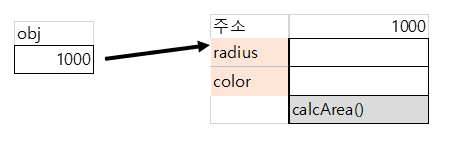
obj = new Circle();new 를 사용해 메모리에 Circle 을 올림. = 으로 obj 에는 메모리에 올라간 Circle 의 주소 값이 들어감
Circle(); 은 생성자
생성자는 나중에 더 배운다.
일단은 저건 기본생성자.
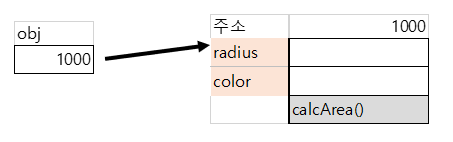
위 그림과 같이 obj 가 메모리의 주소를 담고있고, 그 주소를 가리킨다.
obj.radius = 100;
obj.color = "blue";
객체의 필드에 접근함
double area = obj.calcArea();객체의 메서드에 접근함
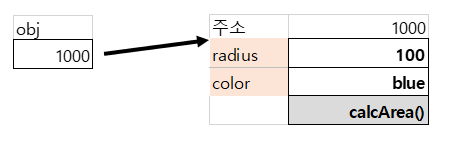
객체의 필드와 메서드에 접근해 값을 넣었다.
저 값들이 1000번지 주소에 있는게 아니라 1000번지부터 4byte의 값에 저 값이 들어있는 주소가 들어있다.
String 도 객체이다!
String str1 = "hi";str1은 주소를 할당받고 그 주소에 가보면 메모리 영역에 hi가 들어있다.
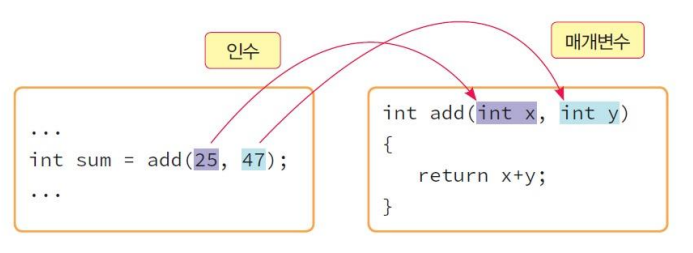
💡 함수의 매개변수(parameter)란 함수를 호출할 때 인수로 전달된 값을 함수 내부에서 사용할 수 있게 해주는 변수 💡 함수의 인수(argument)란 함수가 호출될 때 함수로 값을 전달해주는 변수
0922 과제
1. 수우미양가 프로그램
import java.util.InputMismatchException;
import java.util.Scanner;

public class Homework {

	public static void main(String[] args) {
		Grade grade = new Grade();
		grade.run();
	}

}

class Grade {
	static Scanner sc = new Scanner(System.in);
	static int score;

	public static void run() {
		while (true) {
			try {
				System.out.print("성적을 입력하세요: ");
				score = sc.nextInt();

				if (score > 100) {
					System.out.println("100 이하의 숫자를 입력하세요.");
				} else if (score >= 90) {
					System.out.println("등급: 수");
					break;
				} else if (score >= 80) {
					System.out.println("등급: 우");
					break;
				} else if (score >= 70) {
					System.out.println("등급: 미");
					break;
				} else if (score >= 60) {
					System.out.println("등급: 양");
					break;
				} else {
					System.out.println("등급: 가");
					break;
				}
			} catch (InputMismatchException err) {
				System.out.println("숫자를 입력하세요.");
				sc.next();
			}

		}
	}

}
try catch문에서 문자를 입력시 무한루프가 걸린다. 왜그럴까
sc.next(); 처리하면 된다.
2. 숫자게임 리팩토링
어제의 그 숫자게임. 객체를 사용해서 만들면 된다.
import java.util.InputMismatchException;
import java.util.Scanner;

public class GuessNumber {

	public static void main(String[] args) {
		Guess guess = new Guess();
		guess.Play();

	}

}

class Guess {
	int input;
	int count = 1;

	public void Play() {

		int Number = (int) (Math.random() * 100) + 1;
		Scanner sc = new Scanner(System.in);
		try {
			while (true) {
				if (count == 10) {
					System.out.println("도전 횟수를 다 사용했어요.");
					break;
				}
				System.out.print("정답을 추측하여 보시오: ");
				input = sc.nextInt();
				if (input > Number) {
					System.out.println("HIGH  남은 도전횟수: " + (10 - count));
					count++;
				} else if (input < Number) {
					System.out.println("LOW  남은 도전횟수: " + (10 - count));
					count++;
				} else {
					System.out.println("축하합니다. 시도횟수: " + count);
					break;
				}

			}
		} catch (InputMismatchException err) {
			System.out.println("숫자를 입력하세요.");
			sc.next();
		}

	}
}