The bean 'conversionServicePostProcessor', defined in class path resource
주) 초보개발자가 일단 무작정 애플리케이션을 만드는 과정에서 발생한 에러와
해결과정으로, 깊은 학술적인 내용보단
모야모야 하다가 해결한 내용입니다.
세줄요약
만약 SpringSecurty 관련된 코드를 Spring Starter Web에 기반하여 사용하면서
WebFlux를 함께 사용하고 있다면,
SpringSecurity코드를 WebFlux에 맞게 다시 설정해보자
MSA로 서비스를 구축하던 중
UserService 에서 구현했던 스프링시큐리티 관련 코드를 APIGateway로 이관하면서 발생한 이슈이다.
분명 IDE에서 에러를 발생하고 있지는 않지만, 컴파일을 하면 아래와 같은 메세지가 나오면서 실행에 실패했다.
Error starting ApplicationContext. To display the condition evaluation report re-run your application with 'debug' enabled.
2024-10-29T10:34:13.711+09:00 ERROR 12484 --- [apigateway-service] [           main] o.s.b.d.LoggingFailureAnalysisReporter   :

***************************
APPLICATION FAILED TO START
***************************

Description:

The bean 'conversionServicePostProcessor', defined in class path resource [org/springframework/security/config/annotation/web/reactive/WebFluxSecurityConfiguration.class], could not be registered. A bean with that name has already been defined in class path resource [org/springframework/security/config/annotation/web/configuration/WebSecurityConfiguration.class] and overriding is disabled.

Action:

Consider renaming one of the beans or enabling overriding by setting spring.main.allow-bean-definition-overriding=true


Process finished with exit code 1
대충 에러메세지를 읽어보면
conversionServicePostProcessor 가 WebSecurityConfiguration가 서로 충돌이 난다.
application.yml에서 오버라이딩 설정을 활성화해라 라는 의미처럼 보인다.
근데 기본설정을 무시하고 WebSecurityConfiguration으로 덮어쓰는것도 마음에 걸리고,
UserService에서는 정상적으로 작동했던 코드가 실행이 안되는것이 신기해서 원인을 찾아보았다.
원인 - SpringWeb 과 Sringwebflux 의 충돌문제
- 기존 SpringSecurity 코드를 재사용 하기 위해 APIGateway에 spring web 관련 depency를 추가하였다.
- API GateWay는 기본적으로 netty기반 reactive web application으로 구동된다.
- 이때 비슷한 기능을 수행하는
bean이 SpringWeb과 SpringWebFlux 에 동시에 존재하게 된다. - 애플리케이션이 실행되는 순간 "시큐리티 쓰는건 알겠는데 같은 기능을 수행하는
bean이 있어. springWeb꺼 써야돼 아니면 webFlux꺼 써야돼? 난 모르겠으니까 실행 안시킬래." 하고 에러를 뱉는다.
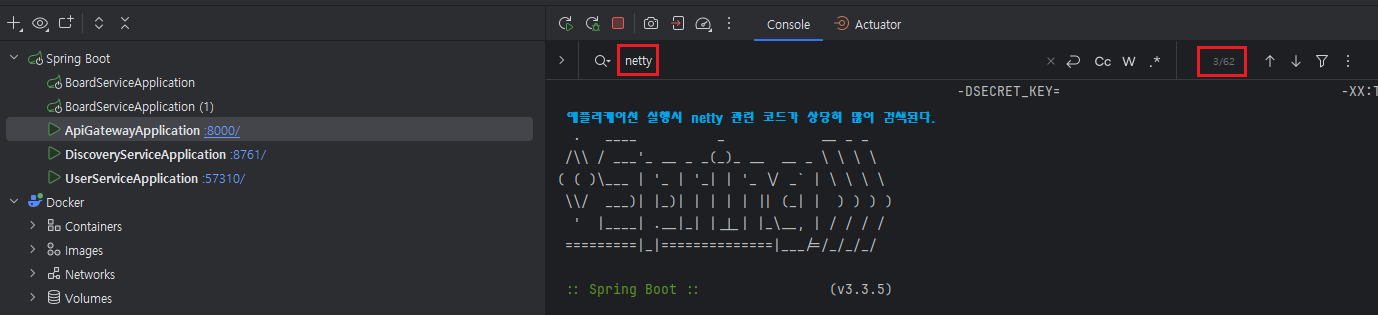
해결 - 의존성 제거 / WebFlux에 맞게 스프링 시큐리티 코드 변경
다행히 이 과정에서 gpt가 적절한 코드를 제공했기에 어렵지는 않았다... 만....
코드를 하나하나 이해하는것은 미래의 나에게로 넘기기로 한다...
이렇게 하니까 되던데.... 욥....
기존코드
build.gradle
dependencies {
    implementation 'org.jetbrains.kotlin:kotlin-reflect'
    implementation 'org.springframework.cloud:spring-cloud-starter-gateway'
    implementation 'org.springframework.cloud:spring-cloud-starter-netflix-eureka-client'

    // springSecurity - start
    implementation 'org.springframework.boot:spring-boot-starter-security'
    testImplementation 'org.springframework.security:spring-security-test'
    // springSecurity - end

    // jwt - start
    implementation 'io.jsonwebtoken:jjwt-api:0.11.5'
    implementation 'io.jsonwebtoken:jjwt-impl:0.11.5'
    implementation 'io.jsonwebtoken:jjwt-jackson:0.11.5'
    // jwt - end

    testImplementation 'org.springframework.boot:spring-boot-starter-test'
    testImplementation 'org.jetbrains.kotlin:kotlin-test-junit5'
    testRuntimeOnly 'org.junit.platform:junit-platform-launcher'

    //lombok - start
    compileOnly("org.projectlombok:lombok")
    annotationProcessor("org.projectlombok:lombok")
    //lombok - end

	// 여기가 문제
    // spring-servlet - start
    implementation 'jakarta.servlet:jakarta.servlet-api:5.0.0'
    // spring-servlet - end
}
SecurityConfig
@Configuration
@EnableWebSecurity
@RequiredArgsConstructor
class SecurityConfig (
    private val jwtUtils: JwtUtils,
){
    @Value("\${jwt.secret-key}")
    private val secretKey: String? = null
    @Bean
    fun securityFilterChain(http: HttpSecurity): SecurityFilterChain {
        return http.csrf { csrf -> csrf.disable() }
            .authorizeHttpRequests { auth ->
                auth
                    .requestMatchers("/hello").permitAll()
                    .requestMatchers("/v1/**").permitAll()
                    .requestMatchers("/v2/**").authenticated()
            }
            .formLogin { form -> form.disable() }
            .httpBasic { b -> b.disable() }
            .addFilterBefore(
                JwtFiler(secretKey = secretKey, jwtUtils = jwtUtils),
                UsernamePasswordAuthenticationFilter::class.java
            )
            .build()
    }

}
JwtFilter
@RequiredArgsConstructor
class JwtFiler(
    private val secretKey: String?,
    private val jwtUtils: JwtUtils,
) : OncePerRequestFilter() {
    private val log = LoggerFactory.getLogger(javaClass)
    override fun doFilterInternal(
        request: HttpServletRequest,
        response: HttpServletResponse,
        filterChain: FilterChain
    ) {
        // permitAll으로 지정된 경로에 대해서는 jwt필터처리 수행x
        if (request.requestURL.contains("/v1")) {
            filterChain.doFilter(request, response)
        } else {
            // get Header
            val header: String? = request.getHeader(HttpHeaders.AUTHORIZATION)
            if (header == null || !header.startsWith("Bearer ")) {
                log.info("Error occurred while getting AUTHORIZATION Header")
                response.sendError(HttpServletResponse.SC_UNAUTHORIZED, "jwt 토큰 정보가 없습니다")
                return
            }
            // "Bearer "이후의 문자열 추출
            val token: String = header.split(" ")[1].trim()
            if (secretKey == null) {
                log.error("key is null")
                response.sendError(HttpServletResponse.SC_UNAUTHORIZED, "secretKey가 존재하지 않습니다.")
                return
            }
            // 토큰만료확인
            if (jwtUtils.isExpired(token)) {
                log.error("key is expired")
                response.sendError(HttpServletResponse.SC_UNAUTHORIZED, "jwt 토큰이 만료되었습니다.")
                filterChain.doFilter(request, response)
            }
            // 유효한 토큰인지 검증
            if (jwtUtils.isInValidated(token)) {
                log.error("inValidated Token")
                response.sendError(HttpServletResponse.SC_UNAUTHORIZED, "토큰정보가 유효하지 않습니다.")
                filterChain.doFilter(request, response)
            }
            // 회원 아이디 추출
            val userId = jwtUtils.getUserId(token)
            val authentication = UsernamePasswordAuthenticationToken(userId, null, mutableListOf())
            SecurityContextHolder.getContext().authentication = authentication
            filterChain.doFilter(request, response)
        }
    }
}
수정코드
build.gradle
dependencies {
    implementation 'org.jetbrains.kotlin:kotlin-reflect'
    implementation 'org.springframework.cloud:spring-cloud-starter-gateway'
    implementation 'org.springframework.cloud:spring-cloud-starter-netflix-eureka-client'

    // springSecurity - start
    implementation 'org.springframework.boot:spring-boot-starter-security'
    testImplementation 'org.springframework.security:spring-security-test'
    // springSecurity - end

    // jwt - start
    implementation 'io.jsonwebtoken:jjwt-api:0.11.5'
    implementation 'io.jsonwebtoken:jjwt-impl:0.11.5'
    implementation 'io.jsonwebtoken:jjwt-jackson:0.11.5'
    // jwt - end

    testImplementation 'org.springframework.boot:spring-boot-starter-test'
    testImplementation 'org.jetbrains.kotlin:kotlin-test-junit5'
    testRuntimeOnly 'org.junit.platform:junit-platform-launcher'

    //lombok - start
    compileOnly("org.projectlombok:lombok")
    annotationProcessor("org.projectlombok:lombok")
    //lombok - end

    // 수정
    // webflux - start
    implementation 'org.springframework.boot:spring-boot-starter-webflux'
    // webflux - end

}
SecurityConfig
@Configuration
@EnableWebFluxSecurity // 수정
class SecurityConfig(
    private val jwtUtils: JwtUtils,
) {

    @Value("\${jwt.secret-key}")
    private val secretKey: String? = null

    @Bean
    fun securityWebFilterChain(http: ServerHttpSecurity): SecurityWebFilterChain { // 수정 (HttpSecurity -> ServerHttpSecurity)
        return http
            .csrf { csrf -> csrf.disable() }
            .authorizeExchange { auth -> // 수정 authorizeHttpRequests -> authorizeExchange
                auth
                    .pathMatchers("/hello").permitAll()
                    .pathMatchers("/v1/**").permitAll()
                    .pathMatchers("/v2/**").authenticated()
            }
            .formLogin { form -> form.disable() }
            .httpBasic { basic -> basic.disable() }
            // 수정
            .addFilterAt(JwtFiler(secretKey, jwtUtils), SecurityWebFiltersOrder.AUTHENTICATION)
            // 수정
            .securityContextRepository(WebSessionServerSecurityContextRepository())
            .build()
    }
}
JwtFilter
class JwtFiler(
    private val secretKey: String?,
    private val jwtUtils: JwtUtils,
) : WebFilter { // 상속클래스 수정 OncePerRequestFilter -> WebFilter

    private val log = LoggerFactory.getLogger(javaClass)

	// request, response 객체 가져오는 방식 변경
    override fun filter(exchange: ServerWebExchange, chain: WebFilterChain): Mono<Void> {
        val request = exchange.request
        val response = exchange.response

        // permitAll으로 지정된 경로에 대해서는 jwt필터처리 수행x
        if (request.uri.path.contains("/v1")) {
            return chain.filter(exchange)
        }

        // get Header
        val header: String? = request.headers.getFirst(HttpHeaders.AUTHORIZATION)

        if (header == null || !header.startsWith("Bearer ")) {
            log.info("Error occurred while getting AUTHORIZATION Header")
            response.statusCode = HttpStatus.UNAUTHORIZED
            return response.setComplete()
        }

        // "Bearer " 이후의 문자열 추출
        val token: String = header.split(" ")[1].trim()

        if (secretKey == null) {
            log.error("key is null")
            response.statusCode = HttpStatus.UNAUTHORIZED
            return response.setComplete()
        }

        // 토큰 만료 확인
        if (jwtUtils.isExpired(token)) {
            log.error("Token is expired")
            response.statusCode = HttpStatus.UNAUTHORIZED
            return response.setComplete()
        }

        // 유효한 토큰인지 검증
        if (jwtUtils.isInValidated(token)) {
            log.error("Invalidated Token")
            response.statusCode = HttpStatus.UNAUTHORIZED
            return response.setComplete()
        }

        // 회원 아이디 추출
        val userId = jwtUtils.getUserId(token)
        val authentication = UsernamePasswordAuthenticationToken(userId, null, mutableListOf())
        val securityContext = SecurityContextImpl(authentication)

		// 다음 filter로 넘기는 과정 변경
        return chain.filter(exchange)
            .contextWrite(ReactiveSecurityContextHolder.withSecurityContext(Mono.just(securityContext)))
    }
}