📚 Part 8 상세 구현
📁 도서 상세 페이지
📌 도서 상세 화면 요구 사항
- 각 도서 상세 정보 노출
- 좋아요 버튼 클릭시 좋아요 또는 취소 기능
- 수량을 입력하여 장바구니 담기
function BookDetail() {
   const bookId = useParams().id;
   const { book } = useBook(bookId);

   console.log(book);
   if (!book) return null;

   return (
      <BookDetailStyle>
         {book.title}
      </BookDetailStyle>
   );
}
params에서 bookId 가져오기
📌 pubDate
date format을 위한 dayjs 라이브러리 설치
npm install dayjs --saveexport const formatDate = (date: string, format?: string) => {
return dayjs(date).format(format ? format : "YYYY년 MM월 DD일");
};📌 내용을 접고 펼칠 수 있는 토글 박스 생성
import { useState } from 'react';
import { styled } from 'styled-components';
import Button from './Button';
import { FaAngleDown } from 'react-icons/fa';

interface Props {
    children: React.ReactNode;
    linelimit: number;
}

function EllipsisBox({ children, linelimit }: Props) {
    const [expanded, setExpanded] = useState(false);
    return (
        <EllipsisBoxStyle linelimit={linelimit} $expanded={expanded}>
            <p>{children}</p>
            <div className="toggle">
                <Button
                    size='small' scheme='normal'
                    onClick={() => setExpanded(!expanded)}
                >
                    {
                        expanded ? '접기' : '펼치기'
                    }
                    <FaAngleDown />
                </Button>
            </div>
        </EllipsisBoxStyle>
    );
}

interface EllipsisBoxStyleProps {
    linelimit: number;
    $expanded: boolean;
}

const EllipsisBoxStyle = styled.div<EllipsisBoxStyleProps>`
    p {
        overflow: hidden;
        text-overflow: ellipsis;
        display: -webkit-box;
        -webkit-line-clamp: ${
            ({linelimit, $expanded}) => $expanded ? 'none' : linelimit
        };
        -webkit-box-orient: vertical;
        padding: 20px 0 0 0;
        margin: 0;
    }

    .toggle {
        display: flex;
        justify-content: end;

        svg {
            transform: ${
                ({$expanded}) => $expanded ? 'rotate(180deg)' : 'rotate(0)'
            };
        }
    }
`;

export default EllipsisBox;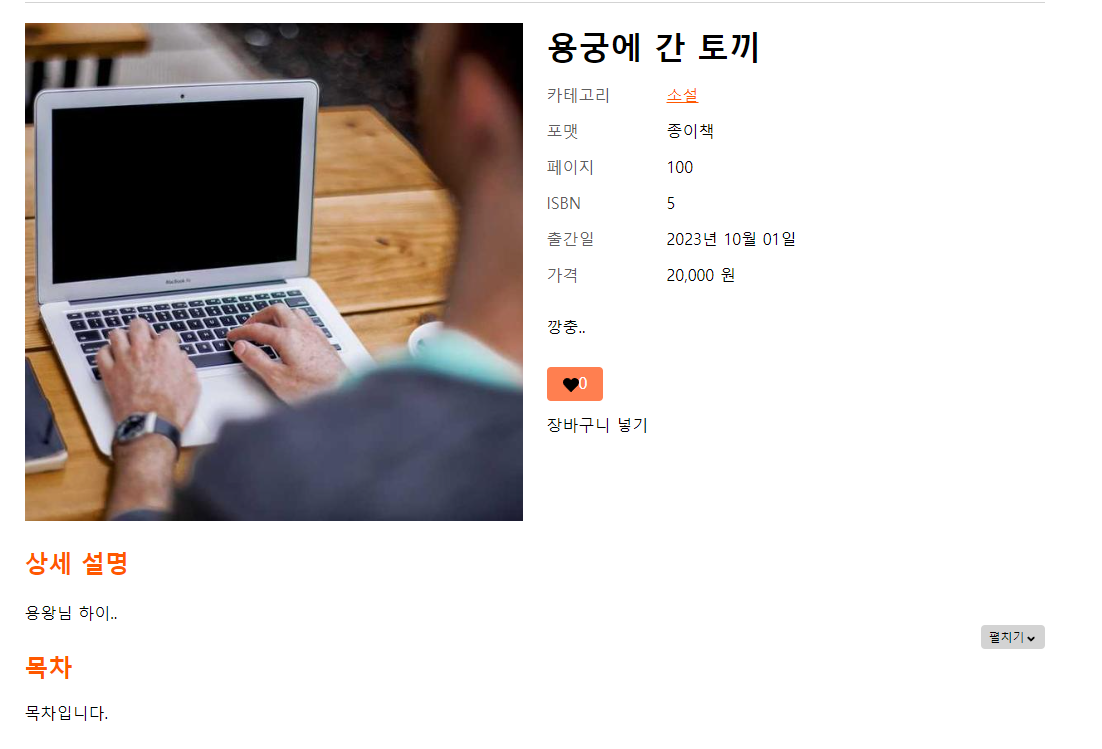
📌 좋아요 버튼
export const likeBook = async (bookId: number) => {
    const response = await httpClient.post(`/likes/${bookId}`);
    return response.data;
};

export const unlikeBook = async (bookId: number) => {
    const response = await httpClient.delete(`/likes/${bookId}`);
    return response.data;
};
좋아요 추가, 취소 api 추가
export const useBook = (bookId: string | undefined) => {
    const  [ book, setBook ] = useState<BookDetail | null>(null);
    const  { isloggedIn } = useAuthStore();
    const showAlert = useAlert();

    const likeToggle = () => {
        if (!isloggedIn) {
            showAlert('로그인이 필요합니다.');
            return;
        }
        if (!book) return;

        if (book.liked) {
            //라이크 상태 -> 언라이크 실행
            unlikeBook(book.id).then(() => {
                setBook({
                    ...book,
                    liked: false,
                    likes: book.likes - 1
                });
            });
        } else {
            // 언라이크 상태 -> 라이크를 실행
            likeBook(book.id).then(() => {
                setBook({
                    ...book,
                    liked: true,
                    likes: book.likes + 1
                });
            });
        }
    };

    return { likeToggle };
};
likeToggle 생성 (좋아요를 누른 상태에서 좋아요를 누르면 취소, 누르지 않은 상태면 그 반대, 로그인 하지 않으면 로그인이 필요하다는 alert 띄우기)
📌 장바구니 담기
const addToCart = (quantity: number) => {
    if (!book) return;

    addCart({
        book_id: book.id,
        quantity: quantity
    }).then(() => {
        setCartAdded(true);
        setTimeout(() => {
            setCartAdded(false);
        }, 3000);
    });
}