📁 CH12. Node.js와 데이터베이스 연동
📌 Node.js와 데이터베이스 연동
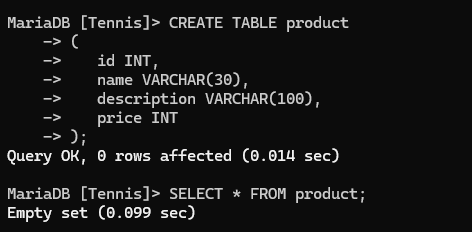
CREATE TABLE product
(
		id INT,
		name VARCHAR(30),
		description VARCHAR(100),
		price INT
);
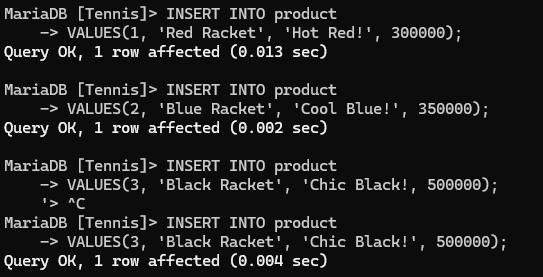
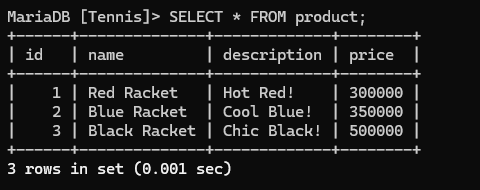
- visual studio code의 터미널 창에
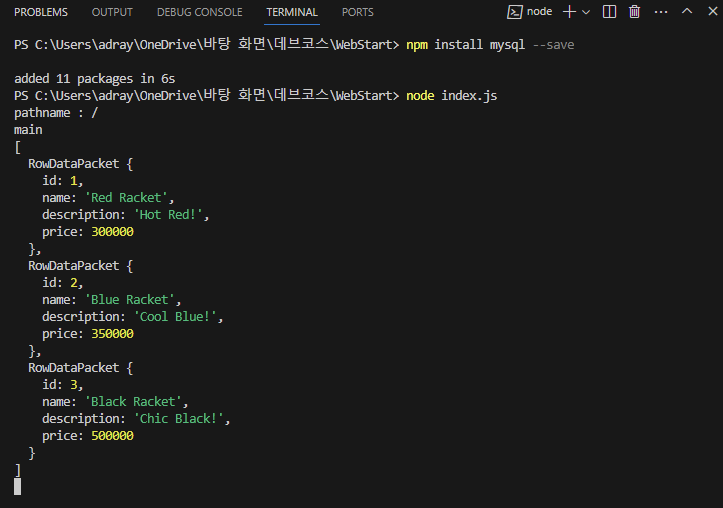
npm install mysql --save
const mariadb = require('mysql');
const conn = mariadb.createConnection(
{
host: 'localhost',
port: 3306,
user: 'root',
password: 'root',
database: 'Tennis'
}
);
module.exports = conn;
- MariaDB 데이터베이스에 연결하기 위한 설정이 포함되어 있음.
mariadb.createConnection()을 사용하여 데이터베이스에 연결- 연결된 객체를 모듈로 내보냄
let server = require('./server');
let router = require('./router');
let requestHandler = require('./requestHandler');
const mariadb = require('./database/connect/mariadb');
mariadb.connect();
server.start(router.route, requestHandler.handle);
- 서버를 시작하기 전에 필요한 설정을 가져옴
- 'mariadb' 모듈을 가져와 데이터베이스에 연결함
- 서버를 시작하고 요청을 처리할 함수들을 전달함
const mariadb = require('./database/connect/mariadb');
function main(response) {
console.log('main');
mariadb.query("SELECT * FROM product", function(err, rows) {
console.log(rows);
});
response.writeHead(200, {'Content-Type' : 'text/html'});
response.write('Main page');
response.end();
}
function login(response) {
console.log('login');
response.writeHead(200, {'Content-Type' : 'text/html'});
response.write('Login page');
response.end();
}
let handle = {};
handle['/'] = main;
handle['/login'] = login;
exports.handle = handle;
- 'main()'함수는 데이터베이스에서 데이터를 조회.
- 'login()' 함수는 로그인 페이지를 반환함
- 'handle' 객체에 URL 경로와 해당 경로에 대응하는 처리 함수들을 매핑함
- 'handle' 객체를 내보냄
let http = require('http');
let url = require('url');
function start(route, handle) {
function onRequest(request, response) {
let pathname = url.parse(request.url).pathname;
route(pathname, handle, response);
}
http.createServer(onRequest).listen(8888);
}
exports.start = start;
- HTTP 서버를 생성하고 요청을 처리하는 start() 함수가 정의되어 있음
- 요청이 들어올 때마다 URL 경로를 핸들러에 전달함
- 외부에서 start 함수를 사용할 수 있도록 내보냄
function route(pathname, handle, response) {
if (pathname === '/favicon.ico') {
response.writeHead(200, { 'Content-Type': 'image/x-icon' });
return response.end();
}
console.log('pathname : '+ pathname);
if (typeof handle[pathname] == 'function') {
handle[pathname](response);
} else {
response.writeHead(404, {'Content-Type' : 'text/html'});
response.write('Not Found.');
response.end();
}
}
exports.route = route;
- URL 경로에 따라 요청을 적절한 핸들러로 routing
- 요청이 매핑된 핸들러가 없는 경우 404 응답 반환
- route 함수를 내보냄