React 동기와 비동기

1)학습내용
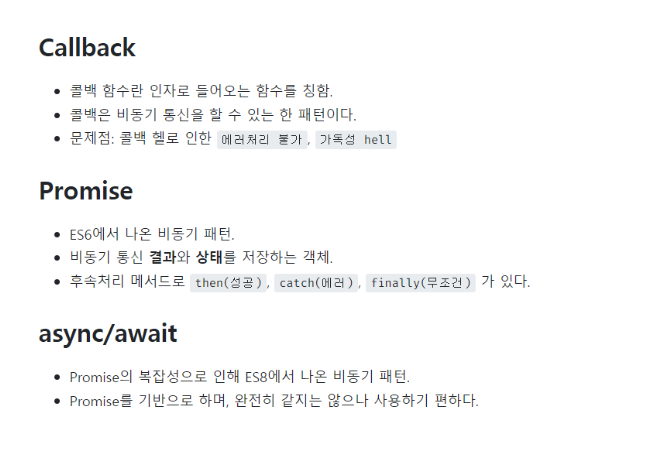
동기,비동기란?
- 동기
-작업들이 순차적 으로 이루어지는것
-다른작업들을 blocking- 비동기
-작업들이 순차적으로 이루어지지 않음
-다른작업들은 non-blocking
-Javascript를 사용한 비동기 통신방식을Ajax
-Http요청(GET, POST), 이벤트핸들러(click, over ...), setTimeout, setInterval
비동기
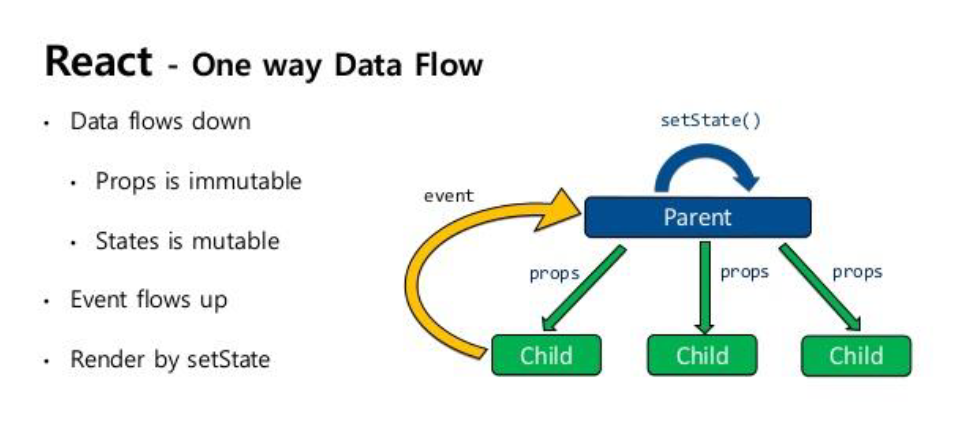
stateful, stateless
컴포넌트를 나누는 다른방식
Stateful 컴포넌트 : 모든 state를 들고있는 컴포넌트
Stateless 컴포넌트 : state를 들고있지않고 props와 같이 받은 데이터만 보여주는 컴포넌트
-
리액트는 단방향 통신이므로 부모에서 자식에게로만 데이터를 전달가능하다
-
모든 중요한 데이터들은 stateful컴포넌트 이기때문에 유지보수가 쉽다 리액트의 이상적인 구조는 최대한 모든컴포넌트를 stateless로 만들고 stateful컴포넌트에서 데이터를 관리하는 구조이다.
실습

import React, { useState, useEffect } from 'react';
import 'bootstrap/dist/css/bootstrap.min.css';
import './App.css';
import { Container } from 'react-bootstrap';
import WeatherButton from './components/WeatherButton';
import WeatherBox from './components/WeatherBox';
import { ClipLoader } from 'react-spinners';

const cities = ['Paris', 'New york', 'Tokyo', 'Seoul'];
const API_KEY = 'b4a0b63fb0a27cc709f6ea5ecd5f5d7d';

const App = () => {
  const [loading, setLoading] = useState(false);
  const [city, setCity] = useState(null);
  const [weather, setWeather] = useState(null);
  const [apiError, setAPIError] = useState('');

  const getWeatherByCurrentLocation = async (lat, lon) => {
    console.log('현재 위치', lat, lon);

    //비동기 처리
    try {
      let url = //units=metric 캘빈을 섭씨로
        // let url = `https://api.openweathermap.org/data/2.5/weather?lat=${lat}&lon=${lon}&appid=${API_KEY}`;
        // `https://api.openweathermap.org/data/2.5/weather?q=${city}&appid=${API_KEY}`;
        'http://api.openweathermap.org/data/2.5/weather?lat=35.87222&lon=128.60250&appid=b4a0b63fb0a27cc709f6ea5ecd5f5d7d';
      //&units=metric
      const res = await fetch(url);
      const data = await res.json();
      setWeather(data);
      setLoading(false);
    } catch (err) {
      setAPIError(err.message);
      setLoading(false);
    }
  };

  const getCurrentLocation = () => {
    navigator.geolocation.getCurrentPosition((position) => {
      const { latitude, longitude } = position.coords;
      getWeatherByCurrentLocation(latitude, longitude);
      // console.log('현재 위치', lat, lon);
    });
  };

  const getWeatherByCity = async () => {
    try {
      let url = `https://api.openweathermap.org/data/2.5/weather?q=${city}&appid=${API_KEY}`;
      //&units=metric
      const res = await fetch(url);
      const data = await res.json();

      setWeather(data);
      setLoading(false);
    } catch (err) {
      console.log(err);
      setAPIError(err.message);
      setLoading(false);
    }
  };

  useEffect(() => {
    if (city == null) {
      setLoading(true);
      getCurrentLocation();
    } else {
      setLoading(true);
      getWeatherByCity();
    }
  }, [city]);

  const handleCityChange = (city) => {
    if (city === 'current') {
      setCity(null);
    } else {
      setCity(city);
    }
  };

  return (
    <Container className="vh-100">
      {loading ? (
        <div className="w-100 vh-100 d-flex justify-content-center align-items-center">
          <ClipLoader color="#f86c6b" size={150} loading={loading} />
        </div>
      ) : !apiError ? (
        <div class="main-container">
          <WeatherBox weather={weather} />
          <WeatherButton
            cities={cities}
            handleCityChange={handleCityChange}
            selectedCity={city}
          />
        </div>
      ) : (
        apiError
      )}
    </Container>
  );
};

export default App;
async: 비동기함수

body {
    background: url(https://encrypted-tbn0.gstatic.com/images?q=tbn:ANd9GcRRSPgPzN8t3CBIa7_Aa435ZBWiv-mggGGqRw&usqp=CAU);
    height : 100vh;
    background-repeat: no-repeat;
    background-size: cover;
}

.weather-card{
    background-color: rgba(52,52,52,.7);
    padding: 50px;
    border: 2px solid #fff;
    border-radius: 20px;
    max-width: 700px;
    width:100%;
    height: 300px;
  }
  .main-container{
    display: flex;
    flex-direction: column;
    align-items: center;
    justify-content: center;
    height: 100%;

  }
  .menu-container{
    display: flex;
    justify-content: center;
    background-color: #000;
    border-radius: 60px;
    max-width: 700px;
    width:100%;
    padding: 30px;
    margin-top: 30px;

  }
  .menu-container Button{
    margin-right:30px;
  }

  .menu-container Button:hover{
    background-color: #ffc107;
  }
import React from 'react';
import { Navbar, Nav } from 'react-bootstrap';

const PublicNavbar = () => {
  return (
    <Navbar bg="light" expand="lg" className="position-fixed navbar-fixed">
      <Navbar.Brand></Navbar.Brand>
      <Nav className="mr-auto"></Nav>
      <Nav>
        <a
          href="https://github.com/dhminh1024/cs_weather_app"
          target="_blank"
          rel="noreferrer"
        ></a>
      </Nav>
    </Navbar>
  );
};

export default PublicNavbar;
import React from 'react';
import { Card } from 'react-bootstrap';

const WeatherBox = ({ weather }) => {
  const temperatureC =
    weather && weather.main ? (weather.main.temp - 273.15).toFixed(2) : '';
  const temperatureF =
    weather && weather.main
      ? (((weather.main.temp - 273.15) * 9) / 5 + 32).toFixed(2)
      : '';
  return (
    <Card className="weather-card">
      {/* <Card.Img src="holder.js/100px270" alt="Card image" /> */}
      <Card.ImgOverlay className="d-flex flex-column justify-content-center text-center">
        <Card.Title>{weather?.name}</Card.Title>
        <Card.Text className="text-success h1">
          {`${temperatureC} °C / ${temperatureF} °F`}
        </Card.Text>
        <Card.Text className="text-info text-uppercase h2">
          {weather && weather.weather[0]?.description}
        </Card.Text>
      </Card.ImgOverlay>
    </Card>
  );
};

export default WeatherBox;

import React from 'react';
import { Button } from 'react-bootstrap';

const WeatherButton = ({ cities, selectedCity, handleCityChange }) => {
  return (
    <div class="menu-container">
      <Button
        variant={`${selectedCity === null ? 'outline-warning' : 'warning'}`}
        onClick={() => handleCityChange('current')}
      >
        Current Location
      </Button>

      {cities.map((city) => (
        <Button
          variant={`${selectedCity === city ? 'outline-warning' : 'warning'}`}
          onClick={() => handleCityChange(city)}
        >
          {city}
        </Button>
      ))}
    </div>
  );
};

export default WeatherButton;
결과
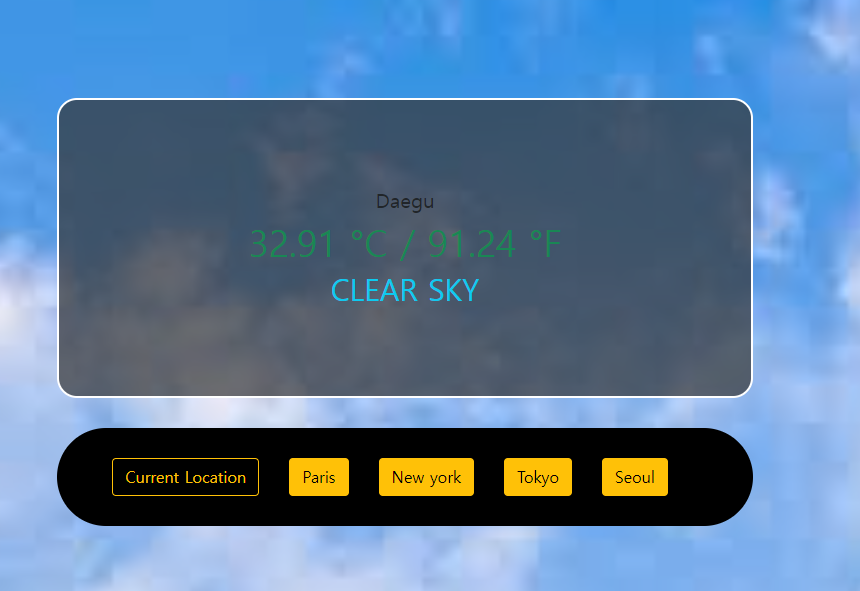
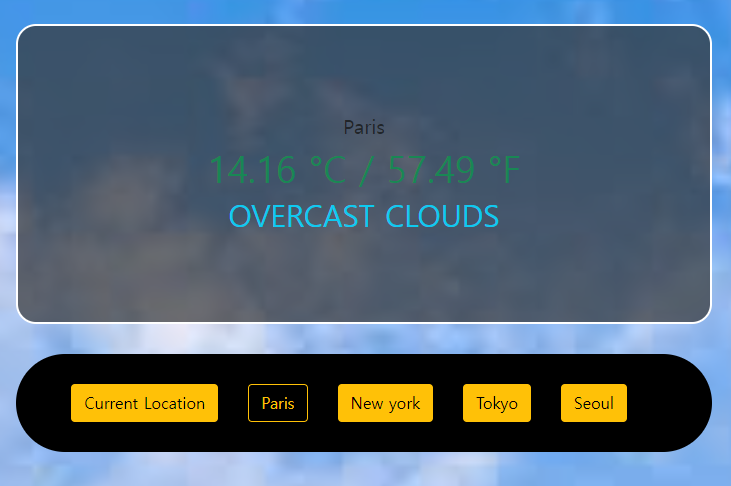
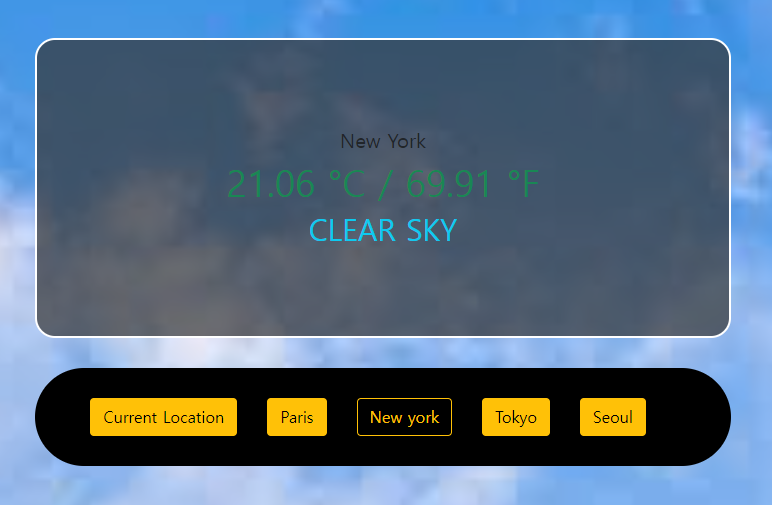
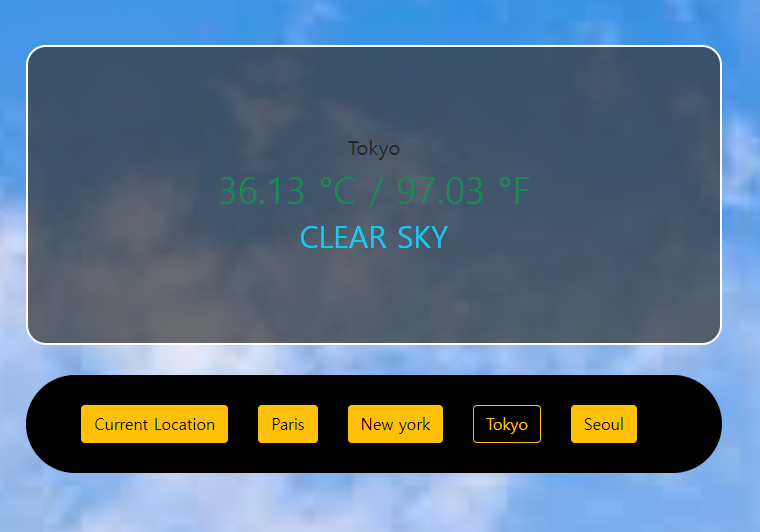
참조: https://openweathermap.org/
2)어려웠던점
-api와 접목시키는것이 힘듦
- 리액트 라이브서버 오류가 자주나서 고생..
3)해결방법
코드를 비교 하여 오탈자 고침
4)소감
api를 접목시켜 실제날씨를 나오게 해보았는데 처음해보는거라서 그런지 너무 어려운내용이었다 @_@...

반갑습니다~