221211 4th WIL - React Lifecycle / Hooks
Lifecycle of React Components
Like all programming languages, JavaScript supports functions allowing reusable pieces of business logic to be inserted into larger chunks of code. This hides complexity and illustrates the concept of a subroutine.
React components serve the same purpose, except React components effectively divide the UI into reusable components that return HTML. In a sense, React components are subroutines for user interfaces. There are two types of React components: class components and functional components.
Class Components (Stateful Components)
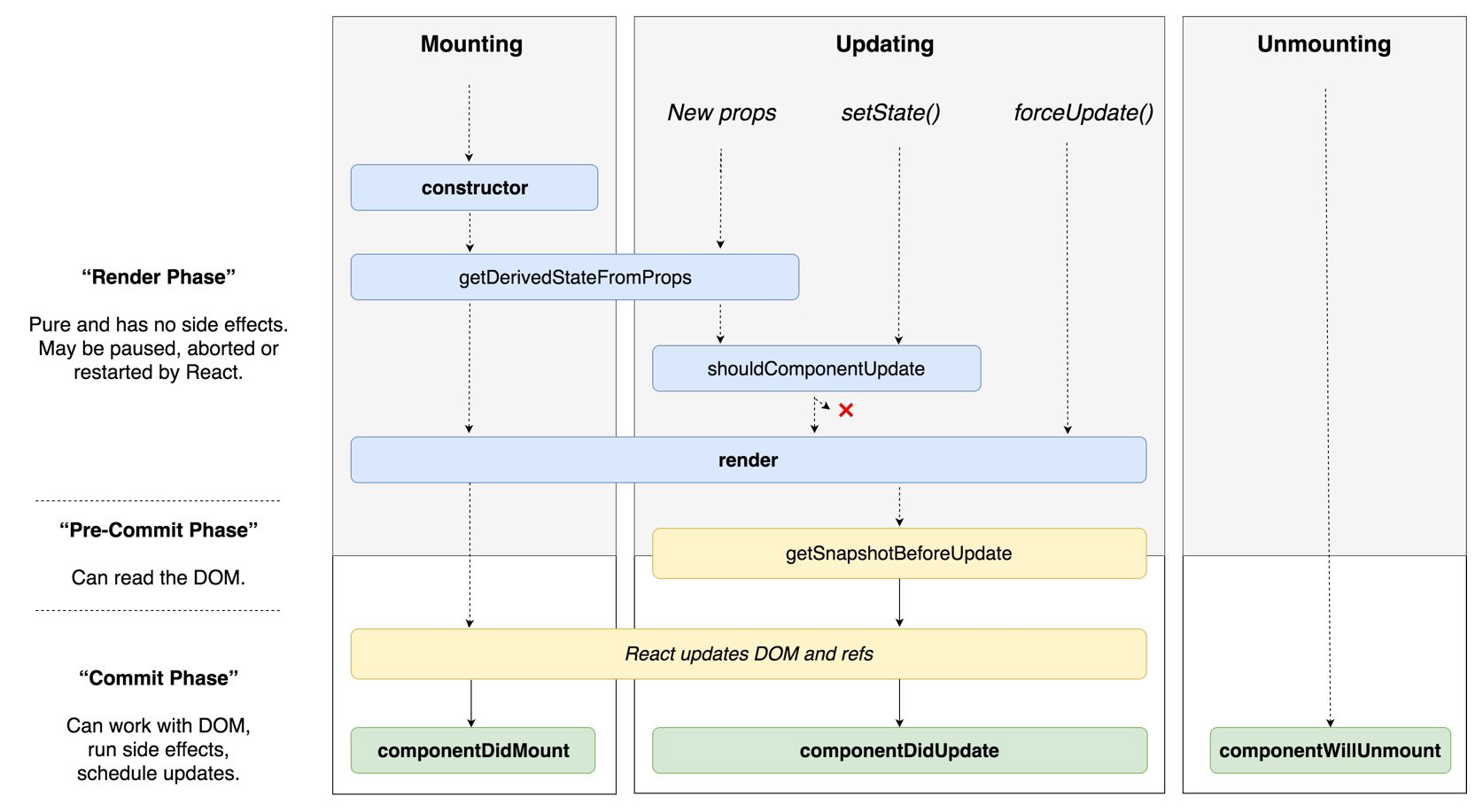
Class components extend from the React.Component class. React.Component objects have state, meaning the object can hold information that can change over the lifetime of the object.
<script>
class Welcome extends React.Component {
  render() {
    return <h1>Hello, {this.props.name}</h1>;
  }
}
// The only method you must define in a React.Component subclass is called render()
</script>
Mounting
These methods are called in the following order when an instance of a component is being created and inserted into the DOM:
constructor()
static getDerivedStateFromProps()
render()
componentDidMount()
Updating
An update can be caused by changes to props or state. These methods are called in the following order when a component is being re-rendered:
static getDerivedStateFromProps()
shouldComponentUpdate()
render()
getSnapshotBeforeUpdate()
componentDidUpdate()
Unmounting
This method is called when a component is being removed from the DOM:
componentWillUnmount()
Functional Components (Stateless Components)
Functional components are JavaScript functions. There are two ways of creating them. The first is by using the function keyword:
<script>
function MyComponent(props) {
  return (
    <div>
      <p>Hello, World</p>
      <p>Have a nice day!</p>
    </div>
  );
}
</script>
You can also use the arrow function syntax to create functional components:
<script>
const MyComponent = (props) => {
  return (
    <div>
			<p>Hello, World</p>
      <p>Have a nice day!</p>
    </div>
  );
}
</script>
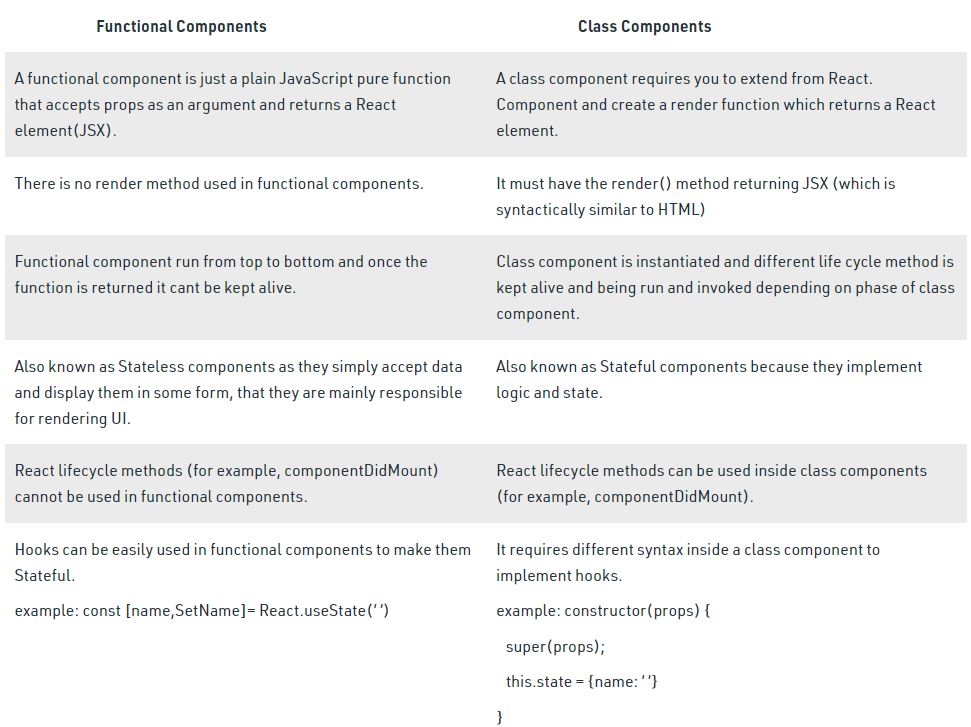
Although functional components have the word “component” in their name, they don’t extend from the React.Component object. Functional components are just JavaScript functions that use React hooks to provide the equivalent functionality as class components. We call them components because the functions are constructed with single props object arguments and return React elements.
Mounting
useEffect(() => {
 console.log(“ComponentDidMount”);
 }, []);
Updating
useEffect(() => {
 console.log(“ComponentDidMount & ComponentDidUpdate”);
 });
Unmounting
useEffect(() => {
 return () => {
 console.log(“ComponentWillUnmount”);
 };
 }, []);
Hooks
What is a Hook? A Hook is a special function that lets you “hook into” React features. For example, useState is a Hook that lets you add React state to function components. We’ll learn other Hooks later.
React doesn’t offer a way to “attach” reusable behavior to a component (for example, connecting it to a store). If you’ve worked with React for a while, you may be familiar with patterns like render props and higher-order components that try to solve this. But these patterns require you to restructure your components when you use them, which can be cumbersome and make code harder to follow. If you look at a typical React application in React DevTools, you will likely find a “wrapper hell” of components surrounded by layers of providers, consumers, higher-order components, render props, and other abstractions. While we could filter them out in DevTools, this points to a deeper underlying problem: React needs a better primitive for sharing stateful logic.
With Hooks, you can extract stateful logic from a component so it can be tested independently and reused. Hooks allow you to reuse stateful logic without changing your component hierarchy. This makes it easy to share Hooks among many components or with the community.
Hooks let you split one component into smaller functions based on what pieces are related (such as setting up a subscription or fetching data), rather than forcing a split based on lifecycle methods. You may also opt into managing the component’s local state with a reducer to make it more predictable.
(https://reactjs.org/docs/hooks-intro.html)
