
React useEffect의 클린업 함수의 중요성: EPUB.js 사례
안녕하세요! 오늘은 React의 useEffect 훅에서 클린업 함수가 얼마나 중요한지에 대해 실제 프로젝트에서 겪었던 문제와 해결 과정을 공유하려고 합니다. 이 글을 통해 클린업 함수의 중요성과 제대로 구현하지 않았을 때 발생할 수 있는 문제점들을 살펴보겠습니다.
문제 상황
최근 EPUB 파일을 읽을 수 있는 웹 애플리케이션을 개발하면서 흥미로운 버그를 만났습니다. TanStack Router를 사용해 라우팅을 구현했고, EPUB.js 라이브러리를 사용해 전자책 뷰어를 구현했습니다.
증상
- 북룸 페이지(
/book-room/$id)에서 홈(/my-library)으로 뒤로가기를 눌렀을 때 다음과 같은 오류가 발생했습니다:TypeError: Cannot read properties of undefined (reading 'getContents') - URL은
/my-library로 변경되었지만, 실제로는 오류 페이지가 표시되었습니다. - 이 오류 페이지에서 다시 뒤로가기를 눌러야만
/my-library페이지가 제대로 표시되었습니다.
원인 분석
문제의 원인은 다음과 같았습니다
- EPUB.js 관련 컴포넌트들이 언마운트될 때 리소스가 제대로 정리되지 않았습니다.
useEffect의 클린업 함수 구현이 불완전했습니다.- 페이지 전환 과정에서 제거되지 않은 이벤트 리스너와 EPUB.js 인스턴스가 계속 메모리에 남아있었습니다.
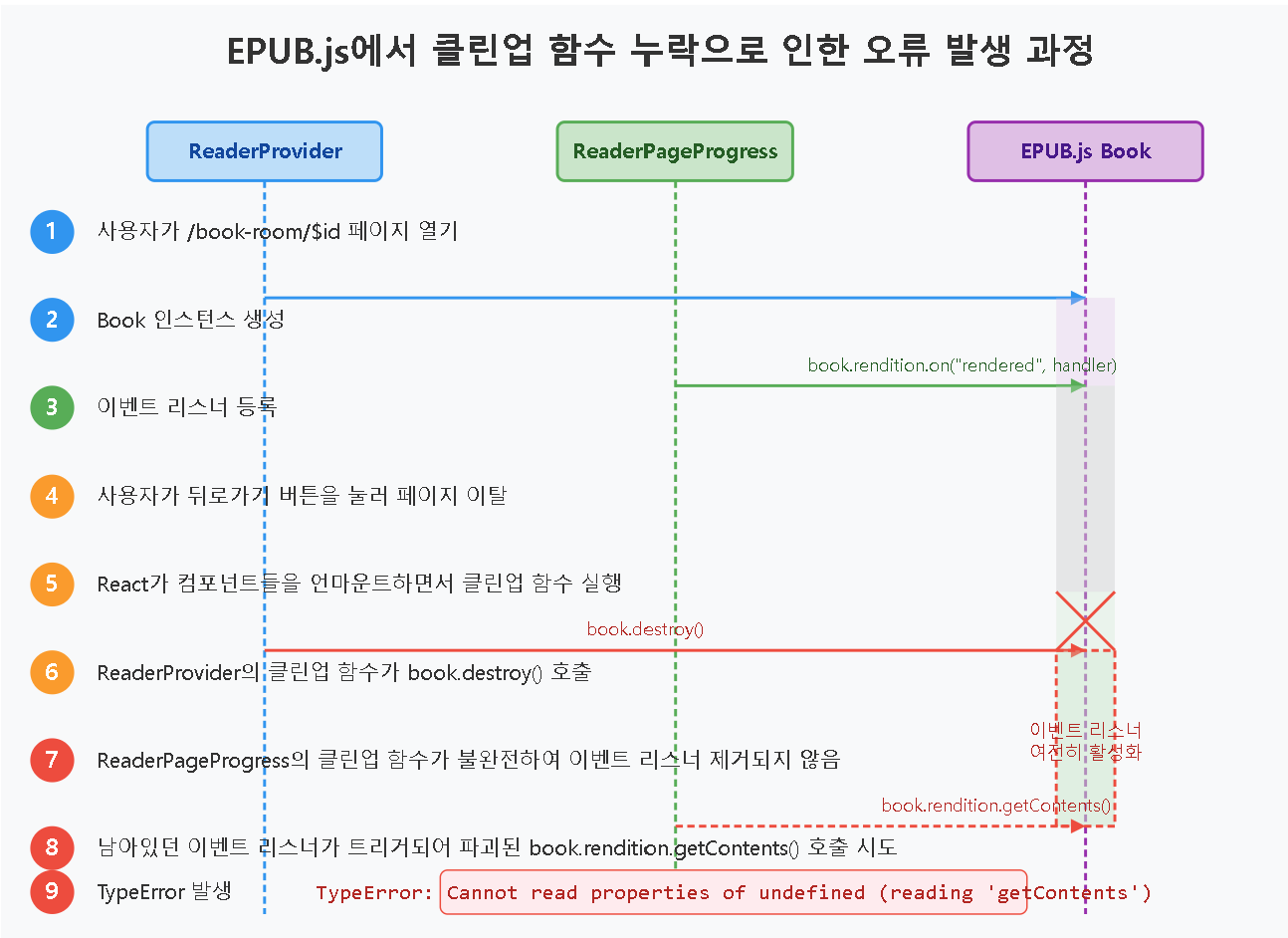
특히 다음 코드가 문제였습니다
// 문제가 있는 코드
useEffect(() => {
  // Create a new Book instance
  const epubBook = new Book("/Alice's Adventures in Wonderland.epub");

  // Wait for the book to be fully loaded before setting it
  epubBook.ready
    .then(() => {
      setBook(epubBook);
    })
    .catch((error) => {
      alert("책을 가져오는데 실패했습니다. 다시 시도해주세요");
      console.error(error);
      navigate({ to: "/my-library" });
    });

  // 불완전한 클린업 함수
  return () => {
    if (epubBook) {
      epubBook.destroy();
    }
  };
}, [navigate]);
더 깊이 이해하기: 클린업 함수의 작동 방식과 문제점 시각화
클린업 함수가 제대로 작동하지 않았을 때 발생한 문제를 더 잘 이해하기 위해 시각적으로 살펴보겠습니다
클린업이 제대로 이루어지지 않은 경우 (문제 상황)
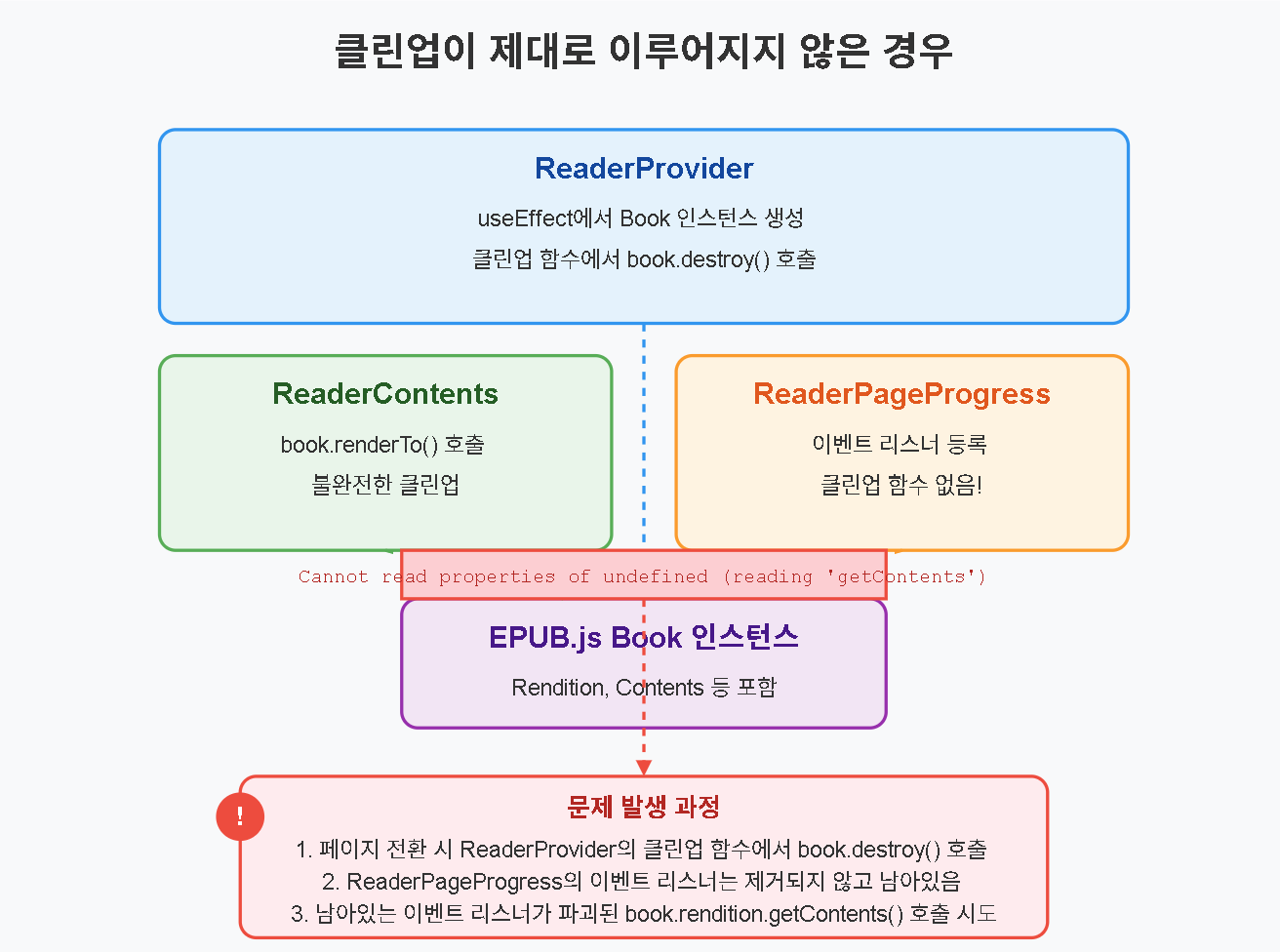
- 여러 컴포넌트가 EPUB.js의 Book과 Rendition 인스턴스를 공유합니다.
- 페이지 전환(라우팅 변경) 시 컴포넌트들이 언마운트됩니다.
- ReaderProvider의 클린업 함수에서 Book 인스턴스를 파괴합니다.
- 그러나 ReaderPageProgress 컴포넌트에 등록된 이벤트 리스너는 제거되지 않았습니다.
- 이 이벤트 리스너가 나중에 트리거되면서 이미 파괴된 객체의 메서드(getContents)를 호출하려고 시도합니다.
- 그 결과
Cannot read properties of undefined (reading 'getContents')오류가 발생합니다.
클린업이 제대로 이루어진 경우 (해결 후)
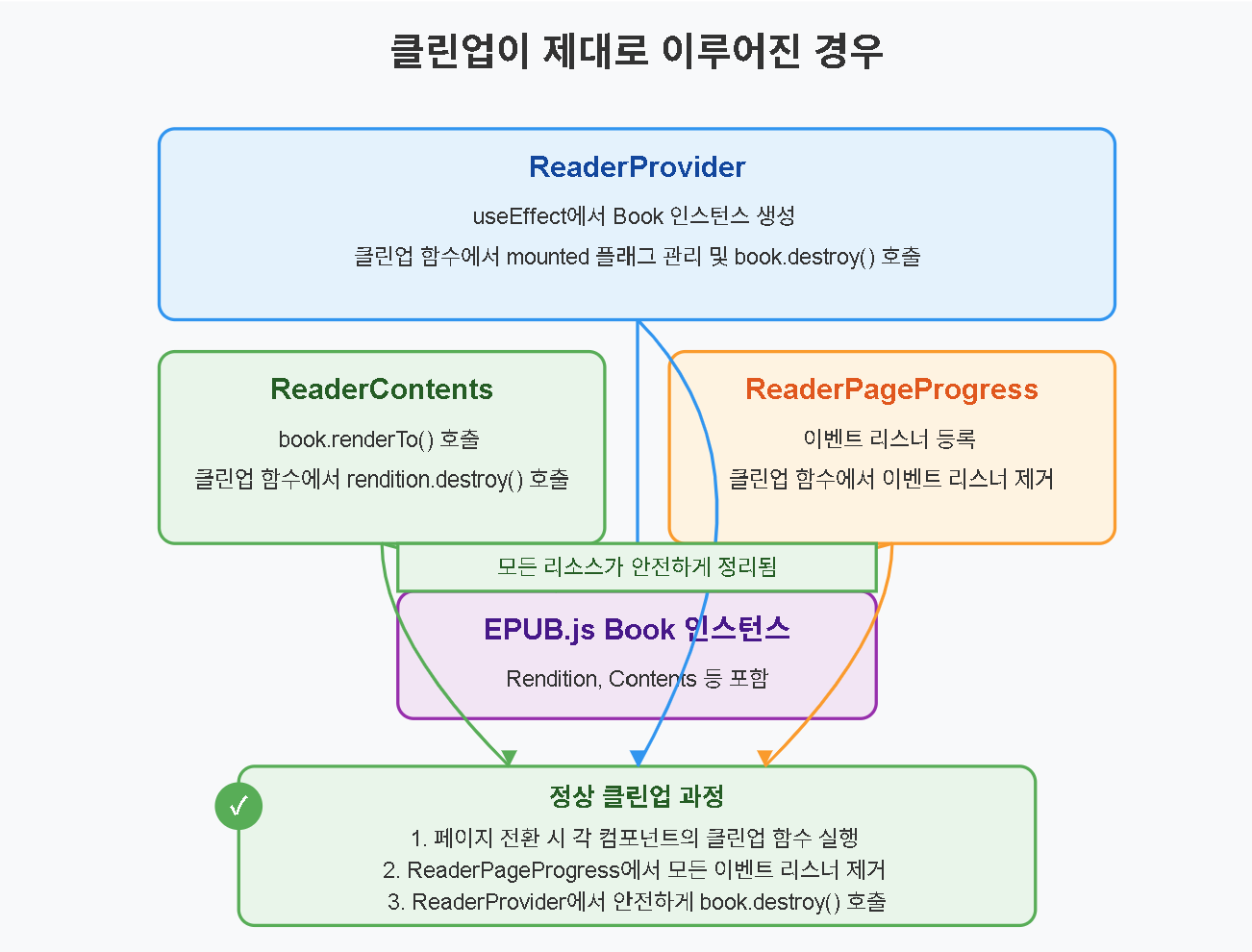
- 여러 컴포넌트가 EPUB.js의 Book과 Rendition 인스턴스를 공유합니다.
- 페이지 전환(라우팅 변경) 시 각 컴포넌트의 클린업 함수가 호출됩니다.
- 각 컴포넌트는 자신이 등록한 이벤트 리스너를 명시적으로 제거합니다.
- 마지막으로 ReaderProvider의 클린업 함수에서 Book 인스턴스를 안전하게 파괴합니다.
- 모든 리소스가 정리되었으므로 메모리 누수나 오류가 발생하지 않습니다.
이러한 시각화를 통해 클린업 함수의 중요성과 여러 컴포넌트 간의 리소스 공유 시 주의해야 할 점을 더 명확히 이해할 수 있습니다.
useEffect 클린업 함수가 중요한 이유
이번 경험을 통해 배운 useEffect의 클린업 함수가 중요한 이유는 다음과 같습니다:
1. 메모리 누수 방지
클린업 함수는 컴포넌트가 언마운트될 때 할당된 리소스를 해제하여 메모리 누수를 방지합니다. 이는 다음과 같은 리소스에 해당합니다:
- 이벤트 리스너
- 타이머 (setTimeout, setInterval)
- 외부 라이브러리의 인스턴스
- 웹소켓 연결
- 구독 (subscription)
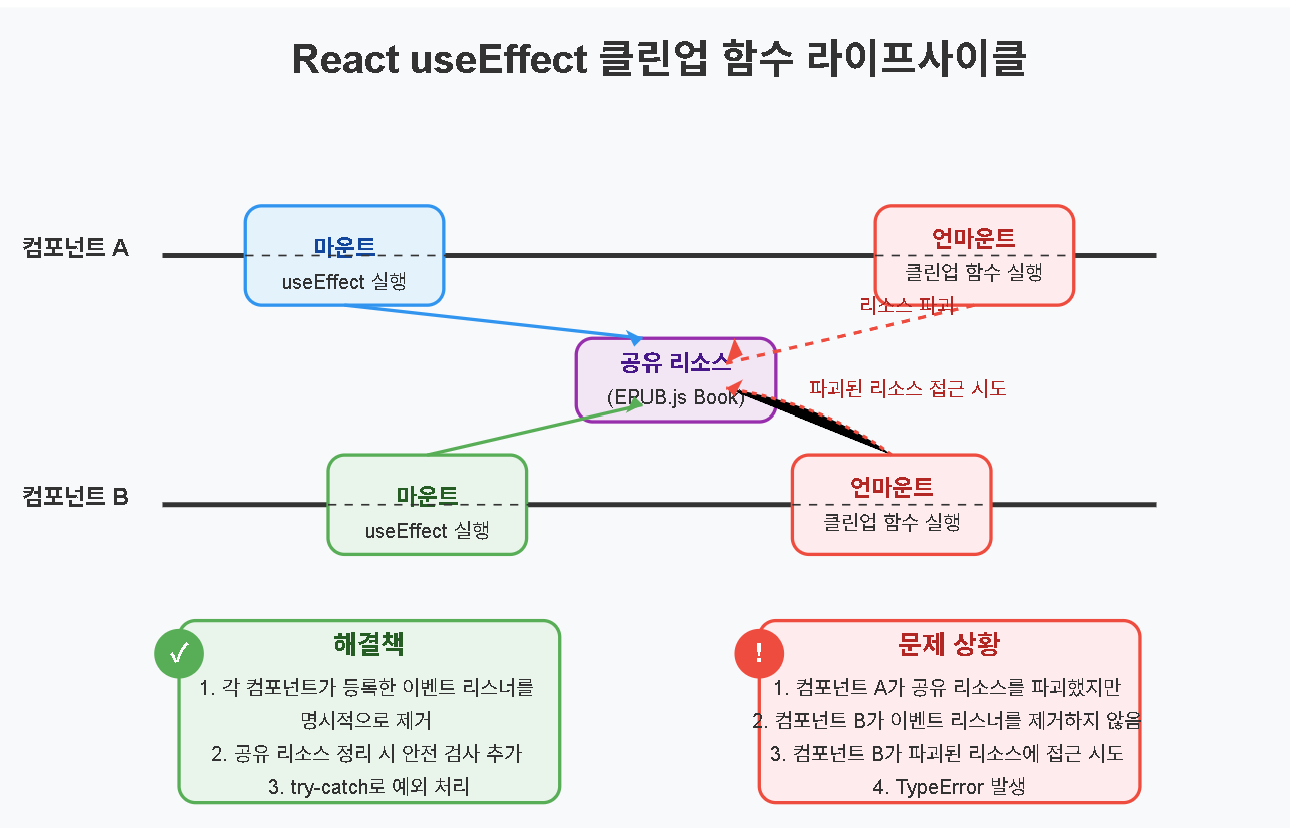
우리 프로젝트에서는 EPUB.js의 Book 인스턴스와 Rendition 인스턴스가 제대로 정리되지 않아 메모리에 계속 남아있었습니다.
2. 이미 언마운트된 컴포넌트의 상태 업데이트 방지
비동기 작업이 완료된 후 이미 언마운트된 컴포넌트의 상태를 업데이트하려고 하면 다음과 같은 경고가 발생합니다
Warning: Can't perform a React state update on an unmounted component. This is a no-op, but it indicates a memory leak in your application.이런 상황을 방지하기 위해 컴포넌트가 마운트된 상태인지를 추적하는 것이 중요합니다.
3. 이벤트 핸들러의 중복 등록 방지
컴포넌트가 재마운트될 때마다 이벤트 리스너가 추가되면, 이전 리스너가 제거되지 않아 같은 이벤트에 여러 핸들러가 반응하게 됩니다. 이로 인해 예상치 못한 동작이나 성능 문제가 발생할 수 있습니다.
4. 외부 라이브러리와의 통합 관리
외부 라이브러리(우리 경우 EPUB.js)는 자체적인 라이프사이클과 정리 메서드를 가질 수 있습니다. 이러한 라이브러리의 인스턴스를 제대로 정리하지 않으면, React 컴포넌트가 언마운트된 후에도 계속 동작하여 예상치 못한 오류를 발생시킬 수 있습니다.
문제 해결 과정
EPUB.js와 관련된 컴포넌트들을 분석하고 다음과 같이 개선했습니다
1. ReaderProvider 컴포넌트 개선
useEffect(() => {
  let mounted = true;  // 마운트 상태 추적

  // Create a new Book instance
  const epubBook = new Book("/Alice's Adventures in Wonderland.epub");

  // Wait for the book to be fully loaded before setting it
  epubBook.ready
    .then(() => {
      if (mounted) {  // 마운트된 상태일 때만 상태 업데이트
        setBook(epubBook);
      }
    })
    .catch((error) => {
      if (mounted) {  // 마운트된 상태일 때만 실행
        alert("책을 가져오는데 실패했습니다. 다시 시도해주세요");
        console.error(error);
        navigate({ to: "/my-library" });
      }
    });

  // 개선된 클린업 함수
  return () => {
    mounted = false;  // 언마운트 표시

    // EPUB.js 인스턴스 정리
    if (epubBook) {
      try {
        if (epubBook.rendition) {
          epubBook.rendition.destroy();
        }
        epubBook.destroy();
      } catch (e) {
        console.error("Error destroying book:", e);
      }
    }

    setBook(null);  // 상태 명시적으로 비움
  };
}, [navigate]);
2. ReaderContents 컴포넌트 개선
useEffect(() => {
  if (!viewerRef.current || !book) return;

  // Render the book in the viewer
  book.renderTo(viewerRef.current, {
    width: "100%",
    height: "100%",
    allowScriptedContent: true,
  });

  // Display the first page
  book.rendition.display();

  // 클린업 함수 추가
  return () => {
    if (book && book.rendition) {
      try {
        book.rendition.destroy();
      } catch (e) {
        console.error("Error destroying rendition:", e);
      }
    }
  };
}, [book]);
3. ReaderPageProgress 컴포넌트 개선
useEffect(() => {
  if (!book || !book.rendition) return;

  // 이벤트 리스너와 클린업 함수 관리
  let cleanupFunctions = [];

  // 이벤트 핸들러들...

  // 이벤트 리스너 등록 함수
  const handleRendered = () => {
    try {
      const contents = book.rendition.getContents();
      if (contents && Array.isArray(contents) && contents.length > 0) {
        const iframe = contents[0].document;
        if (iframe) {
          // 이벤트 리스너 등록
          iframe.addEventListener("click", handleTouchAndClick);
          // ... 다른 이벤트 리스너들 ...

          // 정리 함수 등록
          cleanupFunctions.push(() => {
            try {
              iframe.removeEventListener("click", handleTouchAndClick);
              // ... 다른 이벤트 리스너 제거 ...
            } catch (e) {
              console.error("Error removing event listeners:", e);
            }
          });
        }
      }
    } catch (e) {
      console.error("Error handling rendered event:", e);
    }
  };

  // 이벤트 설정
  try {
    book.rendition.on("rendered", handleRendered);
  } catch (e) {
    console.error("Error adding rendered event:", e);
  }

  // 개선된 클린업 함수
  return () => {
    // 등록된 모든 이벤트 리스너 제거
    cleanupFunctions.forEach(cleanup => {
      try {
        cleanup();
      } catch (e) {
        console.error("Error executing cleanup:", e);
      }
    });

    // 렌더링 이벤트 제거
    try {
      if (book && book.rendition && typeof book.rendition.off === 'function') {
        book.rendition.off("rendered", handleRendered);
      }
    } catch (e) {
      console.error("Error removing rendered event:", e);
    }
  };
}, [book]);
개선 결과
이러한 변경을 통해 다음과 같은 효과를 얻었습니다:
- 페이지 전환 시 발생하던 오류가 해결되었습니다.
- 메모리 사용량이 개선되었습니다.
- 애플리케이션의 안정성이 향상되었습니다.
useEffect 클린업 함수 작성 시 고려할 점
이번 경험을 바탕으로 정리한 클린업 함수 작성 시 고려해야 할 점들입니다
1. 비동기 작업 처리
let mounted = true;

// 비동기 작업
someAsyncWork().then(() => {
  if (mounted) {
    // 상태 업데이트
  }
});

// 클린업
return () => {
  mounted = false;
};
2. 이벤트 리스너 관리
// 이벤트 리스너 등록
element.addEventListener('event', handler);

// 클린업
return () => {
  element.removeEventListener('event', handler);
};
3. 외부 라이브러리 인스턴스 정리
// 외부 라이브러리 인스턴스 생성
const instance = new ExternalLibrary();

// 클린업
return () => {
  if (instance && typeof instance.destroy === 'function') {
    instance.destroy();
  }
};
4. 예외 처리
return () => {
  try {
    // 정리 로직
  } catch (e) {
    console.error("Error during cleanup:", e);
  }
};
5. 조건부 확인
return () => {
  if (resource && typeof resource.method === 'function') {
    resource.method();
  }
};
결론
React의 useEffect 훅에서 클린업 함수는 단순한 선택 사항이 아니라 애플리케이션의 안정성과 성능을 위한 필수적인 요소입니다. 특히 외부 라이브러리를 사용하거나 복잡한 이벤트 핸들링, 비동기 작업을 다룰 때는 더욱 중요합니다.
이번 EPUB.js 관련 이슈를 통해 클린업 함수의 중요성을 다시 한번 깨닫게 되었습니다. 제대로 구현된 클린업 함수는 다음과 같은 이점을 제공합니다:
- 메모리 누수 방지
- 오류 발생 가능성 감소
- 애플리케이션 안정성 향상
- 성능 최적화
여러분의 React 프로젝트에서도 useEffect의 클린업 함수를 잘 활용하여 더 안정적이고 효율적인 애플리케이션을 만들어 보세요!
참고 자료