
예약어(keyword)
자바 에서 정한 예약어를 keyword 라고 함
예) class,public,static,while
리터럴(literal)
int i = 1
에서 1 이라는 값을 리터럴 이라고 함
타입(type)
기본형(primitive type)
소문자로 시작
| 논리형 | 정수형 | 실수형 | 문자형 |
|---|---|---|---|
| boolean | byte | float | char |
| short | double | ||
| int | |||
| long |
레퍼런스(reference type)
대문자로 시작
연산자(operator)
비교연산자(Comparison operator)
Equal to: ==
Not equal to: !=
Greater than: >
Less than: <
Greater than or equal to: >=
Less than or equal to: <=
논리연산자(Logical operator)
Logical AND: &&
Logical OR: ||
Logical NOT: !
XOR : exclusive-or
true ^ false = true
false ^ true = true
true ^ true = false
false ^ false = false
비교대상이 서로 다른경우 true
&& 과 & 그리고 || 과 |
&& : 앞쪽이 false 일경우 뒷쪽은 실행안함
& : 모두 실행
|| : 앞쪽이 true 일경우 뒷쪽은 실행안함
| : 모두 실행
뒷쪽을 실행해야 결과값을 알 수 있는경우엔 & 또는 | 을 사용
boolean 타입은 메모리 얼마나 사용?
1byte (8bit)
1bit 로도 0,1 로 표현가능하나
컴퓨터가 자료를 표현하는 최소단위가 1바이트라서
클래스 필드 메소드?
자주 사용하는 System.out.println()
System 클래스.
out 필드.
println 메소드.
정수형 타입
실수 동생 유리수 동생 정수
| 타입 | 용량 | 표현가능한 수 |
|---|---|---|
| byte | 1byte | -127 부터 128 |
| short | 2byte | -32768 부터 -32767 |
| int | 4byte | -20억 부터 20억 |
| long | 8byte |
표현 가능한 수가 늘어남
실수형 타입
일반적으로 double 을 사용한다고 함
| 타입 | 크기 |
|---|---|
| float | 4byte |
| double | 8byte |
최대값 최소값
각 클래스의 최대값과 최소값을 구하는법
정수의경우
int maxInt = Integer.MIN_VALUE;
int minInt = Integer.MAX_VALUE;
실수의경우java
double maxDouble = Double.MIN_VALUE;
double minDouble = Double.MAX_VALUE;
오버플로우
overflow
최댓값에 더하기 1을하면
이진법 구조상 양수에서 음수로 바뀌어
int 최소값이 되어버리는 현상
예》
아래 코드를 통해 오버플로우를 확인가능
int maxValue = Integer.MAX_VALUE; // 2,147,483,647
int overflowedValue = maxValue + 1;
System.out.println("Overflowed Value: " + overflowedValue);
묵시적 타입 변환
실수 안에 정수가 포함되기 때문에
double(실수형) 변수에 정수를 할당하면
알아서 정수로 변환됨.
L을 붙이면 long 이지만 알아서 실수로 변환되어
.0 이붙는걸 확인가능
double d1 = 50; // 알아서 정수 에서 실수로 변환, 50.0
double d2 = 500L; // 500.0
정수 int 타입에 실수를 대입하면
오류가 발생한다
int i1 = 50.0;
int i2 = 25.4f;
실수를 정수로 변환하려면 (int) 를 붙여야함.
int i1 = (int)50.0;
int i2 = (int)25.4f;
결과, 소수점은 없어지고
반올림도 안됨.
문자
작은 따옴표 '' 로 묶인 문자 하나.
문자는 2byte 크기
유니코드값을 가짐
0부터 65535 까지 저장가능한 정수이기도함
(2byte)
아래의 예와 같이 char 'a' 를 int 로 변환시키면 97 이나옴
char c1 = 'a';

System.out.println((int)c1); // char 를 int 로 변환해서 출력
삼항 연산자(conditional operator)
조건식 ? 값1 : 값2
int a = 10;
int b = 5;

int max = (a > b) ? a : b;
a 는 b 보다 크기때문에 true
즉 결과값은 a 가 반환될것
switch
if 와 비슷한 조건문
속도가 빠르다고 하나 의미없는 수준이라함
예문
public class SwitchExample {
    public static void main(String[] args) {
        int dayOfWeek = 3; // 원하는 요일의 값을 설정합니다.

        switch (dayOfWeek) {
            case 1:
                System.out.println("월요일");
                break;
            case 2:
                System.out.println("화요일");
                break;
            case 3:							// 여기에 해당되므로 이곳이 실행됨
                System.out.println("수요일");
                break; 						// switch 에서 빠져나옴
            case 4:
                System.out.println("목요일");
                break;
            case 5:
                System.out.println("금요일");
                break;
            default: 						// 만약 dayOfWeek 값이 6 이었다면 이곳이 실행될것임
                System.out.println("주말이거나 잘못된 값입니다.");
                break;
        }
    }
}
위의 예문에선
case 3 에 해당되므로
System.out.println("수요일"); 가 실행되고
break 가 실행되면 switch 로 부터 빠져나오게 됨
어떤 case 에도 해당되지 않으면
default 가 실행됨
반복문
3가지가 있다
for문 (for loop):
for문은 주어진 조건식이 참(true)인 동안 일련의 문장들을 반복적으로 실행
for (int i = 1; i <= 5; i++) {
    System.out.println(i);
}
while문 (while loop):
for 와 같지만 반복 횟수가 불명확할 때 주로 사용
int i = 1;					// 먼저 정의하고
while (i <= 5) { 			// 조건을 확인하고 실행여부 결정
    System.out.println(i);
    i++; 					// 증가시킴
}
do-while문 (do-while loop):
do-while문은 while문과 비슷하지만, 먼저 일련의 문장들을 실행한 다음에 조건식을 평가합니다. 따라서 일련의 문장들은 최소한 한 번은 실행됩니다.
int i = 1;					// 먼저 정의
do {						// 조건없이 일단 실행
    System.out.println(i);
    i++;					// 증가시킴
} while (i <= 5);			// 조건을 확인하고 반복여부 결정
후위 증감식
i++ i--
이런걸 후위 증감식 이라함
값이 증가되는 시점은
변수가 사용된 뒤임
예를들면
int i = 1;
	while (i++ < 5){
		System.out.println(i);
	};
위의 코드의 조건문을 보면
4까지만 출력될거 같지만
5까지 출력된다
왜냐면
4가 출력된 뒤
4 와 5를 비교하고난 뒤
i 가 5로 증가하면서
5가 출력되고 조건문이 false 가되며 종료하기때문
문자열과 더해지면 문자열이됨?
문자열 + 정수
hello + 1 // hello1문자열 + boolean
hello + true // hellotrue문자열 + 실수
hello + 50.4 // hello50.4outer
break 를 사용하면
현재의 반복문만 빠져나간다
아래 코드를 예를들면
"내부 반복문" 만 빠져나가고
"외부 반복문" 에서 다시시작하게 된다
완전히 빠져나가려면
빠져 나가려는 부분에 라벨을 지정.
break 옆에 지정한 라벨을 쓰는것.
outer: // 라벨 지정
for (int i = 0; i < 3; i++) { // 외부 반복문
    for (int j = 0; j < 3; j++) { // 내부 반복문
        // 어떤 조건에 따라 반복문을 종료할 수 있다고 가정하면
        if (someCondition) {
            break outer; // 라벨을 사용하여 outer 반복문을 종료
        }
    }
}
객체지향 프로그래밍
객체지향 프로그래밍(Object-Oriented Programming, OOP)
클래스?
코딩할때 만들게되는 파일.
설계도, 틀.
오브젝트?
인스턴스?
book b = new book();new 를 사용하여 새로운 인스턴스를 생성.
새로운 인스턴스는 heap 메모리에 생성.
변수 b 는 새로 만들어진 인스턴스 book 을 참조.
book b = 에서 book 은 레퍼런스 타입
클래스
클래스 (Class)는
필드 (Field) 와 메소드 (Method)를 가진다
클래스 이름은 대문자로 시작하는게 관례
에러는 안나지만 무개념소리들음
카멜케이스(CamelCase) 를 사용해야함
public class Person {
    // 필드(속성)
    String name;
    int age;
    char gender;

    // 메소드(동작)
    void eat() {
        System.out.println(name + "이(가) 밥을 먹습니다.");
    }

    void walk() {
        System.out.println(name + "이(가) 걷습니다.");
    }
}
접근 제한자(Access Modifier)
public:
public 접근 제한자는 해당 멤버가 어떤 클래스에서도 접근 가능함을 의미합니다. 다른 클래스에서도 자유롭게 접근할 수 있습니다.
private:
private 접근 제한자는 해당 멤버가 정의된 클래스 내부에서만 접근 가능함을 의미합니다. 다른 클래스에서는 접근할 수 없습니다.
protected:
protected 접근 제한자는 해당 멤버가 정의된 클래스 내부와 해당 클래스를 상속받은 하위 클래스에서만 접근 가능함을 의미합니다.
default (package-private):
default 접근 제한자는 별도의 접근 제한자를 지정하지 않을 때 기본적으로 적용되는 접근 제한자입니다. 해당 멤버가 정의된 패키지 내에서만 접근 가능함을 의미합니다. 다른 패키지에서는 접근할 수 없습니다.
예문
public class Car {
    // public 접근 제한자를 사용한 필드
    public String model;

    // private 접근 제한자를 사용한 필드
    private int year;

    // protected 접근 제한자를 사용한 메소드
    protected void startEngine() {
        System.out.println("Engine started!");
    }

    // default (package-private) 접근 제한자를 사용한 메소드
    void stopEngine() {
        System.out.println("Engine stopped!");
    }
}
String 도 클래스다
public static void main(String[] args)위 코드에서 String 도 클래스임
자바개발자가 만든 클래스.
public static void main(String[] args)
public 접근제한자, static 메모리에 올리기, void 리턴무효, main 메소드이름
(String[파라미터] args)
static 이 붙은 메소드는 "클래스메소드"
"클래스메소드" 는 인스턴스를 만들지 않아도 사용가능.
static 이 붙으면 인스턴스를 만들지 않아도 메모리에 올라가있다.
void 는 리턴타입인데
비어있다, 무효라는 뜻으로
아무것도 리턴하지 않는다는 말
인스턴스
MyClass mc1 = new MyClass();왼쪽부터 차례대로
클래스명, 변수명 = new, 클래스명
참조타입, 참조변수 = 연산자, 생성자
같은 메소드를 두번 호출하면?
// VendingMachineMain
public class VendingMachineMain{
	public static void main (String[]args){
		VendingMachine vm1 = new VendingMachine();
		VendingMachine vm2 = new VendingMachine();
        // 같은 메소드를 두번 호출하면? 각기 다른 장소가 생성되므로 겹치지 않음

        String product = vm1.pushProductButton(menuId:100);
        System.out.println(product)
// VendingMachine{
public class VendingMachine{
public String pushProductButton(int menuId){
System.out.println(menuId+" 을 전달 받음");
return "cola"
UML 표기법
// UML 표기법
+ getOne() :int
+ plus(int, int) :int
+ printClassName() :void
+ printNumber(int) :void

// 적용하여 코딩한 결과
public int getOne(){
}

public int plus(int x, int y){
}

public void printClassName(){
}

public void printNumber(int n){
}
+ 는 public
괄호는 파라미터
:int 는 타입
static method
static 메소드는 이미 메모리에 올라가 잇으므로
인스턴스를 생성할 필요 없이 바로 호출가능
// static method 경우 인스턴스를 생성 할 필요 없음
public class MyClass {
    public static void staticMethod() {
        System.out.println("This is a static method.");
    }
}

public class Main {
    public static void main(String[] args) {
        MyClass.staticMethod(); // "This is a static method." 출력
    }
}

// non-static method 의 경우
public class MyClass {
    public void nonStaticMethod() {
        System.out.println("This is a non-static method.");
    }
}

public class Main {
    public static void main(String[] args) {
        MyClass myObj = new MyClass();
        myObj.nonStaticMethod(); // "This is a non-static method." 출력
    }
}
CLASSPATH
javac Hello.java 컴파일하고
실행해야 할때.
JVM 은 클래스를 어디서 찾나?
CLASSPATH 에서 찾는다.
환경변수.
math
java 에서 제공하는 math 클래스
자동으로 인스턴스가 생성되므로
인스턴스를 만들필요없음.
public class MathExample {
    public static void main(String[] args) {
        double x = -9.85;
        double y = 3.42;

        System.out.println("abs(-9.85): " + Math.abs(x));
        System.out.println("sqrt(3.42): " + Math.sqrt(y));
        System.out.println("pow(2, 3): " + Math.pow(2, 3));
        System.out.println("max(-9.85, 3.42): " + Math.max(x, y));
        System.out.println("min(-9.85, 3.42): " + Math.min(x, y));
        System.out.println("Random number: " + Math.random());
        System.out.println("Round(3.42): " + Math.round(y));
        System.out.println("Floor(3.42): " + Math.floor(y));
        System.out.println("Ceil(3.42): " + Math.ceil(y));
        System.out.println("sin(30): " + Math.sin(Math.toRadians(30)));
        System.out.println("cos(45): " + Math.cos(Math.toRadians(45)));
        System.out.println("tan(60): " + Math.tan(Math.toRadians(60)));
    }
}
Math.abs(x): 주어진 숫자의 절댓값을 반환합니다.
Math.sqrt(x): 주어진 숫자의 제곱근을 반환합니다.
Math.pow(x, y): x의 y 제곱을 반환합니다.
Math.max(x, y): 두 숫자 중에서 더 큰 값을 반환합니다.
Math.min(x, y): 두 숫자 중에서 더 작은 값을 반환합니다.
Math.random(): 0 이상 1 미만의 무작위 double 값을 반환합니다.
Math.round(x): 주어진 숫자를 반올림하여 가장 가까운 정수로 반환합니다.
Math.floor(x): 주어진 숫자보다 작거나 같은 가장 큰 정수를 반환합니다.
Math.ceil(x): 주어진 숫자보다 크거나 같은 가장 작은 정수를 반환합니다.
Math.sin(x), Math.cos(x), Math.tan(x): 주어진 각도의 사인, 코사인, 탄젠트 값을 반환합니다.
instance method
static method는 항상 매모리에 상주
instance method 는 new 를 통해 인스턴스를 생성해줘야함
필드 (field)
아래와 같이 값들을, 정보들을 정의해놓은 부분을 필드 라고함
public class Person {
    // 인스턴스 변수 (인스턴스마다 고유한 값을 갖습니다)
    private String name; // 초기값이 없으면 null
    private int age;
    private boolean isMale; // 초기값이 없으면 false
위 필드를 이용해 무언가실행 하려면 아래와 같이
// 위의 필드를 이용해 실행해보기
Person p1 = new Person(); // 인스턴스 생성

// 값을 설정하기
p1.name = "conan";

// 콘솔에 출력
System.out.println(p1.name)
System.out.println(p1.age)
System.out.println(p1.isMale)
// 정적 변수 (모든 인스턴스들이 공유하는 값입니다)
public static final int MAX_AGE = 100;
// 상수 (값이 변하지 않는 상수)
public static final String COUNTRY = "Korea";
// 생성자 (인스턴스 생성 시 필드 초기화)
public Person(String name, int age, boolean isMale) {
this.name = name;
this.age = age;
this.isMale = isMale;
}
// 메소드 (필드를 이용한 동작 구현)
public String getName() {
return name;
}
public int getAge() {
return age;
}
public boolean isMale() {
return isMale;
}
}static 필드는 다른 인스턴스여도
다른 인스턴스는
다른 공간에 저장된다고 알고있었는데
static 필드는 아니다
아래처럼 static 필드를 만들었다고하면
static int count = 0;카운트를 증가시켜보자
Person p1 = new Person();
Person p2 = new Person();

p1.count++; // p1 인스턴스의 카운트만 증가시켰지만 p2 도 증가한다 (아래와같이)

System.out.println(p1.count); // 1
System.out.println(p2.count); // 1
같이 증가함을 알수있다.
아래와 같이 클래스자체의 카운트를 띄워보면
같은 결과가 나온다.
즉, static 필드에게 다른 인스턴스 생성은 의미가 없음.?
System.out.println(Person.count);참고로 static field 는 클래스 필드 라고도 한다고한다
인스턴스 메소드, 클래스 메소드
// 인스턴스 메소드
public void instanceMethod() {

// 클래스 메소드
public static void classMethod() {
필드 은닉화
은닉화(Encapsulation)
직접적인 접근을 막음
외부에서 무작위로 데이터를 수정하거나 접근하는 것을 방지
getter, setter
//Book.java
public class Book1
	public int price; // 외부에서 건드릴수 있게 public 으로 설정함
//Book2.java
public class Book2
	public static void main(Stringp[] args){
    	Book b1 = new Book();
        b1.price = 100; // 직접적으로 Book1 의 필드를 건드림
그래서 private 로 필드를 설정해주고
외부에서 간접적으로 건드릴수 있도록
getter 와 setter 를 설정해주는 방법이 있다
inteliJ 에서는 control + Enter 를 누르면 (mac)
"Getter and Setter" 라는 메뉴를 통해
쉽게 생성이 가능하다
public class Book {
    private int price;

    public int getPrice() {
        return price;
    }

    public void setPrice(int price) {
        this.price = price;
    }
}
(int price) 파라미터로 받아와서
price 받아온걸
this.price 필드에 넣기
프로퍼티
Setter, Getter 메소드를 프로퍼티(Property) 라고도함
생성자(Constructor)
특정 값을 가지고
인스턴스를 생성시켜야 할경우 사용.
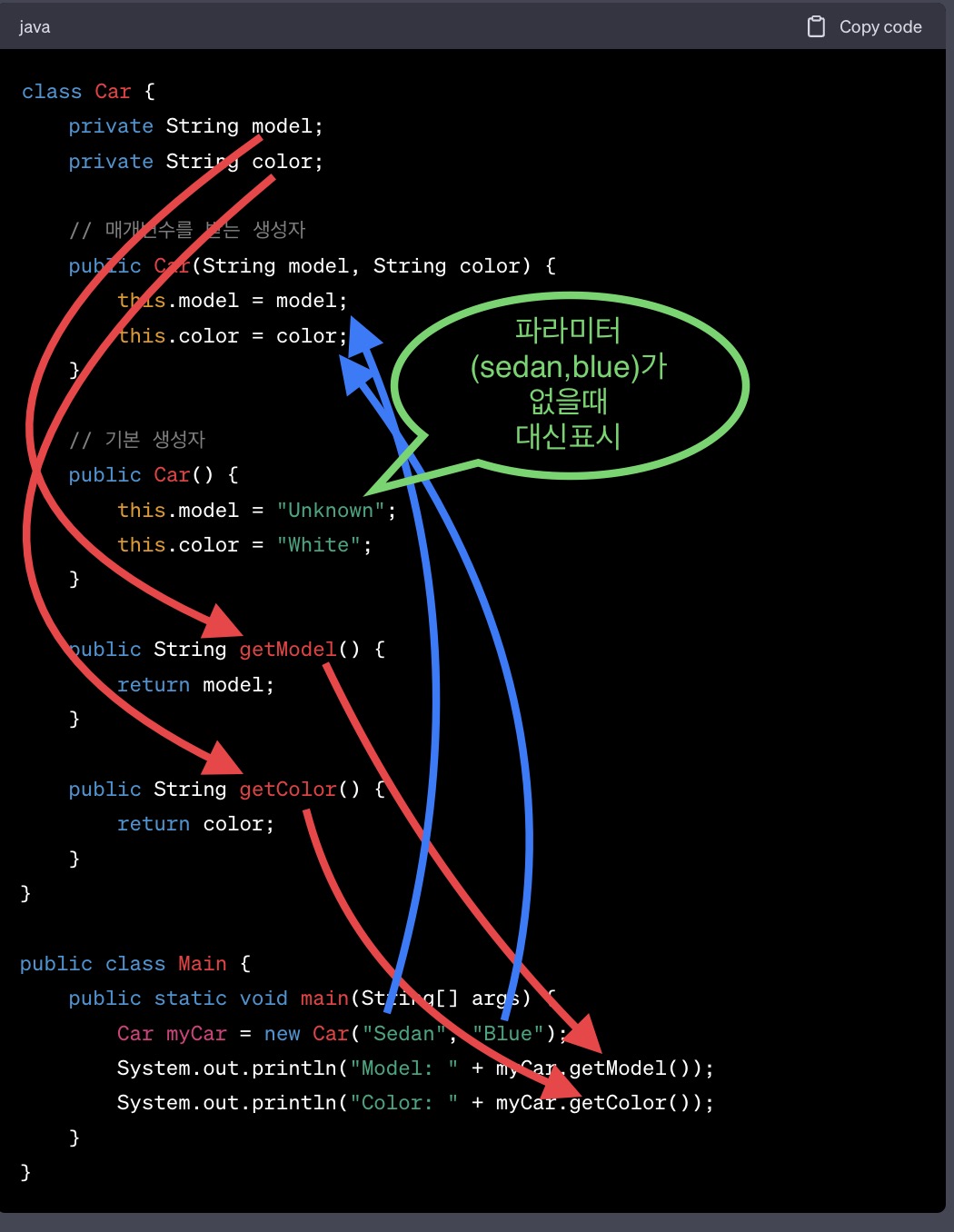
this 활용
아래와같이
비슷한 생성자가 두개있으면
파라미터가 많은쪽을
	public User(String email, String password) {
        this.email = email;
        this.password = password;
    }
    public User(String email, String password, String name) {
        this.email = email;
        this.password = password;
        this.name = name;
아래와 같이 바꿀수있다
	public User(String email, String password) {
        this.email = email;
        this.password = password;
    }
    public User(String email, String password, String name) {
        this(email, password, name)
주의사항으로
this 가 맨윗줄에 있어야한다
아래와 같은경우에러난다
	public User(String email, String password) {
        this.email = email;
        this.password = password;
    }
    public User(String email, String password, String name) {
    	System.out.println(name) // error
        this(email, password, name)
부모가 기본 생성자 없을땐 super();
// 부모
public class Car {
    public Car(){
        System.out.println("car 생성자호출");
    }
}
위와같이 파라미터가 없는게 기본생성자인데
아래와같이 부모가 기본 생성자가 없는경우
에러발생함.
// 부모
public class Car {
    public Car(String name){
        System.out.println("car 생성자호출");
    }
}
그럴땐 자식에 super(parameter) 를 추가해줘야함
// 자식
public class Bus extends Car{
    super("something")
}
불변 (Immutable) 객체
String
추상 클래스 (Abstract Class)
abstract class Shape {위와같이 abstract 를 삽입하여 코딩
추상 클래스는 인스턴스 생성이 불가
public abstract class Car {
    public Car(String name){
        System.out.println("car 생성자호출");
    }
}
아래와같이 인스턴스를 생성하려하면 error 발생함
public class Main {
    public static void main(String[] args) {
        Car c1 = new Car("sonata");
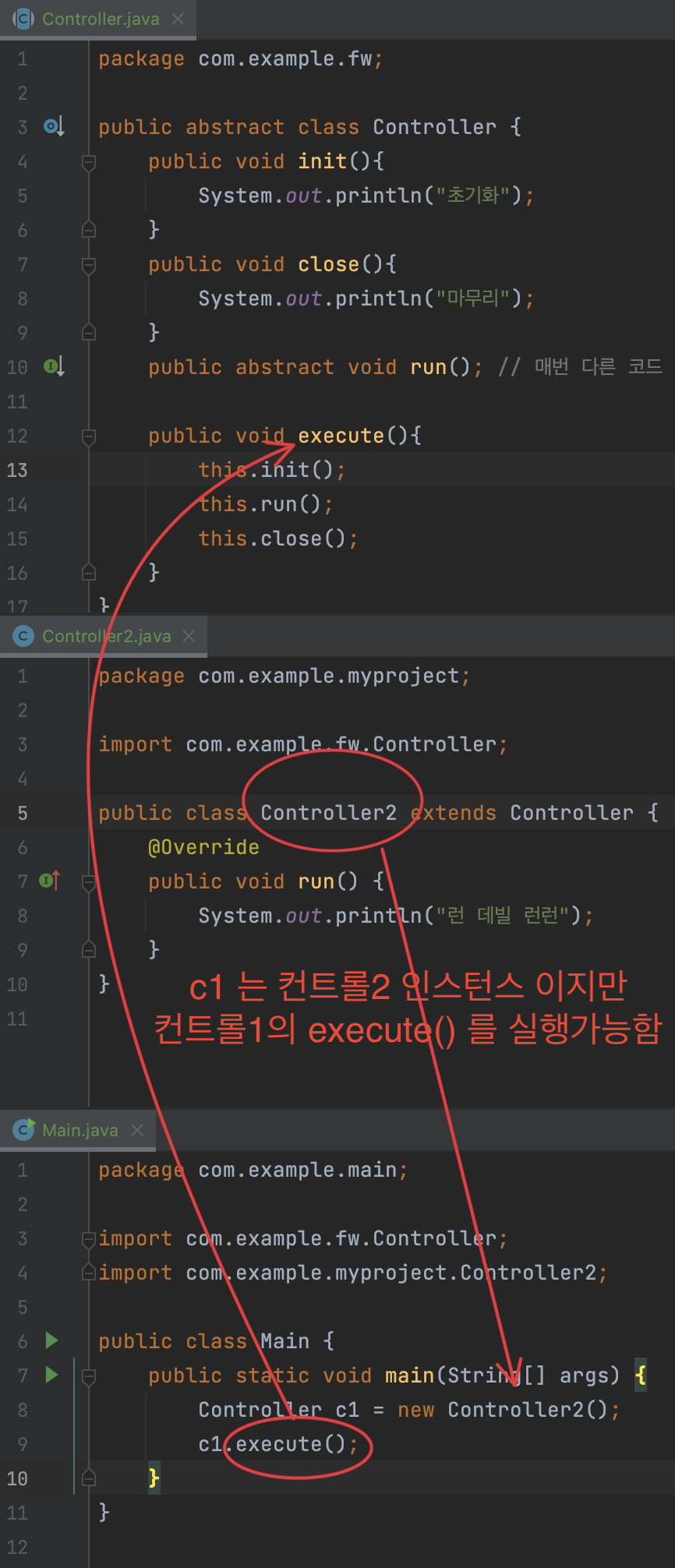
앱스트렉트 언제 쓰이나?
템플릿 메소드 패턴 (Template Method Pattern)
에서 자주쓰인다 고한다
탬플릿 메소드 패턴이 뭔가
package com.example.fw;

public abstract class Controller {
    public void init(){
        System.out.println("초기화");
    }
    public void close(){
        System.out.println("마무리");
    }
    public abstract void run(); // 매번 다른 코드

	// ⬇️이 부분이 템플릿 메소드
    // 위에 있는 메소드를 실행시켜줌

    public void execute(){
        this.init();
        this.run();
        this.close();
    }
}
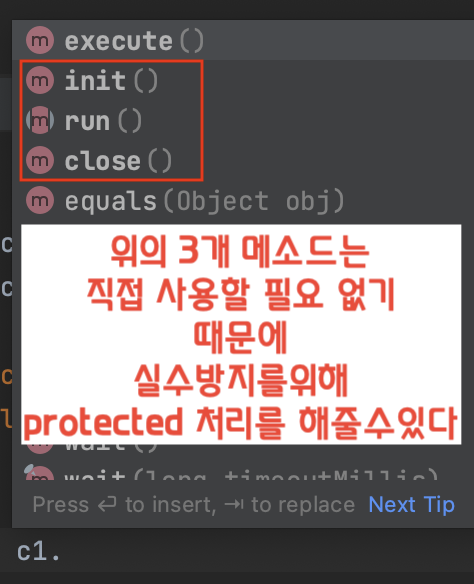
쓰이는 예
protected
package com.example.fw;

public abstract class Controller {
    protected void init(){
        System.out.println("초기화");
    }
    protected void close(){
        System.out.println("마무리");
    }
    protected abstract void run(); // 매번 다른 코드

    public void execute(){
        this.init();
        this.run();
        this.close();
    }
}
protected final
상속을 금지시키려면 final 을 붙인다
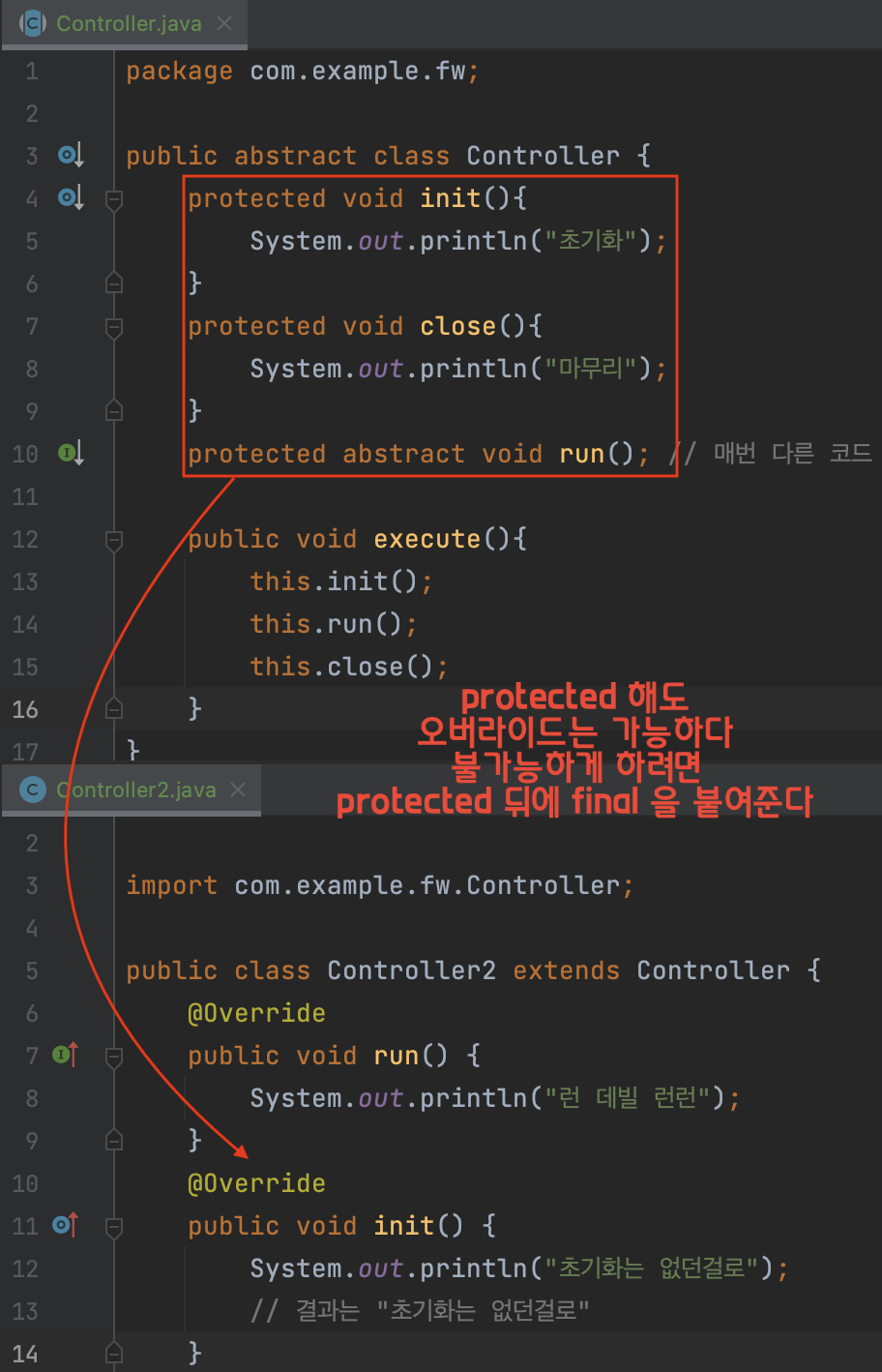
    protected final void init(){
        System.out.println("초기화");
    }
    protected final void close(){
        System.out.println("마무리");
    }
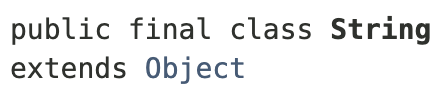
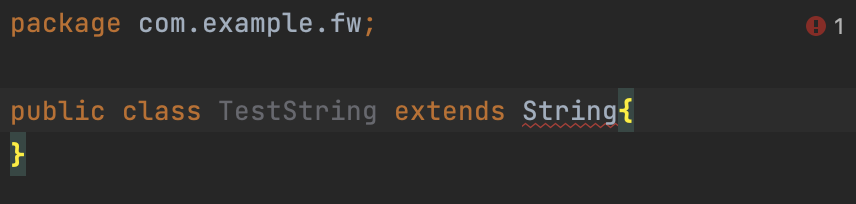
String 은 final 이기때문에 상속불가하다
상속 하려고 하면 에러발생함
new 를 사용할때와 차이
String str1 = "hello";
String str2 = "hello";
String str3 = new String("hello");
String str4 = new String("hello");

if(str1 == str2)
	System.out.println("str1 == str2"); // true
if(str1 == str3)
	System.out.println("str1 == str3"); // false
== 는 값이 같냐가 아니라 같은것을 참조하냐 라는 뜻
new 를 사용하면 메모리를 사용하여 새로운 스트링을 만들어내므로
new 를 사용하지않은 str1 과
사용한 str3 는 서로 다른것을 참조하므로 false.
new 를 사용할때마다 메모리를 사용하므로
String 을 사용할땐 new 를 쓰지않는게 좋겠다
즉 str1 과 str2 는 같은 메모리의 장소를 참조함.
equals()
== 가 같은것을 참조하냐 라면
같은 값인지 보려면 어떻게 해야할까
equals() 를 사용하면 되겠따
        String str1 = "hello";
        String str2 = new String("hello");

        if(str1.equals(str2))
            System.out.println("str1 = str2"); // true
불변객체
String 은 불변객체
String s = str1.toUpperCase();
System.out.println(s) // HELLO
System.out.println(str1) // hello
s는 변하지만 str1 은 변하지않음. 불변.
StringBuffer 는 변한다.

개발자로서 성장하는 데 큰 도움이 된 글이었습니다. 감사합니다.