1. 패턴 정의: 정의와 핵심 요약
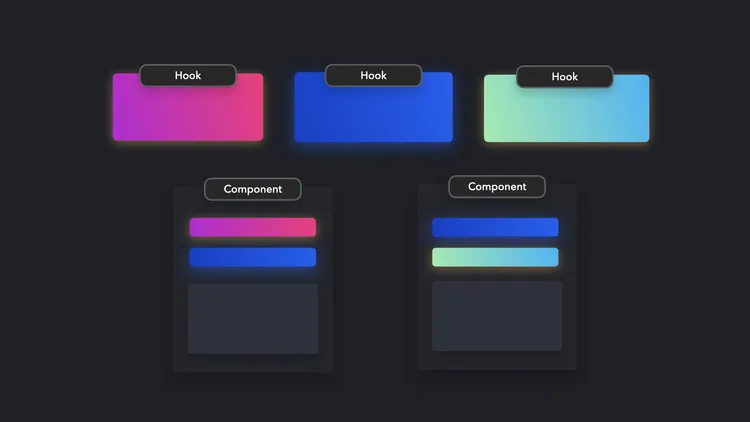
- 훅(Hooks)은 함수형 컴포넌트에서 상태와 생명주기 관련 로직을 관리하고 재사용할 수 있도록 하는 패턴이다.
- 커스텀 훅을 통해 상태 로직을 모듈화·공유할 수 있고, HOC/Render Props보다 간결하다.
2. 사용 목적: 이 패턴이 필요한 이유
- 클래스 컴포넌트의 복잡한 생명주기 메서드 문제를 해결
- 로직 재사용성을 높이고, 관심사별로 캡슐화된 코드 작성 가능
3. 패턴 설명: 동작 방식과 구성 요소
구성 요소
- 기본 훅:
useState,useEffect,useContext,useReducer등을 통해 상태 관리, 생명주기 관리, 컨텍스트 접근 등을 처리 - 커스텀 훅: 반복되는 상태 로직을 함수로 추출 → 다양한 컴포넌트에서 동일한 훅을 호출해 재사용
동작 방식
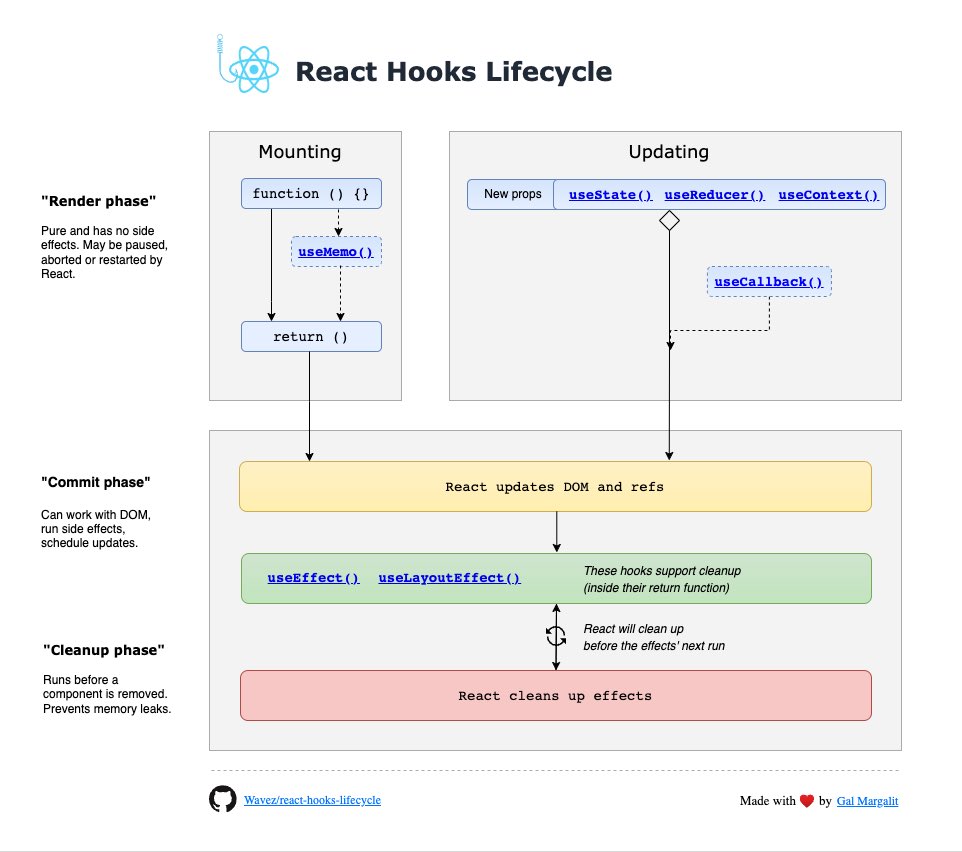
Render Phase (렌더 단계, 순수 계산 단계)
컴포넌트 함수가 호출되어 JSX를 계산한다. 이때 DOM을 건드리지 않는다.
다음 훅들은 “렌더 중” 평가된다 (부수효과 금지):
-
useState/useReducer- 현재
state를 읽고 JSX 계산에 사용 setState를 호출하면 업데이트가 스케줄링되고, 다음 렌더에서 새로운state가 반영- 초기값 함수(
useState(() => init))는 최초 렌더에만 실행
- 현재
-
useMemo/useCallback- 렌더 중 의존성 비교로 메모이제이션된 값을 재사용하거나 재계산
-
useRef.current를 읽고/쓸 수 있으나, 변경해도 리렌더를 일으키지 않는다. DOM 연결은 커밋 이후에 유효
-
useContext/useSyncExternalStore- 렌더 중 구독 값을 읽어 JSX 계산에 반영 (
useSyncExternalStore는 외부 스토어의 일관된 스냅샷을 렌더 중에 제공한다)
- 렌더 중 구독 값을 읽어 JSX 계산에 반영 (
Commit Phase (커밋 단계, DOM 반영 단계)
React가 변경된 DOM을 실제로 적용하고, 브라우저가 페인트한다(Concurrent 모드에서 스케줄링될 수 있음).
커밋 직후 실행되는 훅:
-
useEffect- 페인트 이후 비동기적으로 실행 네트워크 요청, 이벤트 구독, 타이머, 로깅 등 시각적 플리커에 민감하지 않은 작업
- 의존성 배열로 실행 타이밍 제어(빈 배열이면 마운트 후 1회, deps 변화 시 재실행)
-
useLayoutEffect- DOM 커밋 직후, 페인트 이전에 동기 실행 레이아웃 측정/동기 DOM 읽기-쓰기(예: 스크롤 위치 조정, 포커스 이동)에 사용
-
useInsertionEffect- 매우 이른 커밋 타이밍(레이아웃 전에) 스타일 삽입용 훅(CSS-in-JS 라이브러리용)
Cleanup Phase (클린업 단계)
다음 중 하나의 시점에 이전 이펙트의 정리 함수가 먼저 호출된다:
- 같은 컴포넌트가 다시 커밋되기 직전(의존성 변경으로 이펙트 재실행하기 전)
- 컴포넌트 언마운트 직전
해당 훅의 클린업 규칙:
useEffectuseEffect(() => { /* 구독 */ return () => { /* 구독 해제 */ } }, [deps])
4. 코드 및 활용 예시: 기본 구현
import React, { useState, useEffect } from "react";

function Clock() {
  const [time, setTime] = useState(new Date());

  // 마운트 시 타이머 등록 → 언마운트 시 정리
  useEffect(() => {
    const id = setInterval(() => setTime(new Date()), 1000);
    return () => clearInterval(id); // cleanup
  }, []);

  return <h1>{time.toLocaleTimeString()}</h1>;
}
5. 정리와 확장: 학습 포인트와 추가 학습거리
학습 포인트
- 훅은 React에서 로직 재사용의 표준 도구이다.
- HOC/Render Props의 한계를 극복하면서 코드 가독성과 유지보수를 크게 개선함
- 커스텀 훅은 특히 비즈니스 로직을 UI와 분리하는 데 강력하다.
추가 학습: 클래스형 컴포넌트의 생명주기와 비교
클래스형 컴포넌트의 생명주기와 상태 관리
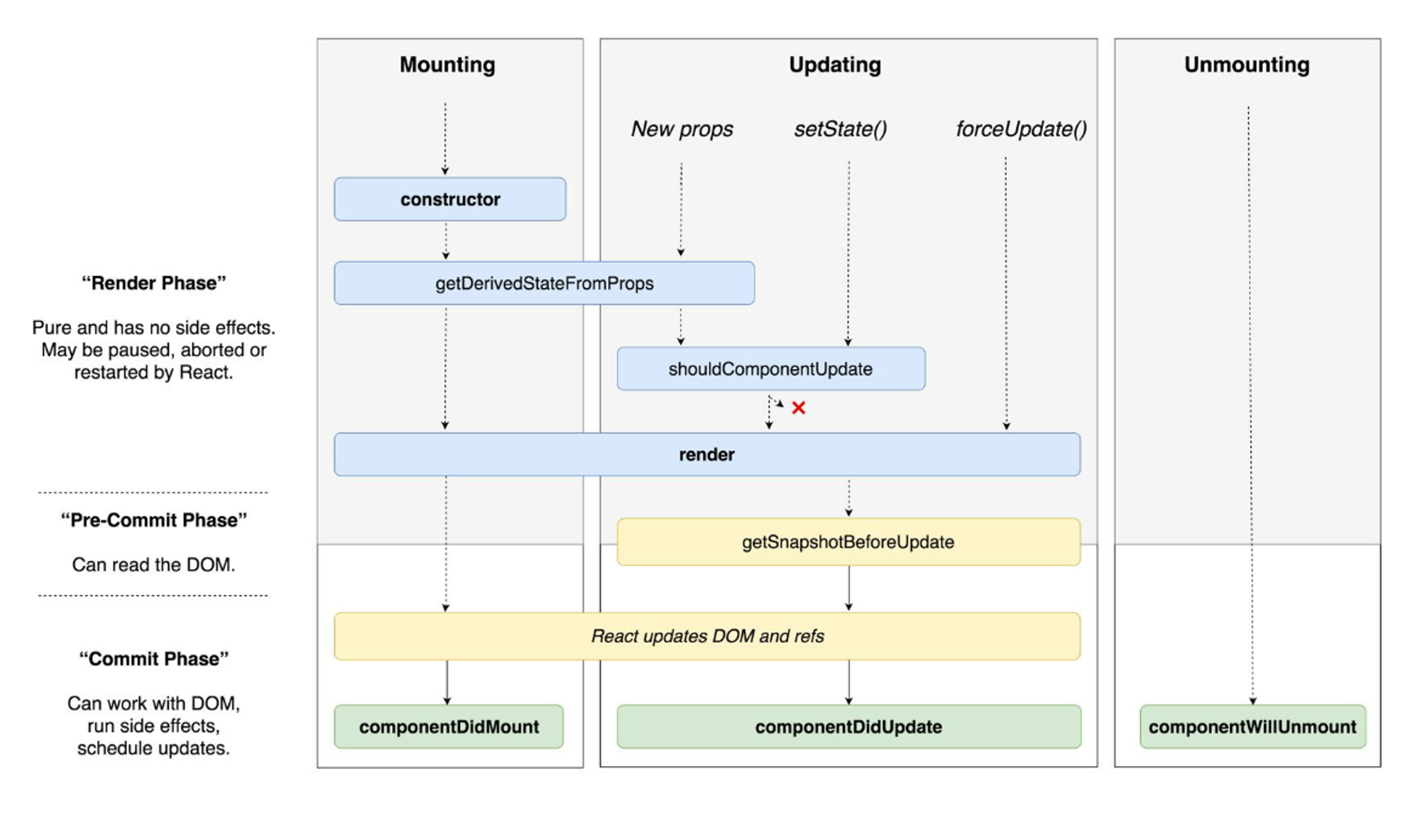
React의 클래스 컴포넌트는 크게 생명주기 메서드(lifecycle methods)와 this.state/this.setState를 통한 상태 관리로 구성된다.
- 상태 관리 방식
- 선언: 클래스 내부에서
state = { count: 0 }처럼 초기값 선언 - 갱신:
this.setState({ count: this.state.count + 1 })호출 시 React가 새로운 렌더를 스케줄링 - 특징: setState는 비동기적으로 동작할 수 있으며, 병합(merge) 기반 → 일부 속성만 변경하면 나머지는 유지됨
- 주요 생명주기 메서드
- constructor: state 초기화, 이벤트 핸들러 바인딩
- componentDidMount: 마운트 직후(첫 렌더 후) 호출
- 네트워크 요청, DOM 조작, 이벤트 리스너 등록 등의 “부수효과” 처리에 사용
- componentDidUpdate(prevProps, prevState): 업데이트 후 호출
- 특정 props/state 변화 감지 후 추가 로직 실행 가능
- componentWillUnmount: 언마운트 직전에 호출
- 타이머 해제, 이벤트 리스너 제거 등 정리(cleanup) 작업
class Clock extends React.Component {
  state = { time: new Date() };

  componentDidMount() {
    this.timer = setInterval(() => this.setState({ time: new Date() }), 1000);
  }

  componentWillUnmount() {
    clearInterval(this.timer);
  }

  render() {
    return <h1>{this.state.time.toLocaleTimeString()}</h1>;
  }
}
훅에서의 대체 방식
훅을 사용하면 위의 상태 관리와 생명주기 메서드가 각각 대응되는 형태로 단순화됨
- 상태 관리
-
useState→ 함수 컴포넌트 내에서 상태 변수와 setter를 직접 반환 -
차이점
- 클래스:
setState는 병합(merge) 방식 - 훅:
useState는 치환(replace) 방식이므로, 객체 상태를 다룰 땐 명시적으로 스프레드({...state, ...update}) 해줘야 함
- 클래스:
- 생명주기 대응
-
componentDidMount+componentDidUpdate+componentWillUnmount
→useEffect한 곳에서 통합- 마운트 시 실행:
useEffect(() => { ... }, []) - 업데이트 시 실행:
useEffect(() => { ... }, [deps]) - 언마운트/재실행 전 정리:
return () => { cleanup }
- 마운트 시 실행:
-
componentDidMount직후 레이아웃 관련 동기 처리useLayoutEffect로 대체- DOM 측정, 포커스, 스크롤 조정 등에 사용
-
componentDidCatch(에러 경계)- 훅만으로는 불가 → 여전히 클래스 컴포넌트 + HOC 방식 사용 필요