MVC
- Model View Controller
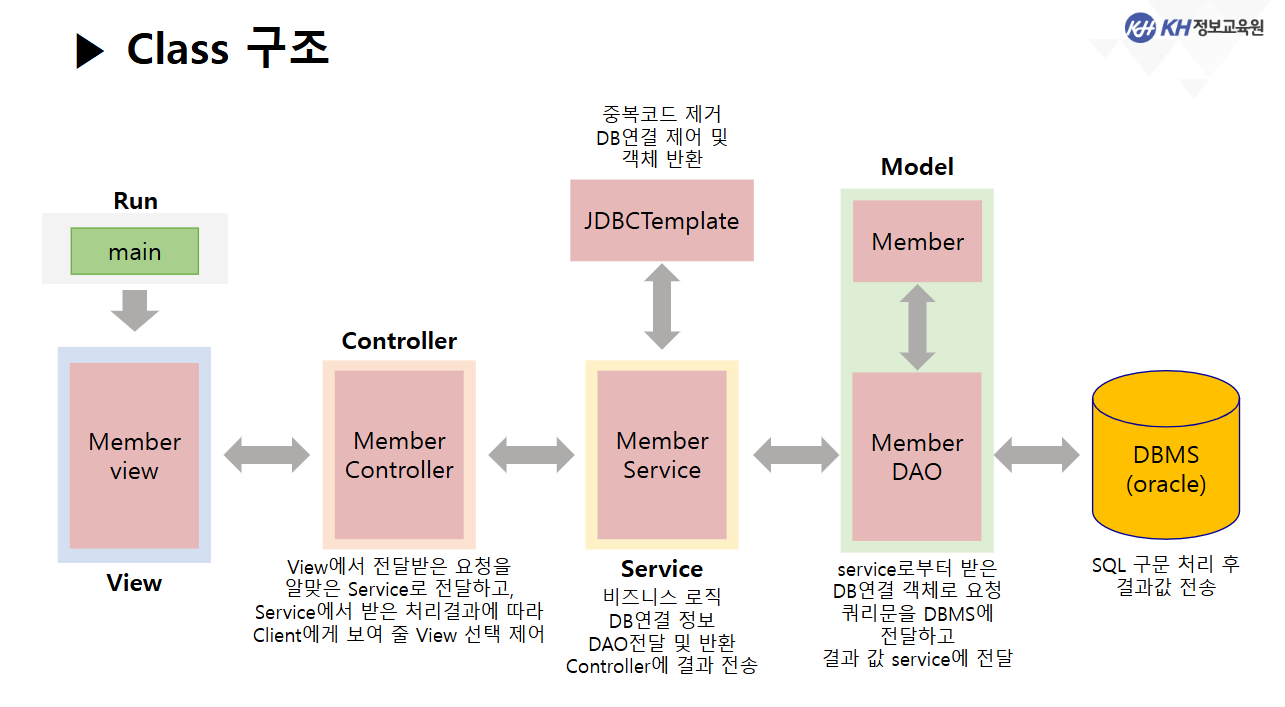
Run
- 애플리케이션 실행을 위해 main메소드를 가지고 있는 패키지
View
- ui
- 사용자 인터페이스 요소로 사용자의 요청과 응답을 보여주는 화면
Controller
- 서버
- View를 통해 받은 클라이언트의 요청에 대해 알맞은 Model을 선택하여 비즈니스 로직을 처리하고 , 로직 처리 결과에 따라 출력할 View를 결정하여 응답데이터를 전달
Model
- 비즈니스 로직(업무에 필요한 데이터 처리 수행)을 구현하는 영역으로 데이터를 가공하고
DB에 접근 추출,입력,갱신 등을 처리
Service
- 비즈니스로직 처리
- 데이터 가공, 트랜잭션 관리 (commit, rollback)
- DAO 전달 및 반환 -> controller에 결과 전송
DTO (VO)
- 데이터베이스의 각 컬럼 개체(entity) 저장용 클래스가 있는 패키지
DAO
- DBMS에 접속하여 실제 데이터를 전송하거나 결과 값을 전달 받는 클래스가 있는 패키지
JDBC
- DBMS연동, 객체반환, 트랜젝션 처리 등 중복 코드를 새로운 클래스에서 구동될 수 있게
싱글톤 패턴을 적용하여 연동 구조 재설계
싱글톤 패턴(Singleton Pattern)
- 객체 사용 시 새로운 객체를 계속 생성해서 사용하는 것이 아니라
하나의 객체만 생성하여 공유하는 것
Common
- 클래스 내부의 중복코드를 처리하는 클래스가 담겨있는 패키지로
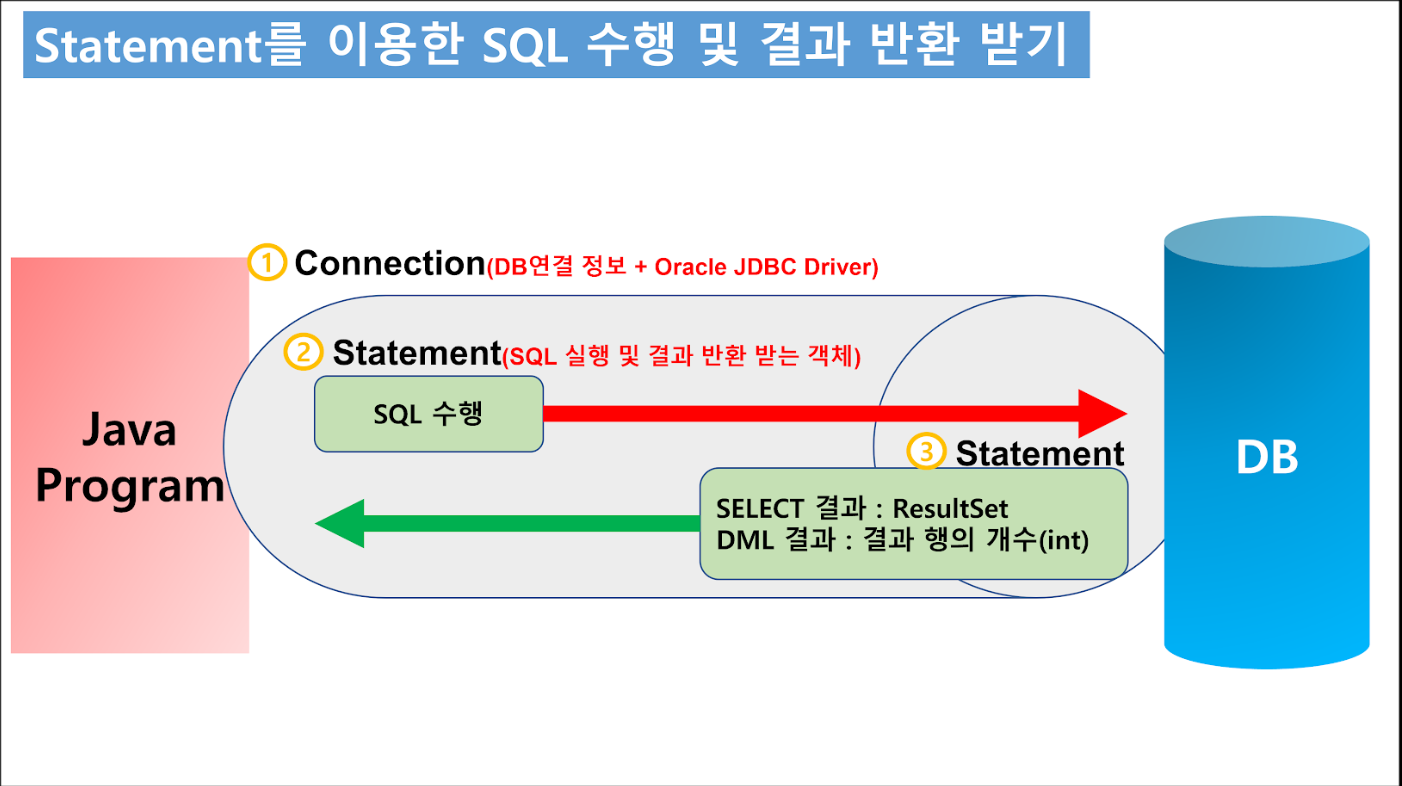
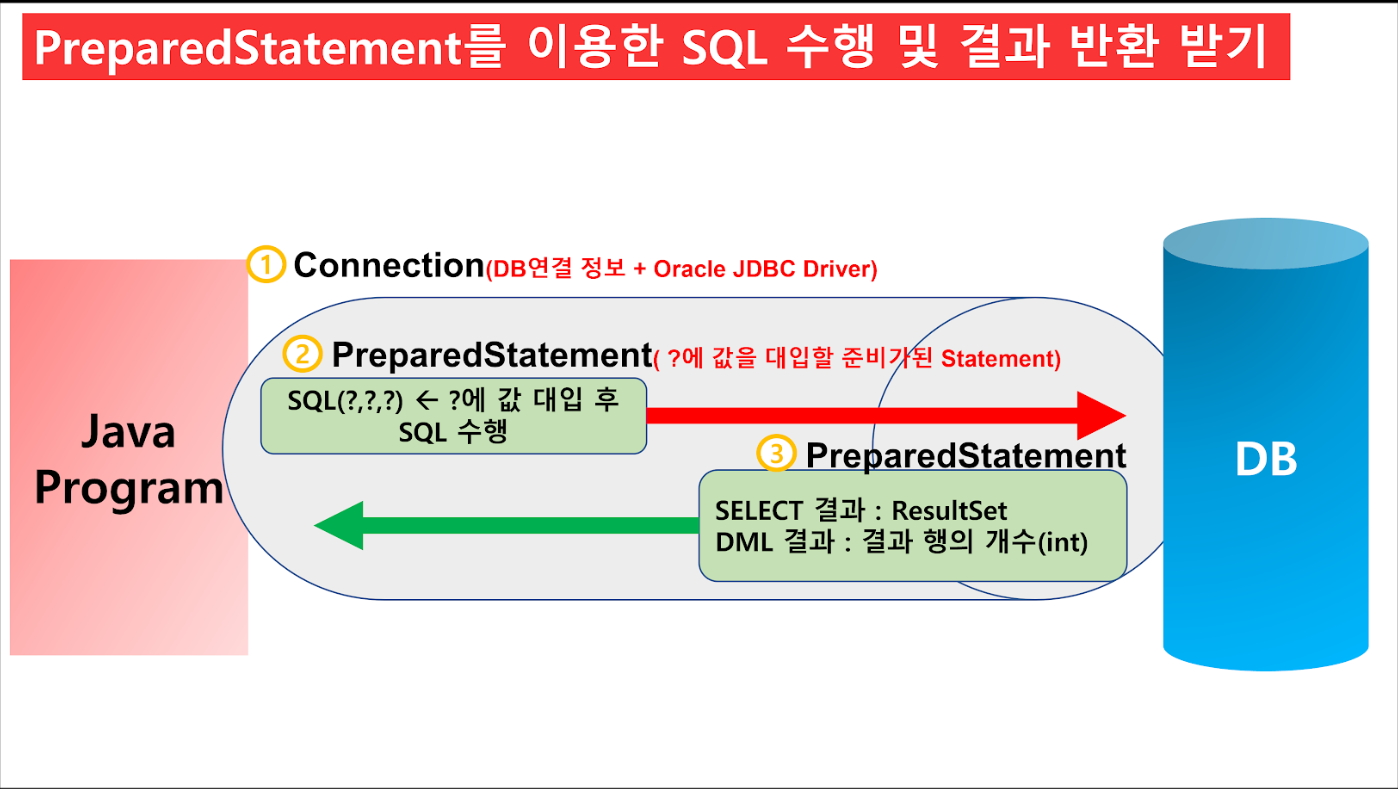
Connection 생성, Connection/Statement/PreparedStatement 반환 메소드,
트랜젝션(commit, rollback)이 묶여있음
XML (eXtensible Markup Language)
- 단순화된 데이터 기술 형식
- XML에 저장되는 데이터 형식 Key : Value (Map)
-> Key, Value 모두 String(문자열) 형식 - XML 파일을 읽고, 쓰기 위한 IO 관련된 클래스 필요
** Properties 컬렉션 객체 **
- Map의 후손 클래스
- Key, Value 모두 String(문자열 형식)
- XML 파일을 읽고, 쓰는데 특화된 메서드 제공
try {
	Scanner sc = new Scanner(System.in);

	// Properties 객체 생성
	Properties prop = new Properties();

	System.out.print("생성할 파일 이름 : ");
	String fileName = sc.next();

	// FileOutputStream
	FileOutputStream fos = new FileOutputStream(fileName + ".xml");

	// Properties 객체를 이용해서 XML 파일 생성
	prop.storeToXML(fos, fileName + ".xml file!!!");

	System.out.println(fileName + ".xml 파일 생성 완료");

	} catch (Exception e) {
		System.out.println("XML 파일 생성 중 예외발생");
		e.printStackTrace();
	}
  }
}
이렇게 해서 만들면
<?xml version="1.0" encoding="UTF-8"?>
<!DOCTYPE properties SYSTEM "http://java.sun.com/dtd/properties.dtd">
<properties>
	<!-- 마크업 언어 주석  -->
	<!-- ctrl + shift + / -->

	<!-- DB 연결을 위한 정보들을 별도 파일에 작성하여
	     읽어오는 형식으로 코드를 변경

	     이유 1 : Github에 DB연결 정보를 올리면 해킹하세요~ 라는 뜻
	     		  보안적인 측면에서 코드를 직접적으로 보지 못하게 함

	     이유 2 : 혹시라도 연결하는 DB 정보가 변경될 경우
	     		  JAVA 코드가 아닌 읽어오는 파일의 내용을 수정하면 되기 때문에
	     		  JAVA 코드 수정 X -> 추가 컴파일 필요 X
	     		  -> 개발 시간 단축!!!
	  -->

<comment>driver.xml</comment>

<!-- entry 태그 (K : V 한 쌍) -->

<entry key ="driver">oracle.jdbc.driver.OracleDriver</entry>
<entry key = "url">jdbc:oracle:thin:@localhost:1521:XE</entry>
<entry key = "userName">kh</entry>
<entry key = "password">kh1234</entry>

</properties>
이걸 읽으면!!!
// XML 파일 읽어오기 (FileInputStream, Properties)
try {
	Properties prop = new Properties();

	// driver.xml 파일을 읽기 위한 InputStream 객체 생성
	FileInputStream fis = new FileInputStream("driver.xml");

	// 연결된 driver.xml 파일에 있는 내용을 모두 읽어와
	// Properties 객체에 K:V 형식으로 저장
	prop.loadFromXML(fis);

	// prop.getProperty("key") : key가 일치하는 속성값(value)을 얻어옴
	String driver = prop.getProperty("driver");
	String url = prop.getProperty("url");
	String userName = prop.getProperty("userName");
	String password = prop.getProperty("password");

	Class.forName(driver);
	Connection conn = DriverManager.getConnection(url, userName, password);

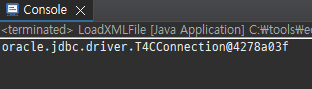
	System.out.println(conn);

	} catch(Exception e) {
		e.printStackTrace();
	}

	/*
	 * 왜 XML 파일을 이용해서 JDBC를 진행하는가?
	 *
	 * 1. DB 연결정보 / 드라이버 정보 등 코드 중복 제거
	 * 2. 보안 측면에서 별도 관리 필요
	 * 3. 재컴파일을 진행하지 않기 위해서
	 * 4. XML 파일에 작성된 문자열 형태를 그대로 읽어오기 때문에
	 * 	  XMl 파일에 SQL문 작성 시 다루기가 좀 더 편리해짐.
	 */
  }
}
Template
- 양식, 틀, 주형
-> "미리 만들어뒀다" 의미
JDBCTemplate
- JDBC 관련 작업을 위한 코드를 미리 작성해서 제공하는 클래스
- Connection 생성
- AutoCommit false
- commit / rollback
- 각종 자원 반환 close()
**** 중요 ****
어디서든지 JDBCTemplate 클래스를
객체로 만들지 않고도 메서드를 사용할 수 있도록 하기 위해
모든 메서드를 public static으로 선언
-> 싱글톤 패턴 적용
public class JDBCTemplate {

	// 필드
	private static Connection conn = null;
	// -> static 메서드에서 사용할 static 필드 선언

    // 메서드

	/** 호출 시 Connection 객체를 생성해서 반환하는 메서드 + AutoCommit 끄기
	 * @return conn
	 */
	public static Connection getConnection() {

		try {

			// 이전에 참조하던 Connection 객체가 존재하고
			// 아직 close() 된 상태가 아니라면
			// 새로 만들지 않고 기존 Connection 반환
			if( conn != null && !conn.isClosed() ) {
				return conn;
			}

			// 1. Properties 객체 생성
			Properties prop = new Properties();

			// 2. Properties가 제공하는 메서드를 이용해서 driver.xml 파일 내용을 읽어오기
			String filePath = "driver.xml";

			prop.loadFromXML(new FileInputStream(filePath));

			// 3. prop에 저장된 값을 이용해서 Connection 객체 생성
			Class.forName(prop.getProperty("driver"));
			// Class.forName("oracle.jdbc.driver.OracleDriver");

			conn = DriverManager.getConnection(prop.getProperty("url"),
											   prop.getProperty("userName"),
											   prop.getProperty("password"));
// conn = DriverManager.getConnection("jdbc:oracle:thin:@localhost:1521:XE","kh","kh1234")

			// 4. 만들어진 Connection에서 AutoCommit 끄기
			conn.setAutoCommit(false);

		} catch (Exception e) {
			System.out.println("커넥션 생성 중 예외 발생..");
			e.printStackTrace();
		}
		return conn;
	}
// -------------------------------------------------------------------------------

	/** 전달 받은 커넥션에서 수행한 SQL을 Commit 하는 메서드
	 * @param conn
	 */
	public static void commit(Connection conn) {

		try {
			if(conn != null && !conn.isClosed()) conn.commit();

		} catch (Exception e) {
			System.out.println("커밋 중 예외 발생");
			e.printStackTrace();
		}

	}

	/** 전달 받은 커넥션에서 수행한 SQL을 ROllBACK 하는 메서드
	 * @param conn
	 */
	public static void rollback(Connection conn) {

		try {
			if(conn != null && !conn.isClosed()) conn.rollback();

		} catch (Exception e) {
			System.out.println("롤백 중 예외발생");
			e.printStackTrace();
		}
	}
// ----------------------------------------------------------------------------

	// 커넥션, Statement(PreparedStatement), ResultSet

	/** 전달 받은 커넥션을 close(자원반환) 하는 메서드
	 * @param conn
	 */
	public static void close(Connection conn) {

		try {
			if(conn != null && !conn.isClosed()) conn.close();

		} catch (Exception e) {
			System.out.println("커넥션 close() 중 예외발생");
			e.printStackTrace();
		}
	}

	/** 전달 받은 Statement or PreparedStatement 둘 다 close() 하는 메서드
	 *  + 다형성의 업캐스팅 적용
	 *  -> PreparedStatement는 Statement 의 자식
	 *  @param stmt
	 */
	public static void close(Statement stmt) {

		try {
			if(stmt != null && !stmt.isClosed()) stmt.close();

		} catch (Exception e) {
			System.out.println("Statement close()중 예외 발생");
			e.printStackTrace();
		}
	}

	public static void close(ResultSet rs) {

		try {
			if(rs != null && !rs.isClosed()) rs.close();

	   } catch (Exception e) {
			System.out.println("ResultSet close() 중 예외 발생");
			e.printStackTrace();
		}
	}
}

인생은 변수