DataTableRaw 값 들고오는 문제


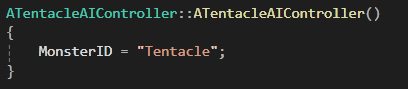
- 에디터에서 MonsterID를 직접 할당하여 해결
- 코드에도 Tentacle로 설정하도록 안전코드 작성
Spline 이동문제
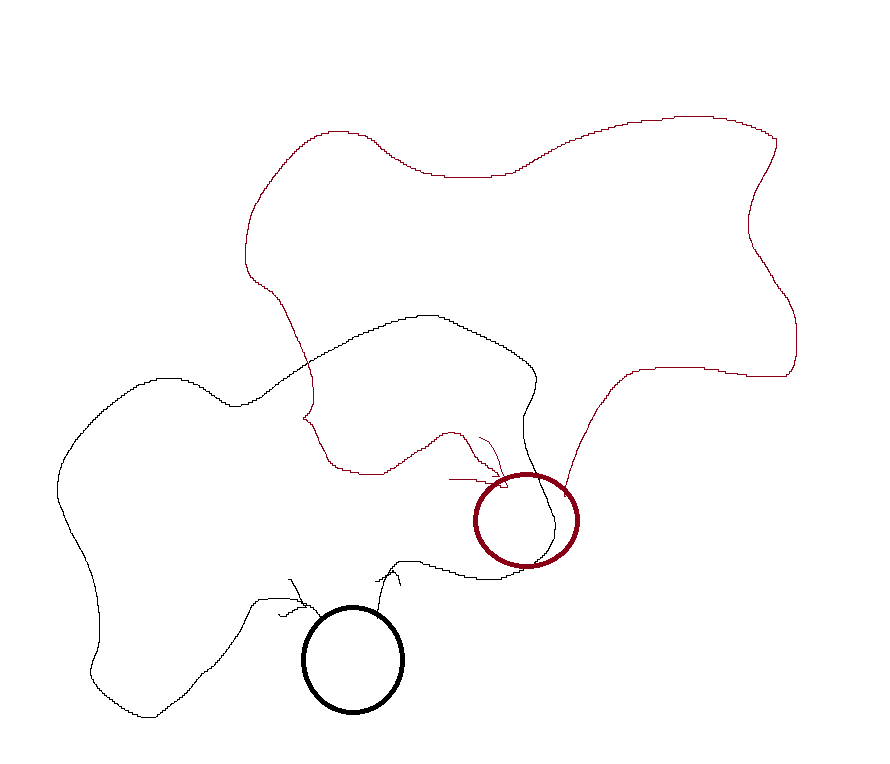
SplineComponent가 BP_Tentacle 안에 있는 친구다 보니깐 같이 이동되면서 이상하게 이동 됌.
그래서 SplineComponent를 가지는 AActor를 만들어서 맵에 배치하는 식으로 하는게 좋을 것 같다고 생각이됌….
- SplinePathActor 생성
// ASplinePathActor.h

#pragma once

#include "CoreMinimal.h"
#include "GameFramework/Actor.h"
#include "SplinePathActor.generated.h"

class USplineComponent;

UCLASS()
class YOURGAME_API ASplinePathActor : public AActor
{
    GENERATED_BODY()

public:
    ASplinePathActor();

    UFUNCTION(BlueprintCallable)
    USplineComponent* GetSplineComponent() const { return Spline; }

protected:
    UPROPERTY(VisibleAnywhere, BlueprintReadOnly)
    TObjectPtr<USplineComponent> Spline;
};- Monster 클래스 수정 (참조한 SplineActor로부터 SplineComponent를 들고옴)
FVector AMonster::GetPatrolLocation(int32 Index) const
{
	if (AssignedSplineActor)
	{
		USplineComponent* PatrolSpline = AssignedSplineActor->GetSplineComponent();
		if (!PatrolSpline || PatrolSpline->GetNumberOfSplinePoints() == 0) return GetActorLocation();

		// Get SplinePoint to World Location
		FVector Location = PatrolSpline->GetLocationAtSplinePoint(Index, ESplineCoordinateSpace::World);
		return Location;
	}
	else
	{
		LOG(TEXT("SplineActor is not Assigned."));
		return FVector::ZeroVector;
	}

}

int32 AMonster::GetNextPatrolIndex(int32 CurrentIndex) const
{
	if (AssignedSplineActor)
	{
		USplineComponent* PatrolSpline = AssignedSplineActor->GetSplineComponent();
		CurrentIndex = (CurrentIndex + 1) % PatrolSpline->GetNumberOfSplinePoints(); // Cycle
		LOG(TEXT("PatrolIndex increment : %d"), CurrentIndex);

		return CurrentIndex;
	}
	else
	{
		LOG(TEXT("SplineActor is not Assigned."));
		return -1;
	}
}
해결 완료
- 그러나 SplinePoint 마다 너무 이상하게 뚝뚝 끊어 지는 느낌이 있음 이건 Character Movement Component의 NavMovement와 연관이 있음
- Use Acceleration for Paths 를 체크하고 → Use Fixed Braking Distance for Paths 를 체크한 다음 → Fixed Path Braing Distnace 수치를 높이면 됌.
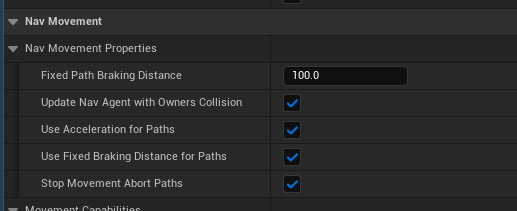
- Use Acceleration for Paths 를 체크하고 → Use Fixed Braking Distance for Paths 를 체크한 다음 → Fixed Path Braing Distnace 수치를 높이면 됌.
Perception이 제대로 안되는 문제
void AMonsterAIController::LoadSightDataFromTable()
{
	if (SightDataTable == nullptr)
	{
		LOG(TEXT("SightDataTable is not assigned"));
		return;
	}

	LOG(TEXT("Loading sight data for MonsterID = %s"), *MonsterID.ToString());
	// Setting up visual information data import from a data table
	const FMonsterSightData* SightRow = SightDataTable->FindRow<FMonsterSightData>(MonsterID, TEXT("MonsterSight"));
	if (SightRow && SightConfig)
	{
		SightConfig->SightRadius = SightRow->SightRadius;
		SightConfig->LoseSightRadius = SightRow->LoseSightRadius;
		SightConfig->PeripheralVisionAngleDegrees = SightRow->PeripheralVisionAngleDegrees;
		SightConfig->SetMaxAge(SightRow->SenseInterval);
	}
	else
	{
		LOG(TEXT("No matching row found for MonsterID"));
	}
}- 현재 아예 OnTargetPerceptionUpdated가 호출안되고 있음.
- 이 부분에 대하여 약간 지식이 부족한 것 같아. 공부함

Unreal 1기