A convenience widget that combines common painting, positioning, and sizing widgets.
- 일반적인 방식으로 그릴때 , 위치 지정 및 크기 조정 위젯을 결합한 편리한 위젯입니다.
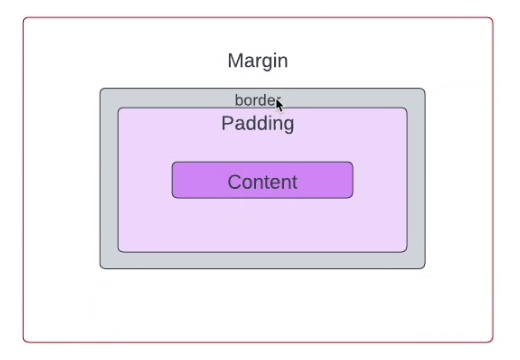
A container first surrounds the child with padding (inflated by any borders present in the decoration) and then applies additional constraints to the padded extent (incorporating the width and height as constraints, if either is non-null). The container is then surrounded by additional empty space described from the margin.
- 컨테이너는 먼저 자식을 패딩(장식에 있는 테두리로 부풀려짐)으로 둘러싸고 패딩된 범위에 추가 제약 조건을 적용합니다(너비와 높이 중 하나가 null이 아닌 경우 제약 조건으로 통합). 그런 다음 컨테이너는 여백에서 설명한 추가 빈 공간으로 둘러싸입니다.
During painting, the container first applies the given transform, then paints the decoration to fill the padded extent, then it paints the child, and finally paints the foregroundDecoration, also filling the padded extent.
- 그리는 동안 컨테이너는 먼저 주어진 변화를 적용한 다 decoration장식(border,color)을 적용한 뒤 패딩 된 범위를 채운 다음 child를 페인팅하고 마지막으로 전경 장식 child 안에 있는 decoration을 페인팅하여 패딩 된 범위를 채웁니다.
- 부모컨테이너에 변경된 사항 저장하고 자식위젯에 있는 속성값을 그리고 범위를 한번더 지정함
Containers with no children try to be as big as possible unless the incoming constraints are unbounded, in which case they try to be as small as possible. Containers with children size themselves to their children. The width, height, and constraints arguments to the constructor override this.
- 자식이 없는 컨테이너는 들어오는 제약 조건이 무제한이 아닌 한 가능한 한 크게 만들려고 노력하며, 이 경우 가능한 한 작게 만들려고 노력합니다. 자식이 있는 컨테이너는 자식에 맞게 크기를 조정합니다. 생성자에 대한 너비, 높이 및 제약 조건 인수가 이를 재정의합니다.
By default, containers return false for all hit tests. If the color property is specified, the hit testing is handled by ColoredBox, which always returns true. If the decoration or foregroundDecoration properties are specified, hit testing is handled by Decoration.hitTest.
- 기본적으로 컨테이너는 모든 hitTest에 대해 false를 반환합니다. 색상 속성이 지정된 경우 hitTest가는 항상 true을 반환하는 ColoredBox가 처리합니다. 장식 또는 전경 장식 속성이 지정된 경우, Decoration.hitTest(특정범위에 닿으면 텍스트반환)가 처리합니다.
Layout behavior
Since Container combines a number of other widgets each with their own layout behavior, Container's layout behavior is somewhat complicated.
- 컨테이너는 각각 고유한 레이아웃 동작을 가진 여러 다른 위젯을 결합하기 때문에 컨테이너의 레이아웃 동작은 다소 복잡합니다.
Summary: Container tries, in order: to honor alignment, to size itself to the child, to honor the width, height, and constraints, to expand to fit the parent, to be as small as possible.
- 요약: 컨테이너는 정렬, 자식에 맞게 크기 조정, 너비, 높이 및 제약 조건 준수, 부모에 맞게 확장, 가능한 한 작게 만들기 등의 순서로 시도합니다.
More specifically:
If the widget has no child, no height, no width, no constraints, and the parent provides unbounded constraints, then Container tries to size as small as possible.
- 위젯에 자식, 높이, 너비, 제약 조건이 없고 부모가 무제한 제약 조건을 제공하는 경우 컨테이너는 가능한 한 작게 크기를 조정하려고 합니다.
If the widget has no child and no alignment, but a height, width, or constraints are provided, then the Container tries to be as small as possible given the combination of those constraints and the parent's constraints.
- 위젯에 자식과 정렬이 없지만 높이, 너비 또는 제약 조건이 제공된 경우 컨테이너는 해당 제약 조건과 부모의 제약 조건의 조합을 고려하여 가능한 한 작게 만들려고 합니다.
- 넓이랑 높이만 있으면 그 크기에서 가장 작게 크기조정
If the widget has no child, no height, no width, no constraints, and no alignment, but the parent provides bounded constraints, then Container expands to fit the constraints provided by the parent.
- 위젯에 자식, 높이, 너비, 제약 조건 및 정렬이 없지만 부모가 경계 제약 조건을 제공하는 경우 컨테이너는 부모가 제공한 제약 조건에 맞게 확장됩니다.
If the widget has an alignment, and the parent provides unbounded constraints, then the Container tries to size itself around the child.
- 위젯에 정렬이 있고 부모가 무제한 제약 조건을 제공하는 경우 컨테이너는 자식을 기준으로 크기를 조정합니다.
If the widget has an alignment, and the parent provides bounded constraints, then the Container tries to expand to fit the parent, and then positions the child within itself as per the alignment.
- 위젯에 정렬이 있고 부모가 바운드 제약 조건을 제공하는 경우 컨테이너는 부모에 맞게 확장을 시도한 다음 정렬에 따라 자식을 자체 내에 배치합니다.
Otherwise, the widget has a child but no height, no width, no constraints, and no alignment, and the Container passes the constraints from the parent to the child and sizes itself to match the child.
- 그렇지 않으면 위젯에 자식은 있지만 높이, 너비, 제약 조건, 정렬이 없는 상태가 되며, 컨테이너는 부모에서 자식으로 제약 조건을 전달하고 자식과 일치하도록 크기를 조정합니다.
The margin and padding properties also affect the layout, as described in the documentation for those properties. (Their effects merely augment the rules described above.) The decoration can implicitly increase the padding (e.g. borders in a BoxDecoration contribute to the padding); see Decoration.padding.
- 여백과 패딩 속성은 해당 속성에 대한 문서에 설명된 대로 레이아웃에도 영향을 줍니다. (그 효과는 위에서 설명한 규칙을 보강할 뿐입니다.) 장식은 암시적으로 패딩을 늘릴 수 있습니다(예: BoxDecoration의 테두리가 패딩에 기여). Decoration.padding을 참조하세요.
See also:
AnimatedContainer, a variant that smoothly animates the properties when they change.
- AnimatedContainer, 프로퍼티가 변경될 때 부드럽게 애니메이션을 적용하는 변형입니다.
Border, which has a sample which uses Container heavily
- 컨테이너를 많이 사용하는 샘플이 있는 테두리.
Ink, which paints a Decoration on a Material, allowing InkResponse and InkWell splashes to paint over them.
- 머티리얼에 데코레이션을 칠하여 잉크반응 및 잉크웰 스플래시가 그 위에 칠할 수 있도록 하는 위젯
Cookbook: Animate the properties of a container
- 컨테이너의 속성 애니메이션 적용
⭐️ 참고자료