2023.08.29.화.TIL
- 할 것
- 오후 12시 회의
- 팔로우 완성해가기
- 팔로우 → 언팔로우 → 팔로우 보여주기
- or 더미 데이터(유저) 생성해서 팔로우 기능 포스트맨으로 기능 보여주기
Follow
- 팔로우 기능 완성!
- 2(user_id)가 1(following_user_id)를 팔로우하고 있다

- 2(user_id)가 1(following_user_id)를 팔로우하고 있다
- FollowController
- follow.html을 반환
- 나를 팔로우 한 사람, 내가 팔로우 한 사람, 내가 팔로우 한 사람의 포스트 확인하기
- 팔로우 하기
- 언팔로우 하기
- localhost:8080/api/follow/1
- 1 : userId = 1번을 갖고 있는 user
- 1번을 갖고 있는 user를 follow하는 api
- ResponseEntity로 타입 바꿔주기, 반환 해주기
package com.sparta.seoulmate.controller;

import com.sparta.seoulmate.dto.PostResponseDto;
import com.sparta.seoulmate.security.UserDetailsImpl;
import com.sparta.seoulmate.service.FollowService;
import lombok.RequiredArgsConstructor;
import lombok.extern.slf4j.Slf4j;
import org.springframework.security.core.annotation.AuthenticationPrincipal;
import org.springframework.stereotype.Controller;
import org.springframework.web.bind.annotation.*;

import java.util.List;

@Slf4j
@Controller
@RequiredArgsConstructor
@RequestMapping("/api/follow")
public class FollowController {

    private final FollowService followService;

    @GetMapping
    public String follow(){
        return "follow";
    } // follow.html을 반환


    // 나를 팔로우 한 사람, 내가 팔로우 한 사람, 내가 팔로우 한 사람의 포스트 확인하기
    @GetMapping("/posts")
    @ResponseBody
    public List<PostResponseDto> postList(@AuthenticationPrincipal UserDetailsImpl userDetail){
        return followService.viewFollowingPostList(userDetail.getUser());
    }

    @PostMapping("/{userId}")
    @ResponseBody
    public void following(@AuthenticationPrincipal UserDetailsImpl userDetails, @PathVariable Long userId) {
        followService.following(userDetails, userId);
    }

    @DeleteMapping("/{userId}")
    @ResponseBody
    public void unfollowing(@AuthenticationPrincipal UserDetailsImpl userDetails, @PathVariable Long userId) {
        followService.unfollowing(userDetails, userId);
    }

}
package com.sparta.seoulmate.controller; import com.sparta.seoulmate.dto.ApiResponseDto; import com.sparta.seoulmate.dto.PostResponseDto; import com.sparta.seoulmate.security.UserDetailsImpl; import com.sparta.seoulmate.service.FollowService; import lombok.RequiredArgsConstructor; import lombok.extern.slf4j.Slf4j; import org.springframework.http.HttpStatus; import org.springframework.http.ResponseEntity; import org.springframework.security.core.annotation.AuthenticationPrincipal; import org.springframework.stereotype.Controller; import org.springframework.web.bind.annotation.*; import java.util.List; @Slf4j @Controller @RequiredArgsConstructor @RequestMapping("/api/follow") public class FollowController { private final FollowService followService; @GetMapping public String follow(){ return "follow"; } // follow.html을 반환 // 나를 팔로우 한 사람, 내가 팔로우 한 사람, 내가 팔로우 한 사람의 포스트 확인하기 @GetMapping("/posts") @ResponseBody public ResponseEntity<List<PostResponseDto>> viewFollowingPostList(@AuthenticationPrincipal UserDetailsImpl userDetail){ List<PostResponseDto> postResponseDto = followService.viewFollowingPostList(userDetail.getUser()); return ResponseEntity.ok().body(postResponseDto); } @PostMapping("/{userId}") @ResponseBody public ResponseEntity<ApiResponseDto> following(@AuthenticationPrincipal UserDetailsImpl userDetails, @PathVariable Long userId) { followService.following(userDetails, userId); return ResponseEntity.ok().body(new ApiResponseDto(userId +" 님을 팔로우 했습니다", HttpStatus.OK.value())); } @DeleteMapping("/{userId}") @ResponseBody public ResponseEntity<ApiResponseDto> unfollowing(@AuthenticationPrincipal UserDetailsImpl userDetails, @PathVariable Long userId) { followService.unfollowing(userDetails, userId); return ResponseEntity.ok().body(new ApiResponseDto(userId +" 님을 팔로우 해제 했습니다", HttpStatus.OK.value())); } } - userId를 user의 nickname으로 바꿔주기 - FollowController
@PostMapping("/{userId}")
    @ResponseBody
    public ResponseEntity<ApiResponseDto> following(@AuthenticationPrincipal UserDetailsImpl userDetails, @PathVariable Long userId) {
        String nickname = followService.following(userDetails, userId);
        return ResponseEntity.ok().body(new ApiResponseDto(nickname + " 님을 팔로우 했습니다", HttpStatus.OK.value()));
    }

    @DeleteMapping("/{userId}")
    @ResponseBody
    public ResponseEntity<ApiResponseDto> unfollowing(@AuthenticationPrincipal UserDetailsImpl userDetails, @PathVariable Long userId) {
        String nickname = followService.unfollowing(userDetails, userId);
        return ResponseEntity.ok().body(new ApiResponseDto(nickname + " 님을 팔로우 해제 했습니다", HttpStatus.OK.value()));
    }
String nickname =추가- nickname 으로 변경
- userId를 user의 nickname으로 바꿔주기 - FollowService
public void following(@AuthenticationPrincipal UserDetailsImpl userDetails, Long id)

public void unfollowing(@AuthenticationPrincipal UserDetailsImpl userDetails, Long id)
public String following(@AuthenticationPrincipal UserDetailsImpl userDetails, Long id) public String unfollowing(@AuthenticationPrincipal UserDetailsImpl userDetails, Long id)- public String unfollowing, public String following로 변경
- void → String으로 바꿔줬으니까 return 값 넣어주기! (following, unfollowing 공통)
return followingUser.getNickname(); - 전체 코드
@Transactional public String following(@AuthenticationPrincipal UserDetailsImpl userDetails, Long id) { // 토큰 체크 User followerUser = userDetails.getUser(); if (followerUser == null) { throw new IllegalArgumentException("로그인을 해주세요"); } // 팔로우 할 유저 조회 User followingUser = userRepository.findById(id) .orElseThrow(() -> new IllegalArgumentException("해당 유저가 없습니다.")); // 본인을 팔로우 할 경우 예외 발생 if (followerUser.getId().equals(followingUser.getId())) { throw new IllegalArgumentException("본인을 팔로우 할 수 없습니다."); } // 중복 팔로우 예외 발생 // followRepository 에서 두 개의 Id 값이 존재하는지 확인 if (followRepository.findByUserAndFollowingUser(followerUser, followingUser).isPresent()) { throw new IllegalArgumentException("팔로우가 중복되었습니다."); } // followRepository DB 저장 followRepository.save(Follow.builder() .user(followerUser) .followingUser(followingUser) .followingDateTime(LocalDateTime.now()) .build()); return followingUser.getNickname(); } @Transactional public String unfollowing(@AuthenticationPrincipal UserDetailsImpl userDetails, Long id) { // 토큰 체크 User followerUser = userDetails.getUser(); if (followerUser == null) { throw new IllegalArgumentException("로그인을 해주세요"); } // 언팔로우 할 유저 조회 User followingUser = userRepository.findById(id) .orElseThrow(() -> new IllegalArgumentException("해당 유저가 없습니다.")); Follow follow = followRepository.findByUserAndFollowingUser(followerUser, followingUser) .orElseThrow(() -> new IllegalArgumentException("팔로우 관계가 아닙니다")); // followRepository DB 삭제(팔로우 해제) followRepository.delete(follow); return followingUser.getNickname(); }- followingUser이 아닌 followerUser를 하면 로그인 한(팔로우를 하는) 본인의 nickname이 설정됨!
- 내가 팔로우 한 사람, 나를 팔로우 한 사람의 확인 기능과 내가 팔로우 한 사람의 포스트 리스트의 확인 기능 나누기
- FollowController(기존)
@GetMapping("/postList") @ResponseBody public ResponseEntity<List<PostResponseDto>> viewFollowingPostList(@AuthenticationPrincipal UserDetailsImpl userDetail){ List<PostResponseDto> postResponseDto = followService.viewFollowingPostList(userDetail.getUser()); return ResponseEntity.ok().body(postResponseDto); } - FollowService(기존)
public List<PostResponseDto> viewFollowingPostList(User user) { List<PostResponseDto> postList = new ArrayList<>(); List<Follow> follows = followRepository.findAllByUser(user); List<User> userList = new ArrayList<>(); for (Follow follow : follows) { userList.add(follow.getFollowingUser()); } for (User foundUser : userList){ List<Post> foundPostList = postRepository.findAllByAuthor(foundUser); postList.addAll(foundPostList.stream().map(PostResponseDto::of).toList()); } return postList; } - FollowController(변경)
- 내가 팔로우 한 사람, 나를 팔로우 한 사람의 확인 기능
@GetMapping("/list") @ResponseBody public ResponseEntity<List<User>> viewFollowingList(@AuthenticationPrincipal UserDetailsImpl userDetail){ List<User> followRepositories = followService.viewFollowingList(userDetail.getUser()); return ResponseEntity.ok().body(followRepositories); } - 내가 팔로우 한 사람의 포스트 리스트의 확인 기능
@GetMapping("/postList")
    @ResponseBody
    public ResponseEntity<List<PostResponseDto>> viewFollowingPostList(@AuthenticationPrincipal UserDetailsImpl userDetail){
        List<PostResponseDto> postResponseDto = followService.viewFollowingPostList(userDetail.getUser());
        return ResponseEntity.ok().body(postResponseDto);
    }
- 내가 팔로우 한 사람, 나를 팔로우 한 사람의 확인 기능
- FollowService(변경)
- 내가 팔로우 한 사람, 나를 팔로우 한 사람의 확인 기능
public List<User> viewFollowingList(User user) { List<Follow> followList = followRepository.findAllByUser(user); List<User> users = new ArrayList<>(); for (Follow follow : followList) { users.add(follow.getFollowingUser()); } return users; } - 내가 팔로우 한 사람의 포스트 리스트의 확인 기능
public List<PostResponseDto> viewFollowingPostList(User user) {
        List<PostResponseDto> postList = new ArrayList<>();
        List<User> userList = new ArrayList<>();
        for (User foundUser : userList){
            List<Post> foundPostList =  postRepository.findAllByAuthor(foundUser);
            postList.addAll(foundPostList.stream().map(PostResponseDto::of).toList());
        }
        return postList;
    }
- 내가 팔로우 한 사람, 나를 팔로우 한 사람의 확인 기능
- FollowController(기존)
- (Entity)를 바로 사용하는 것이 불안…
- List users = new ArrayList<>(); 를 반환해주고 있어서 사실은 괜찮!
- userDto(Dto)로 할지 user(Entity)로 할지 프론트엔드에 영향이 있어서 선택!
→ 선택 여지가 없이 Entity 사용하면 InvalidDefinitionException - Dto로 사용 한다면 Stream으로 해주거나…? new ArrayList<>();
- isPresent()
isPresent()는 자바의Optional클래스의 메서드 중 하나입니다.Optional은 null-safe한 프로그래밍을 도와주는 클래스로, 객체의 값이 있을 수도 있고 없을 수도 있는 상황을 다룰 때 유용하게 사용됩니다.
- InvalidDefinitionException : 순환 참조 오류!!!
public List<User> viewFollowingList(User user) { List<Follow> followList = followRepository.findAllByUser(user); List<User> users = new ArrayList<>(); for (Follow follow : followList) { users.add(follow.getFollowingUser()); } return users; }- List가 문제
→ Dto를 만들어야 함!!
- List가 문제
- FollowResponseDto에 들어갈 User의 부분 정보는?!
- Follow 하면 확인 할 수 있는 정보!
- userId
- nickname
- image 정도…?
- ERD확인해서 팔로우 팔로잉 tables 확인하기
- 나를 팔로우 한 사람 목록, 내가 팔로우 한 사람 목록 조회 기능 나눠주기
- 내가 팔로우 한 사람 목록 조회 기능
public List<FollowResponseDto> viewFollowingList(User user) { List<Follow> followList = followRepository.findAllByUser(user); List<FollowResponseDto> followingResponseList = new ArrayList<>(); for (Follow follow : followList) { FollowResponseDto followResponseDto = FollowResponseDto.builder() .id(follow.getFollowingUser().getId()) .nickname(follow.getFollowingUser().getNickname()) .image(follow.getFollowingUser().getImage()) .build(); followingResponseList.add(followResponseDto); } return followingResponseList; } - 나를 팔로우 한 사람 목록 조회 기능
public List<FollowResponseDto> viewFollowerList(User user) { List<Follow> followList = followRepository.findAllByFollowingUser(user); List<FollowResponseDto> followerResponseList = new ArrayList<>(); for (Follow follow : followList) { FollowResponseDto followResponseDto = FollowResponseDto.builder() .id(follow.getUser().getId()) .nickname(follow.getUser().getNickname()) .image(follow.getUser().getImage()) .build(); followerResponseList.add(followResponseDto); } return followerResponseList; }- .id(follow.getId())
- follow의 Id!(순서)
- .id(follow.getUser().getId())
- follow의 user의 Id!
- .id(follow.getId())
- 내가 팔로우 한 사람 목록 조회 기능
InvalidDefinitionException 해결 공부
InvalidDefinitionException 오류는 주로 Jackson 라이브러리가 사용되는 곳에서 발생하는 문제로, 객체를 JSON으로 변환할 때 발생할 수 있습니다. 주로 역직렬화나 객체를 JSON으로 직렬화하는 과정에서 발생합니다.
가장 일반적인 원인 중 하나는 순환 참조(circular reference)입니다. 예를 들어, 엔티티 클래스에서 서로를 참조하는 관계가 있는 경우 문제가 될 수 있습니다. 이 경우 Jackson이 객체를 JSON으로 변환하려고 할 때 무한 루프에 빠지는 상황이 발생할 수 있습니다.
해결 방법으로는 다음과 같은 방법들이 있습니다:
@JsonIgnore사용: 순환 참조가 발생하는 필드에@JsonIgnore애노테이션을 사용하여 해당 필드를 JSON 변환에서 제외할 수 있습니다. 이는 어느 부분을 제외할지 개발자가 직접 제어할 수 있는 방법입니다.- DTO 사용: 엔티티 대신 DTO(Data Transfer Object)를 사용하여 필요한 필드만을 반환하도록 설계합니다. 이렇게 하면 순환 참조 문제를 피할 수 있습니다.
@JsonManagedReference와@JsonBackReference사용: 엔티티 클래스에서 상호 참조하는 관계가 있는 경우,@JsonManagedReference와@JsonBackReference애노테이션을 사용하여 양방향 참조를 표시하고, 한 방향의 참조를 무시하도록 설정할 수 있습니다.@JsonIdentityInfo사용: 순환 참조가 발생하는 엔티티 클래스에@JsonIdentityInfo애노테이션을 사용하여 각 객체에 고유한 식별자를 부여하여 참조를 해결할 수 있습니다.- Custom Serializer 사용: Jackson의 커스텀 직렬화를 사용하여 원하는 형식으로 객체를 변환할 수 있습니다.
- 예제 1.
@JsonIgnore사용:
위 코드에서javaCopy code @Entity public class User { @Id @GeneratedValue(strategy = GenerationType.IDENTITY) private Long id; private String username; @JsonIgnore @OneToMany(mappedBy = "user") private List<Follow> followers; // Getter and Setter methods }@JsonIgnore애노테이션은followers필드를 JSON 변환에서 제외시키는 역할을 합니다. 2. DTO 사용: DTO 클래스를 만들어서 필요한 정보만 전달하는 방법입니다.
그리고 서비스 레이어나 컨트롤러에서 엔티티를 DTO로 변환하여 사용합니다.javaCopy code public class UserDTO { private Long id; private String username; // Getter and Setter methods }
위 코드에서는javaCopy code @Service public class UserService { // ... public List<UserDTO> viewFollowingList(User user) { List<Follow> followList = followRepository.findAllByUser(user); List<UserDTO> users = new ArrayList<>(); for (Follow follow : followList) { users.add(new UserDTO(follow.getFollowingUser().getId(), follow.getFollowingUser().getUsername())); } return users; } }UserDTO클래스를 사용하여 필요한 필드만을 가지고 있으며,viewFollowingList메서드에서 엔티티를 DTO로 변환하여 반환합니다. 이렇게 하면 엔티티의 불필요한 정보가 노출되지 않습니다.
- approve하는 법
- add youre review
- 연두색 버튼
- approve 선택하고 확인!
기술 문제 13
💡 대용량 트래픽 발생 시 어떻게 대응해야 하나요?대용량 트래픽
대용량 트래픽은 웹사이트, 애플리케이션 또는 네트워크에서 처리하는 데이터의 양을 나타냅니다. 이는 동시에 많은 사용자가 웹사이트를 방문하거나 애플리케이션을 사용할 때 발생하는 요청과 응답의 양을 말합니다. 대용량 트래픽은 일반적으로 갑작스런 인기 상승이나 이벤트, 프로모션 등으로 인해 발생할 수 있습니다.
대용량 트래픽 상황에서 중요한 것은 서버, 네트워크, 데이터베이스 등의 시스템이 이를 처리하고 수용할 수 있는 능력이 있는지입니다. 대용량 트래픽은 서버 과부하, 성능 저하, 응답 지연 등과 같은 문제를 초래할 수 있으며, 이를 해결하기 위해서는 로드 밸런싱, 캐싱, 데이터베이스 최적화 등 다양한 기술과 전략을 활용해야 합니다.
대용량 트래픽 발생 원인
- 인기한 컨텐츠: 많은 사람들이 관심을 갖는 컨텐츠, 뉴스, 동영상, 이벤트 등이 온라인에서 퍼져 대용량 트래픽을 유발할 수 있습니다.
- 소셜 미디어 및 소셜 공유: 소셜 미디어 플랫폼을 통해 컨텐츠가 빠르게 공유되면 대용량 트래픽이 급증할 수 있습니다.
- 이벤트 및 캠페인: 이벤트, 할인, 캠페인과 같은 특별한 상황에서 관련 정보를 얻기 위해 많은 사용자들이 접속하면 트래픽이 급증할 수 있습니다.
- 검색 엔진 인덱싱: 검색 엔진이 사이트를 인덱싱하는 동안 해당 사이트로의 트래픽이 증가할 수 있습니다.
- 온라인 쇼핑과 이벤트: 특히 휴일철이나 할인 행사 기간에 온라인 쇼핑몰과 이벤트 웹사이트에서 대용량 트래픽이 발생할 수 있습니다.
- 뉴스나 사건 발생: 급박한 사건이나 뉴스가 발생할 때 관련 정보를 얻기 위해 많은 사람들이 웹사이트를 방문하여 대용량 트래픽이 발생할 수 있습니다.
- 소프트웨어 업데이트: 소프트웨어 업데이트나 새로운 버전 배포 시에 많은 사용자들이 업데이트를 받거나 사이트를 방문하여 트래픽이 증가할 수 있습니다.
이러한 상황에서 대비책을 마련하고 충분한 서버 용량과 효과적인 인프라 관리를 통해 대용량 트래픽을 처리할 수 있어야 합니다.
대용량 트래픽 발생 해결
- 로드 밸런싱: 여러 대의 서버로 트래픽을 분산하여 부하를 고르게 분담하도록 하는 로드 밸런서를 사용합니다.
- 캐싱: 정적 컨텐츠나 데이터를 캐시하여 반복적인 요청을 처리하는 시간과 자원을 줄입니다.
- 분산 데이터베이스: 데이터베이스를 여러 개의 노드에 분산하여 데이터 처리 능력을 향상시킵니다.
- 클라우드 서비스: 클라우드 서비스를 활용하여 필요한 시기에 자원을 동적으로 확장하거나 축소하여 대용량 트래픽에 대응합니다.
- 최적화: 코드와 데이터베이스를 최적화하여 응답 시간을 개선하고 자원 사용을 최소화합니다.
- CDN 사용: 콘텐츠 전송 네트워크(CDN)를 사용하여 정적 파일을 빠르게 제공하여 서버 부하를 줄입니다.
- 모니터링과 스케일링: 트래픽 상황을 모니터링하고 필요할 때 서버 자원을 추가하거나 조절하여 대응합니다.
- 비동기 처리: 대용량 트래픽을 처리하는데 동기적인 방식보다 비동기적인 처리 방식을 적용하여 성능을 향상시킵니다.
- 코드 최적화: 코드를 효율적으로 작성하고 병목 현상을 제거하여 처리 성능을 개선합니다.
- 긴급 대비책: 예기치 않은 대용량 트래픽 발생 시 긴급 대비책을 마련하고 복구 계획을 준비합니다.
답
- 대용량 트래픽은 웹사이트, 애플리케이션 또는 네트워크에서 처리하는 데이터의 양을 나타냅니다. 소셜 미디어 플랫폼을 통해 컨텐츠가 빠르게 공유되거나 소프트웨어 업데이트와 새로운 버전을 배포 할 때 웹사이트에 방문하는 사용자들이 증가하여 대용량 트래픽이 발생합니다. 발생 시 로드 밸런싱을 활용하여 부하 분산하고 캐싱으로 자주 사용하는 데이터를 저장하여 응답 속도를 높이고 개선합니다. 또한 클라우드 서비스를 활용하여 유연하게 서버 자원을 확장하고, 비동기 처리와 코드 최적화로 성능을 향상 시켜 대응합니다.
- 피드백
댓글 좋아요 기능
-
CommentLikeService - public CommentResponseDto onClickCommentLike
// commentLikeRepository DB저장 CommentLike sevedCommentLike = CommentLike.builder() .comment(comment) .user(user) .build(); commentLikeRepository.save(sevedCommentLike);- CommentLikeResponseDto 클래스로 만들어서 옮기고 of와 빌더 패턴을 사용하려고 했으나…
- 좋지 않은 설계!?
CommentLikeResponseDto클래스는 응답을 위한 데이터 전달 객체이기 때문에, 실제로 데이터베이스에 저장하는 로직을 그 안에 두는 것은 좋지 않은 설계입니다. 이 클래스는 주로 응답용으로 사용되며, 데이터베이스 저장과 관련된 로직은 서비스나 리포지토리 클래스에서 처리하는 것이 바람직합니다. 따라서CommentLikeResponseDto클래스 내부에 데이터베이스 저장과 관련된 로직을 넣는 대신, 해당 로직은 서비스 클래스 내부에 둘 것을 권장합니다. 여기서 더 나은 구조를 위해, 이러한 로직을CommentLikeService나 유사한 클래스로 옮겨 놓는 것이 좋습니다. 이렇게 하면 데이터 저장과 관련된 기능을 서비스 계층에 따로 분리하여 관리할 수 있게 됩니다.
- Service 클래스 안에 놔두기로!
-
좋아요 누른 본인이거나 admin 경우만 삭제 가능
// 좋아요 누른 본인이거나 admin 경우만 삭제 가능 if (!user.getId().equals(commentLike.getUser().getId()) || !user.getRole().equals(ProjConst.ADMIN_ROLE)) { throw new IllegalStateException("권한이 없습니다."); }- !user.getId().equals(commentLike.getUser().getId())
- 사용자(
user)의 아이디가 댓글 좋아요를 누른 사용자의 아이디와 같지 않거나 - 댓글 좋아요를 누른 사용자가 본인인지 아닌지 확인하는 조건
- 사용자(
- || : 또는(or)
||연산자로 묶여 있어서, 위의 어느 하나라도 참이라면 조건은 충족- 사용자가 댓글 좋아요를 누른 사용자가 아니거나 또는 사용자가 관리자가 아니라면 권한이 없다고 판단
- !user.getRole().equals(ProjConst.ADMIN_ROLE)
- 사용자(
user)의 역할이 관리자 역할(ProjConst.ADMIN_ROLE)이 아니라면 - 사용자가 관리자가 아닌지 확인하는 조건
- 사용자(
- 조건이 참인 경우 (사용자가 댓글 좋아요를 누른 사용자가 아니거나, 사용자가 관리자가 아닌 경우)에는
IllegalStateException예외가 발생하며 메서드의 호출자에게 "권한이 없습니다."라는 메시지를 전달하게 됩니다. 댓글 좋아요를 삭제하는commentLikeRepository.delete(commentLike);는 실행되지 않습니다.
- !user.getId().equals(commentLike.getUser().getId())
-
참고
private boolean checkValidUser(User user, CommentLike commentLike) {
            boolean result = !(user.getId().equals(commentLike.getUser().getId()))
                    && !(user.getRole().equals(ProjConst.ADMIN_ROLE));
            return result;
        }
// 좋아요 누른 본인이거나 admin 경우만 취소 가능 if (this.checkValidUser(user, commentLike)) { throw new IllegalStateException("좋아요 취소 권한이 없습니다."); } commentLikeRepository.delete(commentLike); -
변경
// 좋아요 누른 본인이거나 admin 경우만 삭제 가능 if (user.getId().equals(commentLike.getUser().getId()) || user.getRole().equals(ProjConst.ADMIN_ROLE)) { commentLikeRepository.delete(commentLike); } else { throw new IllegalStateException("좋아요 취소 권한이 없습니다."); } -
변경 2
if (user.getId().equals(commentLike.getUser().getId()) || user.getRole() == UserRoleEnum.ADMIN) { commentLikeRepository.delete(commentLike); } else { throw new IllegalStateException("좋아요 취소 권한이 없습니다."); } -
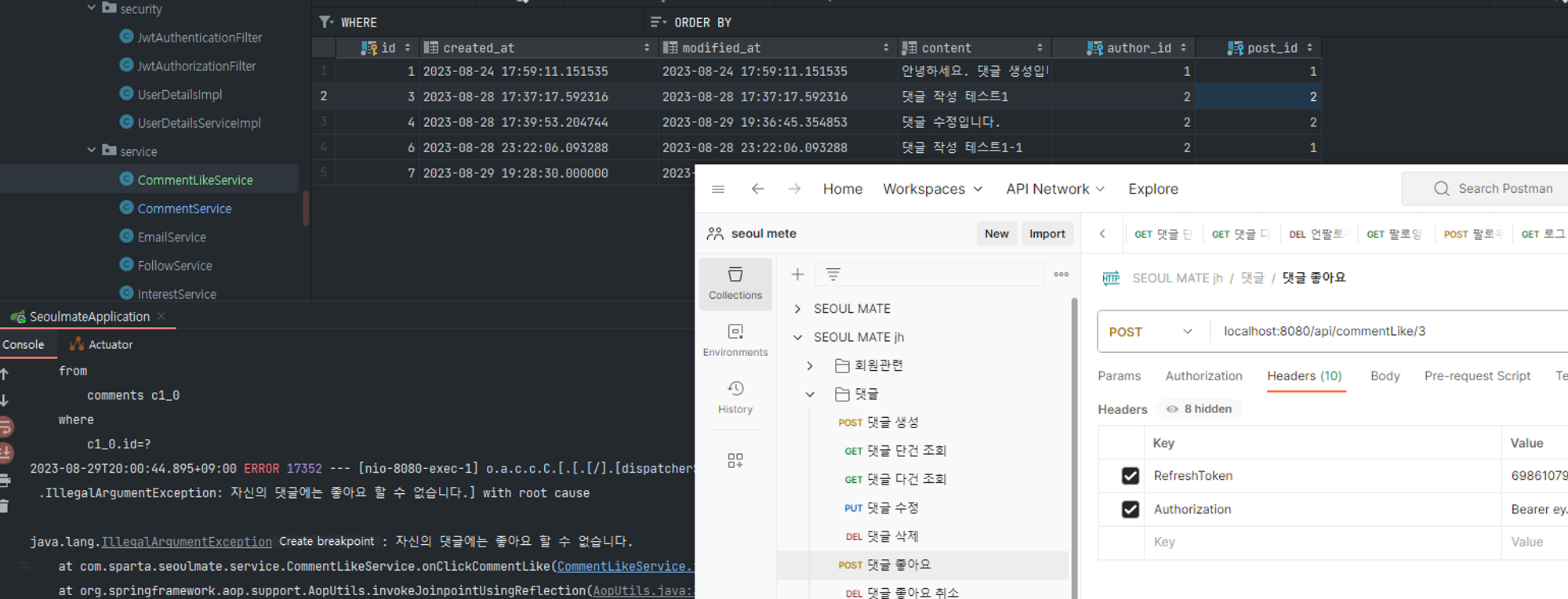
자신의 댓글에 좋아요 할 수 없음 → clear
-
관리자가 좋아요를 삭제할 수 있는 기능은 어떻게 구현하느냐에 문제가 아니라 필요성이 없음!
→ 있어도 이상한 느낌?! 그래서 과감히 포기! 삭제~! -
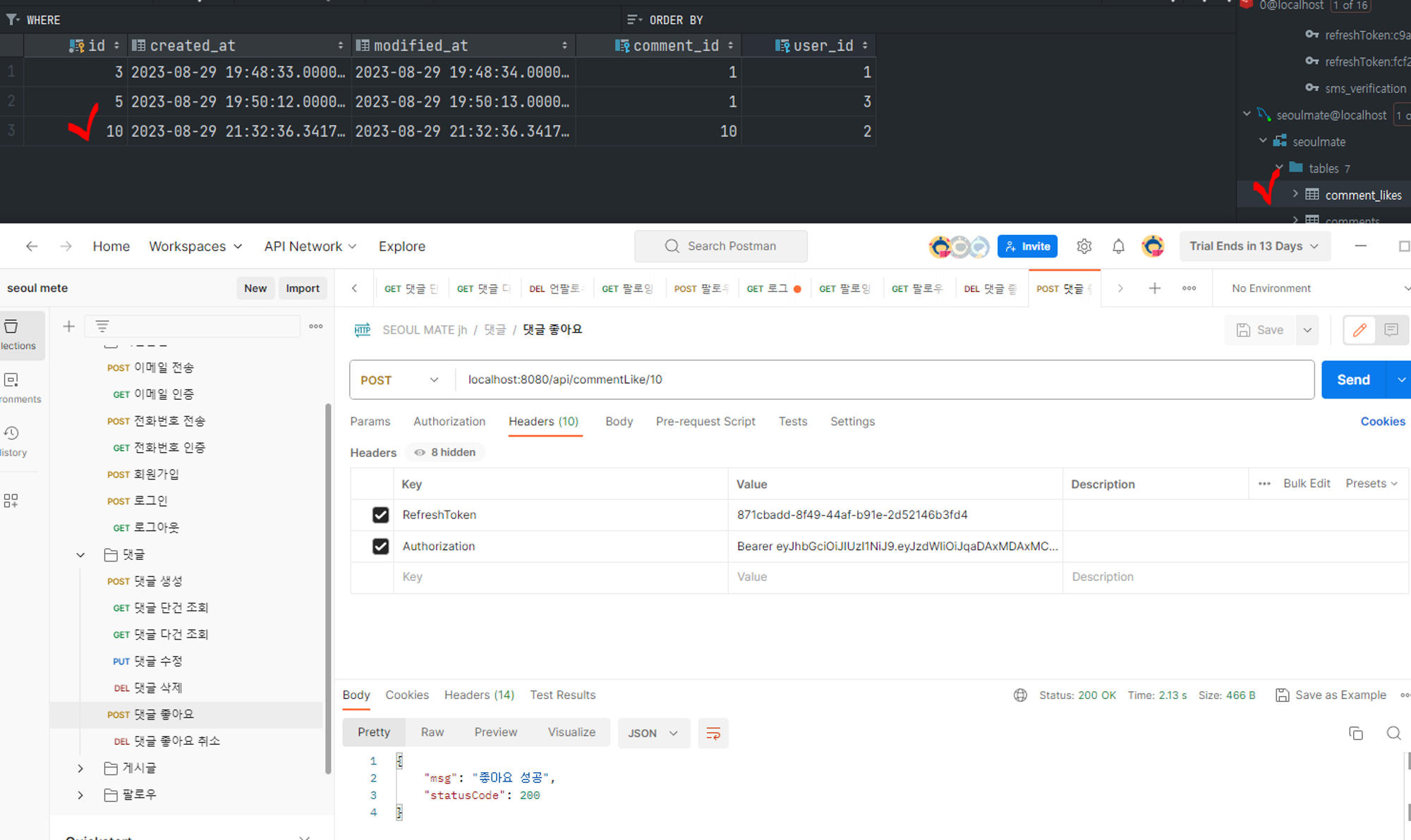
2번(유저)가 3번(유저)의 댓글에 좋아요 → clear

- clear
- clear
-
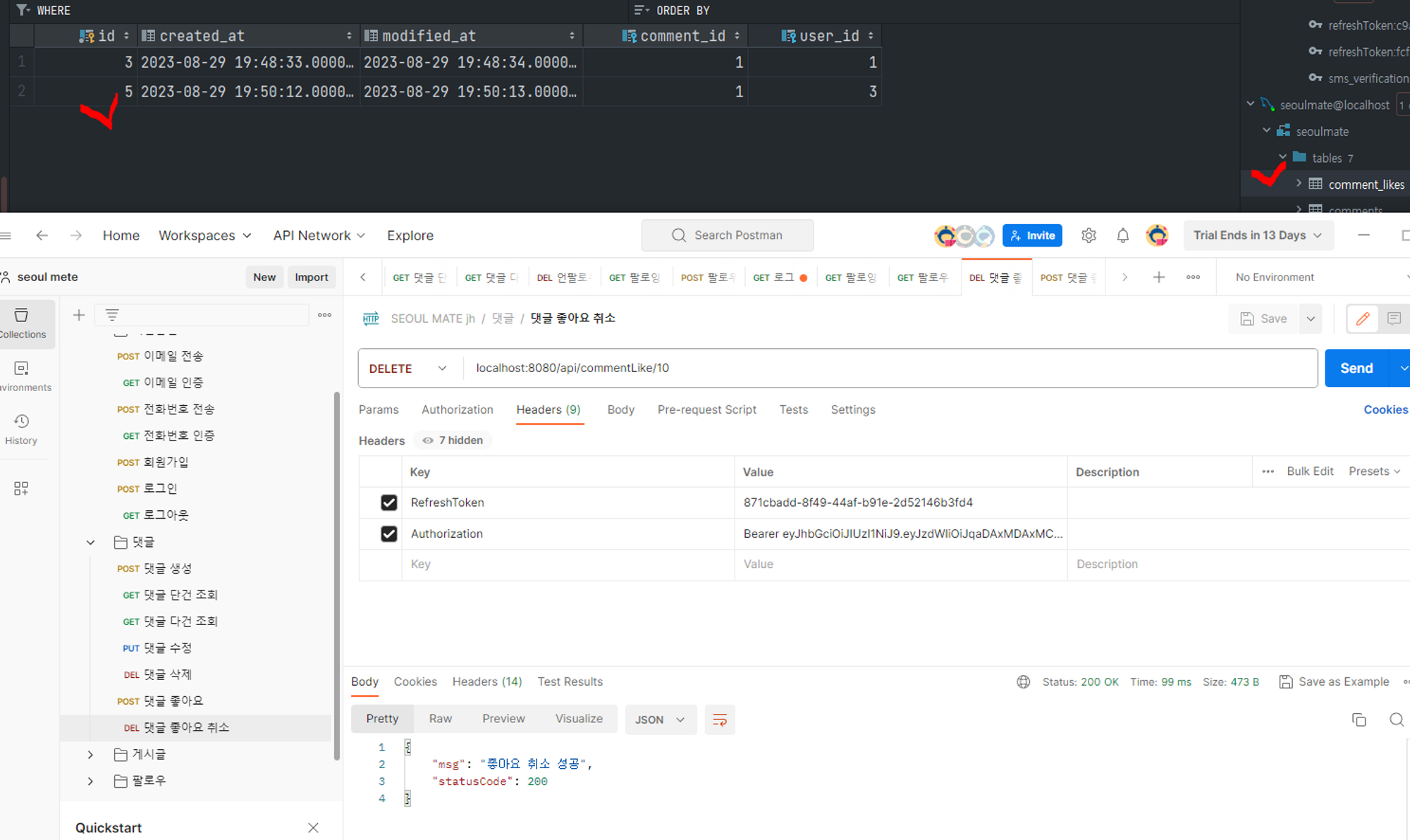
댓글에 좋아요 취소 → clear
댓글 수정, 삭제
-
로그인한 사용자가 댓글 작성자이면 수정, 삭제 가능 & 관리자 ADMIN이면 수정, 삭제 가능하게 하기 → or(||) 사용
- CommentService
- public CommentResponseDto updateComment(Long commentId, User user, CommentRequestDto commentRequestDto)
- 기존
@Transactional public CommentResponseDto updateComment(Long commentId, User user, CommentRequestDto commentRequestDto) { Comment comment = findComment(commentId); if(!comment.getAuthor().getId().equals(user.getId())) { throw new RejectedExecutionException(); } comment.updateContent(commentRequestDto.getContent()); return CommentResponseDto.of(comment); } - 변경
// 로그인한 사용자가 댓글 작성자이거나 관리자인 경우
        if (user.getId().equals(comment.getAuthor().getId()) || user.getRole() == UserRoleEnum.ADMIN) {
            comment.updateContent(commentRequestDto.getContent());
        } else {
            throw new IllegalStateException("댓글 수정 권한이 없습니다.");
        }
- 기존
- public void deleteComment(Long commentId, User user)
- 기존
// Comment 삭제 @Transactional public void deleteComment(Long commentId, User user) { Comment comment = findComment(commentId); if(!comment.getAuthor().getId().equals(user.getId())) { throw new RejectedExecutionException(); } // or 연산자 써서 사용자 계정이 admin일 때 삭제할 수 있도록 commentRepository.delete(comment); } - 변경
// 로그인한 사용자가 댓글 작성자이거나 관리자인 경우
        if (user.getId().equals(comment.getAuthor().getId()) || user.getRole() == UserRoleEnum.ADMIN) {
            commentRepository.delete(comment);
        } else {
            throw new IllegalStateException("댓글 삭제 권한이 없습니다.");
        }
- 기존
- public CommentResponseDto updateComment(Long commentId, User user, CommentRequestDto commentRequestDto)
- CommentService
-
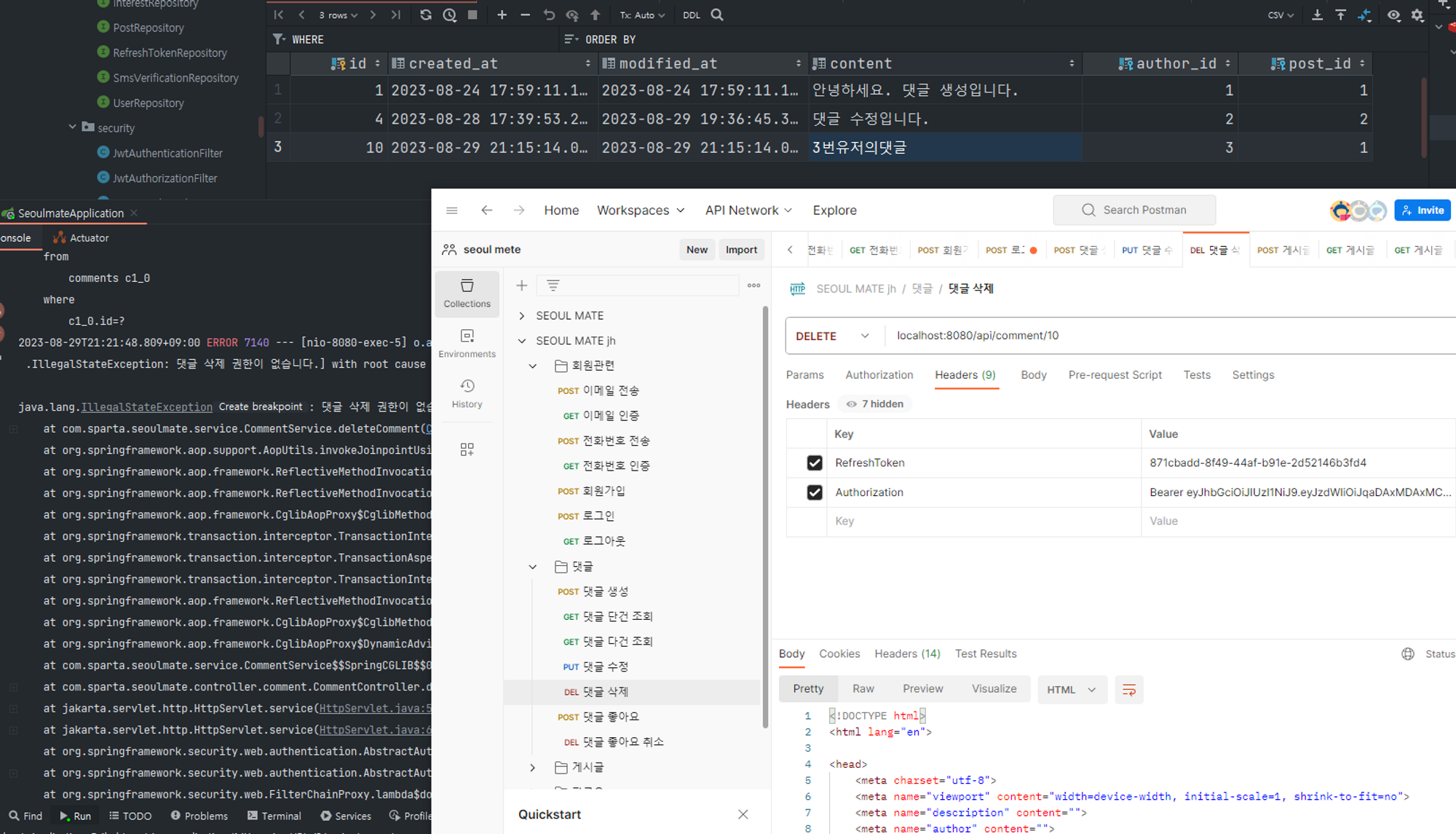
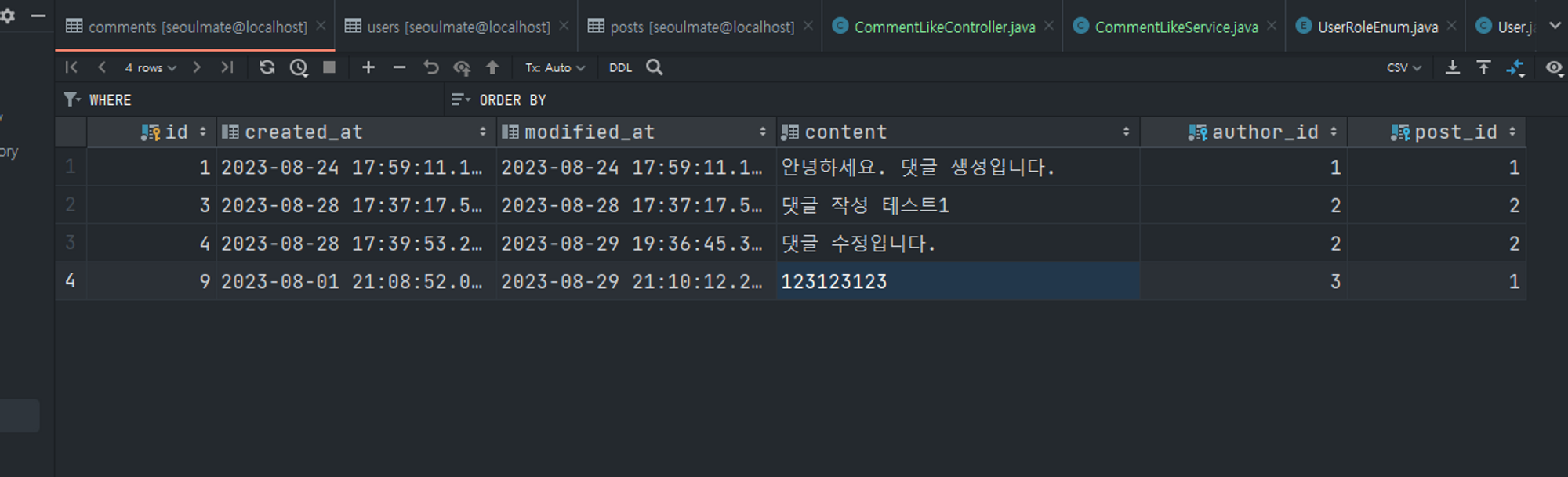
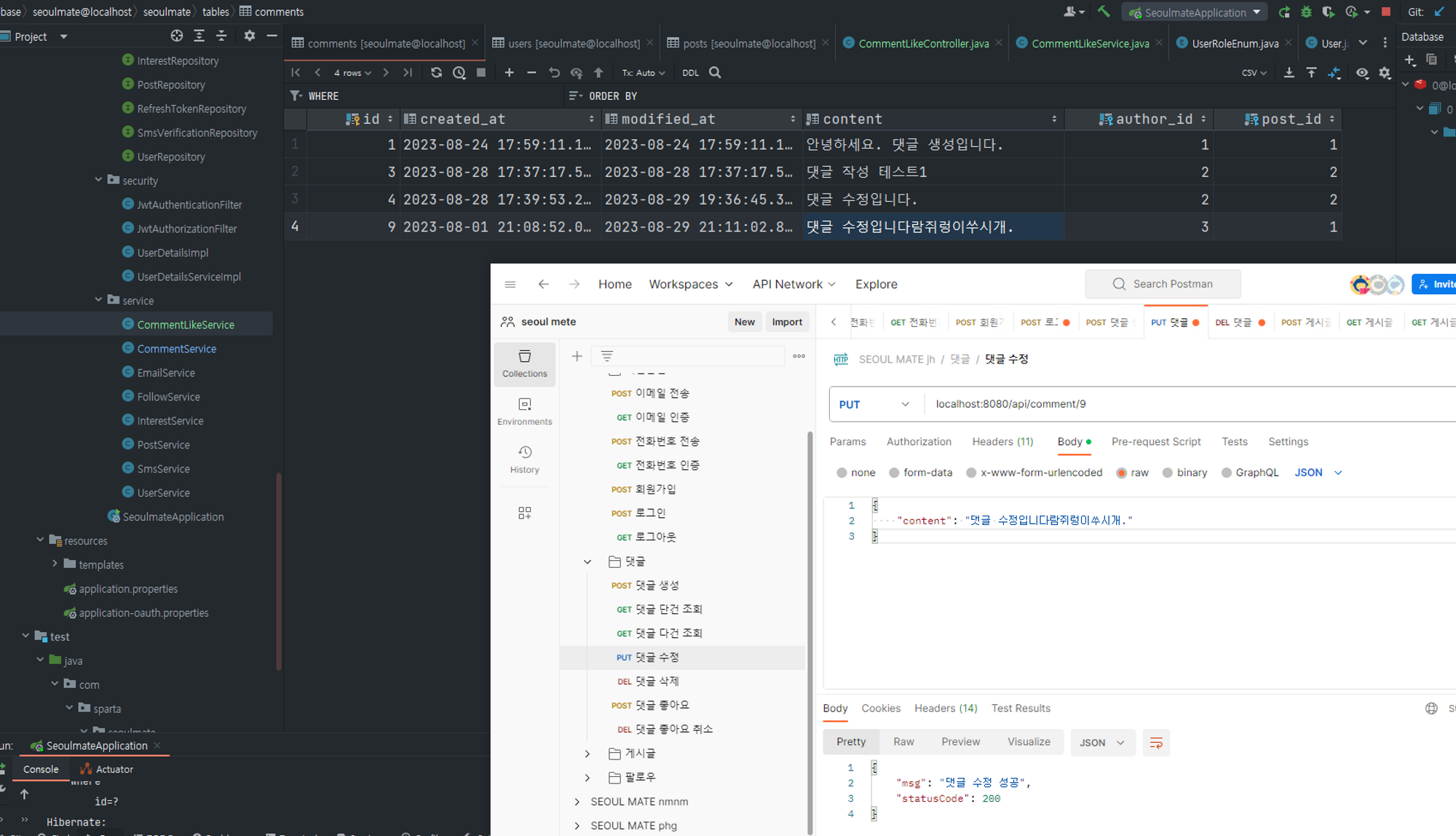
2번(어드민) 유저가 3번(유저) 유저의 댓글 수정하기 → clear
- before
- after
- before
-
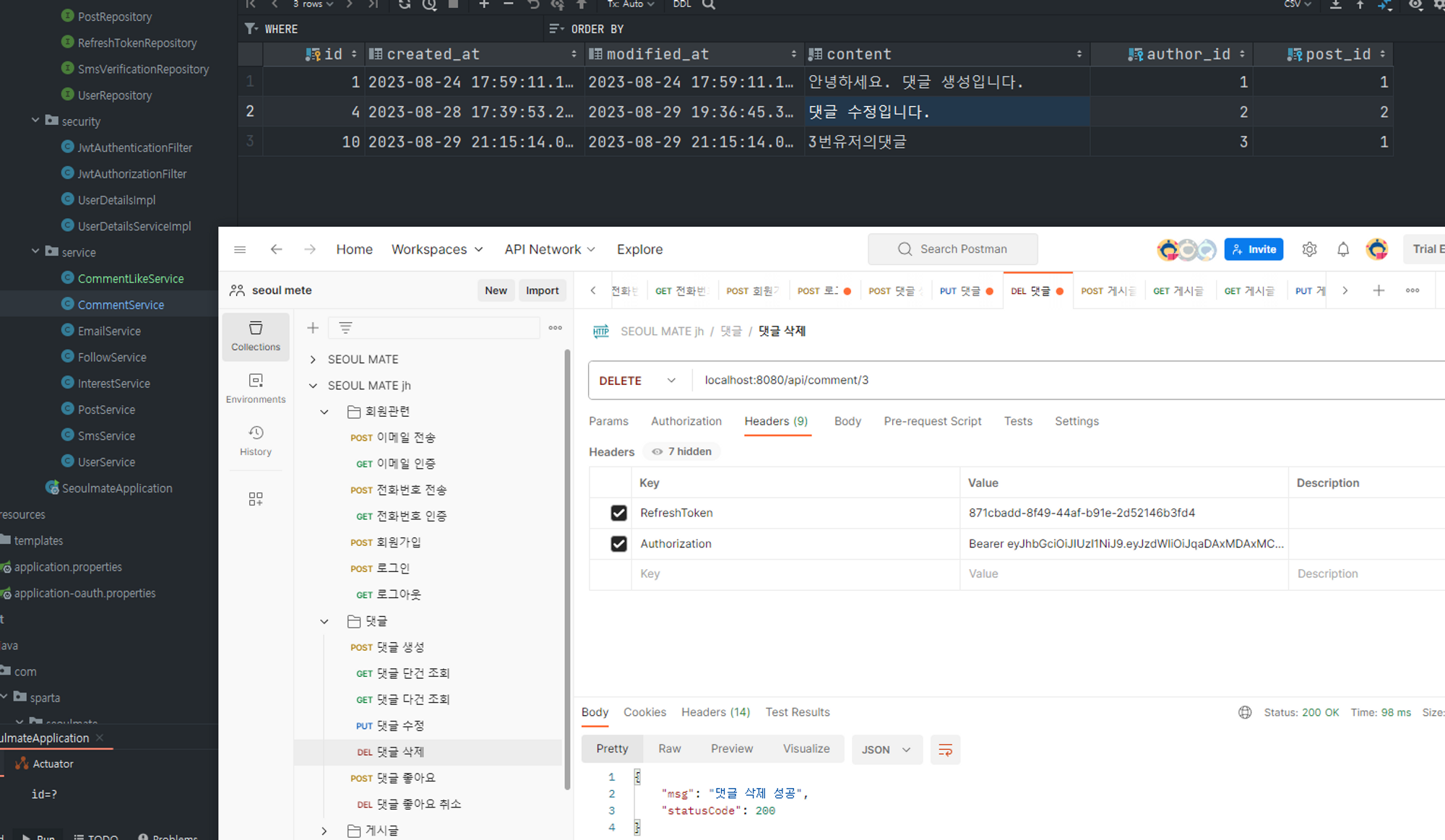
2번(어드민) 유저가 3번(유저) 유저의 댓글 삭제하기 → clear
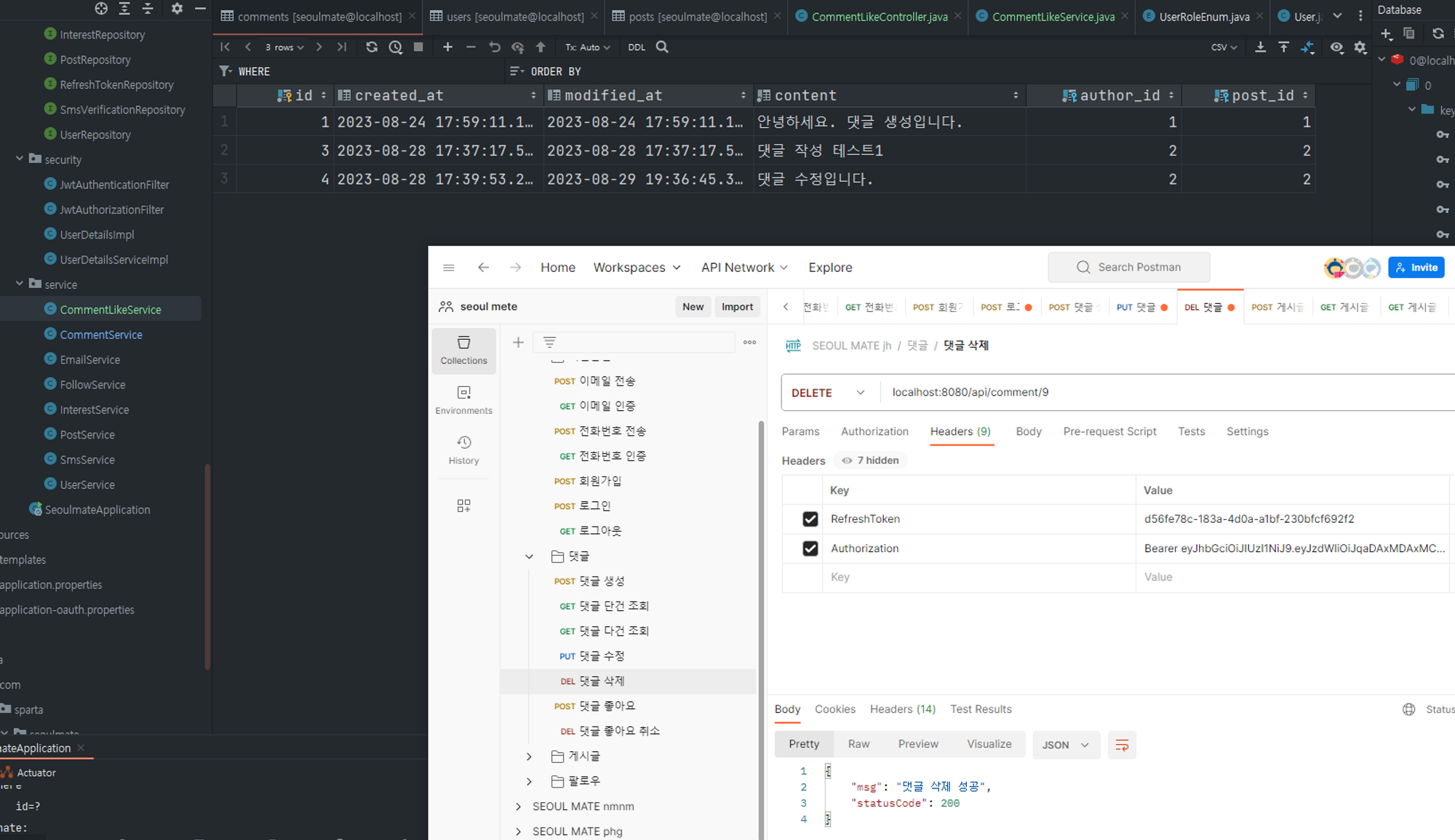
-
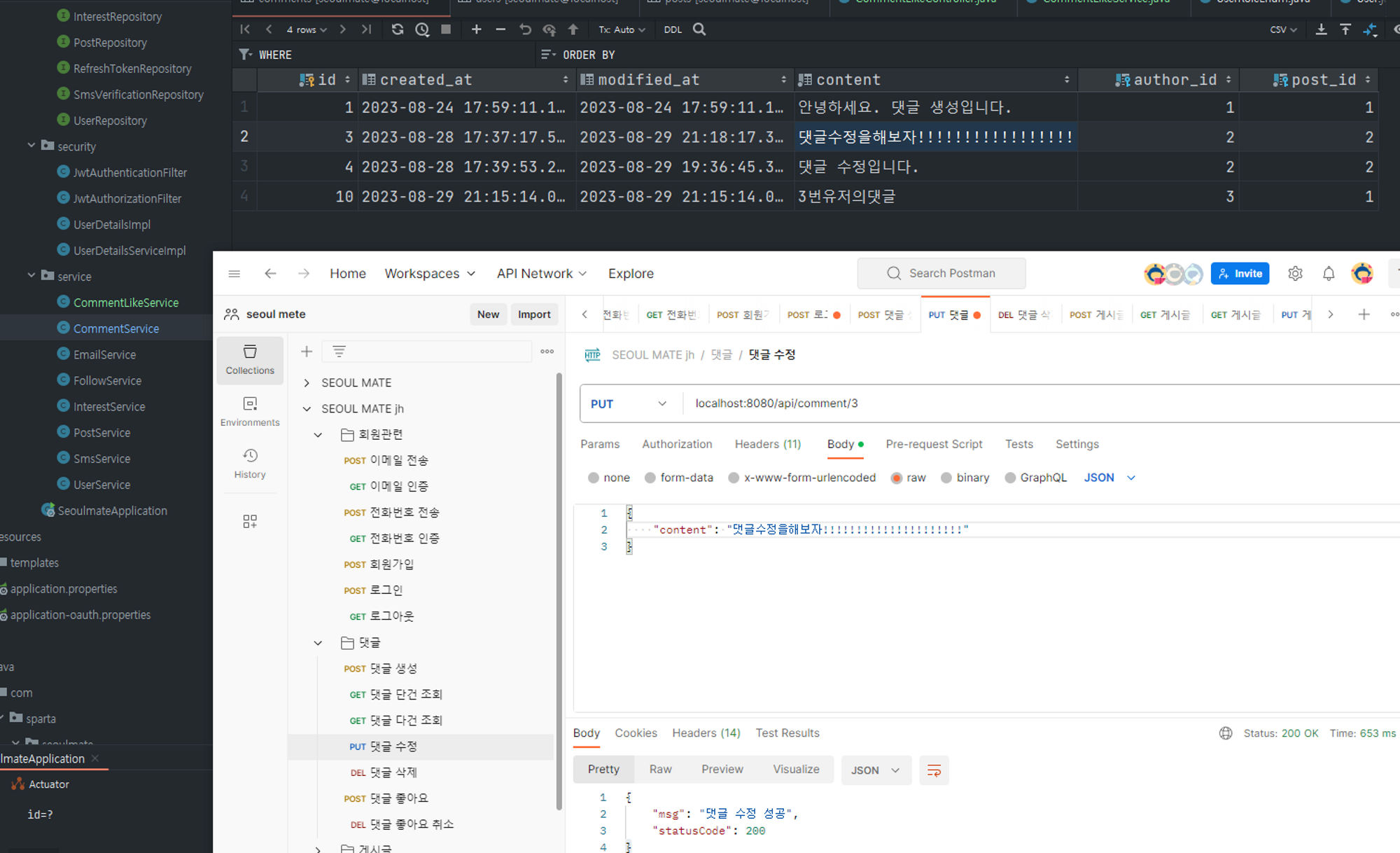
2번(유저)가 본인(유저) 댓글 수정하기 → clear
- before

- after
- before
-
2번(유저)가 본인(유저) 댓글 삭제하기 → clear
-
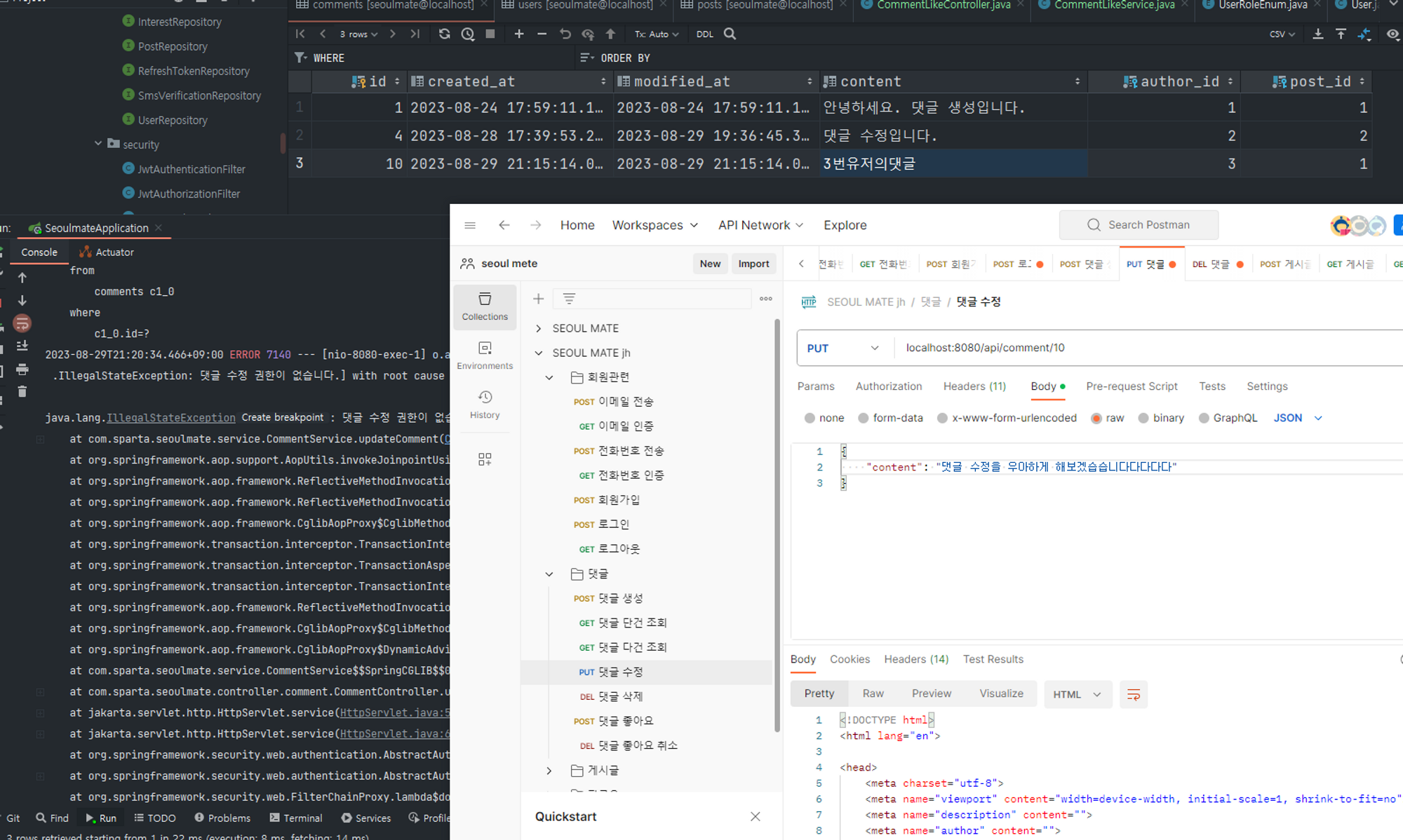
2번(유저가) 3번(유저) 댓글 수정하기 → 실패가 성공! clear
- before

- after
- before
-
2번(유저가) 3번(유저) 댓글 삭제하기 → 실패가 성공! clear