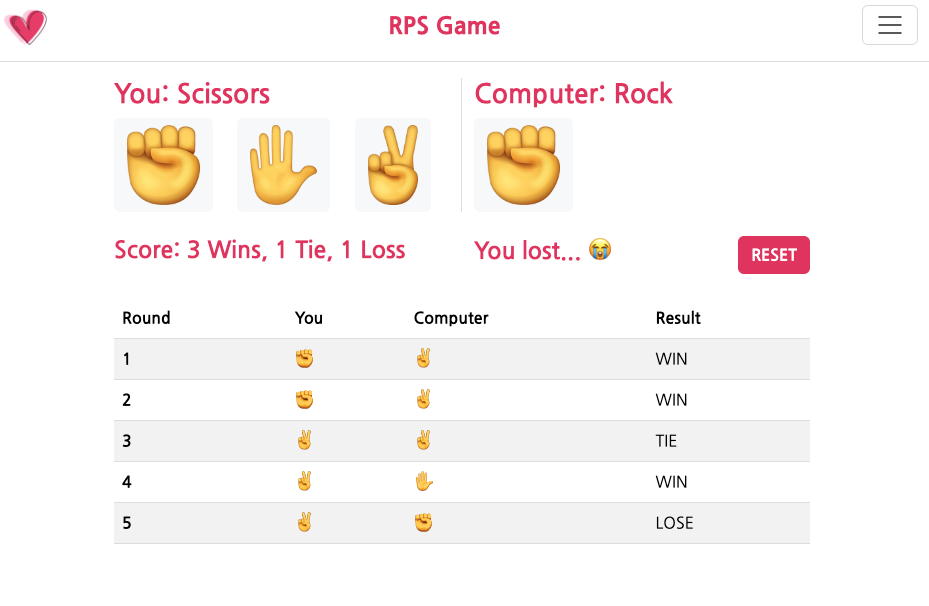
✊ 요구 사항
- 실습으로 만든 가위바위보 게임을 웹사이트로 만든다.
- Flask 내부에서 로직을 처리한 후 HTML에서 결과물이 출력되도록 한다.
- 가위바위보 전적을 SQLite로 저장한다.
- HTML에 승/무/패 통계와 게임 기록을 표시한다.
✋ 추가 사항
-
초기화 버튼 클릭 시, 가위바위보 전적이 모두 리셋된다.
<!-- HTML 코드 -->
<form action="/rps/reset">
  <button type="submit" class="btn fw-bold text-white" style="background-color:#E53C68;">RESET</button>
</form>
# Python 코드 # DB 내 모든 row 삭제 if playerChoice == "Reset": db.session.query(Rps).delete() db.session.commit() -
유저가 클릭하는 버튼만 활성화시키고, 컴퓨터의 버튼은 클릭이 불가하도록 한다.
<button type="submit" class="btn-disabled">비활성화된 버튼</button> -
초기 화면 및 초기화 버튼 클릭 시에는 컴퓨터도 모든 패를 보여준다. 유저가 버튼을 클릭하면 컴퓨터의 패를 랜덤하게 고르고 해당 패의 버튼만 보여준다.
{% if data.playerChoice in ("", "Reset") %} <!-- 바위 버튼 코드 --> <!-- 보 버튼 코드 --> <!-- 가위 버튼 코드 --> {% elif data.computerChoice == "Rock" %} <!-- 바위 버튼 코드 --> {% elif data.computerChoice == "Paper" %} <!-- 보 버튼 코드 --> {% elif data.computerChoice == "Scissors" %} <!-- 가위 버튼 코드 --> {% endif %} -
유저가 가위바위보 선택 버튼을 클릭할 때마다, 유저와 컴퓨터의 패와 승부 결과를 바로 화면에 내보낸다.
<!-- HTML 코드 -->
<!-- 가위/바위/보 버튼 클릭 시 바로 출력하기 위한 코드 -->
<form action="/rps/rock" class="col">바위 버튼</form>
<form action="/rps/paper" class="col">보 버튼</form>
<form action="/rps/scissors" class="col">가위 버튼</form>

<!-- 유저의 패 보여주기 -->
<h3 class="custom-text fw-bold">
  You{{ ": " if data.playerChoice and data.playerChoice != "Reset" }}{{ data.playerChoice if data.playerChoice and data.playerChoice != "Reset" }}
</h3>

<!-- 컴퓨터의 패 보여주기 -->
<h3 class="custom-text fw-bold">
  Computer{{ ": " if data.playerChoice and data.playerChoice != "Reset" }}{{ data.computerChoice if data.playerChoice and data.playerChoice != "Reset" }}
</h3>

<!-- 승부 결과 보여주기 -->
<h4 class="col custom-text fw-bold">{{ data.result_print if data.playerChoice and data.playerChoice != "Reset" }}</h4>

<!-- 승부 전적 보여주기 -->
<h4 class="custom-text fw-bold">
  Score: {{ data.win_count }} Win{{"s" if data.win_count > 1}}, {{ data.tie_count }} Tie{{"s" if data.tie_count > 1}}, {{ data.lose_count }} Loss{{"es" if data.lose_count > 1}}
</h4>
# Python 코드 @app.route("/rps/<playerChoice>/") def rps(playerChoice=""): # 코드 작성 # 가위바위보 판정 및 판정 결과 DB에 저장 # 직전에 저장한 판정 결과까지 모두 불러오기 rps_db = Rps.query.all() # 누적 전적 추출 win_count = Rps.query.filter_by(result="WIN").count() lose_count = Rps.query.filter_by(result="LOSE").count() tie_count = Rps.query.filter_by(result="TIE").count() context = { # 넘길 데이터 } return render_template('rps.html', data=context)