VSCODE 에러
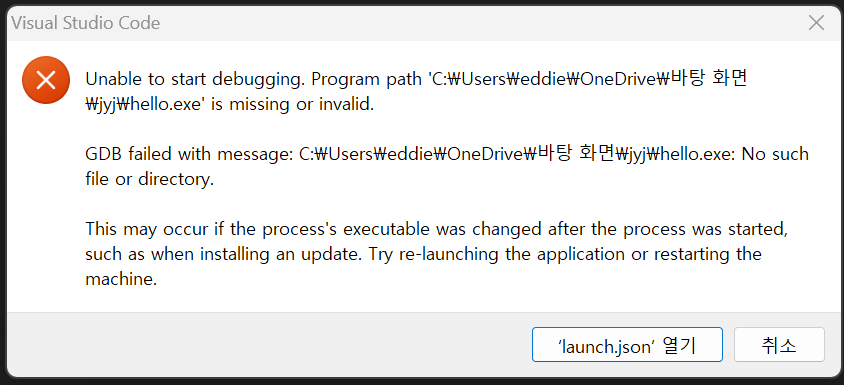
Visual Studio로만 C/C++을 사용하다가 이제 VSCODE도 써봐야지~ 하고 VSCODE 세팅하고 F5를 누르는 순간 이 에러가... 내가 잘못 세팅한줄 알고 재설치를 해도 계속 뜨는 저 에러 문구...
launch.json에서 도대체 뭘 수정해야하는지 몰라서 정말 한참을 헤매다가 드디어 완료!!!
첫 번째 에러 : GDB failed with message : No such file or directory. This may occur if the process's executable was changed after the process was started, such as when installing an update. Try re-launching the application or restarting the machine.
기존 launch.json 파일
{
    "configurations": [
        {
            "name": "C/C++: g++.exe 활성 파일 빌드 및 디버그",
            "type": "cppdbg",
            "request": "launch",
            "program": "${fileDirname}\\${fileBasenameNoExtension}.exe",
            "args": [],
            "stopAtEntry": false,
            "cwd": "C:/mingw64/bin",
            "environment": [],
            "externalConsole": false,
            "MIMode": "gdb",
            "miDebuggerPath": "C:\\mingw64\\bin\\gdb.exe",
            "setupCommands": [
                {
                    "description": "gdb에 자동 서식 지정 사용",
                    "text": "-enable-pretty-printing",
                    "ignoreFailures": true
                },
                {
                    "description": "디스어셈블리 버전을 Intel(으)로 설정",
                    "text": "-gdb-set disassembly-flavor intel",
                    "ignoreFailures": true
                }
            ],
            "preLaunchTask": "C/C++: g++.exe 활성 파일 빌드"
        }
    ],
    "version": "2.0.0"
}
수정 1.
우선 "cwd": "C:/mingw64/bin", 을 "cwd": "${fileDirname}"로 수정했어요!
이러면 두번째 에러가 또 뜨더라구요...?
두 번째 에러 : Unable to start debugging. Unexpected GDB output from command "-enviroment-cd ~~~ : Invalid argument

수정 2.
"type": "cppdbg",을 "type": "lldb", 으로 수정하고,
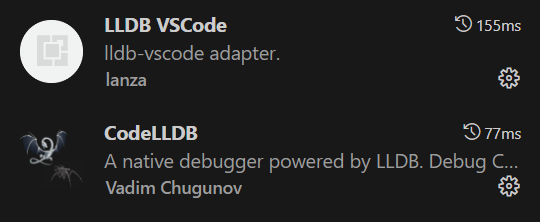
VSCODE 확장 탭에서 lldb 설치 (혹시 몰라서 일단 둘 다 설치했어요!)
결과
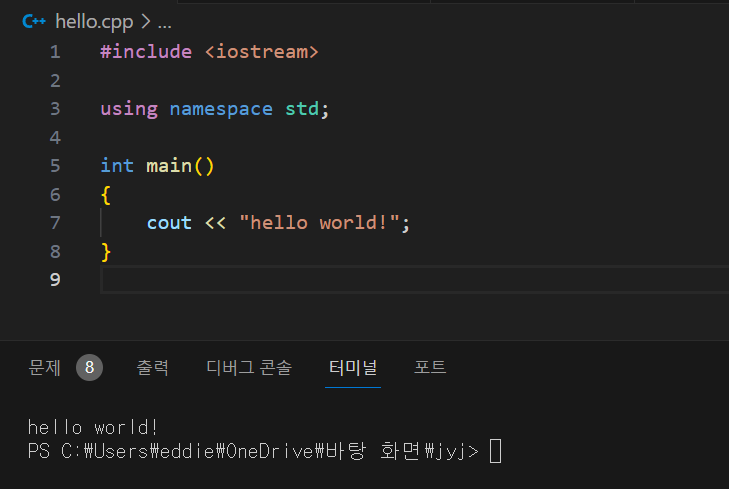
출력이 잘 됩니당 'ㅅ'

🍅 이제 막 공부 시작한 블로그