ApplicationContext
: 스프링 컨테이너라 하며, 인터페이스이다.
스프링 컨테이너의 생성과정
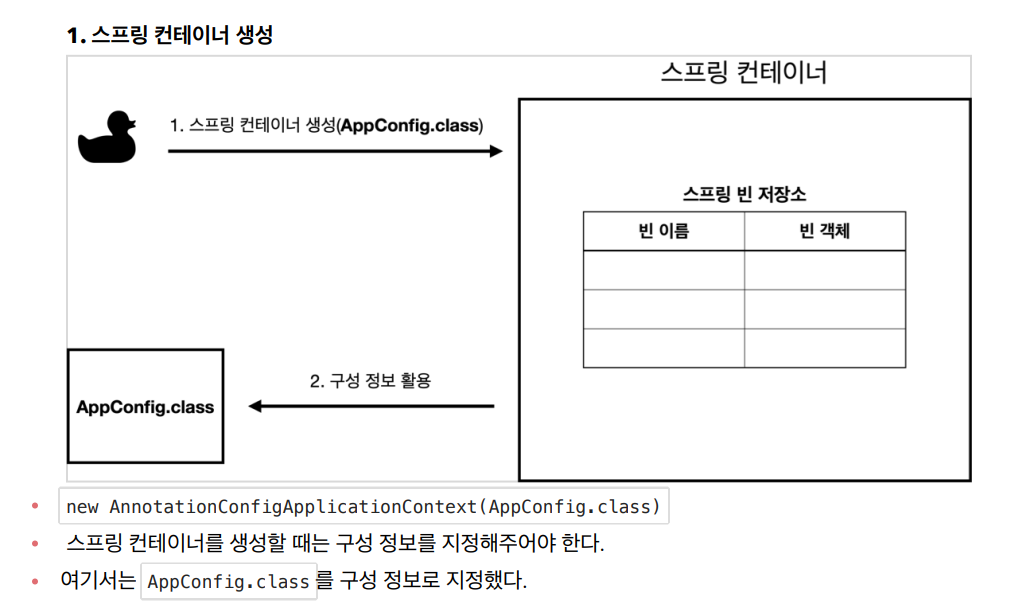
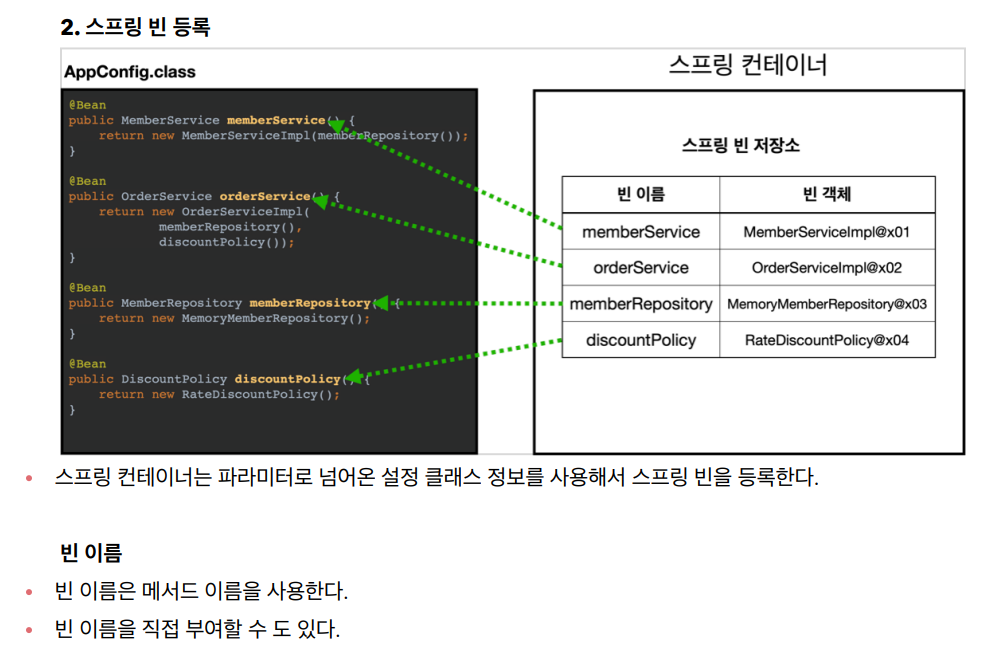
@Bean(name="memberService2")
※ 빈 이름은 항상 다른 이름을 부여해야 한다. 같은 이름을 부여하면, 다른 빈이 무시되거나, 기존 빈을
덮어버리거나 설정에 따라 오류가 발생한다.
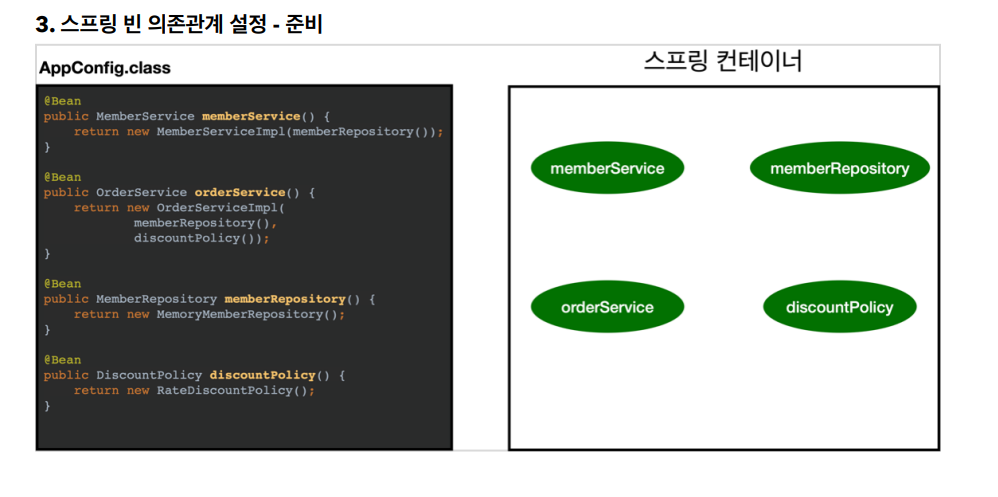
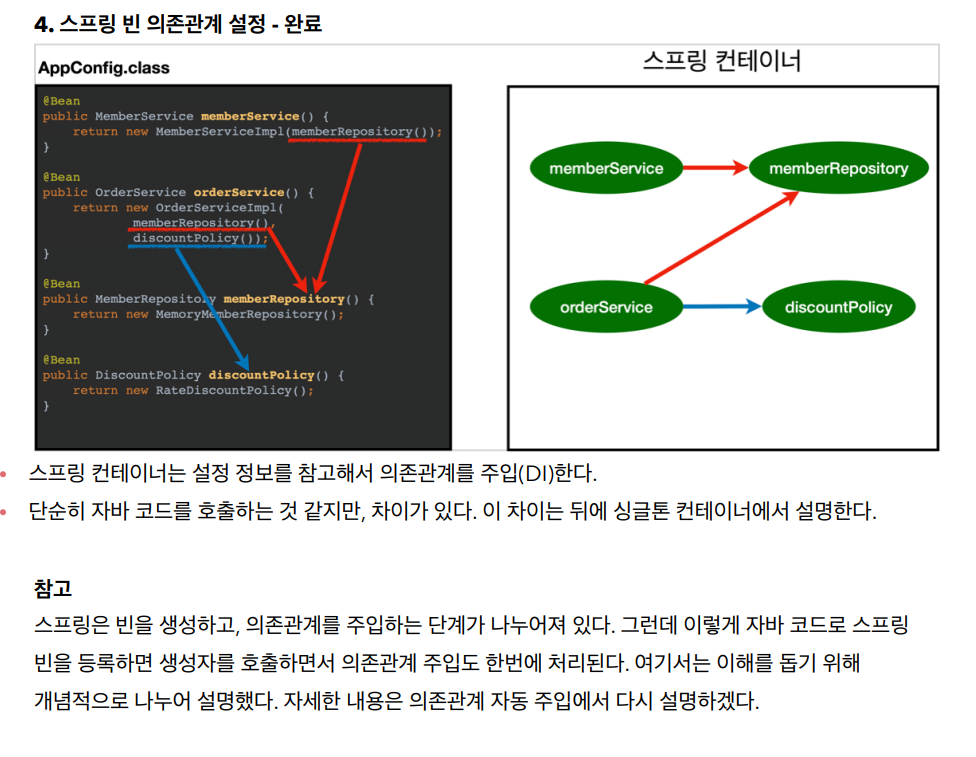
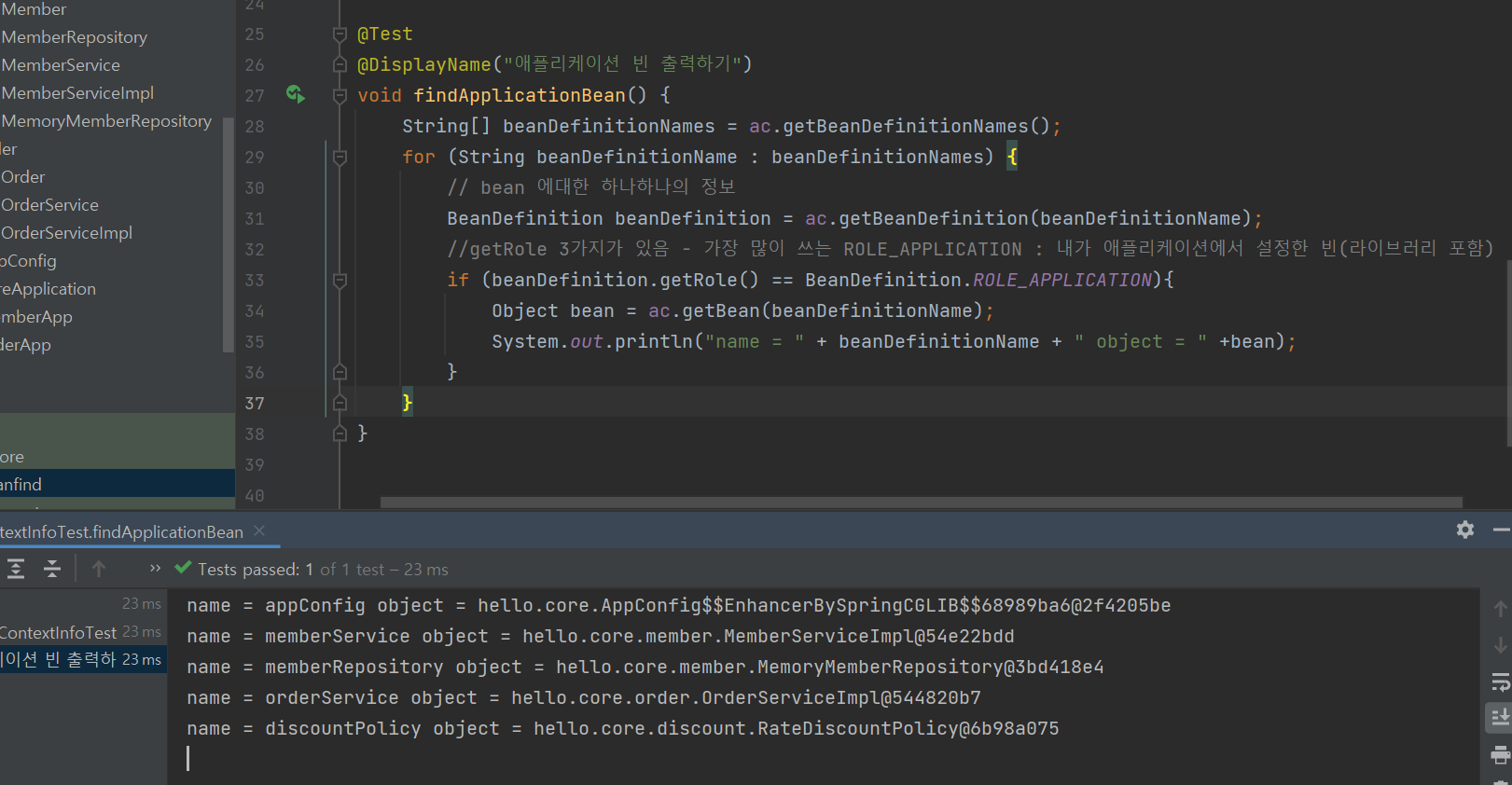
Role ROLE_APPLICATION: 직접 등록한 애플리케이션 빈
Role ROLE_INFRASTRUCTURE: 스프링이 내부에서 사용하는 빈
스프링 빈 조회 - 기본
스프링 컨테이너에서 스프링 빈을 찾는 가장 기본적인 조회 방법
ac.getBean(빈이름, 타입)
ac.getBean(타입)
조회 대상 스프링 빈이 없으면 예외 발생
NoSuchBeanDefinitionException: No bean named 'xxxxx' available
이전 파일로 돌아가기 단축키 ctrl + E
iter 탭 (for 문 자동완성)
psvm 탭 (메인메서드 자동완성)
package hello.core.beanfind;

import hello.core.AppConfig;
import hello.core.member.MemberService;
import hello.core.member.MemberServiceImpl;
import org.assertj.core.api.Assertions;
import org.junit.jupiter.api.DisplayName;
import org.junit.jupiter.api.Test;
import org.springframework.beans.factory.NoSuchBeanDefinitionException;
import org.springframework.context.annotation.AnnotationConfigApplicationContext;

import static org.junit.jupiter.api.Assertions.*;

public class ApplicationContextBasicFindTest {

    AnnotationConfigApplicationContext ac = new AnnotationConfigApplicationContext(AppConfig.class);

    @Test
    @DisplayName("빈 이름으로 조회")
        void findBeanName(){
        MemberService memberService = ac.getBean("memberService", MemberService.class);
//        System.out.println("memberService = " + memberService);
//        System.out.println("memberService.getClass() = " + memberService.getClass());
        //검증은 항상 Assertions
        // 인스턴트인지 검증
        Assertions.assertThat(memberService).isInstanceOf(MemberServiceImpl.class);
    }

    @Test
    @DisplayName("이름 없이 타입으로만 조회")
        void findBeanType(){
        MemberService memberService = ac.getBean(MemberService.class);
        Assertions.assertThat(memberService).isInstanceOf(MemberServiceImpl.class);

    }
    @Test
    @DisplayName("구체타입으로 조회")
    void findBeanName2(){
        MemberService memberService = ac.getBean("memberService", MemberServiceImpl.class);

        Assertions.assertThat(memberService).isInstanceOf(MemberServiceImpl.class);
    }

    @Test
    @DisplayName("빈 이름으로 조회 X")
    void findBeanNameX(){
        //예외가 던져져야 성공
        assertThrows(NoSuchBeanDefinitionException.class,
                () -> ac.getBean("xxxxx", MemberService.class));
    }
}
스프링 빈 조회 - 상속 관계
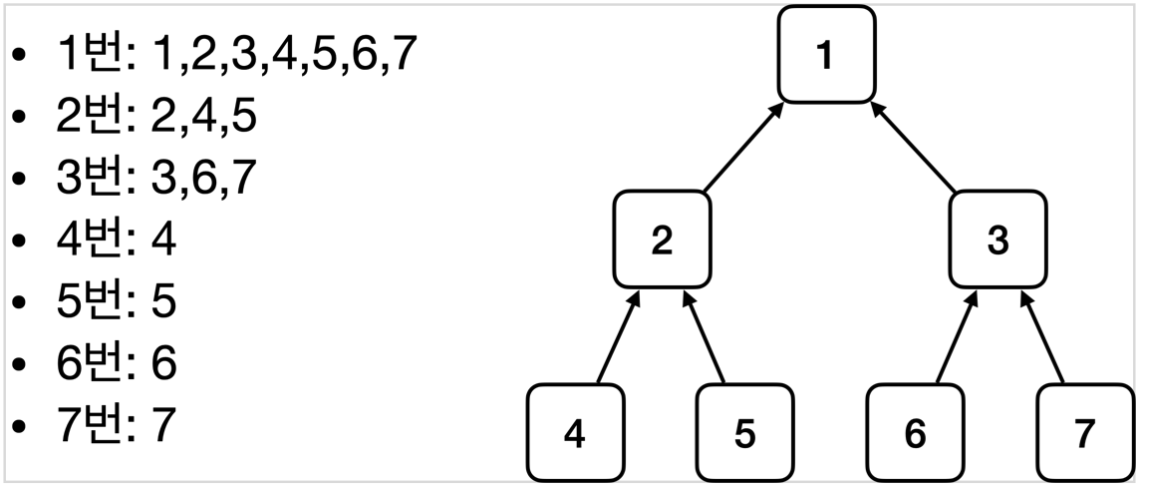
부모 타입으로 조회하면, 자식 타입도 함께 조회한다.
그래서 모든 자바 객체의 최고 부모인 Object 타입으로 조회하면, 모든 스프링 빈을 조회한다.
package hello.core.beanfind;

import hello.core.discount.DiscountPolicy;
import hello.core.discount.FixDiscountPolicy;
import hello.core.discount.RateDiscountPolicy;
import org.junit.jupiter.api.Assertions;
import org.junit.jupiter.api.DisplayName;
import org.junit.jupiter.api.Test;
import org.springframework.beans.factory.NoUniqueBeanDefinitionException;
import org.springframework.context.annotation.AnnotationConfigApplicationContext;
import org.springframework.context.annotation.Bean;
import org.springframework.context.annotation.Configuration;

import java.util.Map;

import static org.assertj.core.api.Assertions.*;
import static org.junit.jupiter.api.Assertions.assertThrows;

public class ApplicationContextExtendsFindTest {
    AnnotationConfigApplicationContext ac = new AnnotationConfigApplicationContext(TestConfig.class);

    @Test
    @DisplayName("부모 타입으로 조회시 자식이 둘 이상 있으면 중복 오류가 발생한다")
    void findBeanByParentTypeDuplicate(){
        assertThrows(NoUniqueBeanDefinitionException.class,
        () -> ac.getBean(DiscountPolicy.class));
    }
    @Test
    @DisplayName("부모 타입으로 조회시 자식이 둘 이상 있으면, 빈 이름을 지정하면 된다")
    void findBeanByParentTypeBeanName(){
        DiscountPolicy rateDiscountPolicy = ac.getBean("rateDiscountPolicy", DiscountPolicy.class);
        assertThat(rateDiscountPolicy).isInstanceOf(RateDiscountPolicy.class);
    }

    @Test
    @DisplayName("특정 하위 타입으로 조회")
    void findBeanBySubType(){
        RateDiscountPolicy bean = ac.getBean(RateDiscountPolicy.class);
        assertThat(bean).isInstanceOf(RateDiscountPolicy.class);
    }
    @Test
    @DisplayName("부모 타입으로 전체 조회")
    void findAllBeanByParentType(){
        Map<String, DiscountPolicy> beansOfType = ac.getBeansOfType(DiscountPolicy.class);
        assertThat(beansOfType.size()).isEqualTo(2);
        //실무에서는 테스트에는 출력문을 남기지 않는다.
        for (String key : beansOfType.keySet()) {
            System.out.println("key = " + key + " value = " + beansOfType.get(key));
        }
    }

    @Test
    @DisplayName("부모타입으로 모두 조회 - Object")
    void findAllBeanByObjectType(){
        Map<String, Object> beansOfType = ac.getBeansOfType(Object.class);
        for (String key : beansOfType.keySet()) {
            System.out.println("key = " + key + " value = " + beansOfType.get(key));
        }
    }

    @Configuration
    static class TestConfig {

        @Bean
        public DiscountPolicy rateDiscountPolicy() {
            return new RateDiscountPolicy();
        }

        @Bean
        public DiscountPolicy fixDiscountPolicy(){
            return new FixDiscountPolicy();
        }
    }
}
BeanFactory와 ApplicationContext
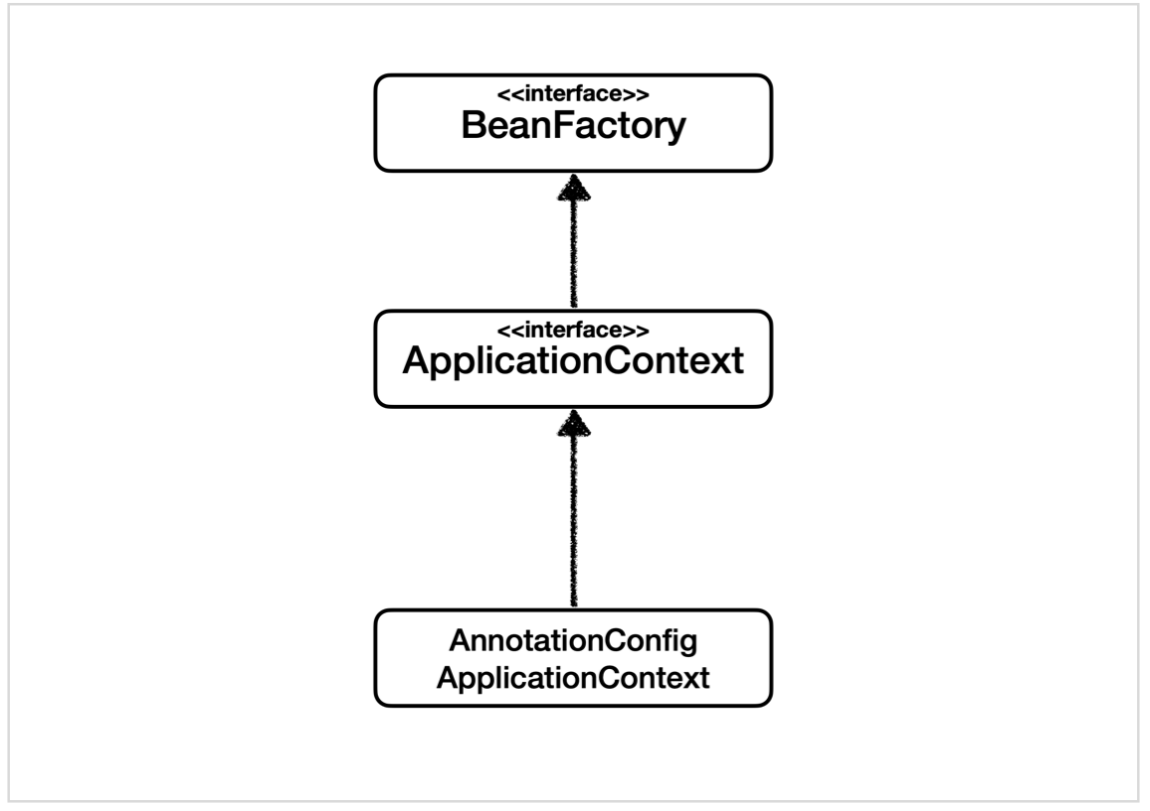
BeanFactory
- 스프링 컨테이너의 최상위 인터페이스다.
- 스프링 빈을 관리하고 조회하는 역할을 담당한다.
- getBean() 을 제공한다.
- 지금까지 우리가 사용했던 대부분의 기능은 BeanFactory가 제공하는 기능이다.
ApplicationContext
- BeanFactory 기능을 모두 상속받아서 제공한다.
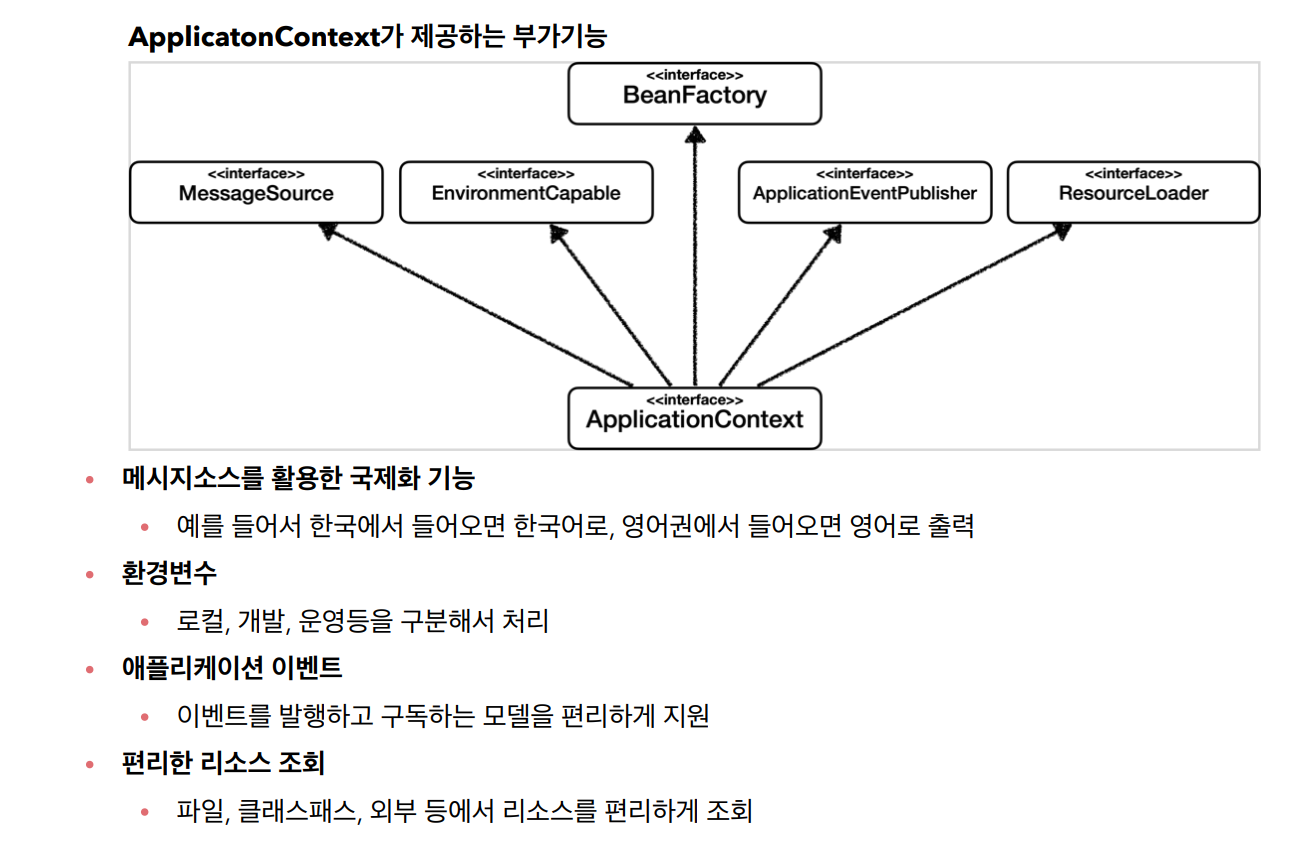
- 빈을 관리하고 검색하는 기능을 BeanFactory가 제공해주는데, 그러면 둘의 차이가 뭘까?
- 애플리케이션을 개발할 때는 빈을 관리하고 조회하는 기능은 물론이고, 수 많은 부가기능이 필요하다.
스프링 컨테이너는 다양한 형식의 설정 정보를 받아드릴 수 있게 유연하게 설계되어 있다.
자바 코드, XML, Groovy 등등
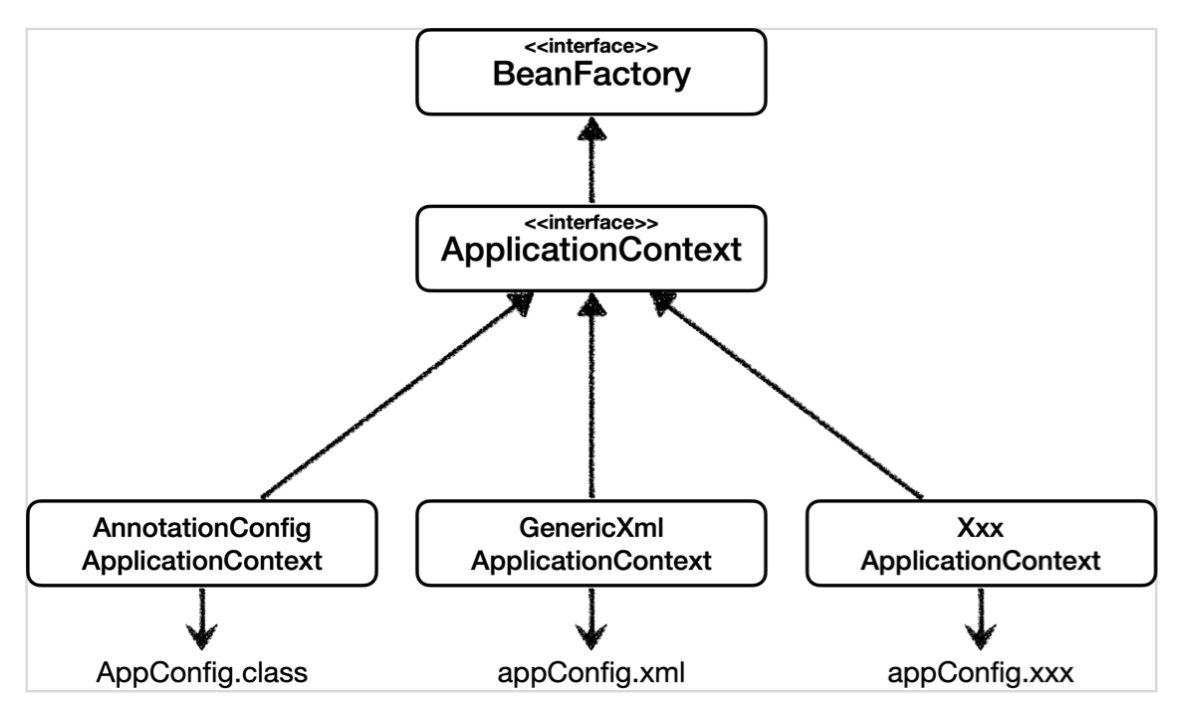
XML 설정 사용
최근에는 스프링 부트를 많이 사용하면서 XML기반의 설정은 잘 사용하지 않는다. 아직 많은 레거시 프로젝트 들이 XML로 되어 있고, 또 XML을 사용하면 컴파일 없이 빈 설정 정보를 변경할 수 있는 장점도 있으므로 한번쯤 배워두는 것도 괜찮다.
GenericXmlApplicationContext 를 사용하면서 xml 설정 파일을 넘기면 된다.
appConfig.xml
<?xml version="1.0" encoding="UTF-8"?>
<beans xmlns="http://www.springframework.org/schema/beans"
       xmlns:xsi="http://www.w3.org/2001/XMLSchema-instance"
       xsi:schemaLocation="http://www.springframework.org/schema/beans http://www.springframework.org/schema/beans/spring-beans.xsd">

    <bean id="memberService" class="hello.core.member.MemberServiceImpl">
        <constructor-arg name="memberRepository" ref="memberRepository" />
    </bean>

    <bean id="memberRepository" class="hello.core.member.MemoryMemberRepository"/>

    <bean id="orderService" class="hello.core.order.OrderServiceImpl">
        <constructor-arg name="memberRepository" ref="memberRepository" />
        <constructor-arg name="discountPolicy" ref="discountPolicy" />
    </bean>

    <bean id="discountPolicy" class="hello.core.discount.RateDiscountPolicy"/>


</beans>
test
package hello.core.xml;

import hello.core.member.MemberService;
import org.assertj.core.api.Assertions;
import org.junit.jupiter.api.Test;
import org.springframework.context.ApplicationContext;
import org.springframework.context.support.GenericXmlApplicationContext;

public class XmlAppContext {
    @Test
    void xmlAppContext(){
        ApplicationContext ac = new GenericXmlApplicationContext("appConfig.xml");
        MemberService memberService = ac.getBean("memberService", MemberService.class);
        Assertions.assertThat(memberService).isInstanceOf(MemberService.class);
    }
}
xml 기반의 appConfig.xml 스프링 설정 정보와 자바 코드로 된 AppConfig.java 설정 정보를
비교해보면 거의 비슷하다는 것을 알 수 있다.