오늘 나는 아래 figma 이미지상 빨간테두리의 날짜/시간을 컴포넌트로 분리하여 코드 수정을 통해 구현해 볼 것이다.
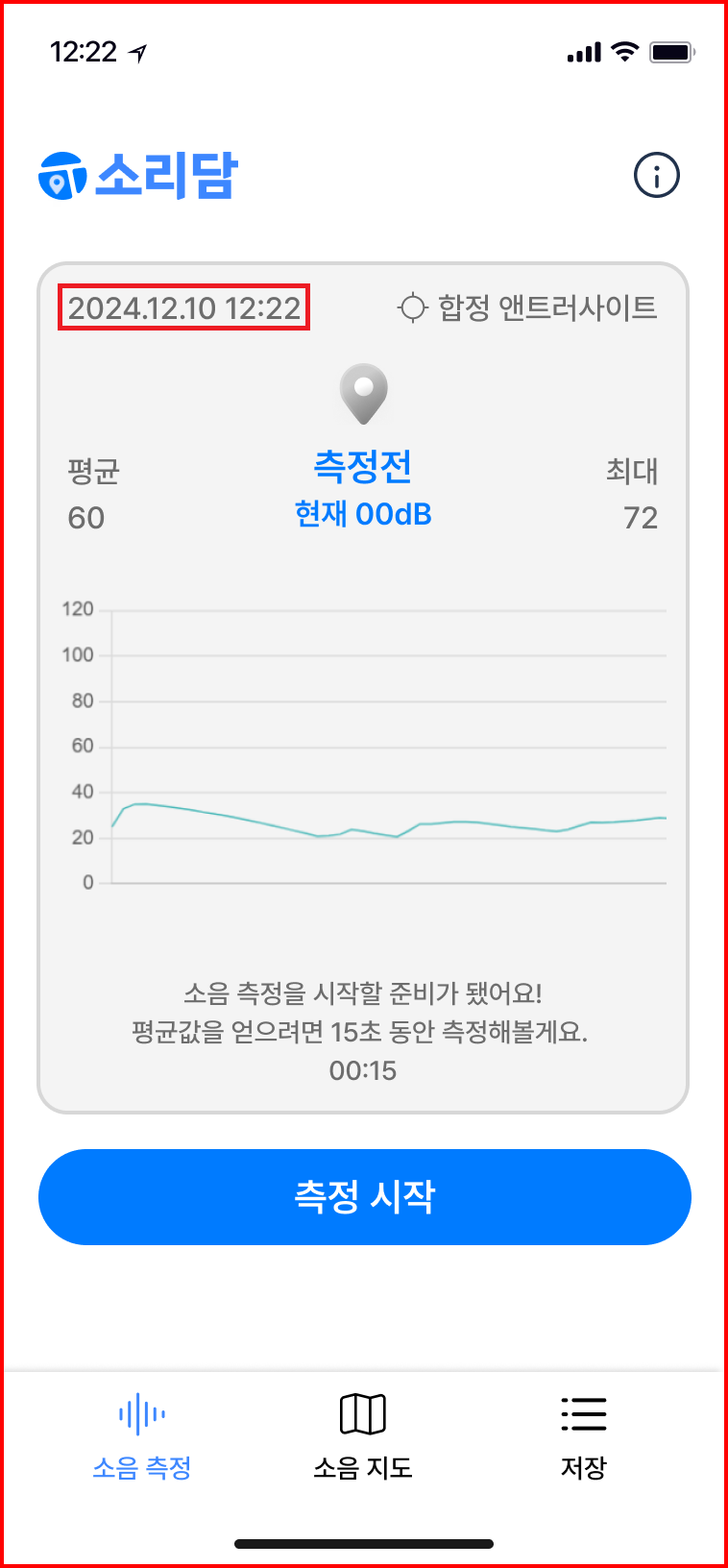
평소 Javascript를 공부하다보면 현재 날짜와 시간을 구현하는 것은 Javascript 내장 함수인Date()함수를 통해 가능하다는 것을 알 수 있다.
다만 현재 프로젝트 상 날짜/시간 컴포넌트(이하 DateTimeDisplay 컴포넌트)는 실시간으로 현재 날짜와 시간을 보여주어야 하며, '측정시작' 버튼을 클릭하여 데시벨 측정 시작시 측정시작 날짜/시간으로 고정되게 보여야 하며, 측정 취소에는 다시 현재 날짜/시간을 실시간으로 보여주어야 한다.
날짜/시간 가져오기(HTML/Javascript사용[기본])
해당 날짜/시간이 동적으로 변화하기 때문에 우선 실시간으로 현재 날짜/시간을 표시하는 것을 최우선 목표로 해야했다.
<!DOCTYPE html>
<html lang="en">
<head>
    <meta charset="UTF-8">
    <meta name="viewport" content="width=device-width, initial-scale=1.0">
    <title>날짜/시간 가져오기기</title>
</head>
<body>
    <div id="datetime"></div>
</body>
<script>
        const now = new Date();
        document.getElementById('datetime').textContent = `${now}`;
</script>
</html>
위와 같이 html과 javascript만을 활용하여 인수 없이 Date함수를 호출하면

위의 이미지와 같이 현재 날짜와 시간이 저장된 Date 객체가 반환된다.
날짜/시간 형식 설정
이를 현재 진행하는 프로젝트처럼 YYYY.MM.DD 00:00 으로 날짜/시간을 보여주기 위해서는 Date의 날짜/시간을 가져와서 일정한 포멧으로 변환해야 한다.
여기서 Date 객체의 메소드를 활용해야 하며 각 메소드는 아래와 같다.
| getFullYear() | 연도(네 자릿수)를 반환합니다. |
| getMonth() | 월을 반환합니다(0 이상 11 이하). |
| getDate() | 일을 반환합니다(1 이상 31 이하). |
| getHours() | 시간(시)를 반환합니다. |
| getMinutes() | 시간(분)를 반환합니다. |
| getSeconds() | 시간(초)를 반환합니다. |
위 메소드를 활용하여 HTML과 JS 코드를 아래와 같이 수정하면
<!DOCTYPE html>
<html lang="en">
<head>
    <meta charset="UTF-8">
    <meta name="viewport" content="width=device-width, initial-scale=1.0">
    <title>날짜/시간 가져오기기</title>
</head>
<body>
    <div id="datetime"></div>
</body>
<script>
    const time = new Date();

    const formatDate = (date) => {
        const year = date.getFullYear();
        const month = date.getMonth() + 1
        const day = date.getDate()
        return `${year}.${month}.${day}`;
    };

    const formatTime = (date) => {
        const hours = date.getHours()
        const minutes = date.getMinutes()
        const seconds = date.getSeconds()
        return `${hours}:${minutes}:${seconds}`;
    };

    document.getElementById('datetime').textContent = `${formatDate(time)} ${formatTime(time)}`;
</script>
</html>
아래와 같은 결과가 나온다.

위 이미지를 자세하게 보면 시간이 00:00:00으로 나오는 것이 아니라 1시라고 가정하면 01이 아닌 1이 출력되게 된다. 날짜는 현재 시기상 공교롭게도 2자릿수가 꽉 채워져서 나오지만 만일 1월달이었으면 2024.01이 아닌 2024.1로 출력되었을 것이다.
따라서 여기서는 padStart 메소드를 활용해주어야한다.(해당 메소드는 String 값의 메소드이기 때문에 해당 날짜를 String값으로 변환하는 작업 역시 필요하다.) padStart는 '결과 문자열이 주어진 길이에 도달할 때까지 이 문자열의 시작 부분에 다른 문자열을 채우는 메소드'이다.
사용방법은 str.padStart(목표로 하는 문자열 길이, 필요한 경우 채우기에 사용될 문자열) 로
여기서 str은 원본 문자열에 해당한다.
참조 및 인용 - String.prototype.padStart()[MDN]
이를 활용하여 다시 코드를 수정해보면
<!DOCTYPE html>
<html lang="en">
<head>
    <meta charset="UTF-8">
    <meta name="viewport" content="width=device-width, initial-scale=1.0">
    <title>날짜/시간 가져오기기</title>
</head>
<body>
    <div id="datetime"></div>
</body>
<script>
    const time = new Date();

    const formatDate = (date) => {
        const year = date.getFullYear();
        const month = String(date.getMonth() + 1).padStart(2, '0');
        const day = String(date.getDate()).padStart(2, '0');
        return `${year}.${month}.${day}`;
    };

    const formatTime = (date) => {
        const hours = String(date.getHours()).padStart(2, '0');
        const minutes = String(date.getMinutes()).padStart(2, '0');
        const seconds = String(date.getSeconds()).padStart(2, '0');
        return `${hours}:${minutes}:${seconds}`;
    };

    document.getElementById('datetime').textContent = `${formatDate(time)} ${formatTime(time)}`;
</script>
</html>- 결과

현재 날짜/시간 가져오기(React)
이제 위 코드를 가지고 React에 적용하여 실시간으로 현재 날짜와 현재 시간을 표시해야 한다.
임의의 디렉토리에 React 프로젝트를 연습삼아 구현했기 때문에 App.js에 코드를 구현하였고, 이는 아래와 같다.
import logo from './logo.svg';
import React, { useState } from 'react';
import './App.css';

function App() {

  const formatDate = () => {
  	  const date = new Date();
      const year = date.getFullYear();
      const month = String(date.getMonth() + 1).padStart(2, '0');
      const day = String(date.getDate()).padStart(2, '0');
      return `${year}.${month}.${day}`;
  };

  const formatTime = () => {
  	  const date = new Date();
      const hours = String(date.getHours()).padStart(2, '0');
      const minutes = String(date.getMinutes()).padStart(2, '0');
      const seconds = String(date.getSeconds()).padStart(2, '0');
      return `${hours}:${minutes}:${seconds}`;
  };

  return (
    <div className="App">
      <p>{formatDate()}</p>
      <p>{formatTime()}</p>
    </div>
  );
}

export default App;- 결과
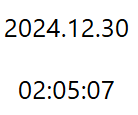
실시간 현재 날짜/시간 보여주기(React)
검색을 통해 여러 참조자료를 살펴보았는데 대부분 실시간을 구현하기 위해 setInterval을 사용하였다. setInterval함수는 setInterval(func|code, [delay], ...)로 사용하며 각각의 인수들을 살펴보면 func|code 는 실행하고자 하는 코드로, 함수 또는 문자열 형태이며 대개는 이 자리에 함수가 들어간다. delay는 실행 전 대기 시간으로, 단위는 밀리초(millisecond, 1000밀리초 = 1초)이며 기본값은 0이다. 따라서 setInterval은 delay 시간 간격으로 func|code를 주기적으로 실행하는 함수이다.
참조 및 인용 - setTimeout과 setInterval[JAVASCRIPT.INFO]
이 setInterval을 활용하여 React에 구현하면
import logo from './logo.svg';
import React, { useState } from 'react';
import './App.css';

function App() {
  const [currentDate, setCurrentDate] = useState(new Date());

  setInterval(() => setCurrentDate(new Date()), 1000);

  const formatDate = (date) => {
      const year = date.getFullYear();
      const month = String(date.getMonth() + 1).padStart(2, '0');
      const day = String(date.getDate()).padStart(2, '0');
      return `${year}.${month}.${day}`;
  };

  const formatTime = (date) => {
      const hours = String(date.getHours()).padStart(2, '0');
      const minutes = String(date.getMinutes()).padStart(2, '0');
      const seconds = String(date.getSeconds()).padStart(2, '0');
      return `${hours}:${minutes}:${seconds}`;
  };

  return (
    <div className="App">
      <p>{formatDate(currentDate)}</p>
      <p>{formatTime(currentDate)}</p>
    </div>
  );
}

export default App;
이렇게 구현하면 실시간으로 시간이 잘 흘러가는 것을 확인할 수 있다.
잠시 코드에 대해 설명하자면, useState의 상태관리를 통해 currentDate으로 Date객체를 생성한다. 이때 setInterval을 활용하여 1초(1000밀리세컨드) 간격으로 setCurrentDate을 통해 currentDate에 새로운 Date 객체를 지속해서 할당한다면 formateDate함수 혹은 formatTime함수에 인자로 1초마다 새로운 currentDate가 들어가게 되면서 날짜/시간이 실시간으로 주입되게 된다.
실시간 날짜/시간 반영시 고려해야 할 점
그러나 여기서 문제!!
유저가 해당 Application의 날짜/시간 화면을 보고 있는 경우라면 setInterval을 통해 시간이 실시간으로 반영되고 있는 것은 상관없지만, 해당 화면을 보지 않는 경우라면, 즉 해당 날짜/시간 컴포넌트가 언마운트 상태에서 setInterval이 실행된다는 것은 불필요한 일이며 메모리 누수가 발생되는 일이라 생각된다. 따라서 setInterval을 종료시킬 clearInterval메소드가 필요하다.
clearInterval 메서드란?
이전에 setInterval()을 호출하여 생성한 타이머에 의해 반복되는 작업을 취소하는 메서드로
claerInterval(intervalId)
로 사용한다.
여기서 intervalId란 setTimeout() 호출에 의해 반환된 값이다.
그럼 이 clearInterval 메소드를 컴포넌트가 언마운트될 때 실행되게 만들어야 하는데
이때 React의 useEffect를 사용해주어야 한다.
import logo from './logo.svg';
import React, { useEffect, useState } from 'react';
import './App.css';

function App() {
  const [currentDate, setCurrentDate] = useState(new Date());

  useEffect(() => {
    const IntervalId = setInterval(() => setCurrentDate(new Date()), 1000);
    return () => {clearInterval(IntervalId)}
  }, [])

  const formatDate = (date) => {
      const year = date.getFullYear();
      const month = String(date.getMonth() + 1).padStart(2, '0');
      const day = String(date.getDate()).padStart(2, '0');
      return `${year}.${month}.${day}`;
  };

  const formatTime = (date) => {
      const hours = String(date.getHours()).padStart(2, '0');
      const minutes = String(date.getMinutes()).padStart(2, '0');
      const seconds = String(date.getSeconds()).padStart(2, '0');
      return `${hours}:${minutes}:${seconds}`;
  };

  return (
    <div className="App">
      <p>{formatDate(currentDate)}</p>
      <p>{formatTime(currentDate)}</p>
    </div>
  );
}

export default App;- 컴포넌트 마운트
해당 코드에서 useEffect의 의존성 배열이 비어있기때문에 컴포넌트가 초기 랜더링시 useEffect의 콜백함수가 실행되므로 setInterval로 타이머가 설정되고 intervalId가 생성된다.
return문으로 clean-up 함수를 반환하며, 이 함수는 호출되지 않고 React에 의해 기억된다. - 컴포넌트 언마운트
React는 컴포넌트를 언마운트할 때, 이전에 반환된 clean-up 함수를 호출한다.
이 호출로 clearInterval(intervalId)가 실행되고, 타이머가 정리된다. - 의존성 변경
의존성 배열이 비어 있으므로 이 경우는 발생하지 않는다.
이때 중요한점 return문의 clean-up함수는 return clearInterval(IntervalId);가 아닌 return () => {clearInterval(IntervalId)};로 사용해주어야 한다.
전자(return clearInterval(IntervalId);)의 경우 clearInterval(IntervalId)의 함수 실행 결과값을 반환하기에 undefined가 반환되지만 후자의 경우(return () => {clearInterval(IntervalId)};) 함수의 실행 자체를 반환하기 때문이다.
사실 useEffect의 의존성 배열과 동작 순서에 대해서도 많은 의문이 생겼지만
useEffect의 실행 시점 짚고가기 해당 사이트를 통해 도움을 많이 받았다.
날짜/시간 동적으로 구현
(고정 날짜/시간 ↔ 실시간 현재 날짜/시간)
이제 실시간으로 날짜/시간 반영이 가능해졌으니 '측정 시작' 버튼 클릭시 측정 시작 시간으로 고정하고, '측정 취소' 버튼 클릭시 현재 실시간을 다시 반영하는 것을 구현해야 한다.
현재 프로젝트 진행상 날짜/시간을 나타내는 화면을 DateTimeDisplay 컴포넌트로 분리하였고, 버튼 컴포넌트 역시 분리할 예정이다. DateTimeDisplay와 button 컴포넌트는 Noise라는 소음 측정 페이지에 구성요소로 사용될 예정이다. 그렇다면 시간고정 상태를 어떻게 관리할 것인가?
바로 생각난 방법은 useState를 활용하여 시간 고정 여부 상태를 관리할 것과 고정된 시간 상태를 관리할 것을 만드는 것이었다. 이에 따라 구성된 코드는 아래와 같다.
- DateTimeDisplay 컴포넌트
import React from 'react';
import { DateTimeContainer, DateWrapper, TimeWrapper } from './DateTimeDisplay.styles';

interface DateTimeDisplayProps {
  date: Date; // 표시할 날짜와 시간
}

const DateTimeDisplay: React.FC<DateTimeDisplayProps> = ({ date }) => {
  const formatDate = (date: Date) => {
    const year = date.getFullYear();
    const month = String(date.getMonth() + 1).padStart(2, '0');
    const day = String(date.getDate()).padStart(2, '0');
    return `${year}.${month}.${day}`;
  };

  const formatTime = (date: Date) => {
    const hours = String(date.getHours()).padStart(2, '0');
    const minutes = String(date.getMinutes()).padStart(2, '0');
    const seconds = String(date.getSeconds()).padStart(2, '0');
    return `${hours}:${minutes}:${seconds}`;
  };

  return (
    <DateTimeContainer>
      <DateWrapper>{formatDate(date)}</DateWrapper>
      <TimeWrapper>{formatTime(date)}</TimeWrapper>
    </DateTimeContainer>
  );
};

export default DateTimeDisplay;- Noise 컴포넌트
import React, { useEffect, useState } from 'react';
import Logo from '../../assets/logo/logo.svg';
import Info from '../../assets/icons/ico_Info.png';
import { useDispatch } from 'react-redux';
import { ChartContainer, Container, Header, InfoWrapper, LogoWrapper } from './Noise.styles';
import { toggleModal } from '../../store/menu/menuSlice';
import DateTimeDisplay from '../../component/time/DateTimeDisplay';
import useCurrentLocation from '../../hook/useCurrentLocation';
import useCoordinateToAddress from '../../hook/useCoordinateToAddress';
import AddressDisplay from '../../component/currentLocate/AddressDisplay';

const Noise = () => {
    const [currentDate, setCurrentDate] = useState(new Date());
    const [isFixed, setIsFixed] = useState(false);
    const [fixedDate, setFixedDate] = useState<Date | null>(null);

    useEffect(() => {
      if (!isFixed) {
        const intervalId = setInterval(() => {
          setCurrentDate(new Date());
        }, 1000);
        return () => clearInterval(intervalId);
      }
    }, [isFixed]);

    const handleStartMeasurement = () => {
      setFixedDate(new Date());
      setIsFixed(true);
    };

    const handleCancelMeasurement = () => {
      setIsFixed(false);
      setFixedDate(null);
    };

  const displayDate = isFixed && fixedDate ? fixedDate : currentDate;

  const dispatch = useDispatch();

  return (
    <Container>
      <Header>
        <LogoWrapper>
          <img src={Logo} alt='logo'/>
        </LogoWrapper>
        <InfoWrapper onClick={() => dispatch(toggleModal(true))}>
          <img src={Info} alt='info'/>
        </InfoWrapper>
      </Header>
      <ChartContainer>
        <div>
          <DateTimeDisplay date={displayDate}/>
        </div>
      </ChartContainer>
    </Container>
  );
};

export default Noise;
handleStartMeasurement 함수와 handleCancelMeasurement 함수는 후에 만들어질 button 컴포넌트에 전달함으로써 측정시작 버튼 클릭시 isFixed 상태가 true로 변경되며 fixedDate에 새로운 Date객체가 들어가고 이 fixedDate에는 setInterval을 사용하지 않았으므로 측정시작시간으로 고정될 것이다. 반대로 측정취소 버튼 클릭시에는 handleCancelMeasurement 함수가 작동하여 isFixed 상태가 false로 변경되며 fixedDate는 null값으로 변경된다. 하지만 isFixed상태가 false이기 때문에 useEffect 내의 조건문을 만족하여 setInterval이 작동하므로 실시간 날짜 및 시간이 반영될 것이다.
날짜/시간 동적으로 구현시 고려할 점
다만 여기서 또다른 side Effect를 고려할 수 있다.
현재 프로젝트 화면 구현 목표가 아래와 같은데
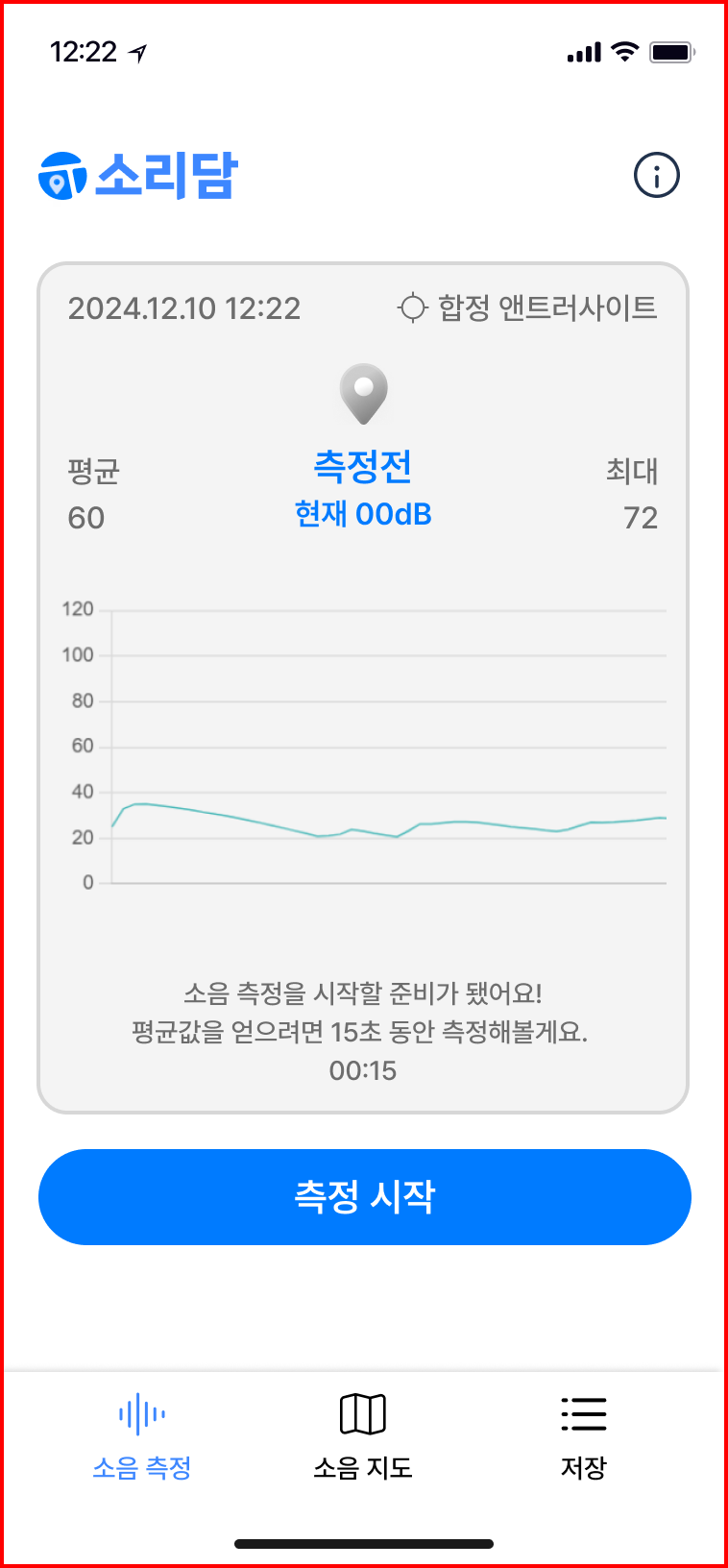
여기서 useEffect의 의존성 배열이 비어있기 때문에 초기 랜더링시에만 useEffect가 작동하기 때문에 여러 측정과정을 거친뒤에 다시 돌아오거나, NavBar를 통해 여러 경로로 이동한뒤 다시 소음 측정 화면으로 돌아온다면 해당 날짜/시간이 실시간으로 반영할 것인가? 였다.
이에 따라 의존성 배열에 isFixed 상태값을 추가함으로써 isFixed 상태가 변화함에 따라 useEffect가 실행되도록 설정해야 하며, isFixed와 fixedDate의 상태가 Routing에 따라 전역적으로 상태를 관리할 필요성을 느껴 redux로 관리해야 한다고 생각했다. 이에 따라 변화된 코드는 아래와 같다.
- redux slice 설정(dateTimeSlice.ts)
import { createSlice } from '@reduxjs/toolkit';

interface TimeState {
  isFixed: boolean;
  fixedDate: Date | null;
}

const initialState: TimeState = {
  isFixed: false,
  fixedDate: null,
};

const dateTimeSlice = createSlice({
  name: 'time',
  initialState,
  reducers: {
    startMeasurement: (state) => {
      state.isFixed = true;
      state.fixedDate = new Date();
    },
    cancelMeasurement: (state) => {
      state.isFixed = false;
      state.fixedDate = null;
    },
    resetState: () => initialState,
  },
});

export const { startMeasurement, cancelMeasurement, resetState } = dateTimeSlice.actions;

export default dateTimeSlice.reducer;- useResetStateOnPath.ts(날짜/시간을 reset할 커스텀 훅함수)
import { useEffect } from 'react';
import { useLocation } from 'react-router-dom';
import { useDispatch } from 'react-redux';
import { resetState } from '../store/dateTime/dateTimeSlice';

const useResetStateOnPath = (path: string) => {
  const location = useLocation();
  const dispatch = useDispatch();

  useEffect(() => {
    if (location.pathname === path) {
      dispatch(resetState());
    }
  }, [location.pathname, path, dispatch]);
};

export default useResetStateOnPath;- Noise 컴포넌트
import React, { useEffect, useState } from 'react';
import Logo from '../../assets/logo/logo.svg';
import Info from '../../assets/icons/ico_Info.png';
import { useDispatch } from 'react-redux';
import { ChartContainer, Container, Header, InfoWrapper, LogoWrapper } from './Noise.styles';
import { toggleModal } from '../../store/menu/menuSlice';
import DateTimeDisplay from '../../component/time/DateTimeDisplay';
import useCurrentLocation from '../../hook/useCurrentLocation';
import useCoordinateToAddress from '../../hook/useCoordinateToAddress';
import AddressDisplay from '../../component/currentLocate/AddressDisplay';
import useResetStateOnPath from '../../hook/useResetStateOnPath';
import { useAppSelector } from '../../hook/redux';
import { RootState } from '../../store';

const Noise = () => {
    const [currentDate, setCurrentDate] = useState(new Date());

    const { coords, error: locationError } = useCurrentLocation();
    const { address, error: addressError } = useCoordinateToAddress(coords);

    const { isFixed, fixedDate } = useAppSelector((state: RootState) => state.dateTime);

    useResetStateOnPath('/measure');

    useEffect(() => {
      if (!isFixed) {
        const intervalId = setInterval(() => {
          setCurrentDate(new Date());
        }, 1000);
        return () => clearInterval(intervalId);
      }
    }, [isFixed]);

  const displayDate = isFixed && fixedDate ? fixedDate : currentDate;

  const dispatch = useDispatch();

  return (
    <Container>
      <Header>
        <LogoWrapper>
          <img src={Logo} alt='logo'/>
        </LogoWrapper>
        <InfoWrapper onClick={() => dispatch(toggleModal(true))}>
          <img src={Info} alt='info'/>
        </InfoWrapper>
      </Header>
      <ChartContainer>
        <div>
          <DateTimeDisplay date={displayDate}/>
          <AddressDisplay address={address} locationError={locationError} addressError={addressError} />
        </div>
        {/* <DecibelChart/> */}
      </ChartContainer>
    </Container>
  );
};

export default Noise;- DateTimeDisplay 컴포넌트
import React from 'react';
import { DateTimeContainer, DateWrapper, TimeWrapper } from './DateTimeDisplay.styles';

interface DateTimeDisplayProps {
  date: Date; // 표시할 날짜와 시간
}

const DateTimeDisplay: React.FC<DateTimeDisplayProps> = ({ date }) => {
  const formatDate = (date: Date) => {
    const year = date.getFullYear();
    const month = String(date.getMonth() + 1).padStart(2, '0');
    const day = String(date.getDate()).padStart(2, '0');
    return `${year}.${month}.${day}`;
  };

  const formatTime = (date: Date) => {
    const hours = String(date.getHours()).padStart(2, '0');
    const minutes = String(date.getMinutes()).padStart(2, '0');
    const seconds = String(date.getSeconds()).padStart(2, '0');
    return `${hours}:${minutes}:${seconds}`;
  };

  return (
    <DateTimeContainer>
      <DateWrapper>{formatDate(date)}</DateWrapper>
      <TimeWrapper>{formatTime(date)}</TimeWrapper>
    </DateTimeContainer>
  );
};

export default DateTimeDisplay;- button 컴포넌트(완전한 구성X, test용)
import React from 'react';
import { useDispatch } from 'react-redux';
import { startMeasurement, cancelMeasurement } from '../../store/timeSlice';

const ControlButtons: React.FC = () => {
  const dispatch = useDispatch();

  return (
    <div>
      <button onClick={() => dispatch(startMeasurement())}>측정 시작</button>
      <button onClick={() => dispatch(cancelMeasurement())}>측정 취소</button>
    </div>
  );
};

export default ControlButtons;
향후 프로젝트 진행에 따라 변경될 수 있지만 현재 시나리오 상 코드를 완전히 구현한 것으로 판단된다. 이번 기회를 통해 날짜/시간을 다룰 수 있었고, useEffect의 원리에 대해 좀 더 고민할 수 있는 기회가 된 것 같았다.
다음 시간에는 geolocation과 카카오맵 라이브러리를 통해 실시간 주소를 받아오는 부분을 수정할 예정이다.