PDFMathTranslate GUI python에서 사용 시 Repository 찾지 못하거나 GRADIO_SERVER_PORT, CERTIFICATE_VERIFY_FAILED 에러가 날 때
Troubleshooting (error..)
PDFMathTranslate
- https://github.com/Byaidu/PDFMathTranslate
- 바이두에서 나온 다국어 논문 pdf를 희망하는 다국어로 번역해주는 오픈소스
(영어, 스페인어, 한국어, 중국어 기타 등등)
에러 상황
- 위 github에서 볼 수 있다시피 사용법은 매우 간단한데,
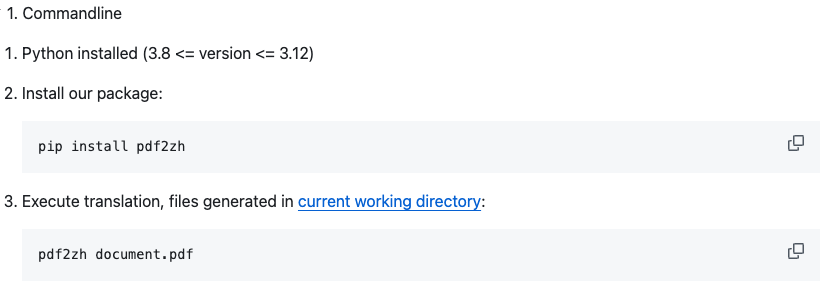
pip install pdf2zh면 끝남..
그리고 해당 파일 내에 희망하는 pdf 파일 명을 쓰고 뒤 옵션을 줘서 번역 형태를 변형할 수도 있다.
CLI에서 할 수도 있지만 GUI가 매우 편한 나는 GUI를 사용해서
그냥 terminal에서
pdf2zh -i 으로 끝내서
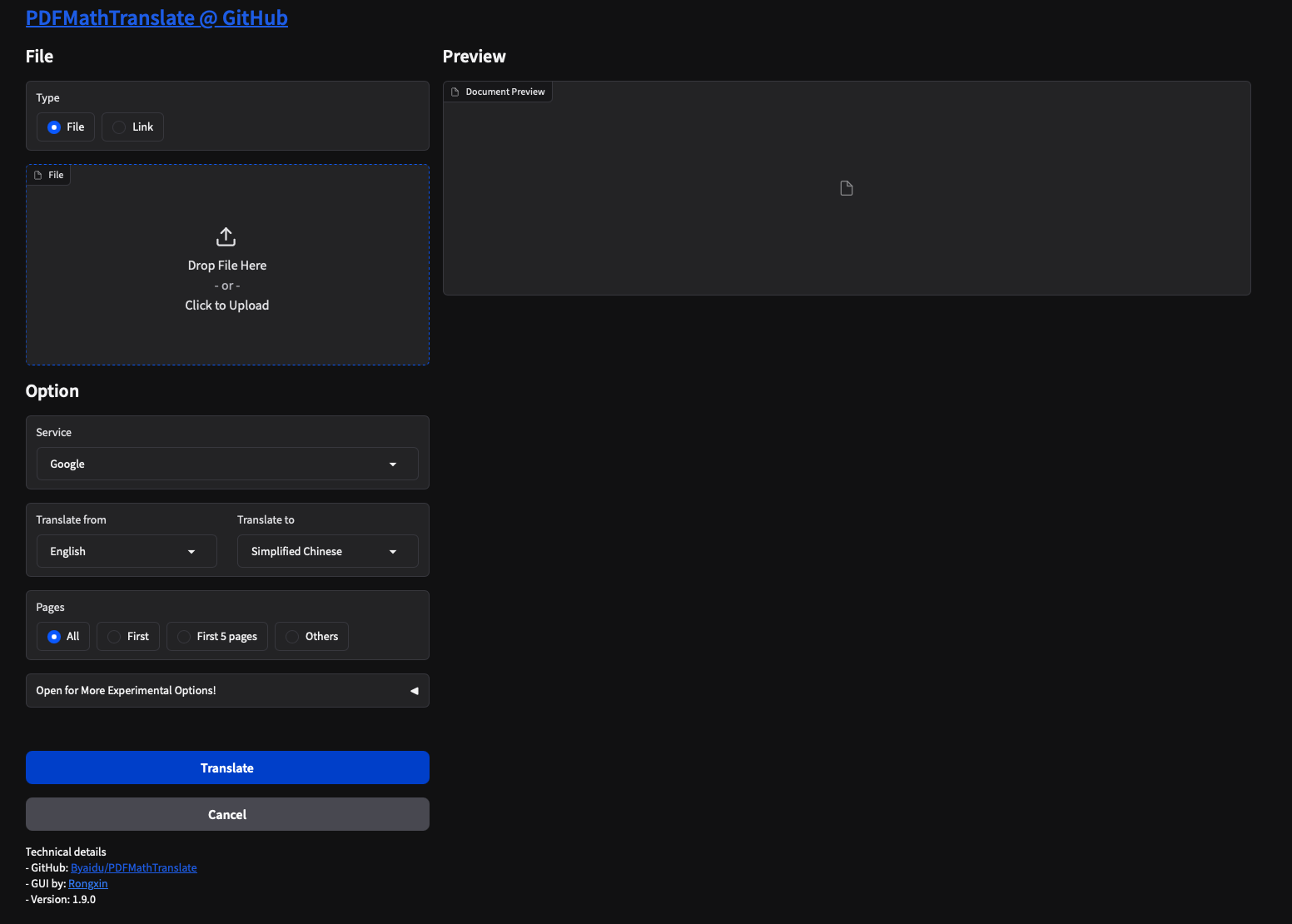
해당 창에 그냥 업로드 하고 끝내는데
갑분 에러가 나기 시작..
pdf2zh -i
Traceback (most recent call last):
  File "/Library/Frameworks/Python.framework/Versions/3.11/lib/python3.11/site-packages/huggingface_hub/utils/_http.py", line 406, in hf_raise_for_status
    response.raise_for_status()
  File "/Library/Frameworks/Python.framework/Versions/3.11/lib/python3.11/site-packages/requests/models.py", line 1024, in raise_for_status
    raise HTTPError(http_error_msg, response=self)
requests.exceptions.HTTPError: 401 Client Error: Unauthorized for url: https://huggingface.co/wybxc/DocLayout-YOLO-DocStructBench-onnx/resolve/main/doclayout_yolo_docstructbench_imgsz1024.onnx

The above exception was the direct cause of the following exception:

Traceback (most recent call last):
  File "/Library/Frameworks/Python.framework/Versions/3.11/bin/pdf2zh", line 8, in <module>
    sys.exit(main())
             ^^^^^^
  File "/Library/Frameworks/Python.framework/Versions/3.11/lib/python3.11/site-packages/pdf2zh/pdf2zh.py", line 234, in main
    ModelInstance.value = OnnxModel.load_available()
                          ^^^^^^^^^^^^^^^^^^^^^^^^^^
  File "/Library/Frameworks/Python.framework/Versions/3.11/lib/python3.11/site-packages/pdf2zh/doclayout.py", line 25, in load_available
    return DocLayoutModel.load_onnx()
           ^^^^^^^^^^^^^^^^^^^^^^^^^^
  File "/Library/Frameworks/Python.framework/Versions/3.11/lib/python3.11/site-packages/pdf2zh/doclayout.py", line 17, in load_onnx
    model = OnnxModel.from_pretrained(
            ^^^^^^^^^^^^^^^^^^^^^^^^^^
  File "/Library/Frameworks/Python.framework/Versions/3.11/lib/python3.11/site-packages/pdf2zh/doclayout.py", line 87, in from_pretrained
    pth = hf_hub_download(repo_id=repo_id, filename=filename, etag_timeout=1)
          ^^^^^^^^^^^^^^^^^^^^^^^^^^^^^^^^^^^^^^^^^^^^^^^^^^^^^^^^^^^^^^^^^^^
  File "/Library/Frameworks/Python.framework/Versions/3.11/lib/python3.11/site-packages/huggingface_hub/utils/_validators.py", line 114, in _inner_fn
    return fn(*args, **kwargs)
           ^^^^^^^^^^^^^^^^^^^
  File "/Library/Frameworks/Python.framework/Versions/3.11/lib/python3.11/site-packages/huggingface_hub/file_download.py", line 860, in hf_hub_download
    return _hf_hub_download_to_cache_dir(
           ^^^^^^^^^^^^^^^^^^^^^^^^^^^^^^
  File "/Library/Frameworks/Python.framework/Versions/3.11/lib/python3.11/site-packages/huggingface_hub/file_download.py", line 967, in _hf_hub_download_to_cache_dir
    _raise_on_head_call_error(head_call_error, force_download, local_files_only)
  File "/Library/Frameworks/Python.framework/Versions/3.11/lib/python3.11/site-packages/huggingface_hub/file_download.py", line 1482, in _raise_on_head_call_error
    raise head_call_error
  File "/Library/Frameworks/Python.framework/Versions/3.11/lib/python3.11/site-packages/huggingface_hub/file_download.py", line 1374, in _get_metadata_or_catch_error
    metadata = get_hf_file_metadata(
               ^^^^^^^^^^^^^^^^^^^^^
  File "/Library/Frameworks/Python.framework/Versions/3.11/lib/python3.11/site-packages/huggingface_hub/utils/_validators.py", line 114, in _inner_fn
    return fn(*args, **kwargs)
           ^^^^^^^^^^^^^^^^^^^
  File "/Library/Frameworks/Python.framework/Versions/3.11/lib/python3.11/site-packages/huggingface_hub/file_download.py", line 1294, in get_hf_file_metadata
    r = _request_wrapper(
        ^^^^^^^^^^^^^^^^^
  File "/Library/Frameworks/Python.framework/Versions/3.11/lib/python3.11/site-packages/huggingface_hub/file_download.py", line 278, in _request_wrapper
    response = _request_wrapper(
               ^^^^^^^^^^^^^^^^^
  File "/Library/Frameworks/Python.framework/Versions/3.11/lib/python3.11/site-packages/huggingface_hub/file_download.py", line 302, in _request_wrapper
    hf_raise_for_status(response)
  File "/Library/Frameworks/Python.framework/Versions/3.11/lib/python3.11/site-packages/huggingface_hub/utils/_http.py", line 454, in hf_raise_for_status
    raise _format(RepositoryNotFoundError, message, response) from e
huggingface_hub.errors.RepositoryNotFoundError: 401 Client Error. (Request ID: Root=1-67a448e6-71c38c530488fcd3374edbba;2f6e6188-a8d2-45f2-b607-70d64869db2c)

Repository Not Found for url: https://huggingface.co/wybxc/DocLayout-YOLO-DocStructBench-onnx/resolve/main/doclayout_yolo_docstructbench_imgsz1024.onnx.
Please make sure you specified the correct repo_id and repo_type.
If you are trying to access a private or gated repo, make sure you are authenticated.
Invalid credentials in Authorization header
걍 아래 에러보니까 pdf2zh가 Hugging Face에서 필요한 모델을 다운로드하려고 했지만, 권한 문제(401 Unauthorized)로 인해 실패한 것이다.
아니 잘 되다가 갑자기 권한이 왜
해결 방법은
- Hugging Face에 로그인 후 인증 토큰 설정
Hugging Face에서 접근 권한이 필요한 모델을 다운로드하려면 인증 필요함
(1) Hugging Face에서 Access Token 생성
Hugging Face 계정에 로그인
"New Token" 버튼을 눌러 새 토큰 생성 (권한: read)
생성된 토큰을 복사
(2) Hugging Face CLI에서 로그인
터미널에서 다음 명령어 실행:
huggingface-cli login
이후 프롬프트에 생성한 토큰을 붙여넣는다.
그래서 그냥 다시 하나 token 생성해서 read로 하나 만들었다.
그랬는데도 에러 발생~
(venv) geonheekim@geonheekimui-MacBookPro rss % pdf2zh -i
Error launching GUI using 0.0.0.0.
This may be caused by global mode of proxy software.
Error launching GUI using 127.0.0.1.
This may be caused by global mode of proxy software.
Traceback (most recent call last):
  File "/Users/geonheekim/Desktop/rss/venv/lib/python3.11/site-packages/pdf2zh/gui.py", line 627, in setup_gui
    demo.launch(
  File "/Users/geonheekim/Desktop/rss/venv/lib/python3.11/site-packages/gradio/blocks.py", line 2562, in launch
    ) = http_server.start_server(
        ^^^^^^^^^^^^^^^^^^^^^^^^^
  File "/Users/geonheekim/Desktop/rss/venv/lib/python3.11/site-packages/gradio/http_server.py", line 156, in start_server
    raise OSError(
OSError: Cannot find empty port in range: 7860-7860. You can specify a different port by setting the GRADIO_SERVER_PORT environment variable or passing the server_port parameter to launch().

During handling of the above exception, another exception occurred:

Traceback (most recent call last):
  File "/Users/geonheekim/Desktop/rss/venv/lib/python3.11/site-packages/pdf2zh/gui.py", line 639, in setup_gui
    demo.launch(
  File "/Users/geonheekim/Desktop/rss/venv/lib/python3.11/site-packages/gradio/blocks.py", line 2562, in launch
    ) = http_server.start_server(
        ^^^^^^^^^^^^^^^^^^^^^^^^^
  File "/Users/geonheekim/Desktop/rss/venv/lib/python3.11/site-packages/gradio/http_server.py", line 156, in start_server
    raise OSError(
OSError: Cannot find empty port in range: 7860-7860. You can specify a different port by setting the GRADIO_SERVER_PORT environment variable or passing the server_port parameter to launch().

During handling of the above exception, another exception occurred:

Traceback (most recent call last):
  File "/Users/geonheekim/Desktop/rss/venv/bin/pdf2zh", line 8, in <module>
    sys.exit(main())
             ^^^^^^
  File "/Users/geonheekim/Desktop/rss/venv/lib/python3.11/site-packages/pdf2zh/pdf2zh.py", line 244, in main
    setup_gui(parsed_args.share, parsed_args.authorized)
  File "/Users/geonheekim/Desktop/rss/venv/lib/python3.11/site-packages/pdf2zh/gui.py", line 650, in setup_gui
    demo.launch(
  File "/Users/geonheekim/Desktop/rss/venv/lib/python3.11/site-packages/gradio/blocks.py", line 2562, in launch
    ) = http_server.start_server(
        ^^^^^^^^^^^^^^^^^^^^^^^^^
  File "/Users/geonheekim/Desktop/rss/venv/lib/python3.11/site-packages/gradio/http_server.py", line 156, in start_server
    raise OSError(
OSError: Cannot find empty port in range: 7860-7860. You can specify a different port by setting the GRADIO_SERVER_PORT environment variable or passing the server_port parameter to launch().
이번에 보니까 GRADIO port 에러가 났다.
pdf2zh 이녀석이 gui 는 gradio를 사용하는데 해당 라이브러리가 사용하고자 하는 7860이 이미 사용중이여서 발생하는 거 였다.
terminal에서 lsoff -i :7860 으로 확인해보니까..
켁.. 3일전에 깔았던 windsurf가 점유중임.

7861은 비어있길래 해결 방법으로
터미널에서 server port를 바꿔 실행해봤는데
export GRADIO_SERVER_PORT=7861똑같이 오류가 났다.
에흉.. 그래서 패키지 내부 코드에서 gradio launch() 메소드 호출하는 부분을 수정하는게 낫다고 하길래. 소스 코드 디렉토리로 가서 port를 7861로 다 바꿔줬다.
나는 vs code venv 가상환경에 있기 때문에
venv > lit > python3.11 > site-packages > pdf2zh 폴더에서 gui.py 파일을 열었고
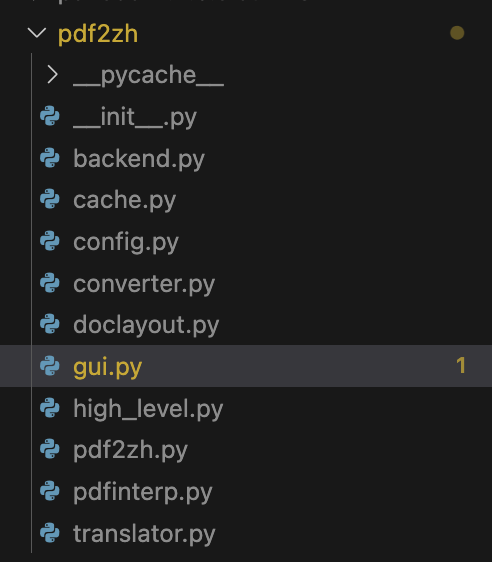
거기서
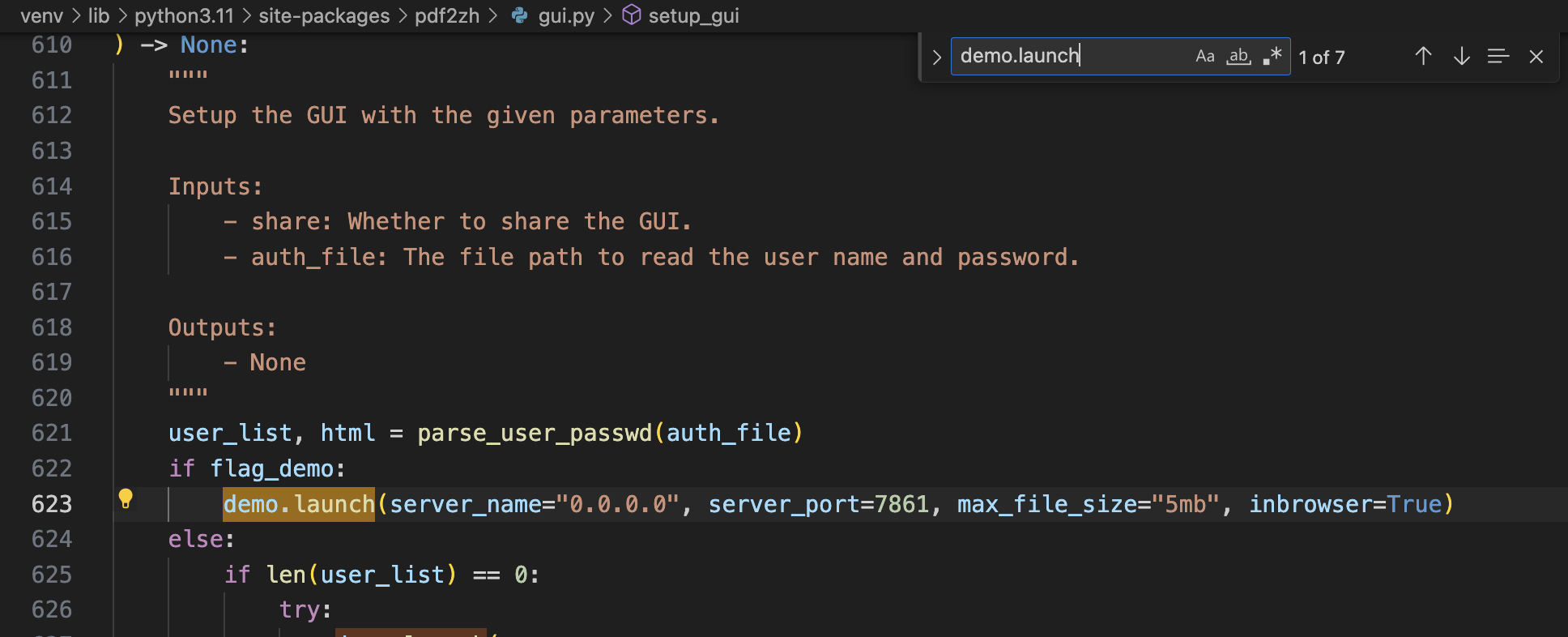
demo.launch() 하는 부분을 찾아서
server_port=7861 넣어주고, 나머지 아래 해당하는 로직에 server_port=server_port를 server_port=7861 로 모두 바꿔서 할당했다.
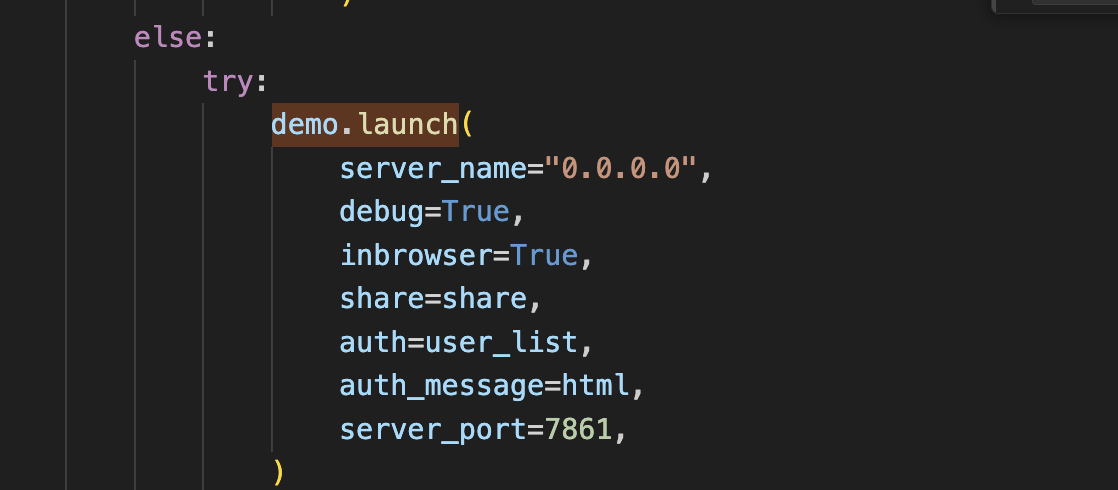
암튼 그리고 다시
vs code terminal에서 pdf2zh -i 해주니까 잘됨 굿굿
영어 논문 쉽게 읽으려고 조금 삽질함~
- 로 파일 업로드 했는데
* Running on local URL:  http://0.0.0.0:7861

To create a public link, set share=True in launch().
Files before translation: ['llm.pdf']
Downloading SourceHanSerifKR-Regular.ttf...
Traceback (most recent call last):
  File "/Library/Frameworks/Python.framework/Versions/3.11/lib/python3.11/urllib/request.py", line 1348, in do_open
    h.request(req.get_method(), req.selector, req.data, headers,
  File "/Library/Frameworks/Python.framework/Versions/3.11/lib/python3.11/http/client.py", line 1282, in request
    self._send_request(method, url, body, headers, encode_chunked)
  File "/Library/Frameworks/Python.framework/Versions/3.11/lib/python3.11/http/client.py", line 1328, in _send_request
    self.endheaders(body, encode_chunked=encode_chunked)
  File "/Library/Frameworks/Python.framework/Versions/3.11/lib/python3.11/http/client.py", line 1277, in endheaders
    self._send_output(message_body, encode_chunked=encode_chunked)
  File "/Library/Frameworks/Python.framework/Versions/3.11/lib/python3.11/http/client.py", line 1037, in _send_output
    self.send(msg)
  File "/Library/Frameworks/Python.framework/Versions/3.11/lib/python3.11/http/client.py", line 975, in send
    self.connect()
  File "/Library/Frameworks/Python.framework/Versions/3.11/lib/python3.11/http/client.py", line 1454, in connect
    self.sock = self._context.wrap_socket(self.sock,
                ^^^^^^^^^^^^^^^^^^^^^^^^^^^^^^^^^^^^
  File "/Library/Frameworks/Python.framework/Versions/3.11/lib/python3.11/ssl.py", line 517, in wrap_socket
    return self.sslsocket_class._create(
           ^^^^^^^^^^^^^^^^^^^^^^^^^^^^^
  File "/Library/Frameworks/Python.framework/Versions/3.11/lib/python3.11/ssl.py", line 1075, in _create
    self.do_handshake()
  File "/Library/Frameworks/Python.framework/Versions/3.11/lib/python3.11/ssl.py", line 1346, in do_handshake
    self._sslobj.do_handshake()
ssl.SSLCertVerificationError: [SSL: CERTIFICATE_VERIFY_FAILED] certificate verify failed: unable to get local issuer certificate (_ssl.c:992)

During handling of the above exception, another exception occurred:

Traceback (most recent call last):
  File "/Users/geonheekim/Desktop/rss/venv/lib/python3.11/site-packages/gradio/queueing.py", line 625, in process_events
    response = await route_utils.call_process_api(
               ^^^^^^^^^^^^^^^^^^^^^^^^^^^^^^^^^^^
  File "/Users/geonheekim/Desktop/rss/venv/lib/python3.11/site-packages/gradio/route_utils.py", line 322, in call_process_api
    output = await app.get_blocks().process_api(
             ^^^^^^^^^^^^^^^^^^^^^^^^^^^^^^^^^^^
  File "/Users/geonheekim/Desktop/rss/venv/lib/python3.11/site-packages/gradio/blocks.py", line 2088, in process_api
    result = await self.call_function(
             ^^^^^^^^^^^^^^^^^^^^^^^^^
  File "/Users/geonheekim/Desktop/rss/venv/lib/python3.11/site-packages/gradio/blocks.py", line 1635, in call_function
    prediction = await anyio.to_thread.run_sync(  # type: ignore
                 ^^^^^^^^^^^^^^^^^^^^^^^^^^^^^^^^^^^^^^^^^^^^^^^
  File "/Users/geonheekim/Desktop/rss/venv/lib/python3.11/site-packages/anyio/to_thread.py", line 56, in run_sync
    return await get_async_backend().run_sync_in_worker_thread(
           ^^^^^^^^^^^^^^^^^^^^^^^^^^^^^^^^^^^^^^^^^^^^^^^^^^^^
  File "/Users/geonheekim/Desktop/rss/venv/lib/python3.11/site-packages/anyio/_backends/_asyncio.py", line 2461, in run_sync_in_worker_thread
    return await future
           ^^^^^^^^^^^^
  File "/Users/geonheekim/Desktop/rss/venv/lib/python3.11/site-packages/anyio/_backends/_asyncio.py", line 962, in run
    result = context.run(func, *args)
             ^^^^^^^^^^^^^^^^^^^^^^^^
  File "/Users/geonheekim/Desktop/rss/venv/lib/python3.11/site-packages/gradio/utils.py", line 883, in wrapper
    response = f(*args, **kwargs)
               ^^^^^^^^^^^^^^^^^^
  File "/Users/geonheekim/Desktop/rss/venv/lib/python3.11/site-packages/pdf2zh/gui.py", line 284, in translate_file
    translate(**param)
  File "/Users/geonheekim/Desktop/rss/venv/lib/python3.11/site-packages/pdf2zh/high_level.py", line 356, in translate
    s_mono, s_dual = translate_stream(
                     ^^^^^^^^^^^^^^^^^
  File "/Users/geonheekim/Desktop/rss/venv/lib/python3.11/site-packages/pdf2zh/high_level.py", line 181, in translate_stream
    font_path = download_remote_fonts(lang_out.lower())
                ^^^^^^^^^^^^^^^^^^^^^^^^^^^^^^^^^^^^^^^
  File "/Users/geonheekim/Desktop/rss/venv/lib/python3.11/site-packages/pdf2zh/high_level.py", line 396, in download_remote_fonts
    urllib.request.urlretrieve(f"{URL_PREFIX}{font_name}", font_path)
  File "/Library/Frameworks/Python.framework/Versions/3.11/lib/python3.11/urllib/request.py", line 241, in urlretrieve
    with contextlib.closing(urlopen(url, data)) as fp:
                            ^^^^^^^^^^^^^^^^^^
  File "/Library/Frameworks/Python.framework/Versions/3.11/lib/python3.11/urllib/request.py", line 216, in urlopen
    return opener.open(url, data, timeout)
           ^^^^^^^^^^^^^^^^^^^^^^^^^^^^^^^
  File "/Library/Frameworks/Python.framework/Versions/3.11/lib/python3.11/urllib/request.py", line 519, in open
    response = self._open(req, data)
               ^^^^^^^^^^^^^^^^^^^^^
  File "/Library/Frameworks/Python.framework/Versions/3.11/lib/python3.11/urllib/request.py", line 536, in _open
    result = self._call_chain(self.handle_open, protocol, protocol +
             ^^^^^^^^^^^^^^^^^^^^^^^^^^^^^^^^^^^^^^^^^^^^^^^^^^^^^^^
  File "/Library/Frameworks/Python.framework/Versions/3.11/lib/python3.11/urllib/request.py", line 496, in _call_chain
    result = func(*args)
             ^^^^^^^^^^^
  File "/Library/Frameworks/Python.framework/Versions/3.11/lib/python3.11/urllib/request.py", line 1391, in https_open
    return self.do_open(http.client.HTTPSConnection, req,
           ^^^^^^^^^^^^^^^^^^^^^^^^^^^^^^^^^^^^^^^^^^^^^^
  File "/Library/Frameworks/Python.framework/Versions/3.11/lib/python3.11/urllib/request.py", line 1351, in do_open
    raise URLError(err)
urllib.error.URLError: <urlopen error [SSL: CERTIFICATE_VERIFY_FAILED] certificate verify failed: unable to get local issuer certificate (_ssl.c:992)>
urllib.error.URLError: <urlopen error [SSL: CERTIFICATE_VERIFY_FAILED] certificate verify failed: unable to get local issuer certificate (_ssl.c:992)>
CERTIFICATE 관련 에러가 난다? SSL 인증서 확인 문제로,
Python이 원격 서버랑 연결 할 때 SSL 인증 확인 과정에 실패한것이다.
mac에서 자주 발생하는데, Install Certificates.command 라는 스크립트를 실행해야 한다고 한다.
python의 FInder에서 Application에서 본인이 설치한 Python3.X (나는 Python3.11) 에서 Certificateds.command 파일을 더블클릭해서 실행했따.
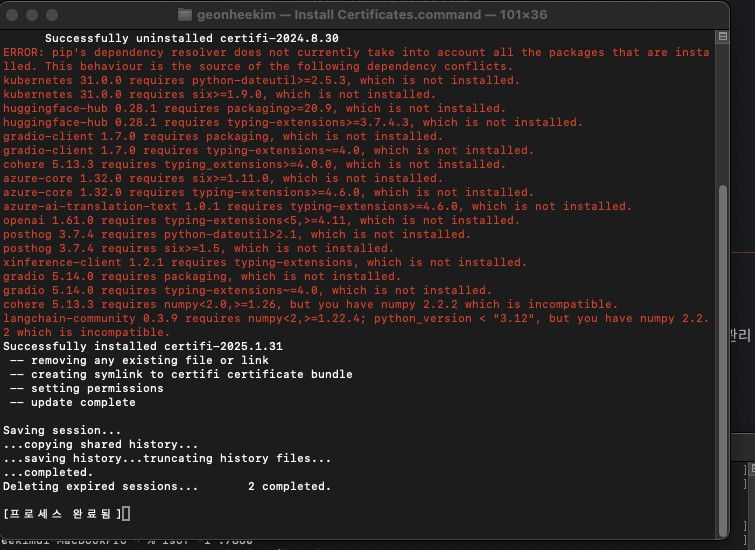
numpy, langchain-community 관련 라이브러리 빼고 완
그리고 나서 다시 pdf2zh -i 다시 구동해서 업로드해주면 진짜 완