기본적인 UI 만드는 법칙
- HTML CSS 로 미리 UI 디자인을 해놓고 필요하면 평소엔 숨김
- 버튼을 누르거나할 경우 UI를 보여달라고 자바스크립트 코드 작성!
1. 디자인을 한다
<div class="alert-box">알림창임</div>.alert-box {
background-color: skyblue;
padding: 20px;
color: white;
border-radius: 5px;
display: none;
}UI를 평소에 숨기고 싶으면 display : none 주면 됩니다. 다시 보여주고 싶으면 display : block 넣으면 보입니다.
- 참고: visibility : hidden
2. 자바스크립트 코드를 짠다

<div class="alert-box" id="alert">알림창임
        <button onclick="document.getElementById('alert').style.display='none';">X</button>
</div>

    <button onclick="document.getElementById('alert').style.display = 'block';">버튼</button>
- onclick: 클릭했을 때~
document.getElementById('alert').style.display='none';:id가 alert인 요소를 안보이게 숨겨줘~
function(함수 문법)
💡공부 TIP: 문법배웠으면 어디에 쓸 지 생각할 것
사용 이유: 길고 더러운 코드 한 단어로 축약하고 싶을 때
또는 특정 기능을 다음에도 쓰기 위해 모듈화해놓는 문법.
ex) 긴 코드 재사용이 잦을 때도 편리

- 작명은 직관적으로, 소문자시작, 카멜케이스
- onclick에 길게 썼던 것을 function문법 사용 ↓
 <div class="alert-box" id="alert">알림창임
        <button onclick="del()">X</button>
    </div>

    <button onclick="show()">버튼</button>

    <script>
        function show() {
            document.getElementById('alert').style.display='block';
        }

        function del() {
            document.getElementById('alert').style.display='none';

        }
    </script>
🫥 자주 겪는 에러 (조심조심~!)
-
JS코드
<script>는 밑에다가 작성하자!
자바스크립트는 html 조작하는 언어. 컴퓨터가 html 파일을 읽을 때 위에서 부터 한줄한줄 읽는데.미리 html을 읽어놔야 조작이 가능하기 때문입니다. -
오타주의
셀렉터나.. id요소를 잘못적는경우 허다함~
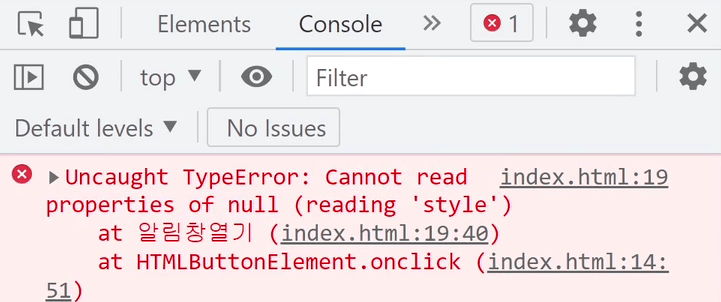
▲ 여기에 Cannot read properties of null 어쩌구 라는 에러가 나오면 보통은 오타이다.id 이름을 잘못적어서 못찾아서 null이다~
단축키
- 주석처리 ctrl + /
- 패널창 ctrl + b

정리하는게 공부가 될 지 모르겠지만, 정리를 하면 마음만큼은 편해