React 에디터 라이브러리 (Toast UI Editor) ...
1. Toast UI Editor 란 ?
Toast UI Editor란, React에서 텍스트 에디터 기능을 쉽게 도와주는 라이브러리 중 하나이다.
프로젝트에서 에디터 기능이 필요했어서 알아보던 중 .....
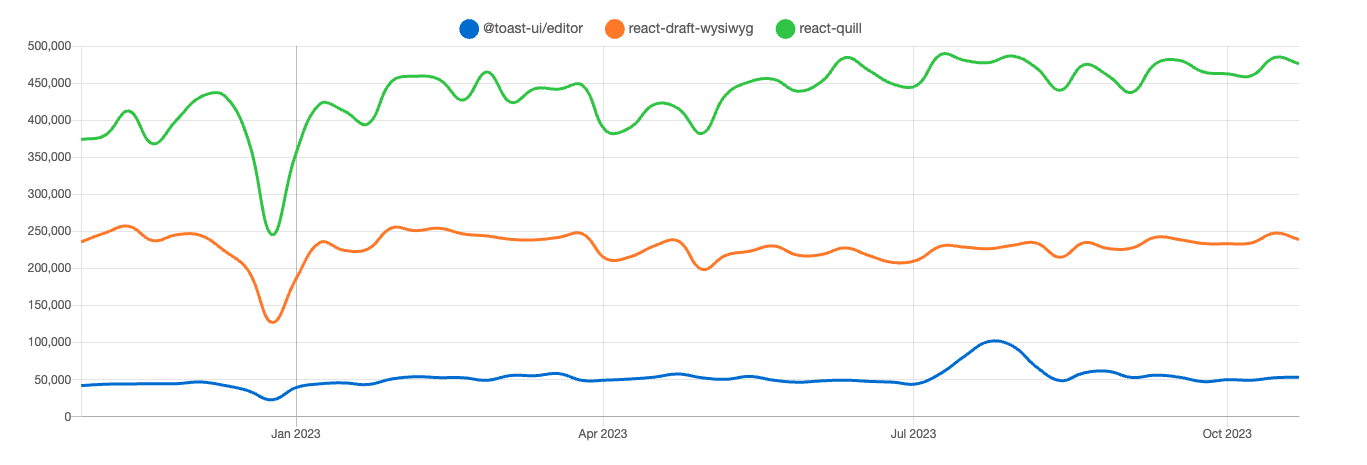 react 텍스트 에디터 라이브러리는 여러 개 있다는 것을 알게 되었고
npm trends에서 볼 수 있다시피 보통 react-quill 많이 사용하던데
나는 뚝심있게 Toast UI Editor를 선택함.
이유는 UI가 마음에 들었고 마크다운과 위지윅 두 버전 모두 지원해주고 있어서이다.
아 그리고 사용법 정리가 잘되어있는 블로그를 발견했기 때문도 ㅋㅋㅋㅎ
2. Toast UI Editor 기본 사용법
위 공식 홈이나 npm 문서 들어가보면 기본적인 사용법이 나와있다.
2-1. Toast UI Editor 설치
npm install @toast-ui/react-editor
yarn add @toast-ui/react-editor
설치는 위 둘 중에 하나로 하면 된다.
2-2. 기본 코드
import React, { useRef } from 'react';
import { Editor } from '@toast-ui/react-editor';
import '@toast-ui/editor/dist/toastui-editor.css';

export default const ToastEditor = ({ body, setBody }) => {
  const editorRef = useRef();

  const onChangeGetHTML = () => {
    // 에디터에 입력된 내용을 HTML 태그 형태로 취득
    const data = editorRef.current.getInstance().getHTML();
    // Body에 담기
    setBody(data);
  };


  return (
      <Editor
        toolbarItems={[
          // 툴바 옵션 설정
          ['heading', 'bold', 'italic', 'strike'],
          ['hr', 'quote'],
          ['ul', 'ol', 'task', 'indent', 'outdent'],
          ['table', 'image', 'link'],
          ['code', 'codeblock']
        ]}
        height="500px" // 에디터 창 높이
        initialEditType="markdown" // 기본 에디터 타입 (or wysiwyg)
        previewStyle="vertical" // 미리보기 스타일 (or tab) (verttical은 양쪽이 나뉨)

        ref={editorRef} // ref 참조
        onChange={onChangeGetHTML} // onChange 이벤트
      >
      </Editor>
  );
}
2-3. 옵션
이 밖에도 아래와 같은 다양한 옵션을 설정해줄 수 있다.
initialValue="Hello..." // 에디터 초기값
hideModeSwitch="true" // 하단 markdown 모드와 wysiwyg 모드 간 변경 버튼 숨김 여부
useCommandShortcut={false} // command 단축키 사용 여부
usageStatistics={false} // Google Analytics 수집 허용 여부
plugins={[colorSyntax]} // 글자 색 변경 플러그인
language="ko-KR" // 언어
+) 참고로 color plugins 옵션 설정 시에 아래 둘 중 하나 설치 필요함
npm install @toast-ui/editor-plugin-color-syntax
yarn add @toast-ui/editor-plugin-color-syntax
더 많은 옵션들은 ? 공식 홈 옵션 문서
 기본적인 설정을 다 했다면 이제 이렇게 에디터를 구현할 수 있게 됨 !!!!!!!!!!
2-4. Toast UI Viewer
이제 에디터를 사용해 글을 작성했다면 그 글을 볼 수 있어야 하지 않은가 ?
그 때 이 Toast UI Viewer를 사용해야 한다 !
// Toast-UI Viewer 임포트
import '@toast-ui/editor/dist/toastui-editor-viewer.css';
import { Viewer } from '@toast-ui/react-editor';

export default const ToastViewer = () => {
  return (
    <>
      <Viewer initialValue={html} />
    </>
  );
}
정성이 좀 부족합니다.