질문 내용
- css에서의 position 의 4가지 설명하시오.
- float 속성에 대하여 설명하시오.
- 강아지 사이트 및 header 사이트를 구현하시오.
개인 작성
- position
- 위치를 설정하는 속성
- 가질 수 있는 값들의 종류. default는 static.
- absolute : 좌표 기준으로 배치.
- 좌표의 기준은 웹 브라우저 상 좌표가 아니라, 부모 요소가 기준이 된다. - static : 기본 값. 문서 흐름에 따라 배치됨
- top, right, bottom, left와 같은 위치 속성 무시됨 - fixed : 절대좌표를 의미한다. 브라우저 창을 기준으로 배치.
- 스크롤해도 항상 같은 위치에 고정 - relative : 상대좌표. static 상태일 때의 위치(default 값)를 기준으로 잡는다.
- 타 요소들에 영향을 주지 않고 오로지 자기 위치를 기준으로 위치 속성에 따라 이동됨.
- absolute : 좌표 기준으로 배치.
- 자식 요소에 absolute로 속성 값이 할당되어 있다면, 부모 요소에는 relative로 속성 값이 할당되어 있어야
부모 요소를 기준으로 한 좌표 기준 배치가 제대로 이루어진다.
요소의 position 기본 값이 static이기 때문에 고려해야 하는 부분으로 보인다.
- float
- 대상을 띄운다.
- 띄워야 하는 대상을 띄움으로서, 컨텐츠는 피해서 보이게끔 들어가는 것.
- 원래 텍스트 인근에 이미지를 올려놓기 위해 사용했던 것.
-> 레이아웃용으로 사용하게 되는 경우가 잦아져서, 특유의 문제점 발생. - 해당 문제점을 해결하기 위해 조치하게 되는 것들. float로 띄운 대상이 있는 경우
- 부모 요소는 overflow : hidden을 통해, 띄워진 자식 요소를 인식
- float된 대상 이후 요소들이 float된 대상에 영향을 받고 싶지 않다면, clear : both 를 통해 띄워진 대상을 인식시킴
- 강아지 페이지 - 이미지 배경의 rgb를 몰라서 비슷한 색으로 맞추기만 함.
해당 부분에서는 display : inline-block의 문제점을 확인할 수 있었다.
이 놈의 inline block는 margin값 적용에 오류가 발생하는지,
'강아지 먹이' post와 '이름표, 목줄' post가 살짝 위로 떠버리는 상황이 발생.
-> 그냥 position 값 분배를 통해 진행.
<!DOCTYPE html>
<html lang="en">
<head>
    <meta charset="UTF-8">
    <meta name="viewport" content="width=device-width, initial-scale=1.0">
    <title>Document</title>
    <style>
        .wrapper{
            margin: 0 auto;
            width: 1000px;
        }

        .header{
            width: 1000px;
            height: 150px;
            background-image: url(../imgs/nav2.png);
            background-repeat: no-repeat;
            background-position: right;
            background-color: rgb(230, 81, 118);
        }

        .header ul{
            margin: 0;
            padding-left: 0;
            width: 1000px;
            height: 150px;
            list-style: none;
            line-height: 150px;
            text-align: left;
        }

        .header ul li{
            display: inline-block;
            margin-left: 50px;
            text-align: center;
        }

        .header a, .header a:visited{
            color : #fff;
            text-decoration: none;
        }

        .header a:hover{
            color: black;
        }

        .title{
            width: 1000px;
            height: 50px;
            font-size: 1.2em;
            text-align: left;
            margin-top: 20px;
            margin-bottom: 20px;
        }

        .title h1{
            margin: 0;
            width: 1000px;
        }

        .content{
            padding: 0;
            text-align: left;
            left: 0;
            position: relative;
            width: 800px;
            height: 800px;
            box-sizing: border-box;
            margin-top: 10px;
        }

        .content .post{
            width: 380px;
            height: 380px;
            border: 1px solid #cccccc;
            margin: 5px;
            margin-left: 0;
            padding: 10px;
            box-sizing: border-box;
        }

        .post h1{
            font-size: 1.5em;
        }

        .post:nth-child(1){
            top: 10px;
            position: absolute;
        }

        .post:nth-child(2){
            position: absolute;
            left: 390px;
            top :10px;
        }

        .post:nth-child(3){
            top: 400px;
            position: absolute;
        }

        .post:nth-child(4){
            top: 400px;
            left: 390px;
            position: absolute;
        }

        .right-sidebar{
            width : 200px;
            height: 770px;
            border: 2px solid black;
            box-sizing: border-box;
            position: absolute;
            left : 800px;
            top : 15px
        }

        .right-sidebar .img{
            margin-top: 10px;
            margin-left: 10px;
            margin-bottom: 70px;
        }

        .right-sidebar .img:last-child{
            margin-bottom: 10px;
        }

        .footer{
            background-color: black;
            width: 1000px;
            height: 100px;
            line-height: 100px;
        }

        .footer p{
            text-align: center;
            color: white;
        }
    </style>
</head>
<body>
    <div class="wrapper">
        <div class="header">
            <ul>
                <li><a href="">애완견 종류</a></li>
                <li><a href="">입양하기</a></li>
                <li><a href="">건강 돌보기</a></li>
                <li><a href="">더불어 살기</a></li>
            </ul>
        </div>
        <div class="title">
            <h1>강아지 용품 준비하기</h1>
        </div>
        <div class="content">
            <div class="post">
                <h1>강아지 집</h1>
                <p>강아지가 편히 쉴 수 있는 포근한 집이 필요합니다.
                     강아지의 집은 강아지가 다 큰 후에도 계속 쓸 수 있는 집으로 구입하세요.
                     집을 구입하실 때는 박음질이 잘 되어 있는지, 세탁이 간편한 제품인지 꼭 확인하시고 고르시는 것이 좋습니다.</p>
            </div>
            <div class="post">
                <h1>강아지 먹이</h1>
                <p>강아지의 먹이는 꼭 어린 강아지용으로 나와있는 사료를 선택하세요.
                    강아지들은 사람에 비해 성장속도가 8배정도 빠르답니다.
                    따라서 강아지에게는 성장속도에 맞는 사료를 급여하셔야 합니다.
                    사람이 먹는 음식을 먹게 되면 양념과 향신료에 입맛이 익숙해지고, 비만이 될 가능성이 매우 높아집니다.
                    강아지용 사료는 생후 12개월까지 급여하셔야 합니다.
                </p>
            </div>
            <div class="post">
                <h1>밥그릇, 물병</h1>
                <p>밥그릇은 쉽게 넘어지지 않도록 바닥이 넓은 것이 좋습니다.
                    물병은 대롱이 달린 것으로 선택하세요.
                    밥그릇에 물을 주게 되면 입 주변에 털이 모두 젖기 때문에 비위생적이므로 대롱을 통해서 물을 먹을 수 있는 물병을 마련하시는 것이 좋습니다.</p>
            </div>
            <div class="post">
                <h1>이름표, 목줄</h1>
                <p>강아지를 잃어버릴 염려가 있으니 산책할 무렵이 되면 이름표를 꼭 목에 걸어주도록 하세요.
                    그리고 방울이 달린 목걸이를 하고자 하실 때는 신중하셔야 합니다.
                    움직일 때마다 방울이 딸랑 거리면 신경이 예민한 강아지들에게는 좋지 않은 영향을 끼칠 수 있기 때문입니다.</p>
            </div>
            <div class="right-sidebar">
                <img src="../imgs/1.png" alt="dog1" class="img">
                <img src="../imgs/2.png" alt="dog2" class="img">
                <img src="../imgs/3.png" alt="dog3" class="img">
            </div>
        </div>
        <div class="footer">
            <p>Copyright 2012 funnycom</p>
        </div>
    </div>
</body>
</html>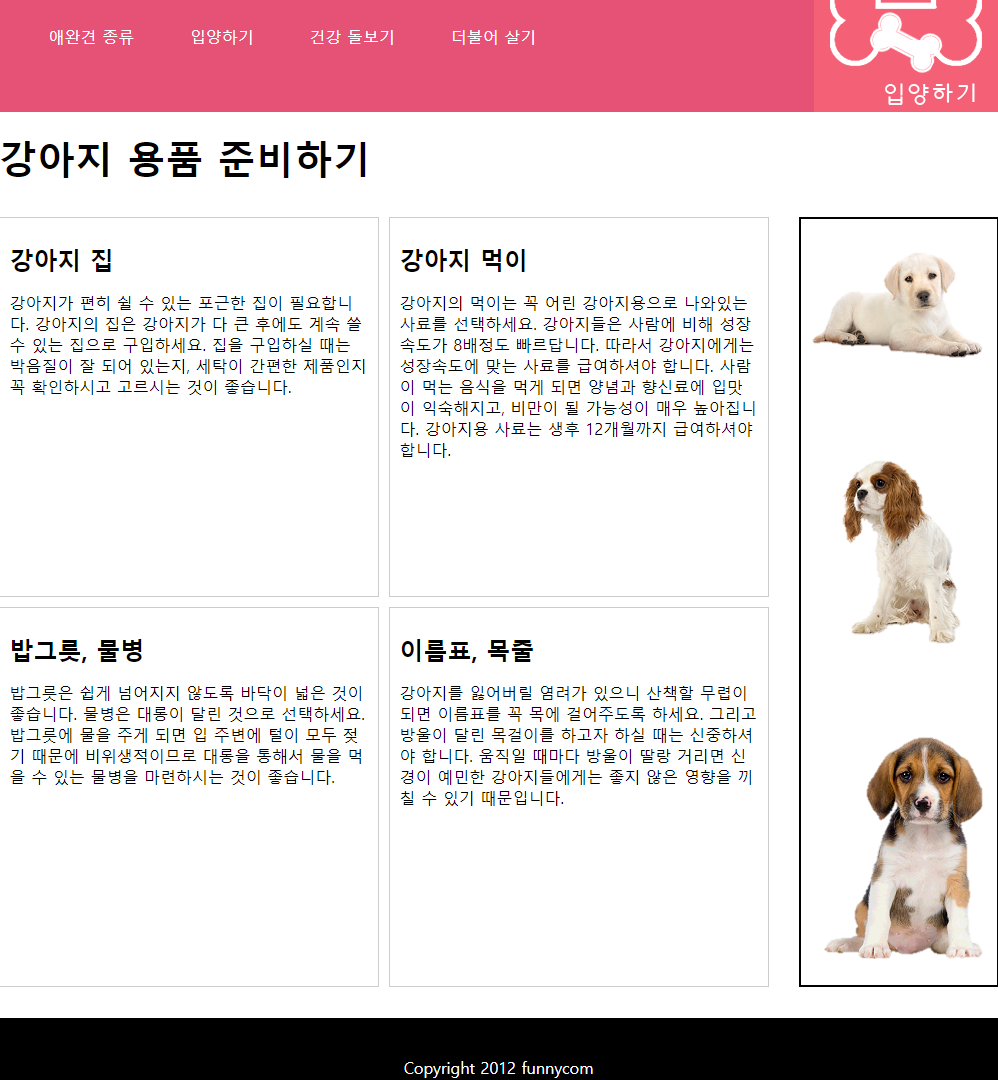
header 페이지 - 기존 내용에 색만 추가로 입힘.
1. CSS에서 float 미사용한 html5 파일
<!DOCTYPE html>
<html lang="en">
<head>
    <meta charset="UTF-8">
    <meta name="viewport" content="width=device-width, initial-scale=1.0">
    <title>Document</title>
    <style>
        #wrap{
            width : 1020px;
            margin: 0 auto;
            text-align: center;
            border: 1px solid #cccccc;
            background-color: antiquewhite;
        }

        .header{
            margin: 10px;
            width:1000px;
            height: 150px;
            line-height: 150px;
            border: 1px solid #cccccc;
            box-sizing: border-box;
            background-color : white;
        }

        h1{
            margin: 0;
        }

        .header h1{
            height: 150px;
            line-height: 150px;
            font-size: 1em;
        }

        .navigation{
            margin: 10px;
            width:1000px;
            height: 150px;
            line-height: 150px;
            border: 1px solid #cccccc;
            box-sizing: border-box;
            background-color : white;
        }

        .navigation h1{
            margin: 0%;
            height: 90px;
            line-height: 90px;
            font-size: 1em;
        }

        .navigation ul{
            margin: -65px;
            padding: 0;
        }

        .navigation ul li{
            margin : 0;
            border: 1px solid #cccccc;
            width: 150px;
            height: 40px;
            line-height: 40px;
            list-style: none;
            display: inline-block;
        }

        .navigation li a, .navigation li a:visited{
            width: 150px;
            height: 40px;
            display: inline-block;
            text-decoration: none;
            color: black;
        }

        .navigation li a:hover{
            width: 150px;
            height: 40px;
            display: inline-block;
            height: 40px;
            color: orange;
            background-color: aquamarine;
        }

        .navigation li a:focus{
            width: 150px;
            height: 40px;
            display: inline-block;
            height: 40px;
            background-color: forestgreen;
            color: magenta;
        }

        .all_content{
            margin: 10px;
            width:1000px;
            height:400px;
            line-height:100px;
            border: 1px solid #cccccc;
            box-sizing: border-box;
            position: relative;
            background-color : white;
        }

        .all_content .content{
            width: 790px;
            height: 380px;
            border: 1px solid #cccccc;
            box-sizing: border-box;
            position: absolute;
            left: 10px;
            top:10px;
            background-color : azure;
        }

        .content h1{
            margin: 0%;
            height: 40px;
            line-height: 40px;
            font-size: 1em;
        }

        .all_content .banner{
            width: 180px;
            height: 380px;
            border: 1px solid #cccccc;
            box-sizing: border-box;
            position: absolute;
            left: 810px;
            top:10px;
            background-color : azure;
        }

        .banner h1{
            margin: 0%;
            height: 40px;
            line-height: 40px;
            font-size: 1em;
        }

        .footer{
            margin: 10px;
            width:1000px;
            height:150px;
            line-height:150px;
            border: 1px solid #cccccc;
            box-sizing: border-box;
            background-color : white;
        }

        .footer h1{
            height: 150px;
            line-height: 150px;
            font-size: 1em;
        }
    </style>
</head>
<body>
    <div id="wrap">
        <div class="header">
            <h1>HEADER</h1>
        </div>
        <div class="navigation">
            <h1>NAVIGATION</h1>
            <ul>
                <li><a href="#">menu1</a></li>
                <li><a href="#">menu2</a></li>
                <li><a href="#">menu3</a></li>
                <li><a href="#">menu4</a></li>
                <li><a href="#">menu5</a></li>
            </ul>
        </div>
        <div class="all_content">
            <div class="content">
                <h1>CONTENT</h1>
            </div>
            <div class="banner">
                <h1>BANNER</h1>
            </div>
        </div>
        <div class="footer">
            <h1>FOOTER</h1>
        </div>
    </div>
</body>
</html>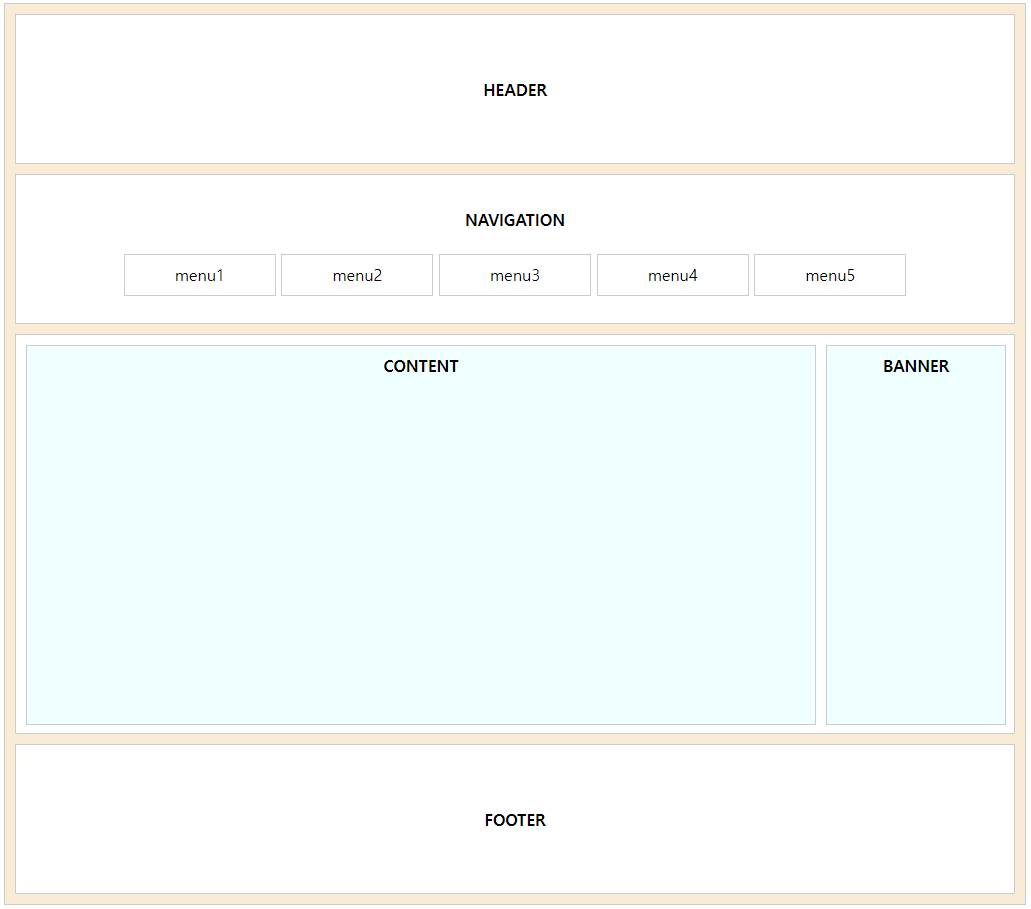
- 해당 파일에서 navigation 부분과 all_content 부분의 처리를, float 속성 사용하여 진행한 파일
<!DOCTYPE html>
<html lang="en">
<head>
    <meta charset="UTF-8">
    <meta name="viewport" content="width=device-width, initial-scale=1.0">
    <title>Document</title>
    <style>
        #wrap{
            width : 1020px;
            margin: 0 auto;
            text-align: center;
            border: 1px solid #cccccc;
            background-color: antiquewhite;
        }

        .header{
            margin: 10px;
            width:1000px;
            height: 150px;
            line-height: 150px;
            border: 1px solid #cccccc;
            box-sizing: border-box;
            background-color : white;
        }

        h1{
            margin: 0;
        }

        .header h1{
            height: 150px;
            line-height: 150px;
            font-size: 1em;
        }

        .navigation{
            margin: 10px;
            width:1000px;
            height: 150px;
            line-height: 150px;
            border: 1px solid #cccccc;
            box-sizing: border-box;
            background-color : white;
        }

        .navigation h1{
            margin: 0%;
            height: 90px;
            line-height: 90px;
            font-size: 1em;
        }

        .navigation ul{
            /* margin: -65px;   */
            margin: 0%;
            padding-left: 90px;
            text-align: center;
            overflow: hidden;
        }

        .navigation ul li{
            margin : 0;
            margin-left: 10px;
            border: 1px solid #cccccc;
            width: 150px;
            height: 40px;
            line-height: 40px;
            list-style: none;
            float: left;
            /* display: inline-block; */
        }

        .navigation li a, .navigation li a:visited{
            width: 150px;
            height: 40px;
            display: inline-block;
            text-decoration: none;
            color: black;
        }

        .navigation li a:hover{
            width: 150px;
            height: 40px;
            display: inline-block;
            height: 40px;
            color: orange;
            background-color: aquamarine;
        }

        .navigation li a:focus{
            width: 150px;
            height: 40px;
            display: inline-block;
            height: 40px;
            background-color: forestgreen;
            color: magenta;
        }

        .all_content{
            margin: 10px;
            width:1000px;
            height:400px;
            line-height:100px;
            border: 1px solid #cccccc;
            box-sizing: border-box;
            position: relative;
            background-color : white;
            overflow: hidden;
        }

        .all_content .content{
            width: 790px;
            height: 380px;
            border: 1px solid #cccccc;
            box-sizing: border-box;
            /* position: absolute;
            left: 10px;
            top: 10px; */
            margin: 10px;
            float: left;
            background-color : azure;
        }

        .content h1{
            margin: 0%;
            height: 40px;
            line-height: 40px;
            font-size: 1em;
        }

        .all_content .banner{
            width: 180px;
            height: 380px;
            border: 1px solid #cccccc;
            box-sizing: border-box;
            /* position: absolute;
            left: 810px;
            top:10px; */
            margin-top: 10px;
            float: left;
            background-color : azure;
        }

        .banner h1{
            margin: 0%;
            height: 40px;
            line-height: 40px;
            font-size: 1em;
        }

        .footer{
            margin: 10px;
            width:1000px;
            height:150px;
            line-height:150px;
            border: 1px solid #cccccc;
            box-sizing: border-box;
            background-color : white;
        }

        .footer h1{
            height: 150px;
            line-height: 150px;
            font-size: 1em;
        }
    </style>
</head>
<body>
    <div id="wrap">
        <div class="header">
            <h1>HEADER</h1>
        </div>
        <div class="navigation">
            <h1>NAVIGATION</h1>
            <ul>
                <li><a href="#">menu1</a></li>
                <li><a href="#">menu2</a></li>
                <li><a href="#">menu3</a></li>
                <li><a href="#">menu4</a></li>
                <li><a href="#">menu5</a></li>
            </ul>
        </div>
        <div class="all_content">
            <div class="content">
                <h1>CONTENT</h1>
            </div>
            <div class="banner">
                <h1>BANNER</h1>
            </div>
        </div>
        <div class="footer">
            <h1>FOOTER</h1>
        </div>
    </div>
</body>
</html>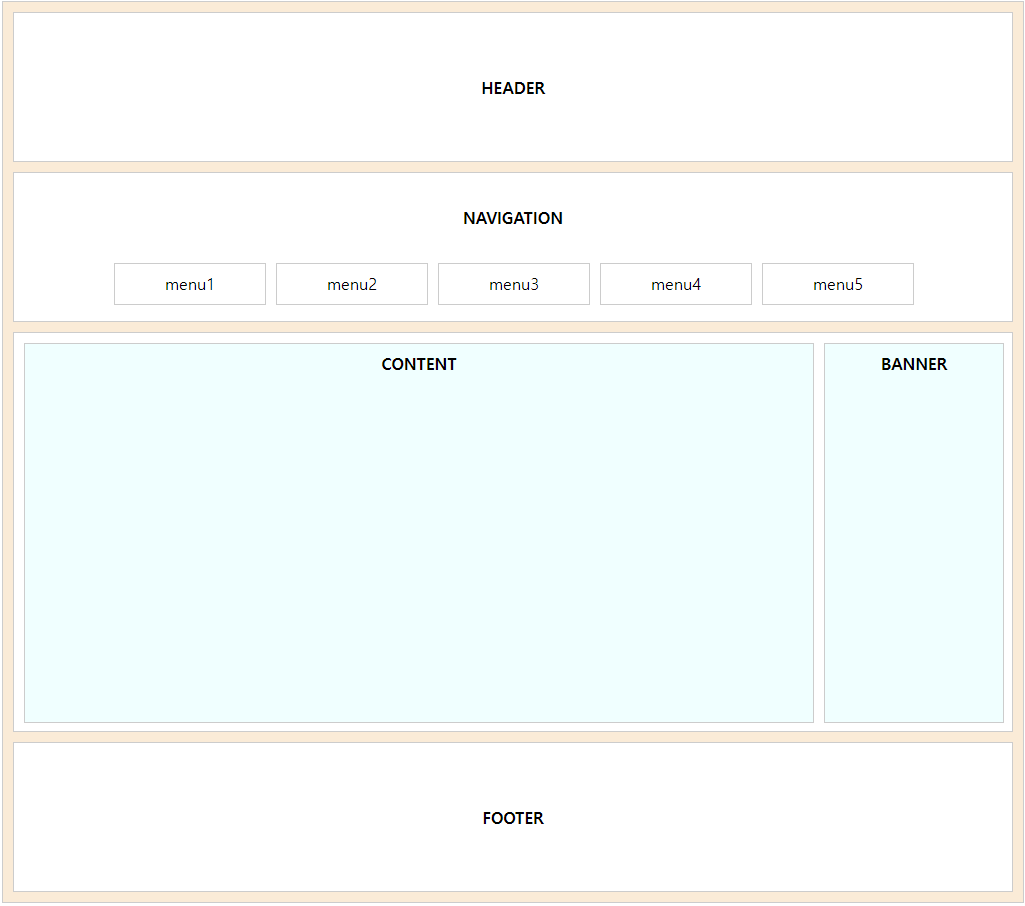

두리둥둥