질문 내용
- eshopper - 에서 로그인후 메인페이지로 가도록 셋팅 하시오.
- 스프링 시큐리티 커스텀마이징 하는 법을 순서대로 정리해 보세요.
- ROLE_ADMIN 권한을 가진 admin3 계정의 패스워드를 암호화 시켜 저장한 후, 해당 계정이 admin/adminHome 에 접근하는지 테스트 하시오.
개인 작성
- 오전 활동 : 로그인 시 메인 페이지 이동 세팅 연습
- 먼저 설정 파일에서 configure()에서 설정을 한다.
- 해당 설정에 따라 파일을 세팅한다.
	@Override
	protected void configure(AuthenticationManagerBuilder auth) throws Exception {
		// 테스트용 유저 만들기(인메모리 방식)
		auth.inMemoryAuthentication()
		.withUser("member").password("{noop}member").roles("USER")
		.and()
		.withUser("admin").password("{noop}admin").roles("ADMIN");
	}

	@Override
	protected void configure(HttpSecurity http) throws Exception {
		// 우선 CSRF설정을 해제한다.
		// 초기 개발시만 해주는게 좋다.
		http.csrf().disable();

		// 권한 설정
		http.authorizeRequests()
		.antMatchers("/user/**").hasAnyRole("USER")
		.antMatchers("/admin/**").hasAnyRole("ADMIN")
		.antMatchers("/board/**").hasAnyRole("ADMIN")
		//.antMatchers("/company/list").hasAnyRole("ADMIN")
		.antMatchers("/**").permitAll();

		// 스프링 시큐리티가 기본적으로 가지고 있는 로그인 폼을 사용한다는 의미. 기본 설정이다.
		// http.formLogin();
		http.formLogin()
			//.loginPage("/login")
			.loginPage("/elogin")
			.usernameParameter("id")
			.passwordParameter("pw")
			//.defaultSuccessUrl("/board/list2")
			.defaultSuccessUrl("/index")
			.permitAll(); // 모든 사람에게 허용하겠다는 의미.
}- 다음과 같이 세팅을 하게 된다면 지금 당장 필요한 것은
- "/elogin" 경로 설정
- "/index" 경로 설정
LoginController
package edu.sejong.ex.controller;

import org.springframework.stereotype.Controller;
import org.springframework.ui.Model;
import org.springframework.web.bind.annotation.GetMapping;

import lombok.extern.slf4j.Slf4j;

@Slf4j
@Controller
public class LoginController {

//   @GetMapping("/login")
//   public String login(Model model) {
//      log.info("login()..");
//
//      return "login/login";
//   }

   @GetMapping("/elogin")
   public String elogin(Model model) {
      log.info("elogin()..");

      return "login/elogin";
   }

   @GetMapping("/logout")
   public String logout(Model model) {
	   log.info("logout()..");

	   return "redirect:/elogin";
   }
}
HomeController
package edu.sejong.ex.controller;

import org.springframework.beans.factory.annotation.Autowired;
import org.springframework.stereotype.Controller;
import org.springframework.ui.Model;
import org.springframework.web.bind.annotation.GetMapping;

import edu.sejong.ex.service.CompanyService;
import lombok.extern.slf4j.Slf4j;

@Slf4j
@Controller
public class HomeController {

   @Autowired
   private CompanyService companyService;

   @GetMapping("/")
   public String home(Model model) {
      log.info("home()..");

      //return "home";
      return "forward:/index";
   }

   @GetMapping("/index")
   public String index(Model model) {
      log.info("index()..");

      model.addAttribute("lists",companyService.showList());

      return "index";
   }
}
SecurityConfig
package edu.sejong.ex.config;

import org.springframework.context.annotation.Configuration;
import org.springframework.security.config.annotation.authentication.builders.AuthenticationManagerBuilder;
import org.springframework.security.config.annotation.web.builders.HttpSecurity;
import org.springframework.security.config.annotation.web.builders.WebSecurity;
import org.springframework.security.config.annotation.web.configuration.EnableWebSecurity;
import org.springframework.security.config.annotation.web.configuration.WebSecurityConfigurerAdapter;

@Configuration
@EnableWebSecurity // 스프링 시큐리티 필터가 스프링 필터체인에 등록됨.
public class SecurityConfig extends WebSecurityConfigurerAdapter {

	@Override
	public void configure(WebSecurity web) throws Exception {
		// web.ignoring().requestMatchers(PathRequest.toStaticResources().atCommonLocations());

		// 해당 경로로 들어왔을 때, 무시하라는 의미이다. 막지 말라는 뜻.
		// 스프링 시큐리티에 적용되지 않도록
		web.ignoring().antMatchers("/css/**", "/js/**", "/images/**", "/lib/**");
	}

	// 테스트용 유저 만들기(인메모리 방식)
	@Override
	protected void configure(AuthenticationManagerBuilder auth) throws Exception {
		auth.inMemoryAuthentication()
		.withUser("member").password("{noop}member").roles("USER")
		.and()
		.withUser("admin").password("{noop}admin").roles("ADMIN");
	}


	@Override
	protected void configure(HttpSecurity http) throws Exception {
		// 우선 CSRF설정을 해제한다.
		// 초기 개발시만 해주는게 좋다.
		http.csrf().disable();

		// 권한 설정
		http.authorizeRequests()
		.antMatchers("/user/**").hasAnyRole("USER")
		.antMatchers("/admin/**").hasAnyRole("ADMIN")
		.antMatchers("/board/**").hasAnyRole("ADMIN")
		//.antMatchers("/company/list").hasAnyRole("ADMIN")
		.antMatchers("/**").permitAll();

		// 스프링 시큐리티가 기본적으로 가지고 있는 로그인 폼을 사용한다는 의미. 기본 설정이다.
		// http.formLogin();
		http.formLogin()
			//.loginPage("/login")
			.loginPage("/elogin")
			.usernameParameter("id")
			.passwordParameter("pw")
			//.defaultSuccessUrl("/board/list2")
			.defaultSuccessUrl("/index")
			.permitAll(); // 모든 사람에게 허용하겠다는 의미.
	}
}
elogin 일부
					<div class="login-form"><!--login form-->
						<c:choose>
						    <c:when test="${param.error != null}">
						        <h2>아이디와 비밀번호가 잘못되었습니다.</h2>
						    </c:when>
						    <c:when test="${param.logout != null}">
						        <h2>로그아웃 하였습니다.</h2>
						    </c:when>
						    <c:otherwise>
								<h2>Login to your account</h2>
							</c:otherwise>
						</c:choose>
						<form action="/index" >
							<input type="text" placeholder="id" name="id"/>
							<input type="password" placeholder="password" name="pw"/>
							<span>
								<input type="checkbox" class="checkbox">
								Keep me signed in
							</span>
							<button type="submit" class="btn btn-default">Login</button>
						</form>
					</div><!--/login form-->
해당 부분은, 유저 관리에 대한 커스터마이징을 진행할 때 어떤 절차를 걸치는지 확인하는 것.
먼저 알아둬야 할 인터페이스 목록 : 인증 절차에 관여하는 인터페이스들
-
UserDetails : Spring Security에서, 사용자의 데이터를 담는 인터페이스.
-
UserDetailsService : Spring Security에서, 유저 데이터를 가져오는 인터페이스.
-
AuthenticationProvider : 데이터베이스에서 가져온 정보와 입력된 정보 간 비교 및 체크하는 로직이 포함된 인터페이스.
커스터마이징 절차(회원 체크)
1) 데이터베이스 테이블 구현 및 테스트 데이터 생성
2) UserDetails를 구현하는 클래스 생성
- 해당 클래스에 유저 데이터를 담을 수 있음
3) Mapper 인터페이스 및 .xml 파일 생성
- 데이터베이스 내 유저 정보들을 가져와 해당 클래스에 담음.
- 이미 구현한 내용들을 재활용할 경우 생략됨. 대신, 해당 인터페이스를 사용하는 UserDetailsService에서 처리해야 하는 내용이 좀 더 많아짐.
4) UserDetailsService를 구현하는 클래스 생성
- 해당 클래스에서는 UserDetails를 리턴하는 loadUserByUsername(String username) 함수를 구현해줘야 한다.
- 해당 함수 내에서 mapper 인터페이스를 활용해 데이터베이스에서 해당 데이터를 받고, 이 데이터를 리턴하면 된다.
5) WebSecurityConfigurerAdapter를 구현한 config 파일(설정 파일) 내에서, configure(AuthenticationManagerBuilder auth) 함수 내용을 수정해주기(처음 만든다면 구현하기).
- 테스트 유저를 만들 때 활용되던 함수이다.
- 인메모리 방식으로 만들던 예비 데이터는 제외하고, 데이터베이스에서 해당되는 데이터를 가져옴.
- 오늘 수업에서는 5번까지만 진행한 상태이다.
6) AuthenticationProvider를 구현하는 클래스 생성
- 로그인을 요청한 유저 데이터와 데이터베이스의 유저 정보를 비교하는, 실질적으로 인증을 담당하는 클래스
Spring Security Customizing 참조 사이트 : 초보자를 위한 스프링 시큐리티 커스텀 구현하기
@Mapper 파일
package edu.sejong.ex.mapper;

import org.apache.ibatis.annotations.Mapper;

import edu.sejong.ex.vo.UserVO;

@Mapper
public interface UserMapper {
	UserVO selectUserAuths(String username);

	public int insertUser(UserVO userVO);

	public void insertAuthority(UserVO userVO);

	public void insertAuthorityAdmin(UserVO userVO);
}
Mapper.xml 파일 설정
<?xml version="1.0" encoding="UTF-8"?>
<!DOCTYPE mapper PUBLIC "-//mybatis.org//DTD Mapper 3.0//EN"
        "http://mybatis.org/dtd/mybatis-3-mapper.dtd">
<mapper namespace="edu.sejong.ex.mapper.UserMapper">
	<select id="selectUserAuths" resultMap="userMap">
    	<![CDATA[
        	select * from users u, authorities au where u.username = au.username and u.username = #{username}
        ]]>
	</select>

	<insert id="insertUser" parameterType="UserVO">
    	<![CDATA[
        	insert into users(username, password) values (#{userName},#{password})
        ]]>
	</insert>

	<insert id="insertAuthority" parameterType="UserVO">
        <![CDATA[
            INSERT INTO authorities(username, authority) VALUES (#{userName}, 'ROLE_USER')
        ]]>
	</insert>

	<insert id="insertAuthorityAdmin" parameterType="UserVO">
        <![CDATA[
            INSERT INTO authorities(username, authority) VALUES (#{userName}, 'ROLE_ADMIN')
        ]]>
	</insert>

	<resultMap id="authMap" type="AuthVO">
		<result column="username" property="userName" />
		<result column="authority" property="authority" />
	</resultMap>

	<resultMap id="userMap" type="UserVO">
		<id column="username" property="userName"/>
		<result column="password" property="password"/>
		<result column="enabled" property="enabled"/>
   		<collection property="authorities" resultMap="authMap" />
	</resultMap>

</mapper>
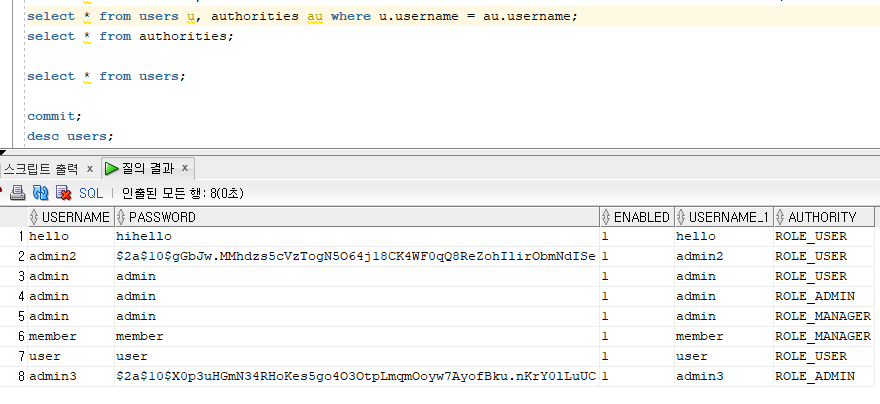
테스트 코드
	@Test
	void testInsertUser() {

//		UserVO user = new UserVO();
//		user.setUserName("admin2");
//		user.setPassword(new BCryptPasswordEncoder().encode("admin2"));
//		user.setEnabled("1");
//
//		userMapper.insertUser(user);
//		userMapper.insertAuthority(user);

		UserVO user = new UserVO();
		user.setUserName("admin3");
		user.setPassword(new BCryptPasswordEncoder().encode("admin3"));
		user.setEnabled("1");

		userMapper.insertUser(user);
		userMapper.insertAuthorityAdmin(user);
	}
UserDetails 인터페이스를 구현한 클래스
package edu.sejong.ex.vo;

import java.util.ArrayList;
import java.util.Collection;
import java.util.List;

import org.springframework.security.core.GrantedAuthority;
import org.springframework.security.core.authority.SimpleGrantedAuthority;
import org.springframework.security.core.userdetails.UserDetails;

import edu.sejong.ex.vo.AuthVO;
import edu.sejong.ex.vo.UserVO;
import lombok.Setter;
import lombok.extern.slf4j.Slf4j;


@Slf4j
@Setter
public class UserDetailsVO implements UserDetails {

	private String username;
	private String password;
	private List<GrantedAuthority> authorities;

	public UserDetailsVO(UserVO user) {
		this.setUsername(user.getUserName());
		this.setPassword(user.getPassword());
		this.setAuthorities(user);
	}

	private void setAuthorities(UserVO userVO) {
		List<GrantedAuthority> authorities = new ArrayList<GrantedAuthority>();

		for(AuthVO authVo : userVO.getAuthorities()) {
			authorities.add(new SimpleGrantedAuthority(authVo.getAuthority()));
		}

		this.authorities = authorities;
	}

	@Override
	public Collection<? extends GrantedAuthority> getAuthorities() {
		// TODO Auto-generated method stub
		return this.authorities;
	}

	@Override
	public String getPassword() {
		// TODO Auto-generated method stub
		return this.password;
	}

	@Override
	public String getUsername() {
		// TODO Auto-generated method stub
		return this.username;
	}

	// 계정이 만료되지 않았는가?
	@Override
	public boolean isAccountNonExpired() {
		// TODO Auto-generated method stub
		return true;
	}

	// 계정이 잠기지 않았는가?
	@Override
	public boolean isAccountNonLocked() {
		// TODO Auto-generated method stub
		return true;
	}

	// 패스워드가 만료되지 않았는가?
	@Override
	public boolean isCredentialsNonExpired() {
		// TODO Auto-generated method stub
		return true;
	}

	// 계정이 활성화되어 있는가?
	@Override
	public boolean isEnabled() {
		// TODO Auto-generated method stub
		return true;
	}
}
UserDetailsService 인터페이스를 구현한 클래스
package edu.sejong.ex.security;

import org.springframework.beans.factory.annotation.Autowired;
import org.springframework.security.core.userdetails.UserDetails;
import org.springframework.security.core.userdetails.UserDetailsService;
import org.springframework.security.core.userdetails.UsernameNotFoundException;
import org.springframework.stereotype.Service;

import edu.sejong.ex.mapper.UserMapper;
import edu.sejong.ex.vo.UserDetailsVO;
import edu.sejong.ex.vo.UserVO;
import lombok.extern.slf4j.Slf4j;

@Slf4j
@Service
public class CustomUserDetailsService implements UserDetailsService{

	@Autowired
	private UserMapper userMapper;

	@Override
	public UserDetails loadUserByUsername(String username) throws UsernameNotFoundException {
		log.warn("load User By UserVO member : " + username);

		UserVO user = userMapper.selectUserAuths(username);

		log.warn("queried by UserVO mapper : " + user);

		return user == null ? null : new UserDetailsVO(user);
	}

}
WebSecurityConfigurerAdapter를 구현한 파일
- 주석이 많지만, 주석이 주석처럼 안보이는 경우가 꽤 있으므로 구분 잘하기.
package edu.sejong.ex.config;

import org.springframework.beans.factory.annotation.Autowired;
import org.springframework.context.annotation.Configuration;
import org.springframework.security.config.annotation.authentication.builders.AuthenticationManagerBuilder;
import org.springframework.security.config.annotation.web.builders.HttpSecurity;
import org.springframework.security.config.annotation.web.builders.WebSecurity;
import org.springframework.security.config.annotation.web.configuration.EnableWebSecurity;
import org.springframework.security.config.annotation.web.configuration.WebSecurityConfigurerAdapter;
import org.springframework.security.crypto.bcrypt.BCryptPasswordEncoder;

import edu.sejong.ex.security.CustomUserDetailsService;

@Configuration
@EnableWebSecurity // 스프링 시큐리티 필터가 스프링 필터체인에 등록됨.
public class SecurityConfig extends WebSecurityConfigurerAdapter {

	@Autowired
	private CustomUserDetailsService customUserDetailsService;

	@Override
	public void configure(WebSecurity web) throws Exception {
		// web.ignoring().requestMatchers(PathRequest.toStaticResources().atCommonLocations());

		// 해당 경로로 들어왔을 때, 무시하라는 의미이다. 막지 말라는 뜻.
		// 스프링 시큐리티에 적용되지 않도록
		web.ignoring().antMatchers("/css/**", "/js/**", "/images/**", "/lib/**");
	}


	@Override
	protected void configure(AuthenticationManagerBuilder auth) throws Exception {
		// 테스트용 유저 만들기(인메모리 방식)
//		auth.inMemoryAuthentication()
//		.withUser("member").password("{noop}member").roles("USER")
//		.and()
//		.withUser("admin").password("{noop}admin").roles("ADMIN");

		auth.userDetailsService(customUserDetailsService)
			.passwordEncoder(new BCryptPasswordEncoder()); // 암호화 방식
	}


	@Override
	protected void configure(HttpSecurity http) throws Exception {
		// 우선 CSRF설정을 해제한다.
		// 초기 개발시만 해주는게 좋다.
		http.csrf().disable();

		// 권한 설정
		http.authorizeRequests()
		.antMatchers("/user/**").hasAnyRole("USER")
		.antMatchers("/admin/**").hasAnyRole("ADMIN")
		.antMatchers("/board/**").hasAnyRole("ADMIN")
		//.antMatchers("/company/list").hasAnyRole("ADMIN")
		.antMatchers("/**").permitAll();

		// 스프링 시큐리티가 기본적으로 가지고 있는 로그인 폼을 사용한다는 의미. 기본 설정이다.
		// http.formLogin();
		http.formLogin()
			.loginPage("/login")
			//.loginPage("/elogin")
			.usernameParameter("id")
			.passwordParameter("pw")
			//.defaultSuccessUrl("/board/list2")
			//.defaultSuccessUrl("/index")
			.defaultSuccessUrl("/")
			.permitAll(); // 모든 사람에게 허용하겠다는 의미.
	}
}