Git과 GitHub
Git
내 컴퓨터에서 코드의 시간을 되돌리거나, 특정 시점을 기록하는 버전 관리 도구
인터넷 불필요
- Working Directory
- Local Repository
GitHub
타임머신을 타고 온 코드들이 모여 다른 사람들과 협업하는 클라우드 저장소
인터넷 필요
- Remote Repository
- GitHub(Cloud)
Quest
git init
- 숨겨진
.git폴더가 생성됨 - 모든 변경 사항을 추적하는
Git 저장소가 됨
git add ., git status
- Working Directory → Staging Area
git commit -m "<commit name>"
- 현재 상태를 영구적인 스냅샷으로 저장하는 행위
git log
git remote add origin <remote repository>
- remote: 원격 저장소(GitHub)
- Origin: 원격 저장소의 별명(기본값)
git push -u <remote name, 기본값: origin> <branch name, 기본값: main>
- push: 로컬의 커밋을 원격 저장소로 업로드
- -u: 로컬 브랜치와 원격 브랜치를 연결
- origin main: origin의 main 브랜치로 발송
코드 가져오기
1) clone
Remote Repository → My Computer
원격 저장소를 내 컴퓨터로 복제
2) fork
Other's Repository → My GitHub Account → My Computer
타인의 저장소를 내 저장소로 가져온 후 내 컴퓨터로 복제
최신 상태 유지하기
pull(fetch + merge) vs fetch
pull
- 가져와서 병합까지 완료
git pull origin main
fetch
- 확인만 하고 합치지는 않음
branch
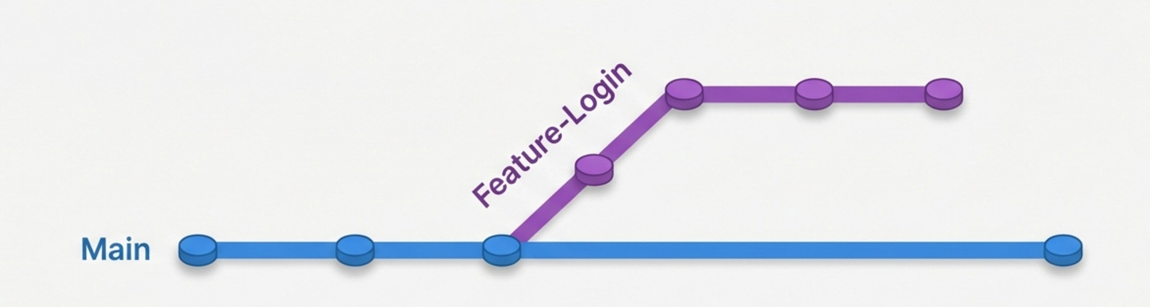
- main 줄기를 건드리지 않고 새로운 기능을 개발하거나 버그를 수정할 때 사용
git branch feature-login
git switch feature-login
merge & conflict
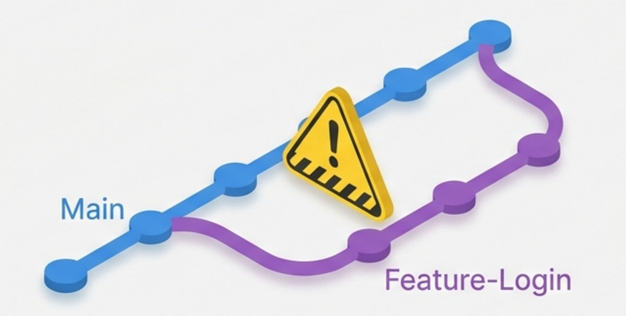
git switch main
git merge feature-login
충돌(conflict)
- 같은 파일의 줄을 수정하면 생김
- 코드를 직접 수정 후 커밋하면 해결됨
Pull Request(PR)
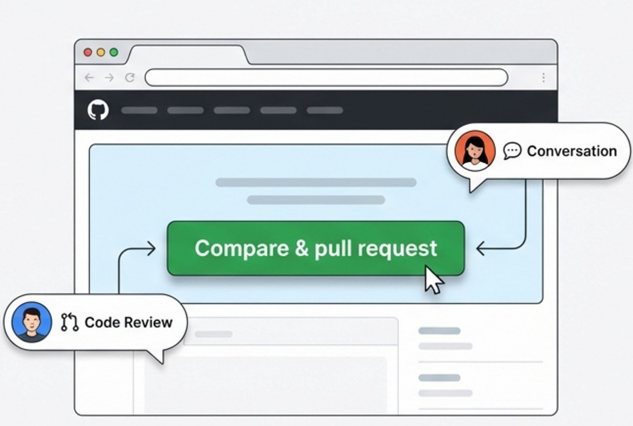
병합 요청
push: 작업한 브랜치를 GitHub에 업로드- PR 생성: 내 코드를
main에 합쳐달라는 요청 - Review: 동료들과 코드 리뷰 및 피드백
Merge: 승인 후 병합 클릭
총정리
| 시작 | `$ git init` `$ git clone` |
|---|---|
| 변경 | `$ git add .` `$ git commit -m` `$ git status` |
| 동기화 | `$ git push` `$ git pull` `$ git remote add` |
| 분기 | `$ git branch` `$ git switch` `$ git merge` |
5주차 대면수업
front matter
- 파일의 맨 앞부분에 위치하는 메타데이터 블록
YAML형식으로 작성됨
YAML이란?
key,value로 이루어짐- 들여쓰기가 중요함
들여쓰기는 스페이스로 이루어지며 보통 2칸으로 작성함
시스템 프롬프트
유저 프롬프트
---
title: "내 블로그 포스트"
date: 2024-01-01
author: "홍길동"
tags: [python, programming]
---

여기서부터 본문 내용...
trigering point