학습 목표
- 인터넷 연결에 필요한 권한을 이해하고 사용할 수 있다.
- 네트워크 연결 상태를 확인하는 방법을 이해하고 구현할 수 있다.
- 자바 API를 사용하여 네트워크 프로그래밍을 할 수 있다.
- Retrofit을 사용하여 프로그래밍할 수 있다.
- DownloadManager를 이용하여 파일 다운로드를 만들 수 있다.
네트워크 프로그래밍 용어 확인
- UDP, TCP, HTTP, HTTPS
- IP주소, 포트(port) 번호
- 서버, 클라이언트
- 소켓 프로그래밍
Listen, accept, connect
안드로이드에서 네트워크 프로그래밍 방법
-
자바 소켓 API
TCP, UDP -
TCP, UDP상에서 바로 하기보다는 응용 프로토콜 라이브러리 사용
-
HTTP(S)를 사용하는 경우, 대부분 이 경우에 해당됨
자바 HTTP URL Connection
Retrofit 라이브러리 (OkHttp 기반)
Volley, Cronet 등도 있음 -
MQTT를 사용한다면
paho, HiveMQ 등 라이브러리 사용
권한 설정
- 안드로이드에서 네트워크에 접근하기 위한 권한 필요
- 설치시 부여되는 일반 권한이므로 동적 권한 확인 코드는 불필요
AndroidManifest.xml
<manifest xmlns:android="http://schemas.android.com/apk/res/android"
          xmlns:tools="http://schemas.android.com/tools">

<uses-permission android:name="android.permission.INTERNET" />
<uses-permission android:name="android.permission.ACCESS_NETWORK_STATE" />

<application ...
HTTP 사용할 경우
-
HTTP와 HTTPS
HTTPS는 메시지를 암호화하여 전송
HTTP는 메시지를 그대로 전송 -
안드로이드에서 HTTP Url Connection API 사용할 때, http는 기본적으로 금지
-
http를 사용하기 위해서 Manifest의 application 태그 속성에
android:usesCleartextTraffic="true"를 추가
<application
   ...
   android:usesCeartextTraffic="true"
   ...
>
네트워크 연결 상태
-
현재 연결된 네트워크 종류나 인터넷 연결 가능 여부를 판단
-
ConnectivityManager.allNetworks: 모든 네트워크 IF를 리턴 -
ConnectivityManager.activeNetwork: 현재 활성화된 네트워크 IF
private fun isNetworkAvailable(): Boolean {
	val connectivityManager =
    getSystemService(Context.CONNECTIVITY_SERVICE) as ConnectivityManager
    val nw = connectivityManager.activeNetwork ?: return false // 현재 활성화된 네트워크
    val actNw = connectivityManager.getNetworkCapabilities(nw) ?: return false

    println("${actNw.hasTransport(NetworkCapabilities.TRANSPORT_WIFI)},
    		 ${actNw.hasTransport(NetworkCapabilities.TRANSPORT_CELLULAR)}, "
             + "${actNw.hasTransport(NetworkCapabilities.TRANSPORT_ETHERNET)}")

    return actNw.hasCapabilities(NetworkCapabilities.NET_CAPABILITY_INTERNET)
    // 인터넷 가능 여부
}-
hasTransport: 네트워크의 특정 전송 방식
Wi-Fi인지, 모바일 데이터인지 -
hasCapabilities: 네트워크의 특정 기능
인터넷에 연결 가능한지
자바 소켓 API
NetworkRepository
class NetworkRepository {
	suspend fun fetchFromSocket(): String = withContext(Dispatchers.IO) {
    	val sock = SocketFactory.getDefault().createSocket("google.com", 80)
        val istream = sock.getInputStream()
        val ostream = sock.getOutputStream()
        ostream.write("GET / \r\n".toByteArray())
        ostream.flush()
        val result = istream.readBytes().decodeToString()
        sock.close()
        result
    }
}withContext(코루틴 컨텍스트, 코루틴)
- 해당 코루틴 컨텍스트로 코루틴을 수행
- 여기에서는 IO 담당 디스패쳐(스레드)에서 수행하도록 함
suspend
- 네트워크나 파일 I/O같이 블록 가능성있는 API 호출할 때
반드시 비동기로 호출하거나 코루틴/스레드에서 수행해야 함
ViewModel
class MyViewModel : ViewModel() {
	private val repository = NetworkRepository()

    private val _response = MutableStateFlow("")
    val response: StateFlow<String> = _response.asStateFlow()

    private val _responseBy = MutableStateFlow("")
    val responseBy: StateFlow<String> = _responseBy.asStateFlow()

    fun refreshJavaSocket() {
    	viewModelScope.launch {
        	try {
            	val result = repository.fetchFromSocket()
                _responseBy.value = "Java Socket : Succeeded to connect to the server"
                _response.value = result
            } catch (e: Exception) {
            	_responseBy.value = "Java Socket"
                _responseBy.value = "Failed to connect to the server ${e.message}"
            }
        }
    }
}
HTTP(s) URL Connection API
-
java에서 제공하는 HttpURLConnection, HttpsURLConnection
HTTP(s) 프로토콜을 손쉽게 사용할 수 있는 API -
HTTP 사용 시
Manifest파일의application태그에
android:usesCleartextTraffic="true"
NetworkRepository
- 이미지 URL의 데이터 수신 후 Bitmap으로 변환
class NetworkRepository {
	suspend fun fetchBitmapHttps(url: String):Bitmap?
    = withContext(Dispatcher.IO) {
    	val conn = URL(url).openConnection() as HttpsURLConnection
    	try {
			val istream = conn.inputStream
            BitmapFactory.decodeStream(istream)
		} finally {
        	conn.disconnect()
        }
    }
}
ViewModel
class MyViewModel : ViewModel() {
	private val repository = NetworkRepository()

    private val _response = MutableStateFlow("")
    val response: StateFlow<String> = _response.asStateFlow()

    private val _responseBy = MutableStateFlow("")
    val responseBy: StateFlow<String> = _responseBy.asStateFlow()

    private val _responseImg = MutableStateFlow<Bitmap?>(null)
    val responseImg: StateFlow<Bitmap?> = _responseImg.asStateFlow()

    fun refreshBitmapByHttpsLib(url: String) {
    	viewModelScope.launch {
        	try {
            	val bitmap = repository.fetchBitmapHttps(url)
                _responseBy.value = "HttpsURLConnection"
                _response.value = "Succeeded to download the image"
                _responseImg.value = bitmap
            } catch(e: Exception) {
            	_responseBy.value = "HttpsURLConnection"
                _responseBy.value = "Failed to download the image: ${e.message}"
            }
        }
    }
}
Bitmap을 파일로 저장
ContentResolver를 이용하여 MediaStore에 이미지 저장
private fun saveBitmap(bitmap: Bitmap, fileName : String) {
	val collection = if (Build.VERSION.SDK_INT >= Build.VERSION_CODES.Q) {
    	MediaStore.Images.Media.getContentUri(MediaStore.VOLUME_EXTERAL)
    } else {
    	MediaStore.Images.Media.EXTERNAL_CONTENT_URI
    }
    val contentValues = ContentValues().apply {
    	put(MediaStore.Images.Media.DISPLAY_NAME, fileName)
    }
    val destUri = contentResolver.insert(collection, contentValues) ?: return
    contentResolver.openOutputStream(destUri)?.use {
    	bitmap.compress(Bitmap.CompressFormat.PNG, 100, it)
    }
}
Retrofit
-
HTTP 연결을 통해 받은 JSON 등의 구조체 데이터를
알아서 클래스 객체로 만들어줌
HTTP body 내용이 JSON, 일반 문자열, XML 등에 따라
변환기를 선택 사용 가능 -
프로그래머는 필요한 인터페이스와 데이터 클래스만 정의하면
구현은 Retrofit이 알아서 함 -
build.gradle(모듈)
dependencies {
	implementation("com.squareup.retrofit2:retrofit:3.0.0")
    implementation("com.squareup.retrofit2:converter-gson:3.0.0")
    // Json용 변환기
}
Interface 정의
-
Retrofit에서 자동으로 만들어주는 REST API 정의
-
@GET(경로명) annotation 사용
경로명에 {이름}으로 된 것은 메소드의 인자로 치환됨
치환되는 인자의 앞에 @Path("이름") annotation 사용 -
리턴 값은
Call<타입>을 리턴받아 콜백으로 응답을 받거나,
suspend를 붙여서 해당 타입 객체를 바로 리턴 받는 방법이 가능
interface RestApi {
	@GET("users/{user}/repos")
    fun listReposCall(@Path("user") user: String): Call<List<Repos>>

    @GET("users{user}/repos")
    suspend fun listRepos(@Path("user")user: String): List<Repo>
}
Data class 정의
data class Owner(val login: String)
data class Repo(val name: String, val owner: Owner, val url: String)

interface RestApi {
	@GET("users/{user}/repos")
    suspend fun listRepos(@Path("user")user: String): List<Repo>
}
JSON
- NetworkRepository
- RestApi 객체 생성
JSON 변환기 지정
class NetworkRepository {
	private val baseURL = "https://api.github.com"
    private val api: RestAi = with(Retrofit.Builder()) {
    	baseUrl(baseURL)
        addConverterFactory(GsonConverterFactory.create()) // JSON 변환기 지정
        build()
    }.create(RestApi::class.java)

    suspend fun fetchRepos(userName: String): List<Repo> {
    	return api.listRepos(userName)
    }
}
ViewModel
class MyViewModel : ViewModel() {
	private val repository = NetworkRepository()
    private val _response = MutableStateFlow("")
    val response: StateFlow<String> = _response.asStateFlow()
    private val _responseBy = MutableStateFlow("")
    val responseBy: StateFlow<String> = _responseBy.asStateFlow()

    fun refreshRetrofit(userName: String) {
    	viewModelScope.launch {
        	try {
            	val repos = repository.fetchRepos(userName)
                _responseBy.value = "retrofit : ${repos.size} repositories"
                _response.value = StringBuilder().apply {
                	repos.forEach {
                    	append(it.name)
                        append(" - ")
                        append(it.owner.login)
                        append("\n")
                    }
                }.toString()
            } catch (e: Exception)
        }
    }
}
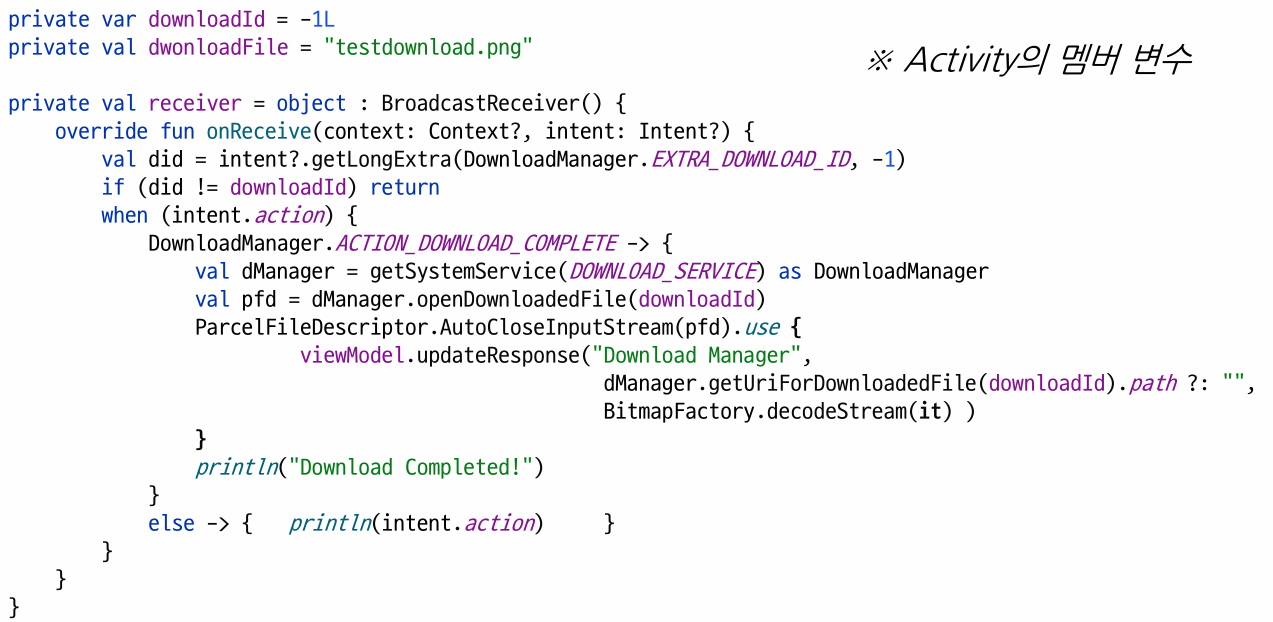
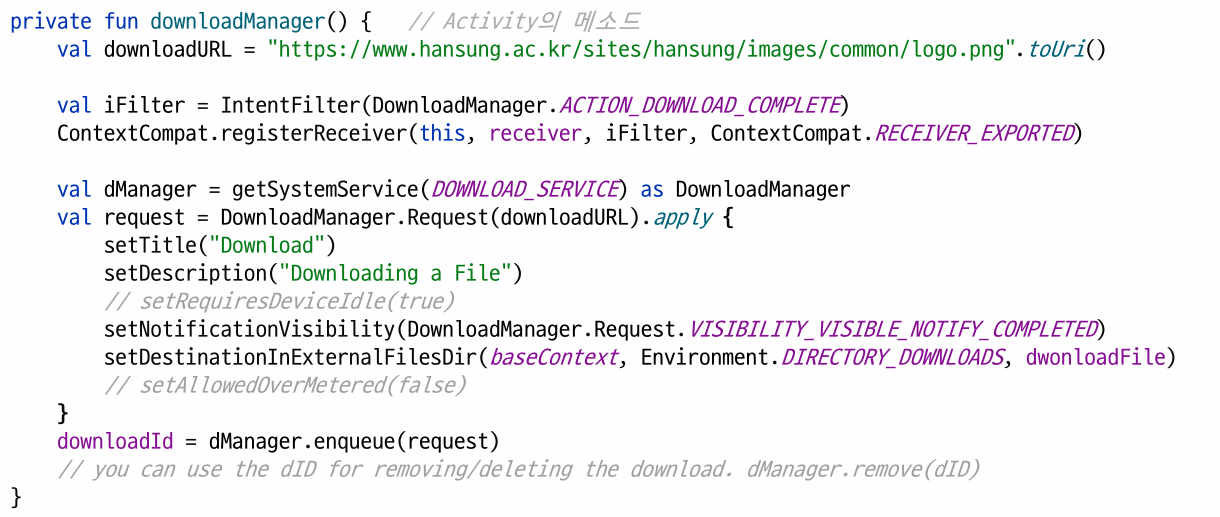
Download Manager
- 시스템에서 제공하는 다운로드 기능
- URL과 다운로드 위치만 알려주면 알아서 알림도 표시하고 다운로드 수행
- 다운로드 완료 방송 받는 방송 수신자
DownloadManager.ACTION_DOWNLOAD_COMPLETE