-
하드웨어 스레드:
- 인텔의 hyper-threading: 물리적인 코어마다 하드웨어 스레드가 2개
- 각 코어마다 동시에 처리할 수 있는 명령어 단위
-
커널 스레드:
- 비슷한 용어: Native Thread, Kernel Thread, Kernel-level Thread, OS-level Thread
- OS 커널 레벨에서 생성되고 관리되는 스레드
- OS Thread를 사용하고 관리하는 데에는 자원(메모리, CPU)이 많이 필요하다. 즉, 생성 및 유지 비용이 비싸다.
- CPU에서 실제로 실행되는 단위, CPU 스케줄링의 단위로 관리된다.
- OS 스레드의 Context Switching은 커널이 주도적으로 한다.
- 커널 스레드 개수는 OS 자체적으로 정해져 있다.
-
User Thread:
- User-level Thread라고 불리기도 한다.
- 스레드 개념을 프로그래밍 레벨에서 추상화 한 것
- Java에서 User Thread가 CPU에서 실행되려면, 반드시 OS-level Thread와 연결돼야 한다.
-
Context Switching이 비용이 많이 드는 이유:
- 사용하던 thread와 사용할 thread가 같은 프로세스내에 있다는 보장이 없으므로, CPU내의 캐시 무력화
- CPU 레지스터 정보를 TCB에 백업과 TCB에 있는 값을 CPU 레지스터로 복원 과정
- context switching은 cpu에서 일어나기 때문에 오버헤드 발생한다.
-
JDK 21 이전 방식:
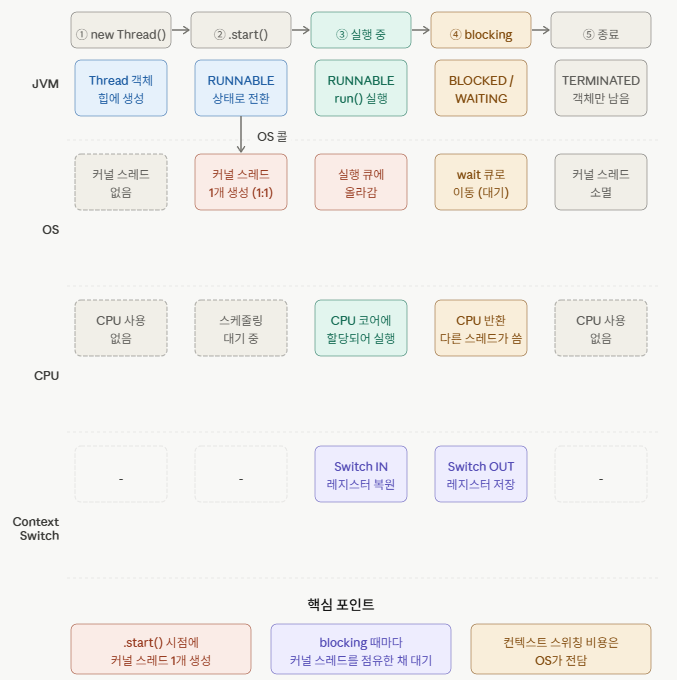
- Java의 Thread는 OS Thread를 Wrapping한 것(Platform Thread)
- Java 애플리케이션에서 Thread를 사용하면 실제로는 OS Thread를 사용한 것
- 과정:
- new Thread().start()를 호출하면 JVM의 JNI에서 OS에 커널 스레드 1개를 생성해 달라고 System Call을 한다. 생성된 OS-level Thread와 자바에서 생성한 Thread가 mapping 된다.
- Thread 클래스의 핵심 메서드는 Native Code로 구현되어있다. - 커널 스레드와 플랫폼 스레드(new Thread()) 생성을 제한하기 위해 Thread Pool을 사용한다.
-
기본 방식 문제점:
- 기본적인 Web Request 처리 방식은 Thread Per Request(하나의 요청당 하나의 스레드)이다. 이때 처리량을 높이려면 추가적인 스레드 필요하지만 스레드를 무한정 늘릴 수 없다.
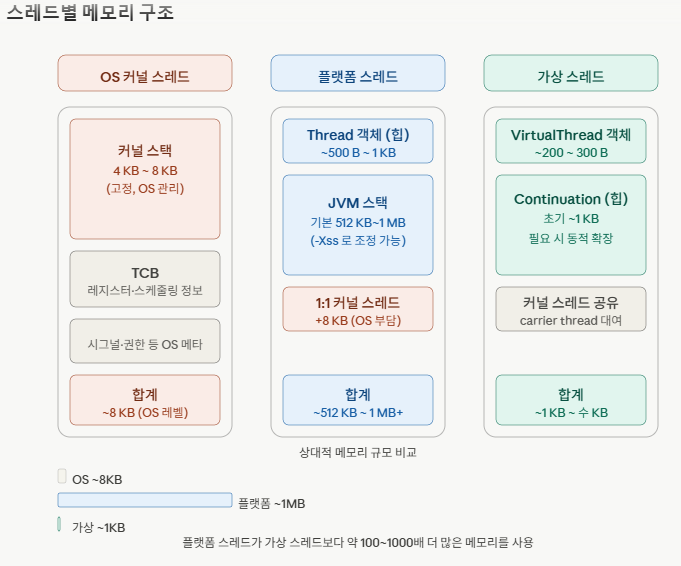
- 플랫폼 thread 1개를 생성하면 1MB 정도 메모리를 차지한다. - Thread에서 I/O 작업을 처리할 때 Blocking이 일어난다.
- 작업을 처리하는 시간보다 대기하는 시간이 길다.
- 기본적인 Web Request 처리 방식은 Thread Per Request(하나의 요청당 하나의 스레드)이다. 이때 처리량을 높이려면 추가적인 스레드 필요하지만 스레드를 무한정 늘릴 수 없다.
-
용량 비교
구분 커널 스레드 플랫폼 스레드 가상 스레드 크기 ~8 KB ~1 MB 수 KB
-
커널 스레드와 플랫폼 스레드가 1대1 mapping인지 확인:
- wsl 접속 또는 리눅스 환경
- 아래 코드 실행하면 "before"와 "after"의 차이를 보면 커널 스레드 수가 증가한 것을 확인할 수 있다.
import java.nio.file.Files; import java.nio.file.Paths; public class ThreadTest { private static int getThreadCount() throws Exception { return (int) Files.list(Paths.get("/proc/self/task")).count(); } public static void main(String[] args) throws Exception { System.out.println("Before = " + getThreadCount()); // 18 for (int i = 0; i < 10; i++) { new Thread(() -> { try { Thread.sleep(60000); } catch (InterruptedException e) { } }).start(); } Thread.sleep(1000); // 생성될 시간 주기 System.out.println("After = " + getThreadCount()); // 28 Thread.sleep(60000); } } -
Virtual Thead:
- JVM에 의해서 생성된다.
- OS 스레드를 그대로 사용하지 않고 JVM 내부 스케줄링을 통해서 수십만~수백만개의 스레드를 동시에 사용할 수 있게 한다.
- I/O 작업을 기다리는 Virtual Thread는 carrier thread에서 unmount된다. I/O 작업이 끝나면 다시 carrier thread에 mount된다.
- virtual thread는 heap 영역에 존재
- spring boot는 3.2.0 이상, java는 21 이상부터 Virtual Thread를 지원한다.
- fork/join pool thread는 daemon thread로 동장
-
Virtual Thread I/O 작업:
- ForkJoinPool-1-worker-3과 7로 숫자가 다르다. 즉, carrier thread가 다르다. 가상 스레드가 waiting 상태에 들어가니 carrier thread가 다른 가상 스레드의 작업을 진행한다.
hello.world.virtualthread.purejava.VirtualThreadExecutorsCreation -- 1) run. thread: VirtualThread[#28,myVirtual-6]/runnable@ForkJoinPool-1-worker-3
...
hello.world.virtualthread.purejava.VirtualThreadExecutorsCreation -- 2) run. thread: VirtualThread[#28,myVirtual-6]/runnable@ForkJoinPool-1-worker-7
import java.util.concurrent.ExecutorService; import java.util.concurrent.Executors; import java.util.concurrent.Future; import java.util.concurrent.ThreadFactory; @Slf4j public class VirtualThreadExecutorsCreation { private static final Runnable runnable = new Runnable() { @Override public void run() { log.info("1) run. thread: " + Thread.currentThread()); // 시작과 끝의 thread가 다르다. try { Thread.sleep(3000); } catch (InterruptedException e) { throw new RuntimeException(e); } log.info("2) run. thread: " + Thread.currentThread()); } }; public static void main(String[] args) throws InterruptedException { log.info("1) main. thread: " + Thread.currentThread()); ThreadFactory factory = Thread.ofVirtual().name("myVirtual-", 0).factory(); // 권장 코드 try (ExecutorService executorService = Executors.newThreadPerTaskExecutor(factory)) { for (int i = 0; i < 10; i++) { executorService.submit(runnable); } } log.info("2) main. thread: " + Thread.currentThread()); }
// Virtual Thread의 toString 메서드 @Override public String toString() { StringBuilder sb = new StringBuilder("VirtualThread[#"); sb.append(threadId()); String name = getName(); if (!name.isEmpty()) { sb.append(","); sb.append(name); } sb.append("]/"); Thread carrier = carrierThread; if (carrier != null) { // include the carrier thread state and name when mounted synchronized (carrierThreadAccessLock()) { carrier = carrierThread; if (carrier != null) { String stateAsString = carrier.threadState().toString(); sb.append(stateAsString.toLowerCase(Locale.ROOT)); sb.append('@'); sb.append(carrier.getName()); } } } // include virtual thread state when not mounted if (carrier == null) { String stateAsString = threadState().toString(); sb.append(stateAsString.toLowerCase(Locale.ROOT)); } return sb.toString(); } -
fork/join pool:
- carrier thread의 pool 역할을 한다.
- virtual thread의 작업 스케줄링을 담당한다.
-
runContinuation:
- virtual thread는 runContinuation이라는 virtual thread의 실제 작업 내용(Runnable)을 가지고 있다.
-
cpu bound vs i/o bound:
- virtual thread는 i/o bound 작업에서 성능이 더 좋다.
- 일반 thread는 cpu bound 작업에서 성능이 좋다.
-
가상 스레드가 carrier thread에서 분리될 수 없는 경우:
* virtual thread가 carrier thread에서 분리될 수 없는 상태가 된 경우 pinned 상태가 되었다고 한다.
(1) native method를 호출하는 경우
(2) synchronized 메서드 or block을 호출한 경우
- run configuration에서 "add VM Option" 클릭 후 "-Djdk.tracePinnedThreads=full or -Djdk.tracePinnedThreads=short 를 통해 detect" 둘중 하나 입력하여 detect
(3) parallelStream을 사용할 경우
해결책: ReentrantLock 사용해서 synchronized 부분에 lock.lock()과 lock.unlock()으로 동기화를 해주면 된다.import lombok.extern.slf4j.Slf4j; import java.util.concurrent.ExecutorService; import java.util.concurrent.Executors; import java.util.concurrent.ThreadFactory; import java.util.concurrent.locks.ReentrantLock; @Slf4j public class ReentrantLockMain { private final ReentrantLock lock = new ReentrantLock(); // -Djdk.tracePinnedThreads=full or -Djdk.tracePinnedThreads=short 를 통해 detect private final Runnable runnable = new Runnable() { @Override public void run() { log.info("1) run. thread: " + Thread.currentThread()); lock.lock(); try { Thread.sleep(5000); } catch (InterruptedException e) { throw new RuntimeException(e); } finally { lock.unlock(); } log.info("2) run. thread: " + Thread.currentThread()); } }; public static void main(String[] args) { long startTime = System.currentTimeMillis(); log.info("1) main. thread: " + Thread.currentThread()); // platform(); // 5019 virtual(); // 5021 log.info("2) main. time: " + (System.currentTimeMillis()-startTime) + " , thread: " + Thread.currentThread()); } private static void virtual() { ThreadFactory factory = Thread.ofVirtual().name("myVirtual-", 0).factory(); try (ExecutorService executorService = Executors.newThreadPerTaskExecutor(factory)) { for (int i = 0; i < 20; i++) { ReentrantLockMain pinning = new ReentrantLockMain(); executorService.submit(pinning.runnable); } } } private static void platform() { try (ExecutorService executorService = Executors.newFixedThreadPool(20)) { for (int i = 0; i < 20; i++) { ReentrantLockMain pinning = new ReentrantLockMain(); executorService.submit(pinning.runnable); } } } }

공부한 것 기록용 블로그입니다.