-
vscode 단축기
단어 선택 일관 바꾸기 => 단어 선택후 Ctrl + Shift + L
-
Quick Fix 단축기
에러가 있는 곳에서 Ctrl + .
-
Navigation(화면 이동)
Navigator.push(
  context,
  MaterialPageRoute(builder: (context) => SecondPage()), // 이동하려는 페이지
);
Navigator.pop(context); // 현재 화면 종료
Navigate with named routes [https://docs.flutter.dev/cookbook/navigation/named-routes]
MaterialApp(
...
      initialRoute : '/',
      routes : {
       '/' : (context) => const FirstScreen(),
       '/ssecond' : (context) => const SecondScreen(),
...

...
  onPressed: () {
    // Navigate back to the first screen by popping the current route
    // off the stack.
    Navigator.pop(context);
  }
...

...
  Navigator.pop(context);
...

);
-
AppBar.leading
AppBar.leadingWidth
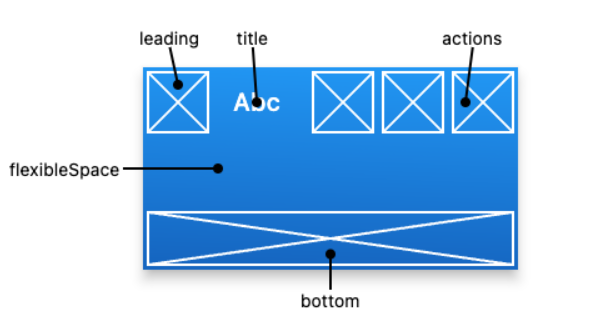
AppBar.bottomNavigationBar : 하단 메뉴 구성..
  bottomNavigationBar : BottomNavigationBar(
    items : [],
    currentUndex:
    selectedItemColor:
    onTap: () {},
  ),
ListView.builder 에 구분자 추가.
ListView.separted ( ... separatorBuilder: (BuildContext context, int index) { return Divider(); }, ... ), -
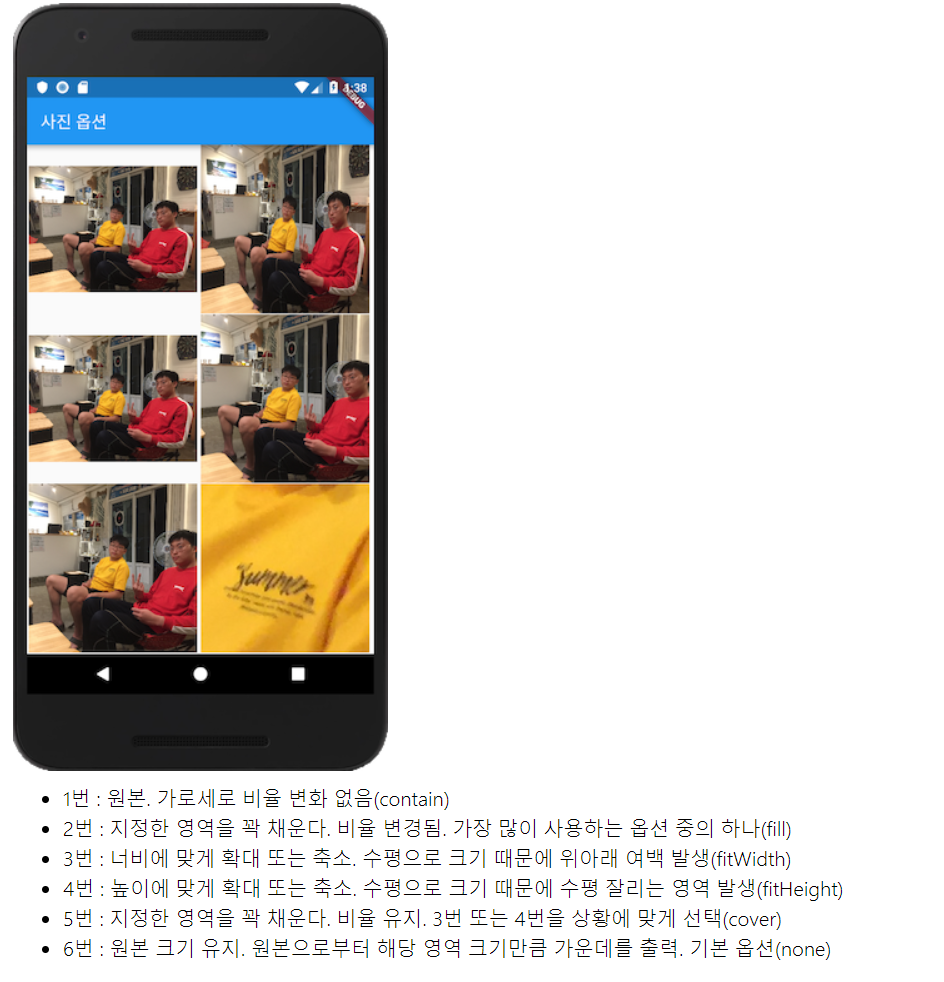
BoxFit
enum BoxFit {
	fill, contain, cover, fitWidth, fitHeight, none, scaleDown
}- Expanded
A widget that expands a child of a Row, Column, or Flex so that the child fills the available space.
-
Flexible vs Expanded
Expaned는 Flexible 위젯의 fit 옵션이 FlexFit.tight 로 고정된 위젯이다.간단한게 위젯의 텍스트가 넘치는 것을 방지하려면 > Expanded
디테일하게 영역을 설정하려면 > Flexible -
Spacer
Spacer creates an adjustable, empty spacer that can be used to tune the spacing between widgets in a Flex container, like Row or Column.
- StatefulWidget의 상태 클래스에서 widget.변수명으로 전달받은 변수에 접근할 수 있습니다.
--- 숙제 리뷰 ---
-
제공된 코드에 대한 부분
main.dart 의 tab 구현 부분.. example 을 찾을 수 가 없네. 안보고 구현하려고 했는데.DefaultTabController.of(context)?.addListener(() {
setState(() {});
})
DefaultTabController - DefaultTabController is an inherited widget that is used to share a TabController with a TabBar or a TabBarView.
TabBar - 보통 상단의 tabbar
TabBarView - tab bar view
SafeArea - 각 기기의 특성에 따라서 화면이 가려지는 현상을 보호하기 위해서..
TabPageSelector - tab 현재위치를 표시하는 점 o o o 표현하는 widget -
숙제 구현 부에 대한 리뷰
.. 계속childAspectRatio GridView item 의 가로 / 세로 비율 지정.
childAspectRatio : 3 / 5, // 가로 3, 세로 5
BixFit
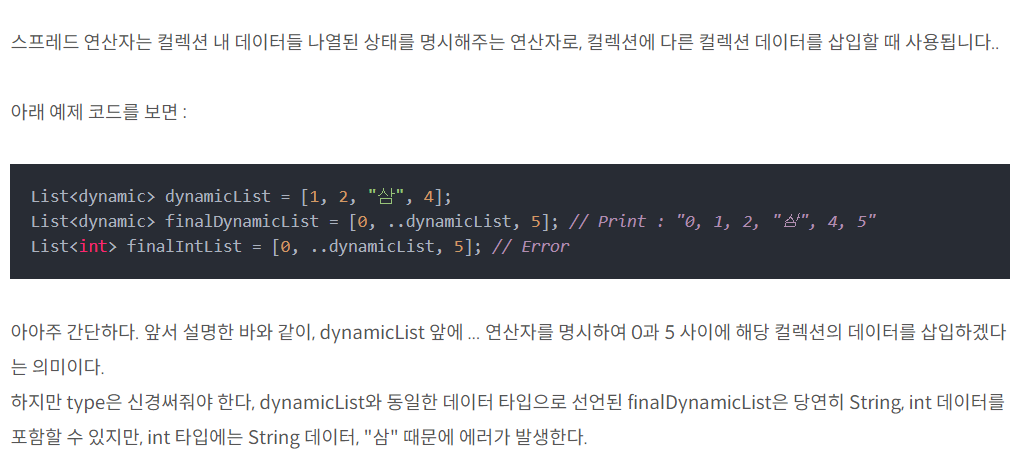
... 스프레드 연산자