1. 프록시(Proxy) 객체
예제 분석: factorial() 메서드의 실행시간 측정
factorial 연산 코드
package chapter07;

public class LoopCalculator implements Calculator {

    @Override
    public long factorial(long num) {   // 반복문을 이용한 팩토리얼 연산 구현
        long start = System.currentTimeMillis();    // 실행 시작 시간
        long result = 1;
        for (int i = 1; i <= num; i++) {
            result *= i;
        }
        long end = System.currentTimeMillis();      // 실행 종료 시간
        System.out.printf("chapter07.LoopCalculator.factorial(%d) 실행 시간 = %d\n", num, end-start);
        return result;
    }
}
package chapter07;
public class RecCalculator implements Calculator {
@Override
public long factorial(long num) { // 재귀호출을 이용한 팩토리얼 연산 구현
long start = System.currentTimeMillis(); // 실행 시작 시간
try {
if (num == 0) {
return 1;
} else {
return num * factorial(num - 1);
}
} finally {
long end = System.currentTimeMillis(); // 실행 종료 시간
System.out.printf("chapter07.RecCalculator.factorial(%d) 실행 시간 = %d\n", num, end-start);
}
}
} 실행 결과 및 분석
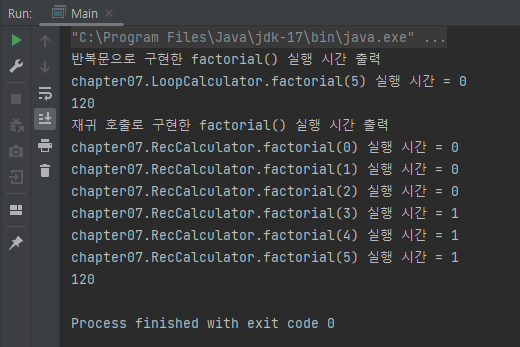
재귀호출로 구현한 RecCalculator에서는 반복문으로 구현한 LoopCalculator에 비해 factorial() 메서드의 실행 시간 출력 코드가 다소 복잡해졌다. 게다가 RecCalculator의 코드를 실행했을 시 재귀 호출이 발생할 때마다 실행 시간 출력 메시지가 중복 출력되는 문제가 발생했다.
1차 코드 수정
RecCalculator에서 발생했던 중복 출력 문제는 아래처럼 RecCalculator 클래스 내부가 아닌 Main 클래스에서 RecCalculator.factorial() 메서드 실행 전후에 실행 시간을 구하는 방식으로 해결할 수 있다. 하지만 개선된 코드 역시 실행 시간 출력 코드를 중복해서 작성해야 한다는 점에서 추후 코드 수정이 번거로워질 수 있다는 문제가 발생한다.
package main;

import chapter07.LoopCalculator;
import chapter07.RecCalculator;

public class Main {

    public static void main(String[] args) {
        LoopCalculator ttCal1 = new LoopCalculator();	// 반복문 활용
        long start1 = System.currentTimeMillis();		// 팩토리얼 연산 시작 시간
        System.out.println(ttCal1.factorial(5));
        long end1 = System.currentTimeMillis();			// 팩토리얼 연산 종료 시간
        System.out.printf("chapter07.LoopCalculator.factorial(5) 실행 시간 = %d\n", end1-start1);

        RecCalculator ttCal2 = new RecCalculator();	// 재귀호출 활용
        long start2 = System.currentTimeMillis();	// 팩토리얼 연산 시작 시간
        System.out.println(ttCal2.factorial(5));
        long end2 = System.currentTimeMillis();		// 팩토리얼 연산 종료 시간
        System.out.printf("chapter07.RecCalculator.factorial(5) 실행 시간 = %d\n", end2-start2);
    }
}
2차 코드 수정: 프록시 활용
아래의 ExeTimeCalculator 클래스는 외부에서 주입받은 Calculator 객체에게 팩토리얼 연산을 위임하고, 실행 시간 측정과 같은 부가적인 기능을 직접 수행하도록 구현되었다.
이를 통해 기존의 LoopCalculator, RecCalculator 클래스를 변경하지 않으면서도 실행 시간의 출력을 중복 없이 수행할 수 있게 되었다. 그리고 실행 시간 출력 코드를 추후에 수정해야 할 때도 ExeTimeCalculator 클래스만 수정하면 된다는 점에서 코드를 수정할 때의 번거로움 또한 방지할 수 있다.
package chapter07;

public class ExeTimeCalculator implements Calculator {	// 프록시 객체

    private final Calculator delegate;

	/* 생성자를 통해 외부에서 Calculator 객체를 주입 */
    public ExeTimeCalculator(Calculator delegate) {
        this.delegate = delegate;
    }

	/* 외부에서 주입받은 Calculator 객체인 delegate가 핵심 기능 수행 */
    @Override
    public long factorial(long num) {
        long start = System.nanoTime();			// 살행 시작
        long result = delegate.factorial(num);	// 팩토리얼 연산 수행(핵심 기능)
        long end = System.nanoTime();			// 실행 종료
        System.out.printf("%s.factorial(%d) 실행 시간: %d\n",
                delegate.getClass().getSimpleName(), num, end-start);
        return result;
    }
}
package main;
import chapter07.ExeTimeCalculator;
import chapter07.LoopCalculator;
import chapter07.RecCalculator;
public class MainProxy {
public static void main(String[] args) {
/* 이 코드에서 ExeTimeCalculator는 프록시 객체, LoopCalculator는 대상 객체 */
ExeTimeCalculator ttCal1 = new ExeTimeCalculator(new LoopCalculator());
System.out.println(ttCal1.factorial(20));
/* 이 코드에서 ExeTimeCalculator는 프록시 객체, RecCalculator는 대상 객체 */
ExeTimeCalculator ttCal2 = new ExeTimeCalculator(new RecCalculator());
System.out.println(ttCal2.factorial(20));
}
}최종 수정 코드의 실행 과정 & 실행 결과
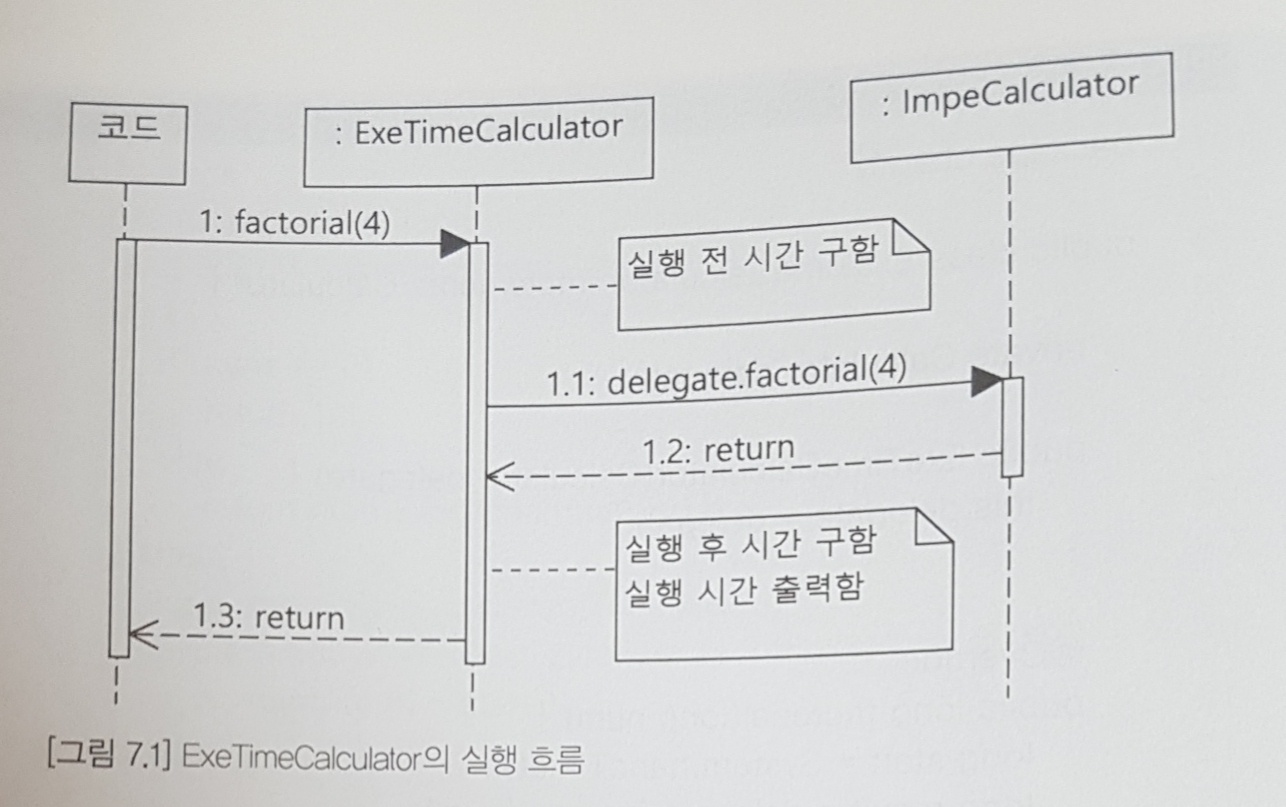
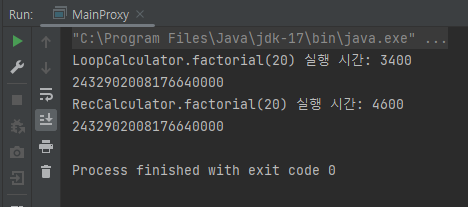
정리: 프록시(Proxy) 객체의 개념 & 특징
위와 같이 핵심 기능의 실행은 다른 객체에게 위임하고 부가적인 기능을 제공하는 객체를 프록시(Proxy) 객체라고 지칭한다. 프록시 객체는 핵심 기능을 구현하지 않는 대신 여러 객체에 공통으로 적용 가능한 기능을 구현한다는 특징을 갖는다.
cf) Decorator vs Proxy
Decorator 객체와 Proxy 객체 모두 핵심 기능을 담당하는 객체와 부가 기능을 담당하는 객체를 구분하고, 부가 기능 담당 객체에 핵심 기능을 담당하는 객체를 주입하는 방식을 취한다는 점에서 기본 구조 자체는 동일하다. 하지만 이 둘은 그 사용 목적에 따라 구분되는데, Decorator 객체는 기능의 추가와 확장에 초점이 맞춰져 있다면 Proxy 객체는 접근 제어에 초점을 맞춘다.
2. 프록시와 AOP
AOP(Aspect-Oriented Programming)란?
AOP는 Aspect-Oriented Programming이라고도 하며, 여러 객체에 공통적으로 적용 가능한 기능을 분리해서 재사용성을 높여주는 프로그래밍 기법이다. AOP에서는 핵심 기능과 공통 기능을 분리하여 핵심 기능의 수정 없이 공통 기능의 구현을 추가할 수 있도록 만드는데, 공통 기능을 추가하는 방식으로는 다음의 3가지가 있다.
- 컴파일 시 코드에 공통 기능 삽입
- 클래스 로딩 시 바이트 코드에 공통 기능 삽입
- 런타임에 프록시 객체 생성 후 공통 기능 삽입
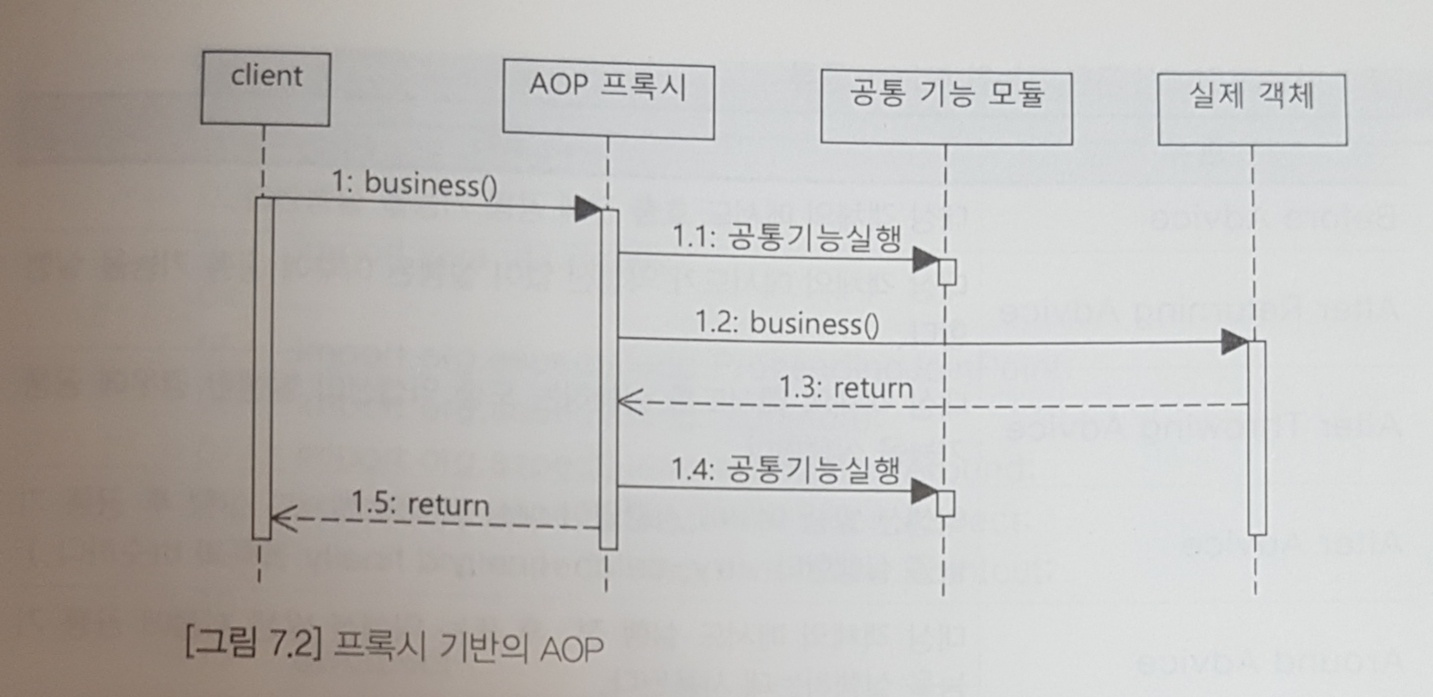
위의 3가지 방법 중 Spring에서 제공하는 AOP는 프록시를 이용한 세번째 방식이다. 아래와 같이 동작한다. 그리고 Spring AOP에서는 프록시 객체를 자동으로 생성하기 때문에, 별도의 프록시 클래스를 구현할 필요 없이 공통 기능에 관한 클래스만 구현하면 된다. 아래는 Spring AOP의 기본 동작 방식이다.
AOP 관련 주요 용어 정리
Aspect
여러 객체에 공통으로 적용되는 기능을 지칭한다. (트랜잭션, 보안 등)Advice
언제, 어떤 Aspect를 핵심 로직에 적용할 것인지를 정의하는 것을 말한다.JoinPoint
메서드 호출, 필드 값 변경 등 Advice를 적용 가능한 지점을 지칭한다.
Spring AOP는 프록시를 통해 구현되므로 메서드 호출에 대한 JoinPoint만 지원 가능하다.PointCut
JoinPoint의 일종으로, 실제 Aspect가 적용되는 JoinPoint를 지칭한다.
Spring에서는 정규표현식이나 AspectJ 문법을 통해 PointCup을 정의할 수 있다.Weaving
Advice를 핵심 로직 코드에 적용하는 것을 말한다.
Spring에서 구현 가능한 Advice의 종류
Before Advice
대상 객체의 메서드 호출 전 공통 기능 실행After Returning Advice
대상 객체의 메서드가 Exception 없이 실행된 이후 공통 기능 실행After Throwing Advice
대상 객체의 메서드 실행 도중 Exception 발생 시 공통 기능 실행After Advice
Exception 발생 여부에 관계없이 대상 객체의 메서드 실행 이후 공통 기능 실행
(try-catch-finally의 finally 블록과 유사)Around Advice
대상 객체의 메서드 실행 전, 후, 또는 Exception 발생 시점에 공통 기능 실행
캐시 기능, 성능 모니터링과 같은 공통 기능을 구현할 때 주로 이용되며, 다양한 시점에서 원하는 공통 기능을 삽입 가능하기 때문에 널리 활용된다.
3. Spring AOP 구현
@Aspect, @Pointcut, @Around를 이용한 AOP 구현
주요 어노테이션 설명
@Aspect
해당 어노테이션이 사용된 클래스를 Aspect로 취급한다. 이 어노테이션이 적용된 클래스는 Advice와 PointCut을 모두 제공한다.@Pointcut("execution("Aspect를 적용할 Bean 메서드")")
이 어노테이션에서 설정한 excution 명시자 표현식에 맞는 public 메서드를 찾아 PointCut으로 지정한다.@PointCut이 사용된 메서드 자체는 이 어노테이션의 excution 명시자 표현식에서 지정한 PointCut에@Around가 붙은 메서드를 적용하는 기능을 수행한다.@Around("@PointCut에서 지정한 메서드")
@PointCut어노테이션으로 지정한 메서드에 이 어노테이션이 붙은 메서드를 적용한다.
이 어노테이션 역시 execution 명시자 표현식을 사용할 수 있으며, 이를 통해 Pointcut을 직접 지정할 수 있다. 하지만 이 어노테이션이 사용하고자 하는 Pointcut의 접근제한자가 private라면 해당 Pointcut은 이 어노테이션이 사용된 메서드와 같은 클래스에 있는 경우에만 사용할 수 있다.
실행 코드 분석
MainAspect 클래스의 AnnotationConfigApplicationContext에 의해 생성된 대상 객체의 Bean 타입은 RecCalculator이므로, 해당 Bean의 factorial() 메서드가 ExeTimeAspect에서 지정한 PointCut이 된다.
/* 공통 기능 정의 */
package aspect;

import java.util.Arrays;
import org.aspectj.lang.ProceedingJoinPoint;
import org.aspectj.lang.Signature;
import org.aspectj.lang.annotation.Around;
import org.aspectj.lang.annotation.Aspect;
import org.aspectj.lang.annotation.Pointcut;

@Aspect
public class ExeTimeAspect {

	/* 이 코드의 PointCut: RecCalculator.factorial() 메서드 */
    @Pointcut("execution(public * chapter07..*(..))")
    private void publicTarget() {
    }

	/* 이 코드의 PointCut에 이 클래스의 measure() 메서드 적용,
       ProceedingJoinPoint 타입 파라미터: 프록시 대상 객체의 메서드 호출용 객체*/
    @Around("publicTarget()")
    public Object measure(ProceedingJoinPoint joinPoint) throws Throwable {
        long start = System.nanoTime();
        try {
        	/* 대상 객체인 RecCalculator의 factorial() 메서드 호출 */
            return joinPoint.proceed();
        } finally {
            long finish = System.nanoTime();
            Signature sig = joinPoint.getSignature();
            System.out.printf("%s.%s(%s) 실행 시간: %d ns\n",
                    joinPoint.getTarget().getClass().getSimpleName(),
                    sig.getName(), Arrays.toString(joinPoint.getArgs()),
                    (finish-start));
        }
    }
}
/* Spring 설정 클래스 */
package config;
import aspect.ExeTimeAspect;
import chapter07.Calculator;
import chapter07.RecCalculator;
import org.springframework.context.annotation.Bean;
import org.springframework.context.annotation.Configuration;
import org.springframework.context.annotation.EnableAspectJAutoProxy;
@Configuration
@EnableAspectJAutoProxy // 프록시 객체 생성 관련 설정을 자동으로 처리
public class AppCtx {
@Bean
public ExeTimeAspect exeTimeAspect() {
return new ExeTimeAspect();
}
@Bean
public Calculator calculator() {
return new RecCalculator();
}
}package main;
import chapter07.Calculator;
import config.AppCtx;
import org.springframework.context.annotation.AnnotationConfigApplicationContext;
public class MainAspect {
public static void main(String[] args) {
/* Spring 컨테이너 생성 */
AnnotationConfigApplicationContext ctx = new AnnotationConfigApplicationContext(AppCtx.class);
/* getBean() 메서드로 가져온 Calculator 객체는 프록시 객체 */
Calculator cal = ctx.getBean("calculator", Calculator.class);
long fiveFact = cal.factorial(5);
System.out.println("cal.factorial(5) = " + fiveFact);
/* Spring이 생성한 프록시 타입 출력 */
System.out.println(cal.getClass().getName());
ctx.close();
}
}실행 과정
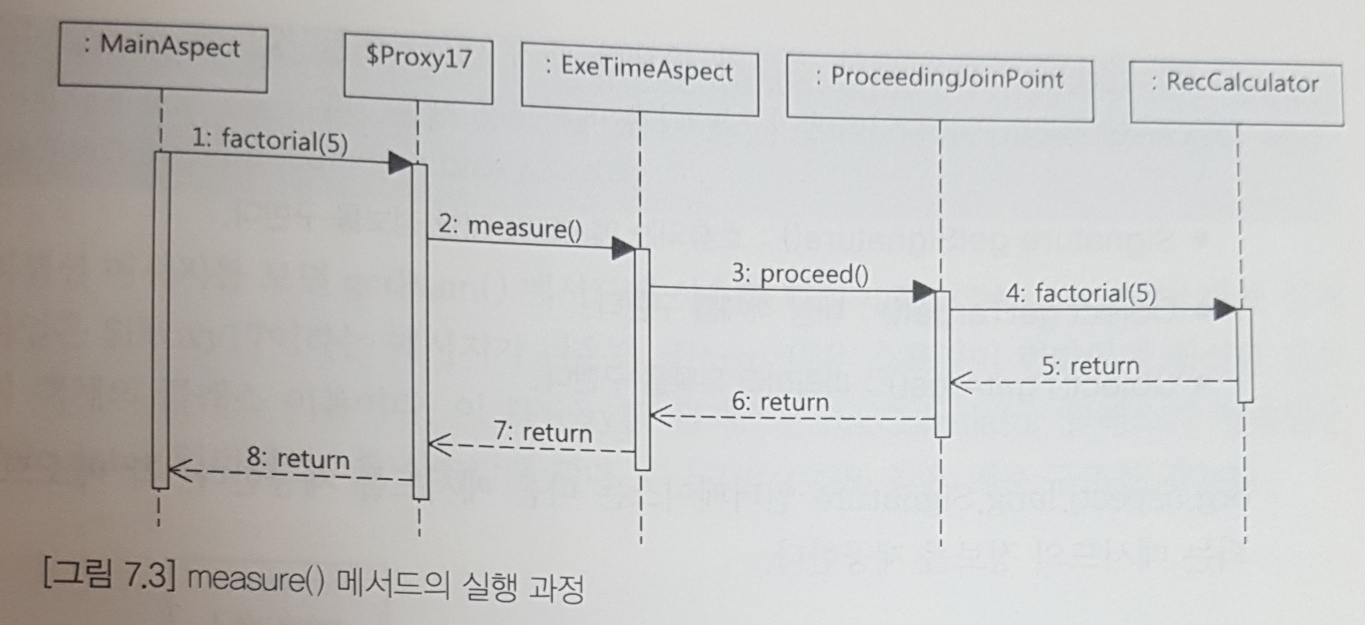
실행 결과
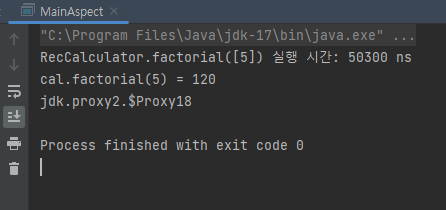
실행 결과의 첫번째 줄은 ExeTimeAspect 클래스의 measure() 메서드에서 출력한 코드이고, 세번째 줄은 MainAspect 클래스에서 출력한 코드이다. 이는 곧 AnnotationConfigApplicationContext.getBean() 메서드로 구한 Calculator 타입이 Spring에 의해 생성된 프록시 타입임을 나타낸다.
ProceedingJoinPoint의 메서드
-
org.aspectj.lang.ProceedingJoinPoint인터페이스의 주요 메서드Object proceed(): 실제 대상 객체의 메서드를 호출한다.Signature getSignature(): 호출되는 메서드에 관한 정보를 구한다.Object getTarget(): 대상 객체를 구한다.Object[] getArgs(): 파라미터 목록을 구한다.
-
org.aspectj.lang.Signature인터페이스의 주요 메서드String getName(): 호출되는 메서드의 이름을 구한다.String toLongString()
호출되는 메서드를 완전하게 표현한 문자열을 구한다. 이 때 메서드의 리턴 타입, 파라미터 타입을 모두 표시한다.String toShortString()
호출되는 메서드를 축약해서 표현한 문장을 구한다. 이 메서드의 기본 구현 시 메서드의 이름만을 표기한다.
5. 프록시 생성 방식
Spring에서 AOP를 위한 프록시 객체를 생성할 때, 실제 생성할 Bean 객체가 인터페이스를 상속한다면 해당 인터페이스를 이용해 프록시를 생성한다.
따라서 Bean의 실제 타입이 인터페이스를 상속한 java 클래스 타입일지라도 getBean() 메서드로 가져오는 Bean 객체의 타입은 인터페이스를 상속받은 프록시 타입으로 취급한다. 만약 클래스를 이용해서 프록시를 생성하고자 하는 경우 @EnableAspectJAutoProxy의 속성을 변경해야 한다.
@EnableAspectJAutoProxy
이 어노테이션을 Spring 설정 클래스에 사용할 시 프록시 객체 생성에 관한AnnotationAwareAspectProxyCreator객체를 Bean으로 등록하여 프록시 객체를 생성할 수 있게 한다. 이때 생성된 프록시 객체는 기본적으로 인터페이스를 상속받는다.@EnableAspectJAutoProxy(proxyTargetClass = true)
해당 어노테이션의proxyTargetClass속성값을 true로 변경할 시 인터페이스가 아닌 java 클래스를 상속받은 프록시 객체를 생성한다.
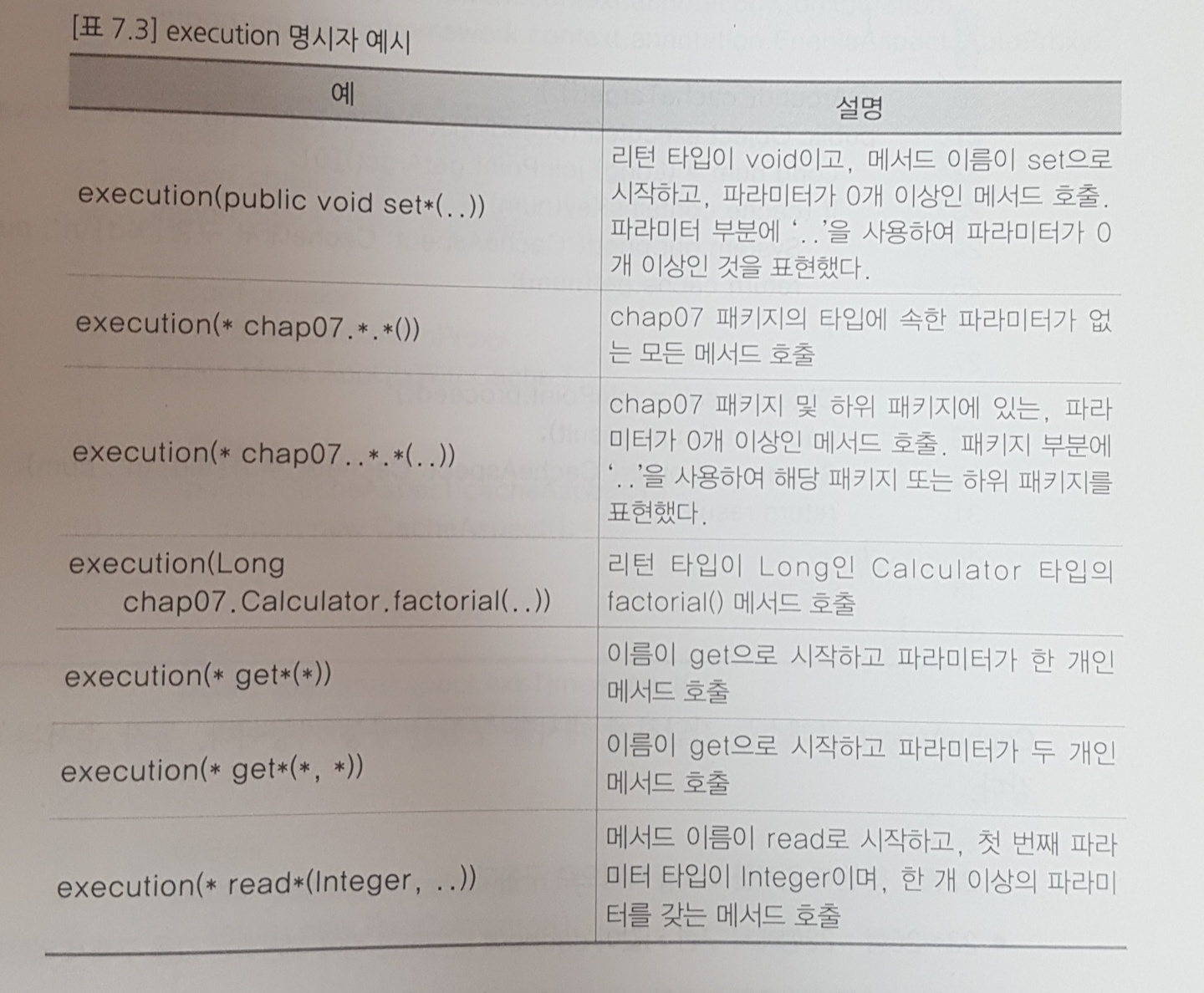
execution 명시자 표현식
execution 명시자 표현식의 기본 형식
@Pointcut(execution([수식어패턴] 리턴타입패턴 [클래스이름패턴]메서드이름패턴(파라미터패턴)))
- 공통 사항
- 각 패턴은 '*'를 이용하여 모든 값을 표현 가능
- '..'을 이용하여 패키지/파라미터 개수가 0개 이상임을 표현 가능
- 각 패턴별 설명
- 수식어 패턴
: 생략도 가능하지만, 명시할 경우 Spring AOP가 public 메서드에만 적용 가능하다는 점으로 인해 사실상 public만 사용할 수 있다.- 리턴타입 패턴 : 매칭할 메서드의 반환 타입을 명시한다.
- 클래스 이름 패턴 : 매칭할 패키지명과 그 하위 패키지명을 포함한 클래스명을 패턴으로 명시한다. (생략하는 것도 가능)
- 메서드 이름 패턴 : 매칭할 메서드의 이름을 패턴으로 명시한다.
- 파라미터 패턴
: 매칭할 메서드의 파라미터 타입/개수를 나타낸다. 아무 것도 기입하지 않으면 파라미터가 없는 메서드를 매칭한다.
execution 명시자 예시
Advice 적용 순서의 변동
1개의 PointCut에 여러 개의 Advice를 적용하는 경우 코드의 실행 상황에 따라 Advice 적용 양상이 달라질 수 있다. 이를 잘 드러내는 사례로는 Proxy 객체를 통해 구현한 cache가 있다.
package aspect;

import java.util.HashMap;
import java.util.Map;
import org.aspectj.lang.ProceedingJoinPoint;
import org.aspectj.lang.annotation.Around;
import org.aspectj.lang.annotation.Aspect;
import org.aspectj.lang.annotation.Pointcut;

@Aspect
public class CacheAspect {

    private final Map<Long, Object> cache = new HashMap<>();

    @Pointcut("execution(public * chapter07..*(..))")
    public void cacheTarget() {
    }

    @Around("cacheTarget()")
    public Object execute(ProceedingJoinPoint joinPoint) throws Throwable {
        Long num = (Long) joinPoint.getArgs()[0];
        /* 이전에 연산한 결과값이 저장되어 있으면 CacheAspect의 execute()만 실행*/
        if (cache.containsKey(num)) {
            System.out.printf("CacheAspect: Cache에서 구함[%d]\n", num);
            return cache.get(num);
        }

		/* cache에 저장한 결과값이 없으면 joinPoint.proceed()를 통해
          CacheAspect -> ExeTimeAspect -> Calculator 순으로 Advice를 적용하며
          팩토리얼 연산값을 cache에 저장 */
        Object result = joinPoint.proceed();
        cache.put(num, result);
        System.out.printf("CacheAspect: Cache에 추가[%d]\n", num);
        return result;
    }
}
package main;
import chapter07.Calculator;
import config.AppCtxWithCache;
import org.springframework.context.annotation.AnnotationConfigApplicationContext;
public class MainAspectWithCache {
public static void main(String[] args) {
AnnotationConfigApplicationContext ctx = new AnnotationConfigApplicationContext(AppCtxWithCache.class);
Calculator cal = ctx.getBean("calculator", Calculator.class);
cal.factorial(7);
cal.factorial(7);
System.out.println(cal.getClass().getName());
cal.factorial(5);
cal.factorial(5);
System.out.println(cal.getClass().getName());
ctx.close();
}
}실행 결과 및 분석
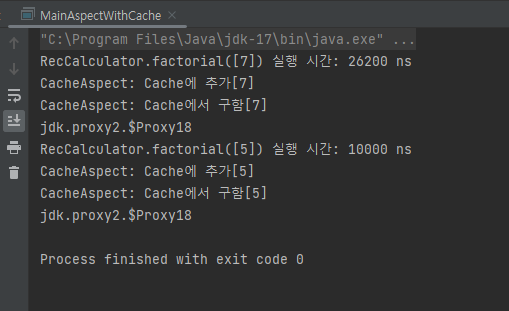
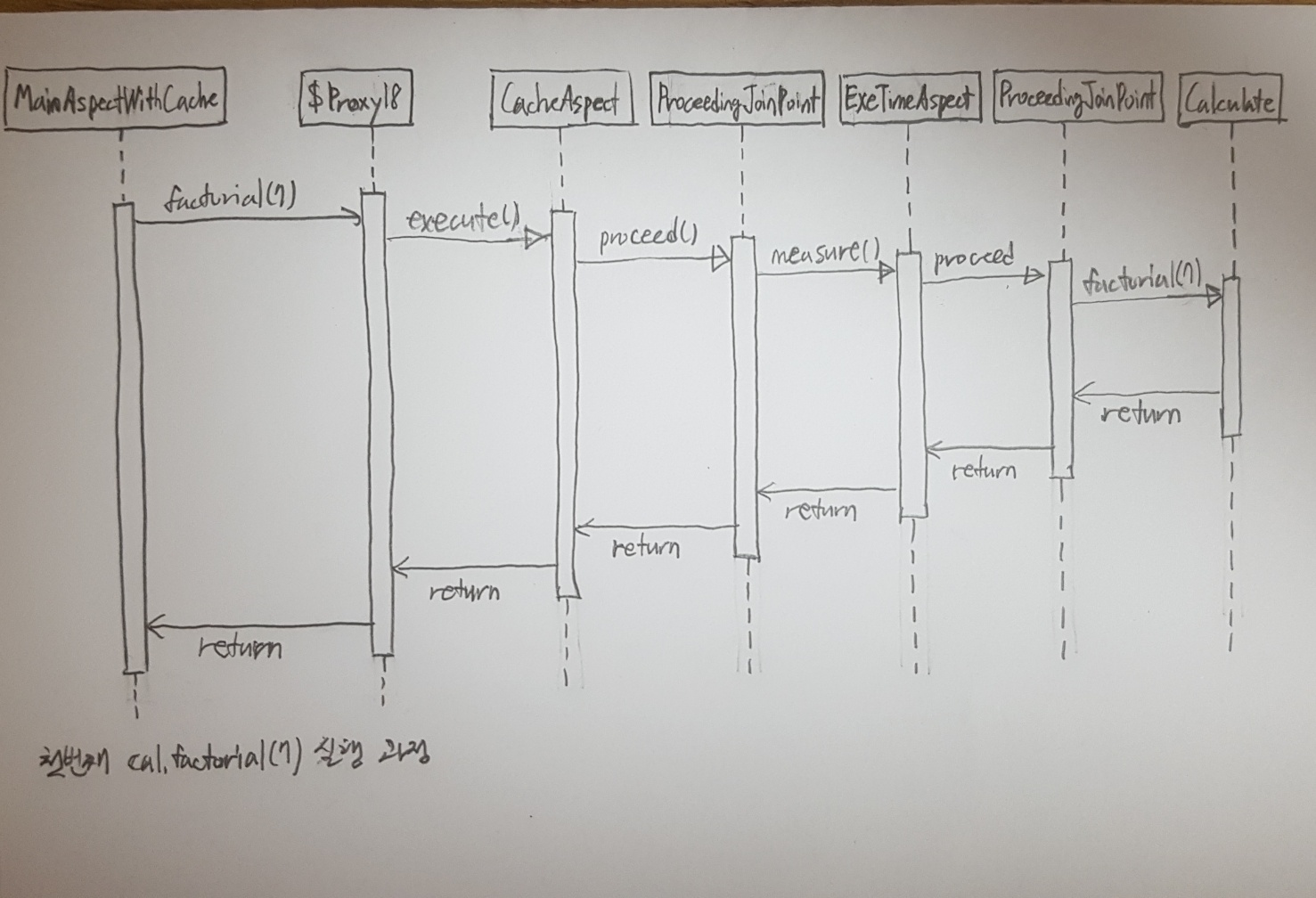
MainAspectWithCache의 첫번째 cal.factorial(7) 호출 과정
CacheAspect의 cache에는 7!를 연산한 결과가 없으므로execute()에서joinPoint.proceed()를 실행하여 그 대상인ExeTimeAspect의measure()를 실행한다.ExeTimeAspect의measure()에서joinPoint.proceed()를 실행하여 그 대상인Calculator의factorial()를 통해 7!의 값을 구한다.- 팩토리얼 연산 종료 후
measure()는 연산 수행 시간을 출력한 후 종료된다.ExeTimeAspect의 실행이 끝나면CacheAspect의 cache에 팩토리얼 연산 결과를 저장하고 "CacheAspect: Cache에 추가" 메시지를 출력한다.
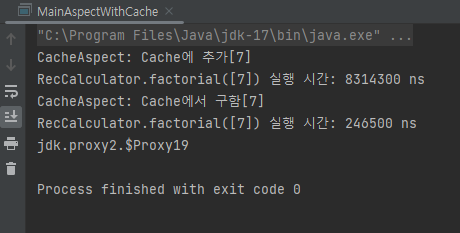
정리하면, cal.factorial(7) 메서드를 처음 호출할 때는 CacheAspect, ExeTimeAspect, Calculator 순으로 Advice를 적용했지만, 이후 cal.factorial(7) 메서드를 다시 호출하면 이미 cache에 값이 저장되어 있으므로 CacheAspect만 적용하는 방식으로 Aspect 적용 순서가 런타임 동안 변동되어 나타난다.
@Order
여러 개의 Aspect를 사용할 때 어느 Aspect가 먼저 적용될지는 Spring Framework나 Java 버전에 따라 달라질 수 있다. 이 때문에 Aspect의 적용 순서를 유지하는 것이 중요하다면 @Order 어노테이션을 사용해야 한다.
@Order(순위)
이 어노테이션은@Aspect를 붙인 클래스에 사용하여 어노테이션에서 지정한 순위대로 Aspect의 적용 순서를 결정한다. 이 때 Aspect 적용 우선순위는 이 어노테이션의 값이 작을수록 높아진다.
이 어노테이션을 사용한 Aspect가 하나라도 존재할 경우 코드 실행 상황에 관계없이 Aspect는 지정된 순서대로 항상 적용된다.
Reference
- 초보 웹 개발자를 위한 스프링 5 프로그래밍 입문(최범균)