스프링에서 제공해주는 인증(로그인, 회원가입)과 인가(페이지 접근 권한)에 대한 처리를 위임하는 프레임워크.
Filter는 Dispatcher Servlet으로 가기 전에 가장 먼저 URL 요청을 받는다.
동작 과정
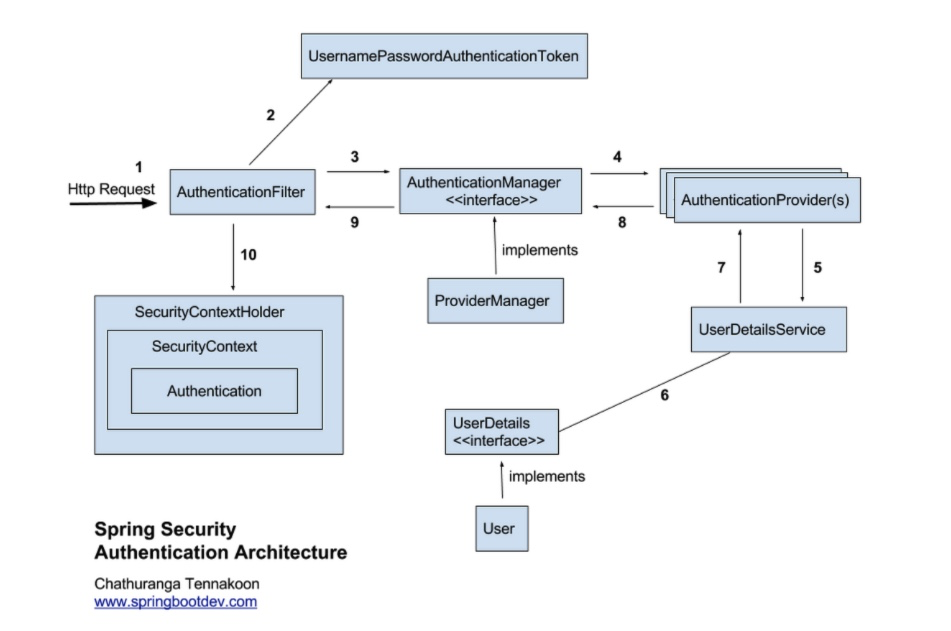
- 사용자가 로그인 정보(id, password) 로 로그인을(인증) 요청
- AuthenticationFilter가 (1) 의 정보를 인터셉트하여 UsernamePasswordAuthentication Token (Authentication 객체) 을 생성
- AuthenticationManager에게 Authentication 객체를 전달
- AuthenticationManager 인터페이스는 AuthenticationProvider에게 Authentication 객체의 정보 전달하고 등록된 AuthenticationProvider(들)을 조회하여 인증을 요구
- AuthenticationProvider 는 UserDetailsService를 통해 입력받은 Authentication 객체의 사용자의 정보를 DB에서 조회
- supports() 메소드를 통해 실행 가능한지 체크
- authenticate() 메소드를 통해 DB에 저장된 이용자 정보와 입력한 로그인 정보 비교
- DB 이용자 정보: UserDetailsService의 loadUserByUsername() 메소드를 통해 불러옴
- 입력 로그인 정보: 받았던 Authentication 객체
- 일치하는 경우 Authentication 객체 반환
- AuthenticationManager 는 Authentication 객체를 AuthenticationFilter로 전달
- AuthenticationFilter는 전달받은 Authentication 객체를 LoginSuccessHandler 로 전송하고, SecurityContextHolder에 담음
- 성공 시 AuthenticationSuccessHandle, 실패 시 AuthenticationFailureHandle 실행
Config 설정
WebSecurityConfigurerAdapter 는 스프링 시큐리티 5.7.0 버전 이후로 deprecated 되었다. 공식문서를 참고하여 설정하자.
@RequiredArgsConstructor
@EnableWebSecurity
public class SecurityConfig {

    private final ObjectMapper objectMapper;
    private final JwtAuthenticationFilter jwtAuthenticationFilter;

    @Bean
    public WebSecurityCustomizer configure() {
        return (web) -> web.ignoring().mvcMatchers(
                "/v3/api-docs/**",
                "/swagger-ui/**",
                "/api/v1/login" // 임시
        );
    }

    @Bean
    public SecurityFilterChain filterChain(HttpSecurity http) throws Exception {
        return http.antMatcher("/**")
                .authorizeRequests()
                .antMatchers("/api/v1/**").hasAuthority(USER.name())
                        .and()
                .httpBasic().disable()
                .formLogin().disable()
                .cors().disable()
                .csrf().disable()
                .sessionManagement().sessionCreationPolicy(SessionCreationPolicy.STATELESS)
                .and()
                .authorizeRequests()
                .anyRequest().permitAll()
                .and()
                .addFilterBefore(jwtAuthenticationFilter, UsernamePasswordAuthenticationFilter.class)

                .exceptionHandling()
                    .authenticationEntryPoint(((request, response, authException) -> {
                        response.setStatus(HttpStatus.UNAUTHORIZED.value());
                        response.setContentType(MediaType.APPLICATION_JSON_VALUE);
                        objectMapper.writeValue(
                                response.getOutputStream(),
                                ExceptionResponse.of(ExceptionCode.FAIL_AUTHENTICATION)
                        );
                }))
                    .accessDeniedHandler(((request, response, accessDeniedException) -> {
                        response.setStatus(HttpStatus.FORBIDDEN.value());
                        response.setContentType(MediaType.APPLICATION_JSON_VALUE);
                        objectMapper.writeValue(
                                response.getOutputStream(),
                                ExceptionResponse.of(ExceptionCode.FAIL_AUTHORIZATION)
                        );
                    })).and().build();
    }
}