
드라이버 로드 → DB 접속 → SQL 실행 → 자원 해제
package db;
import java.sql.*;

class DBTest {
    public static void main(String[] args) {
        Connection con = null;
        PreparedStatement pstmt = null; // 자원 해제를 위해 전역 선언

        // MySQL 접속 정보
        String mysqlDriver = "com.mysql.cj.jdbc.Driver";
        String mysqlUrl = "jdbc:mysql://localhost:3306/dev";
        String mysqlId = "root";
        String mysqlPass = "비밀번호";

        // Oracle 접속 정보
        String oracleDriver = "oracle.jdbc.driver.OracleDriver";
        String oracleUrl = "jdbc:oracle:thin:@localhost:1521:XE";
        String oracleId = "java";
        String oraclePass = "비밀번호";

        try {
            // 1️⃣ 드라이버 로드 (JVM 메서드 영역에 수동으로 올림)
            Class.forName(oracleDriver);
            System.out.println("드라이버 로드 성공");
JDBC 드라이버 로딩부터 DB 연결까지 흐름
Class.forName("oracle.jdbc.driver.OracleDriver")
          ⬇
[드라이버 클래스 Method영역에 로드됨]
          ⬇
[static 블록 실행 → DriverManager.registerDriver()]
          ⬇
DriverManager에 드라이버 등록됨
          ⬇
DriverManager.getConnection(...) 호출
          ⬇
등록된 드라이버 중 URL에 맞는 드라이버 선택
          ⬇
DB 연결 성공
→ Connection을 구현한 클래스의 객체 반환
// 2️⃣ DB 접속
String url = oracleUrl;
String id = oracleId;
String pass = oraclePass;
con = DriverManager.getConnection(url, id, pass);
if (con == null) {
System.out.println("접속 실패");
} else {
System.out.println("접속 성공");접속 성공 했을 때 SQL준비!
                // 3️⃣ SQL 준비 및 실행
                //String sql="insert into member3(uid, pwd, email) ";
                //sql=sql+"values('Scott', '3333', 'scott@daum.net')";
                String sql = "insert into member3(member3_id, id, pwd, email) "
                sql=sql+"values(seq_member3.nextval, 'James', '2222', 'james@gmail.com')";

                // SQL을 실행할 준비된 명령 객체 생성 (Connection이 있어야 가능)
                pstmt = con.prepareStatement(sql);

                // DML 실행 (insert, update, delete → executeUpdate)
                int result = pstmt.executeUpdate();
                // 0이 나오면 실패

                if (result > 0) {
                    System.out.println("등록 성공!");
                } else {
                    System.out.println("등록 실패");
                }
            }
        } catch (ClassNotFoundException e) {
            System.out.println("드라이버를 찾을 수 없습니다. 확인해주세요.");
        } catch (SQLException e) {
            System.out.println("SQL 관련 에러가 발생됨");
        } finally {
            // 4️⃣ 자원 해제 (순서: pstmt → con) 안쪽부터 닫기!
            try {
                if (pstmt != null) pstmt.close();
                if (con != null)   con.close();
            } catch (SQLException e) {
                e.printStackTrace();
            }
        }
    }
}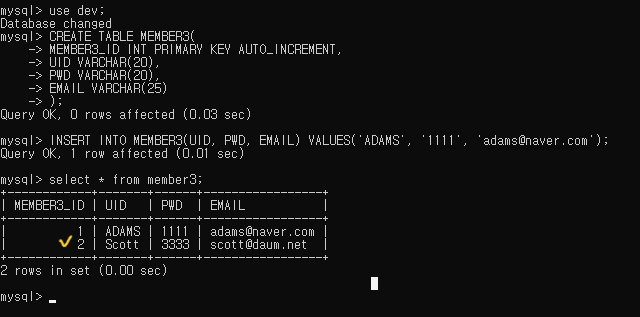
테이블에 데이터가 INSERT된 걸 확인할 수 있음
JDBC에서 꼭 알아야 할 부분
Connection con = DriverManager.getConnection(...); // DB 연결
PreparedStatement pstmt = con.prepareStatement(sql); // SQL 준비
pstmt.executeUpdate(); // SQL 실행
✅ pstmt=con.PreparedStatement(sql)
- JDBC에서 SQL 실행을 담당하는 객체 :
PreparedStatement
- Connection 인터페이스에 정의된 prepareStatement() 메서드 호출
(그래서con.붙여야함 - 문법적 이유)- 내부적으로 PreparedStatement 구현클래스의 객체 생성
(PreparedStatement 인터페이스 이름 가진 자료형으로 반환됨
= PreparedStatement 인터페이스 타입으로 반환됨)- 그 객체를 pstmt에 저장
- 쿼리 실행은 DB 연결이 완료된 후에만 가능하므로, (논리적 이유)
⭐ 반드시Connection객체로부터 PreparedStatement를 얻어야 함
→ pstmt =con.prepareStatement(sql);
🔍
PreparedStatement와Connection이 인터페이스인 이유DB 종류가 바뀌어도
자바 코드는 달라지지 않고, 표준 인터페이스만 쓰면 그대로 작동할 수 있게 하려고각 DBMS의 드라이버가 구현체(.class)를 제공하기 때문에
(.jar안에 JDBC 인터페이스들을 구현한 클래스(.class)들이 들어 있음)
개발자는 하나의 표준 인터페이스만 사용하면 된다.
✅ executeUpdate()
- DML(insert, update, delete) 수행 시 이 메서드 사용

아이들의 가능성을 믿었던 마음 그대로, 이제는 나의 가능성을 믿고 나아가는 중입니다.🌱