
저번주까지 토이프로젝트2를 마치고 이번주는 리팩토링 기간(24/8/12-24/8/16)을 갖기로 했다.
멘토님께서 PR에 피드백을 달아주셔서 어떠한 점을 개선할지 알기 좋았다.
피드백을 쭉 보니 거의 리액트 훅에 관한 내용이었다. 리액트의 가장 큰 장점이 훅인데 내가 훅을 제대로 모르고 사용했구나 깨닫게 되었다.
기존코드
// calendatContents.tsx

export interface ICalenderDateProps {
	nowDate: Timestamp;
	isOfficial: boolean;
}

const CalenderContents: FC<ICalenderDateProps> = ({ nowDate, isOfficial }) => {
	const weeks = ['일', '월', '화', '수', '목', '금', '토'];
	const calendarDates = monthList(nowDate);

	const currentDate = nowDate.toDate();
	const currentYear = currentDate.getFullYear();
	const currentMonth = currentDate.getMonth();
	const schedules = useSchedules(currentYear, currentMonth + 1, isOfficial);

	return (
		<Container>
			{weeks.map((week) => (
				<CalendarWeek key={week} weekName={week} />
			))}
			{calendarDates.map((date: Timestamp) => (
				<CalendarDates
					key={date.toMillis().toString()}
					date={date}
					currentYear={currentYear}
					currentMonth={currentMonth}
					isOfficial={isOfficial}
					schedules={schedules}
				/>
			))}
		</Container>
	);
};

export default CalenderContents;
개선 1
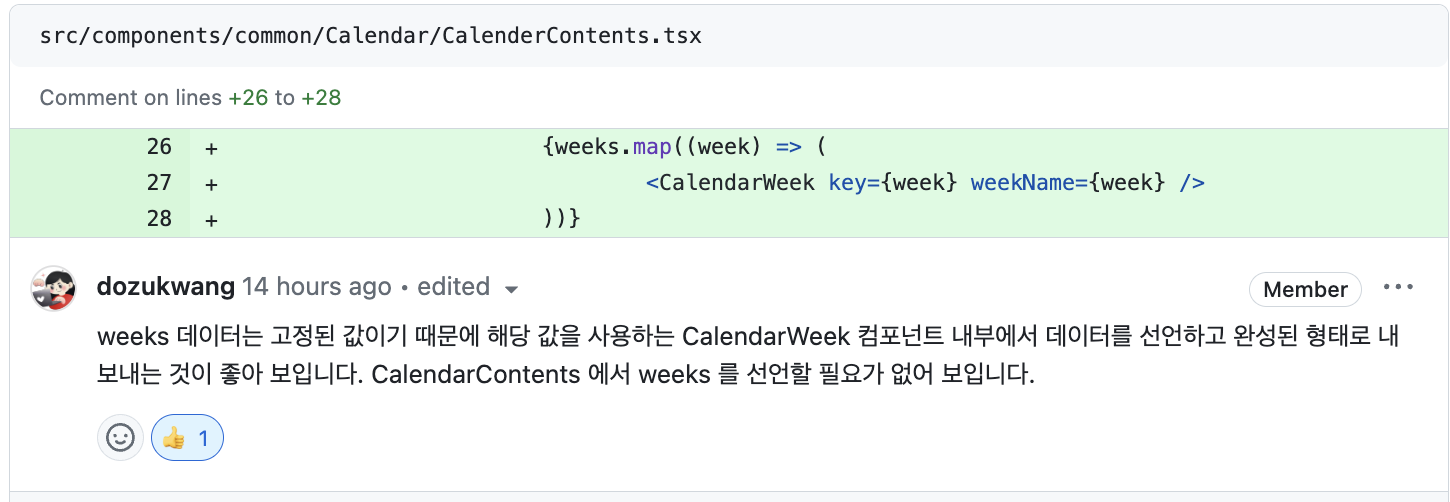
✅ weeks 배열을 컴포넌트 내부로 이동
CalendarWeek로 변수 weeks를 이동시켰다. CalendarContents 컴포넌트에서 weeks 관련 로직이 제거되어 더 깔끔해졌고(코드 간소화), CalendarWeek 컴포넌트를 완전히 독립적으로 분리하여, 어떤 곳에서도 쉽게 재사용할 수 있게되었다(재사용성 향상).
개선 2
Timestamp.toDate() 메소드
Timestamp 값은 Firebase Firestore의 Timestamp 객체로, 이 객체는 불변(immutable)하다. 즉, 한 번 생성된 Timestamp 값을 직접적으로 변경할 수는 없기 때문에 toDate를 사용해 Javascript의 Date 객체로 변환 후 사용해야 한다. toDate 메소드를 사용하는 상황은 주로 날짜와 시간을 표시하거나 조작해야 할 때이다. 예를 들어, Firestore에서 데이터를 읽어와서 화면에 표시할 때 유용하다.
Timestamp 제공 메소드
- toDate(): Timestamp 객체를 JavaScript Date 객체로 변환
- toMillis(): Timestamp 객체를 밀리초 단위의 숫자로 변환
- isEqual(other): 다른 Timestamp 객체와 비교하여 동일한지 여부를 확인
import { Timestamp } from 'firebase/firestore';

// 현재 시점을 기준으로 Timestamp 객체 생성
const timestamp = Timestamp.now();
console.log(timestamp) // 출력 예: {_seconds: 1633596950, _nanoseconds: 123456789 }

// Timestamp 객체를 JavaScript Date로 변환
const date = timestamp.toDate();
console.log(date); // 출력 예: 2023-10-01T10:15:30.123Z

// Timestamp 객체를 밀리초 단위로 변환
const millis = timestamp.toMillis();
console.log(millis); // 출력 예: 1633596950123

// Timestamp 객체를 다른 Timestamp 객체와 비교
const otherTimestamp = Timestamp.fromDate(new Date('2024-01-01T00:00:00Z'));
console.log(timestamp.isEqual(otherTimestamp)); // 출력 예: false- seconds: 타임스탬프의 초 단위 값
- nanoseconds: 타임스탬프의 나노초 단위 값
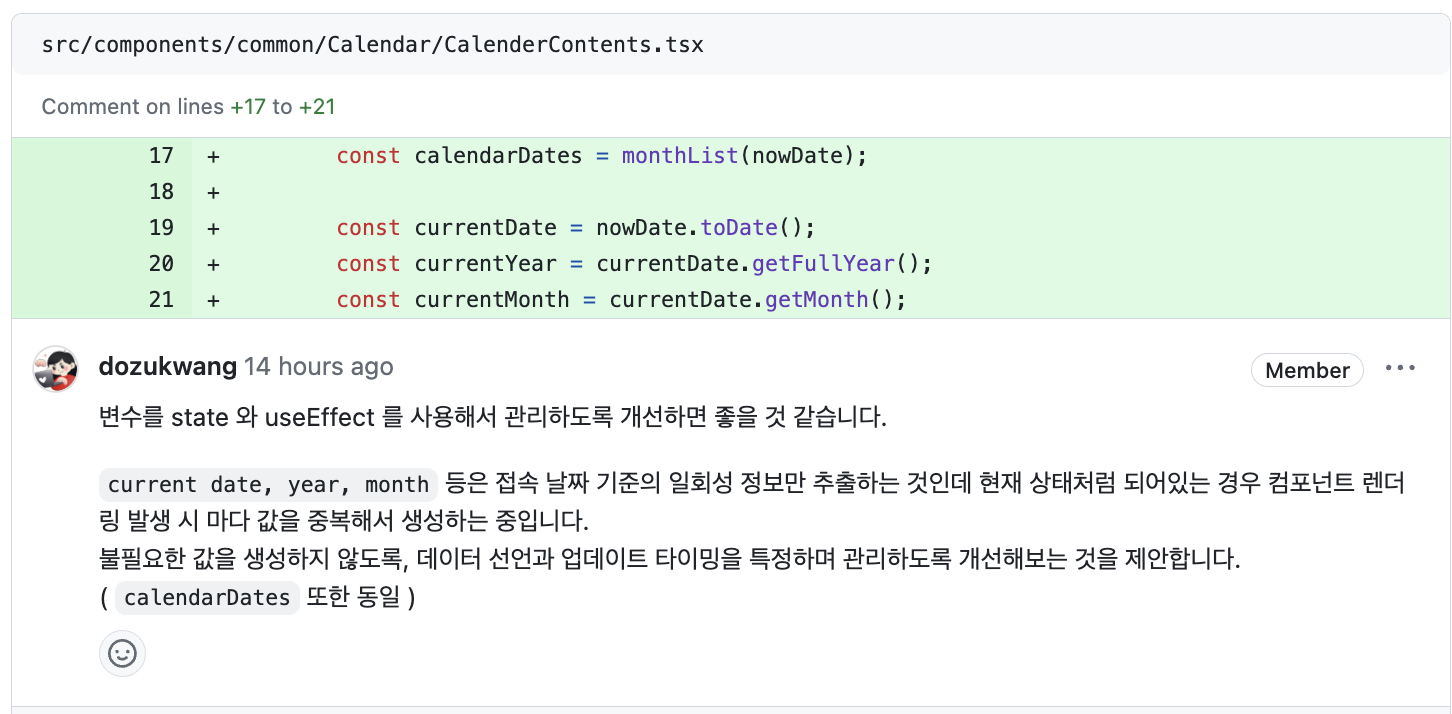
✅ 상태관리를 위한 useState 훅을 도입
date, calendarDates를 위한 useState 훅을 도입했다.
	const [date, setDate] = useState<IDateStateProps>({} as IDateStateProps);
	const [calendarDates, setCalendarDates] = useState<Timestamp[]>([]);
	const schedules = useSchedules(date.year, date.month + 1, isOfficial);
✅ 날짜 계산을 위한 useEffect 도입
nowDate prop이 변경될 때 날짜 관련 상태 변수들을 업데이트하는 useEffect 훅을 추가하여 날짜 계산이 필요할 때만 수행되도록 했다.
useEffect안에 setDate를 객체로 받는데, 객체 형식으로 받는 이유는 멘토님께서 현업에서 백에서 객체형식으로 데이터를 받는 경우가 많고, 객체형식은 안에 어떠한 데이터가 있는지 쉽게 예상이 가서 많이 사용한다고 했다.
아래 코드에서 setDate는 date, year, month를 갖고있다는 것은 한눈에 확인할 수 있다.
	useEffect(() => {
		const currentDate = nowDate.toDate();
		setDate({
			date: currentDate,
			year: currentDate.getFullYear(),
			month: currentDate.getMonth(),
		});
		setCalendarDates(monthList(nowDate));
	}, [nowDate]);
수정된 코드
//CalenderContents
import { FC, useEffect, useState } from 'react';
import { Timestamp } from 'firebase/firestore';
import CalendarWeek from '@/components/common/Calendar/CalendarWeek';
import CalendarDates from '@/components/common/Calendar/CalendarDates';
import monthList from '@/utils/dateUtils';
import styled from '@emotion/styled';
import useSchedules from '@/hooks/useSchedules';

export interface ICalenderDateProps {
	nowDate: Timestamp;
	isOfficial: boolean;
}

interface IDateStateProps {
	date: Date;
	year: number;
	month: number;
}

const CalenderContents: FC<ICalenderDateProps> = ({ nowDate, isOfficial }) => {
	const [date, setDate] = useState<IDateStateProps>({} as IDateStateProps);
	const [calendarDates, setCalendarDates] = useState<Timestamp[]>([]);
	const schedules = useSchedules(date.year, date.month + 1, isOfficial);

	useEffect(() => {
		const currentDate = nowDate.toDate();
		setDate({
			date: currentDate,
			year: currentDate.getFullYear(),
			month: currentDate.getMonth(),
		});
		setCalendarDates(monthList(nowDate));
	}, [nowDate]);

	return (
		<div>
			<CalendarWeek />
			<CalendarDatesWrap>
				{calendarDates.map((day: Timestamp) => (
					<CalendarDates
						key={day.toMillis().toString()}
						date={day}
						currentYear={date.year}
						currentMonth={date.month}
						isOfficial={isOfficial}
						schedules={schedules}
					/>
				))}
			</CalendarDatesWrap>
		</div>
	);
};

export default CalenderContents;

const CalendarDatesWrap = styled.div`
	display: grid;
	grid-template-columns: repeat(7, 1fr);
	text-align: center;
`;
// CalendarWeek
const weeks = ['일', '월', '화', '수', '목', '금', '토'];

const CalendarWeek: FC = () => {
	return (
		<Container>
			{weeks.map((weekName) => (
				<span key={weekName}>{weekName}</span>
			))}
		</Container>
	);
};

export default CalendarWeek;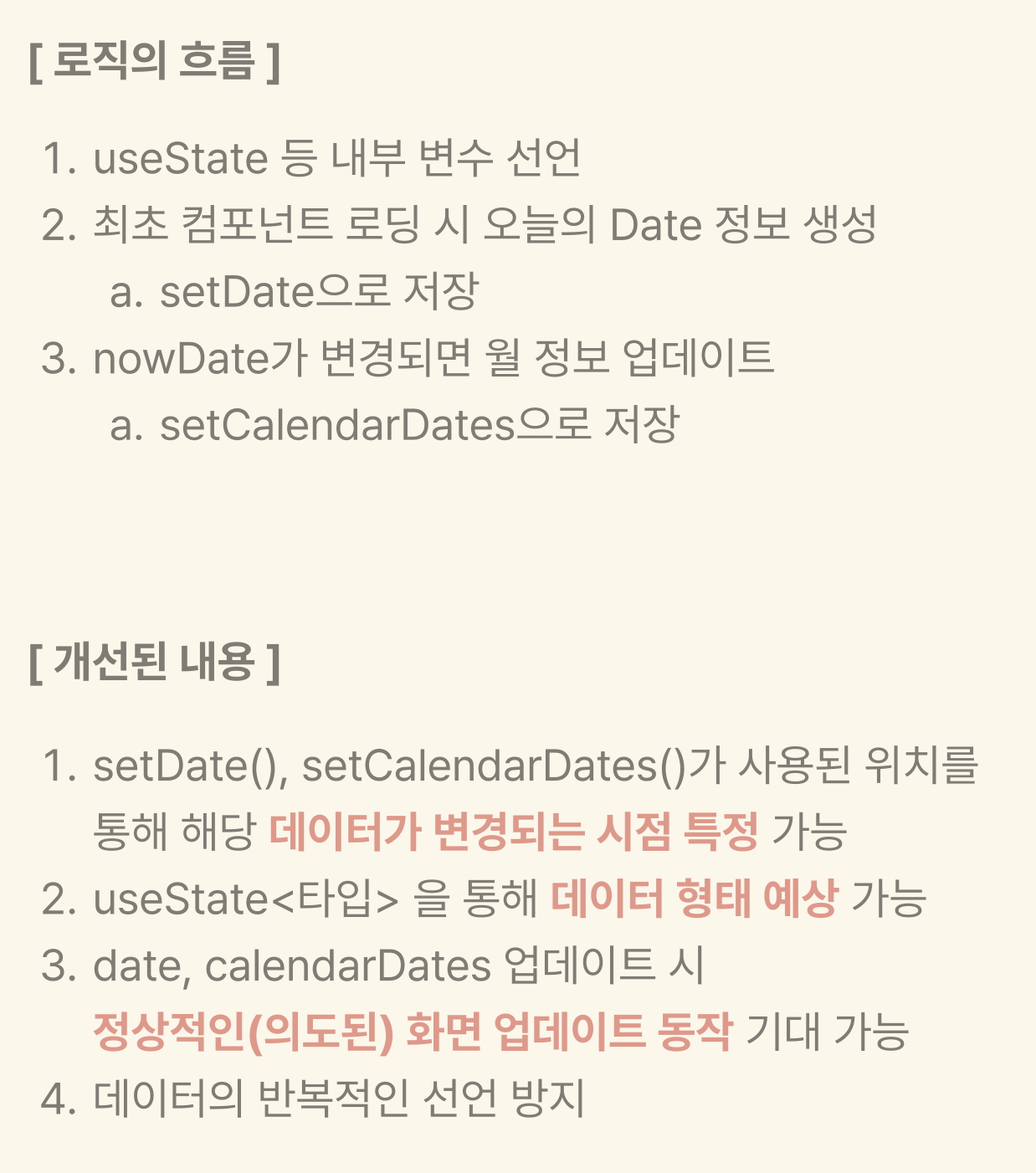
개선 3
✅ 날짜 반환 함수 합치기
기존코드
export const formatDateWithLeadingZeros = (timestamp: Timestamp) => {
	const date = timestamp.toDate();
	return ${date.getFullYear()}-${(date.getMonth() + 1).toString().padStart(2, '0')}-${date.getDate().toString().padStart(2, '0')};
};

export const formatDateWithoutLeadingZeros = (timestamp: Timestamp) => {
	const date = timestamp.toDate();
	return ${date.getFullYear()}-${date.getMonth() + 1}-${date.getDate()};
};
두 개의 함수(formatDateWithLeadingZeros, formatDateWithoutLeadingZeros)가 형식만 다르고, 비슷한 작업을 수행하기때문에 합쳐준다.
수정된 코드
1) 매개변수가 string 인지 Timestamp 인지 판단한다. Timestamp면 toDate를(자바스크립트 Date 객체로 변환), string이면 new Date를 반환한다.
2) useLeadingZeros 값이 true면 0을 포함한 날짜를, false면 0을 제외한 날짜를 반환하도록 한다
3) type이 dot이면 2024.02.02형식을 line이면 2024-02-02형식을 반환하도록 한다.
export const formatDate = (date: string | Timestamp, useLeadingZeros: boolean, type: string) => {
	let dateObj: Date;

	if (date instanceof Timestamp) {
		dateObj = date.toDate();
	} else {
		dateObj = new Date(date);
	}

	if (useLeadingZeros) {
		if (type === 'dot') {
			return `${dateObj.getFullYear()}.${(dateObj.getMonth() + 1).toString().padStart(2, '0')}.${dateObj.getDate().toString().padStart(2, '0')}`;
		} else if (type === 'line') {
			return `${dateObj.getFullYear()}-${(dateObj.getMonth() + 1).toString().padStart(2, '0')}-${dateObj.getDate().toString().padStart(2, '0')}`;
		}
	} else {
		if (type === 'dot') {
			return `${dateObj.getFullYear()}.${dateObj.getMonth() + 1}.${dateObj.getDate()}`;
		} else if (type === 'line') {
			return `${dateObj.getFullYear()}-${dateObj.getMonth() + 1}-${dateObj.getDate()}`;
		}
	}
};
개선 4
기존코드
const SummaryInfoCard = () => {
	const [totalWorkHour, setTotalWorkHour] = useState<number | string>(0);
	const [totalWage, setTotalWage] = useState<number | string>(0);

	const today = new Date();
	const year = today.getFullYear();
	const month = today.getMonth() + 1;
	const monthString = month.toString().padStart(2, '0');

	useEffect(() => {
		const fetchWageData = async () => {
			try {
				const { totalWorkHour, totalWage } = await getOfficialWage(year, month);
				setTotalWorkHour(totalWorkHour);
				setTotalWage(totalWage);
			} catch (error) {
				setTotalWorkHour('급여 정보를 불러오는 데 실패했습니다');
				setTotalWage('급여 정보를 불러오는 데 실패했습니다');
			}
		};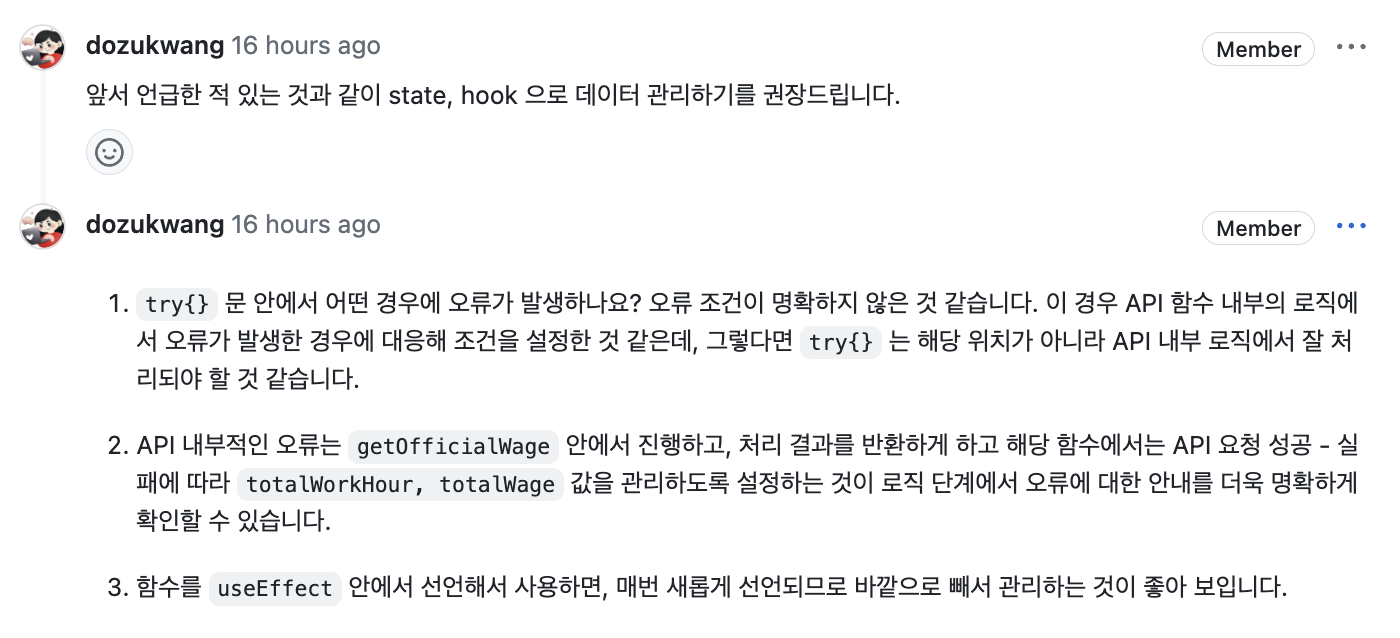
✅ 상태관리를 위한 useState 훅을 도입
wageData로 통합된 상태를 사용하여 totalWorkHour와 totalWage를 함께 관리하고, error 상태를 추가하여 오류 처리를 개선했다.
interface IWageDataProps {
	totalWorkHour: number;
	totalWage: number;
}

const SummaryInfoCard = () => {
	const [wageData, setWageData] = useState<IWageDataProps | null>(null);
	const [error, setError] = useState<string | null>(null);
✅ useCallback, useEffect 사용
useCallback 이란?
useCallback은 React의 훅 중 하나로, 함수 컴포넌트 내에서 메모이제이션된 콜백 함수를 반환하는 데 사용된다. 메모이제이션은 계산된 결과를 저장하고, 다음번 호출 시에 저장된 결과를 사용하는 방식으로 성능을 최적화하는 기법이다.
아래 코드에서 useCallback을 사용함으로써 의존성 배열([dateInfo.year, dateInfo.month])이 변경되지 않는 한 동일한 함수 인스턴스를 반환하도록 했다. 이는 컴포넌트나 훅이 불필요하게 다시 렌더링되는 것을 방지할 수 있다.
또한 useEffect 안에 fetchWageData를 넣어 fetchWageData 값이 변경되면 fetchWageData를 실행하게 했다. fetchWageData는dateInfo.year, dateInfo.month 값이 변경되지 않는 한 동일하게 유지되므로, useEffect의 불필요한 재실행을 방지할 수 있다.
	const [error, setError] = useState<string | null>(null);

	const fetchWageData = useCallback(async () => {
		setError(null);
		try {
			const data = await getOfficialWage(dateInfo.year, dateInfo.month);
			setWageData(data);
		} catch (error) {
			setError('급여 정보를 불러오는 데 실패했습니다');
		}
	}, [dateInfo.year, dateInfo.month]);

    	useEffect(() => {
		fetchWageData();
	}, [fetchWageData]);
✅ useMemo 사용
	const dateInfo = useMemo(() => {
		const today = new Date();
		const year = today.getFullYear();
		const month = today.getMonth() + 1;
		const monthString = month.toString().padStart(2, '0');
		return { year, month, monthString };
	}, []);
이 부분을 useState로 관리할지 useMemo로 관리할지 고민했는데, today, year, month, monthString 같은 값들은 변경될 일이 거의 없기 때문에(년/월이 바뀔때만 갱신) state로 관리할 필요가 없다고 판단했다. 그래서 이 값들을 효율적으로 관리하고 불필요한 재계산을 방지하기 위해 useMemo를 사용했다. 이렇게 하면 의존성이 변경되지 않는 한 이 값들이 재계산되지 않는다. 의존성에는 빈배열을 넣어 처음 컴포넌트가 랜더링될 때만 실행되도록 했다.
수정된 코드
interface IWageDataProps {
	totalWorkHour: number;
	totalWage: number;
}

const SummaryInfoCard = () => {
	const [wageData, setWageData] = useState<IWageDataProps | null>(null);
	const [error, setError] = useState<string | null>(null);

	const dateInfo = useMemo(() => {
		const today = new Date();
		const year = today.getFullYear();
		const month = today.getMonth() + 1;
		const monthString = month.toString().padStart(2, '0');
		return { year, month, monthString };
	}, []);

	const fetchWageData = useCallback(async () => {
		setError(null);
		try {
			const data = await getOfficialWage(dateInfo.year, dateInfo.month);
			setWageData(data);
		} catch (error) {
			setError('급여 정보를 불러오는 데 실패했습니다');
		}
	}, [dateInfo.year, dateInfo.month]);

	useEffect(() => {
		fetchWageData();
	}, [fetchWageData]);

	const renderContent = () => {
		if (error) return <p>{error}</p>;
		if (!wageData) return <p>급여정보가 없습니다.</p>;

		return (
			<>
				<FirstSection>
					<p>
						공식 근무 스케줄 | {dateInfo.year}년 {dateInfo.monthString}월
					</p>
					<p>근무 시간 | {wageData.totalWorkHour}시간</p>
				</FirstSection>
				<SecondSection>
					<p>예상 급여액</p>
					<p>{wageData.totalWage.toLocaleString()}원</p>
				</SecondSection>
			</>
		);
	};

	return (
		<SummaryCard>
			<SummaryCardContainer>{renderContent()}</SummaryCardContainer>
			<img src={characterCheese} alt="치즈캐릭터" />
		</SummaryCard>
	);
};

export default SummaryInfoCard;
+ 추가
다른 팀원이 만들어놓은 useWageCheck를 가져다써서 따로 패치해오는 부분을 지워줬다. 그 값을 SummaryInfoCard에 props로 넘겨주어 깔끔한 코드를 작성하도록 했다.
import SummaryInfoCard from '@/components/Home/SummaryInfoCard';
import Calendar from '@/components/common/Calendar/Calendar';
import Title from '@/components/common/Title';
import styled from '@emotion/styled';
import useWageCheck from '@/hooks/useWageCheck';

const Home = () => {
	const { year, month, officialWageData, officialWageError, getErrorMessage } = useWageCheck();

	if (officialWageError) {
		return <div>Error: {getErrorMessage(officialWageError)}</div>;
	}

	return (
		<Container>
			<SummaryInfoCard
				year={year}
				month={month}
				wagecount={officialWageData?.totalWage || 0}
				workinghours={officialWageData?.totalWorkHour || 0}
			/>
			<Title title="공식 근무 스케줄" className="title" />
			<Calendar isOfficial={true} />
		</Container>
	);
};

export default Home;
interface IWageDataProps {
year: number;
month: number;
wagecount: number;
workinghours: number;
}
const SummaryInfoCard = ({ year, month, wagecount, workinghours }: IWageDataProps) => {
return (
<SummaryCard>
<SummaryCardContainer>
<FirstSection>
<p>
공식 근무 스케줄 | {year}년 {month.toString().padStart(2, '0')}월
</p>
<p>근무 시간 | {workinghours}시간</p>
</FirstSection>
<SecondSection>
<p>예상 급여액</p>
<p>{wagecount.toLocaleString()}원</p>
</SecondSection>
</SummaryCardContainer>
<img src={characterCheese} alt="치즈캐릭터" />
</SummaryCard>
);
};
export default SummaryInfoCard;