디자인 시스템이란 사람들이 디자인을 시작할 때 공통으로 사용하는 컬러, 폰트, 레이아웃, UI 구성 요소 등 일관된 집합을 두고 이를 구성하는 체계이다.
프로젝트를 하면 디자이너 분들께서 만들어 주시는데
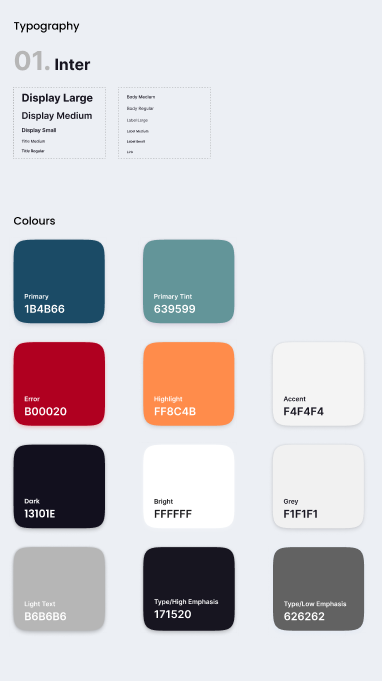 이렇게 생긴 걸 볼 수 있다.
획일화된 시스템을 도입할 수가 있다.
좋은 점은 프로젝트에 통일성 있는 디자인을 적용해 사용자에게 시각적인 안정감을 줄 수 있고 개발적인 측면에서는 코드의 재사용이 편리하므로 중복된 코드를 줄일 수 있고 유지보수가 용이하다. 컴포넌트에 일일이 font-size, font-weight line-height를 지정해 주는 것보다 훨씬 간결하게 스타일링을 할 수 있다.
그래서 전에 만들어 놓은 걸 이용해서 Typography 시스템을 해봤다.
:root {
  /* Fonts */
  --main-font: "Inter", sans-serif;

  /* Colors */
  --color-primary: #1b4b66;
  --color-primary-tint: #639599;
  --color-error: #b00020;
  --color-highlight: #ff8c4b;
  --color-dark: #13101e;
  --color-bright: #ffffff;
  --color-light-text: #b6b6b6;
  --color-high-emphasis: #171520;
  --color-low-emphasis: #626262;
  --color-grey: #f1f1f1;
  --color-accent: #f4f4f4;

  /* Font-sizes */
  --font-size-xl: 40px;
  --font-size-lg: 34px;
  --font-size-md: 20px;
  --font-size-sm: 16px;
  --font-size-xs: 14px;
  --font-size-xxs: 12px;

  /* Font-weights */
  --font-weight-bold: 700;
  --font-weight-semibold: 600;
  --font-weight-medium: 500;
  --font-weight-regular: 400;

  /* Line-heights */
  --line-height-xl: 52px;
  --line-height-lg: 44px;
  --line-height-md: 26px;
  --line-height-sm: 20px;
  --line-height-xs: 18px;
  --line-height-xxs: 16px;
}

body {
  font-family: var(--main-font);
  color: var(--color-high-emphasis);
}
전에 만들어 놓은 전역 스타일이고 이걸 이용해
const textVariants = {
  H_B_52: {
    fontSize: "var(--font-size-xl)",
    fontWeight: "var(--font-weight-bold)",
    lineHeight: "var(--line-height-xl)",
  },
  H_S_34: {
    fontSize: "var(--font-size-lg)",
    fontWeight: "var(--font-weight-semibold)",
    lineHeight: "var(--line-height-lg)",
  },
  H_S_20: {
    fontSize: "var(--font-size-md)",
    fontWeight: "var(--font-weight-semibold)",
    lineHeight: "var(--line-height-md)",
  },
  H_M_14: {
    fontSize: "var(--font-size-xs)",
    fontWeight: "var(--font-weight-medium)",
    lineHeight: "var(--line-height-xs)",
  },
  H_S_14: {
    fontSize: "var(--font-size-xs)",
    fontWeight: "var(--font-weight-semibold)",
    lineHeight: "var(--line-height-xxs)",
  },
  H_M_16: {
    fontSize: "var(--font-size-sm)",
    fontWeight: "var(--font-weight-medium)",
    lineHeight: "var(--line-height-sm)",
  },
  P_R_16: {
    fontSize: "var(--font-size-sm)",
    fontWeight: "var(--font-weight-regular)",
    lineHeight: "var(--line-height-sm)",
  },
  P_M_16: {
    fontSize: "var(--font-size-sm)",
    fontWeight: "var(--font-weight-medium)",
    lineHeight: "var(--line-height-sm)",
  },
  P_R_14: {
    fontSize: "var(--font-size-xs)",
    fontWeight: "var(--font-weight-regular)",
    lineHeight: "var(--line-height-sm)",
  },
  P_M_12: {
    fontSize: "var(--font-size-xxs)",
    fontWeight: "var(--font-weight-medium)",
    lineHeight: "var(--line-height-sm)",
  },
  P_S_12: {
    fontSize: "var(--font-size-xxs)",
    fontWeight: "var(--font-weight-semibold)",
    lineHeight: "var(--line-height-xxs)",
  },
  C_M_12: {
    fontSize: "var(--font-size-xxs)",
    fontWeight: "var(--font-weight-medium)",
    lineHeight: "var(--line-height-xs)",
  },
  S_M_16: {
    fontSize: "var(--font-size-sm)",
    fontWeight: "var(--font-weight-semibold)",
    lineHeight: "var(--line-height-sm)",
  },
  M_X_16: {
    fontSize: "var(--font-size-sm)",
    fontWeight: "var(--font-weight-medium)",
    lineHeight: "var(--line-height-xs)",
  },
};

export default textVariants;
textVariants를 만들어 프로젝트에 적용했는데 너무 편했다. 일일이 다 안쳐도 되고
<div style={textVariants.P_M_16}>편하다</div>이런 식으로 적용하면 되니까 너무 간결했다.
나만 몰랐던 것 같은데 이제라도 알게되서 다행이다.

프론트엔드 개발자