해당 게시물은 Udemy의 "JSP, Servlets and JDBC for Beginners" 강의를 정리한 내용입니다.
1. <c:if> 태그
- 식을 평가하고 식이 참으로 평가되는 경우에만 본문 내용을 표시
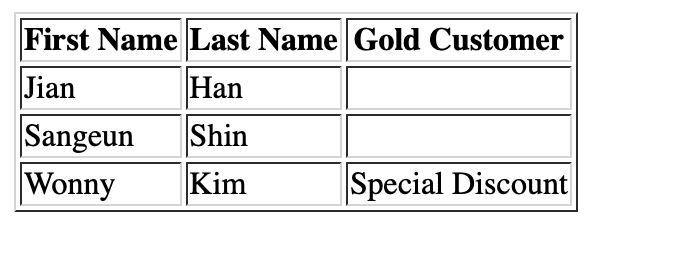
<%@ taglib uri="http://java.sun.com/jsp/jstl/xml" prefix="x" %>
<%@ taglib prefix="c" uri="http://java.sun.com/jsp/jstl/core" %>
<%@ page import="java.util.*,com.luv2code.jsp.tagdemo.Student" %>

<%

List<Student> data = new ArrayList<>();

data.add(new Student("Jian","Han", false));
data.add(new Student("Sangeun","Shin", false));
data.add(new Student("Wonny","Kim", true));


pageContext.setAttribute("myStudents", data);

%>

<html>
<body>
<table border="1">

<tr>
<th> First Name</th>
<th> Last Name</th>
<th> Gold Customer</th>
</tr>

<c:forEach var = "tempStudent" items= "${myStudents}">
	<tr>

	<td>${tempStudent.firstName} </td>
	<td>${tempStudent.lastName}</td>
	<td>
	<c:if test ="${tempStudent.goldCustomer}">
		Special Discount
		</c:if>

	 </td>

	</tr>
</c:forEach>

</table>

</body>
</html>
cf) tag 라이브러리는 else는 없음!
대신 태그 라이브러리 안에 not 조건을 넣을 수 있음
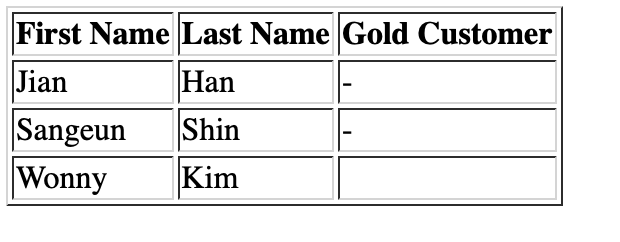
<%@ taglib uri="http://java.sun.com/jsp/jstl/xml" prefix="x" %>
<%@ taglib prefix="c" uri="http://java.sun.com/jsp/jstl/core" %>
<%@ page import="java.util.*,com.luv2code.jsp.tagdemo.Student" %>

<%

List<Student> data = new ArrayList<>();

data.add(new Student("Jian","Han", false));
data.add(new Student("Sangeun","Shin", false));
data.add(new Student("Wonny","Kim", true));


pageContext.setAttribute("myStudents", data);

%>

<html>
<body>
<table border="1">

<tr>
<th> First Name</th>
<th> Last Name</th>
<th> Gold Customer</th>
</tr>

<c:forEach var = "tempStudent" items= "${myStudents}">
	<tr>

	<td>${tempStudent.firstName} </td>
	<td>${tempStudent.lastName}</td>
	<td>
	<c:if test ="${not tempStudent.goldCustomer}">
		-
		</c:if>

	 </td>

	</tr>
</c:forEach>

</table>

</body>
</html>
Slow and Steady