
Git 설치해보자
깃 사용방법 Terminal, UI프로그램인 Source Tree 사용할수 있다
commands > UI
터미널 setting
아래 링크를 클릭하면 해당페이지로 이동
| WINDOW | MAC |
|---|---|
| iterm2 | cmder |
- iterm2 디자인 변경하기
추후 수정 필요
git, sourcetree setting
Git Set up
명령어 프로그램이기 때문에
터미널로 배워야 깃을 정확하게 사용할수 있다.
git 설치 확인
git --versiongit config 확인
git config --listgit global적으로 edit 하기
git config --global -e
git editer(visual studio code) 해당경로 수정
code .- 위처럼 사용하려면 VSC에서 설정을 해줘야함
- command + shift + p 실행하여 Shell Command : install 'code' 로 시작하는거 실행
git username , useremail 설정 및 확인
git config --global user.name "hangueira"
git config --global user.email "hks713@naver.com"

git config user.name
git config user.email
git 줄바꿈 속성 설정(운영체제별)
github에서 다양한 운영체제로 개발할경우 변경하지 않았음에도 불구하고 git history 볼때 문제 있을수 있음
| WINDOW | MAC |
|---|---|
| git config --global core.autocrlf true | git config --global core.autocrlf input |
- 운영체제마다 줄바꿈시 문자열이 달라짐
- window : text \r\n
- mac : text \n
git 초기화
git initgit 프로젝트 삭제
rm -rf .gitgit 상태 보기
git statusgit 명령어 속성값 보기
git config --hgit staging area 올리기
git add 파일명
git add *
git add *.js
git staging area 에서 working directory 내리기
rf -rf cached 파일명
rf -rf cached *
rf -rf cached *.js
git commit 하기
git commit -m "설명넣기"
git commit 하기
git commit -m "설명넣기"
github push 하기
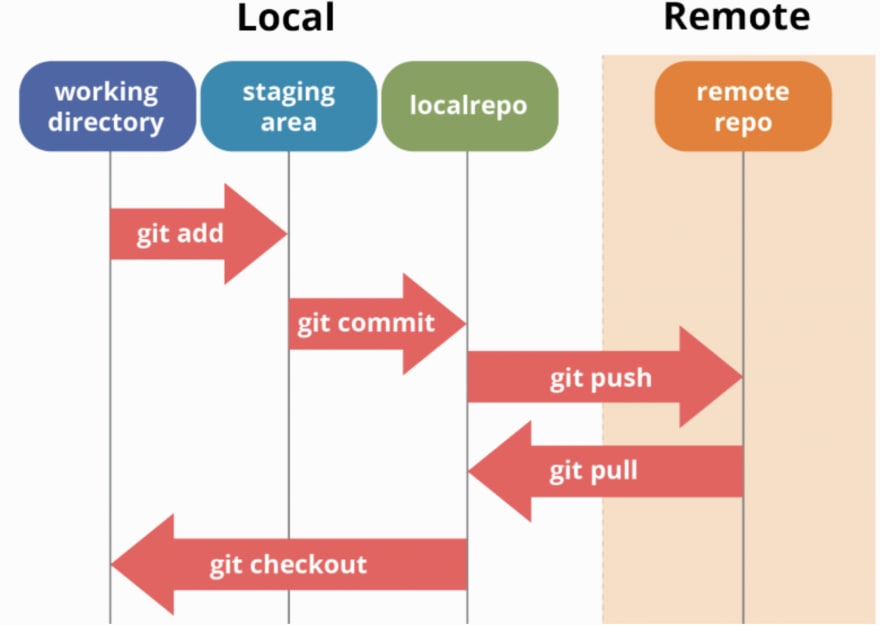
git pushGit workflow

내가 보려고 기록하는 velog