출처 https://www.youtube.com/watch?v=fR8tsJ2r7Eg&t=111s
제품이 변경되는 이유는 놓쳤던 고객 니즈를 발견!
= 제품을 성장시키는 것 (기회!!!)
변경에 대응하기
컴포넌트 잘 만들기
(a.k.a 변경에 유연하게 대응하도록!)
컴포넌트?
- 데이터 관리 (외부에서 주입받은 데이터 + 상태와 같은 내부 데이터)
- UI (데이터가 사용자에게 어떻게 보여질지 정의)
- 사용자와 어떻게 상호작용할지?
1. Headless 기반의 추상화하기
변하는 것 vs 상대적으로 변하지 않는 것
데이터와 UI를 분리하자
ex) 달력 컴포넌트 만들기
export default function Calendar() {
	// 달력에 대한 데이터를 추상화하여 useCalendar 라는 hooks로 표현
	const { headers, body, view } = useCalendar();

	return (
		<Table>
			<Thead>
        <Tr>
          {headers.weekDays.map(({ key, value }) => {
            return <Th key={key}>{format(value, 'E', { locale })}</Th>
          })}
        </Tr>
			</Thead>
      <Tbody>
        {body.value.map(({ key, value: days }) => {
          <Tr key={key}>
            {days.map(({ key, value }) => {
              <Td key={key}>{getDate(value)}</Td>
            })}
          </Tr>
        })}
      </Tbody>
		</Table>
	);
}
UI를 관심사에서 제외하고 데이터에만 집중해서 모듈화
=> Headless
상호작용과 UI를 분리하자
interface Props extends ComponentProps<typeof Button> {
  onLongPress?: (event: LongPressEvent) => void;
}

export function PressButton(props: Props) {
  const longPressProps = useLongPress();

  return <Button {...longPressProps} {...props} />
}

function useLongPress() {
  return {
    onKeyDown = { e => {
      //...
    }}
    onKeyUp = { e => {
      //...
	}}
	onMouseDown = { e => {
   	  //...
    }}
  }
}
2. 한 가지 역할만 하기
또는 한 가지 역할만 하는 컴포넌트의 조합으로 구성하기
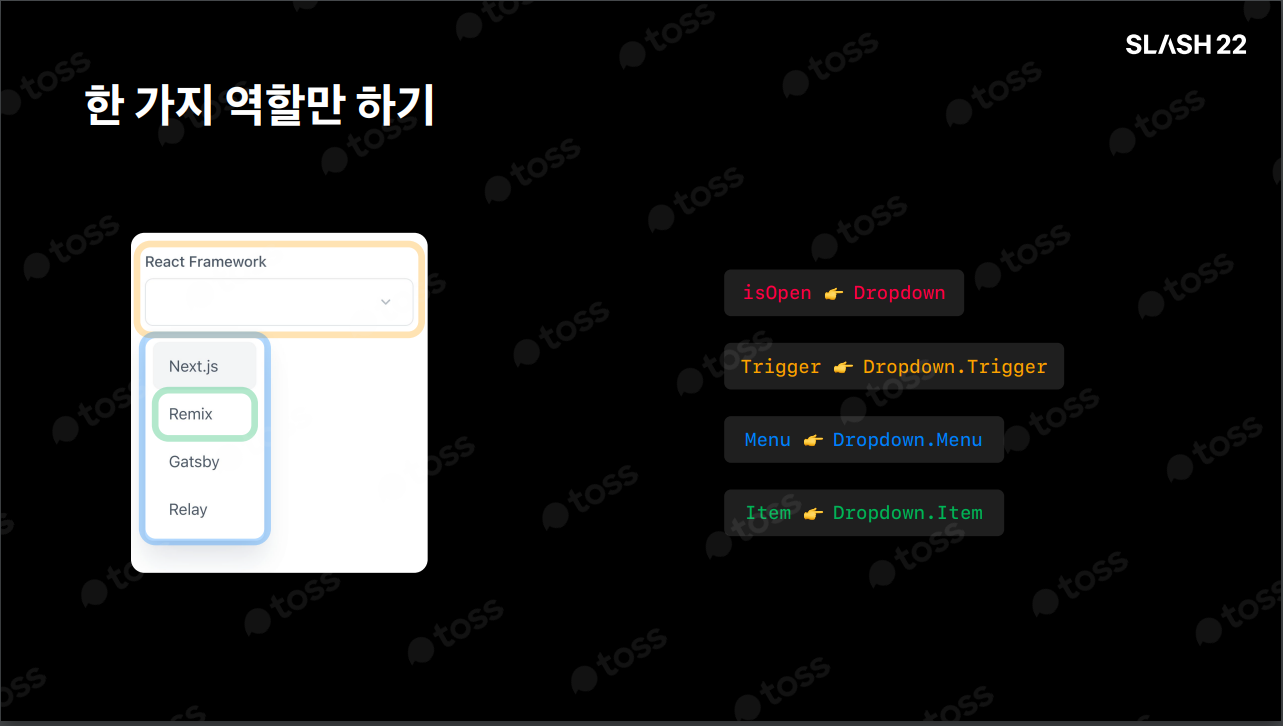
function Select({ label, trigger, value, onChange, options }: Props) {
	return (
		<Dropdown label={label} value={value} onChange={onChange}>
			<Dropdown.Trigger as={trigger} />
			<Dropdown.Menu>
				{options.map((option) => (
					<Dropdown.Item>{option}</Dropdown.Item>
				))}
			</Dropdown.Menu>
		</Dropdown>
	);
}

function FrameworkSelect() {
	const {
		data: { frameworks },
	} = useFrameworks();
	const [selected, change] = useState();

	return (
		<Select
			trigger={<InputButton value={selected} />}
			value={selected}
			onChange={change}
			options={frameworks}
		/>
	);
}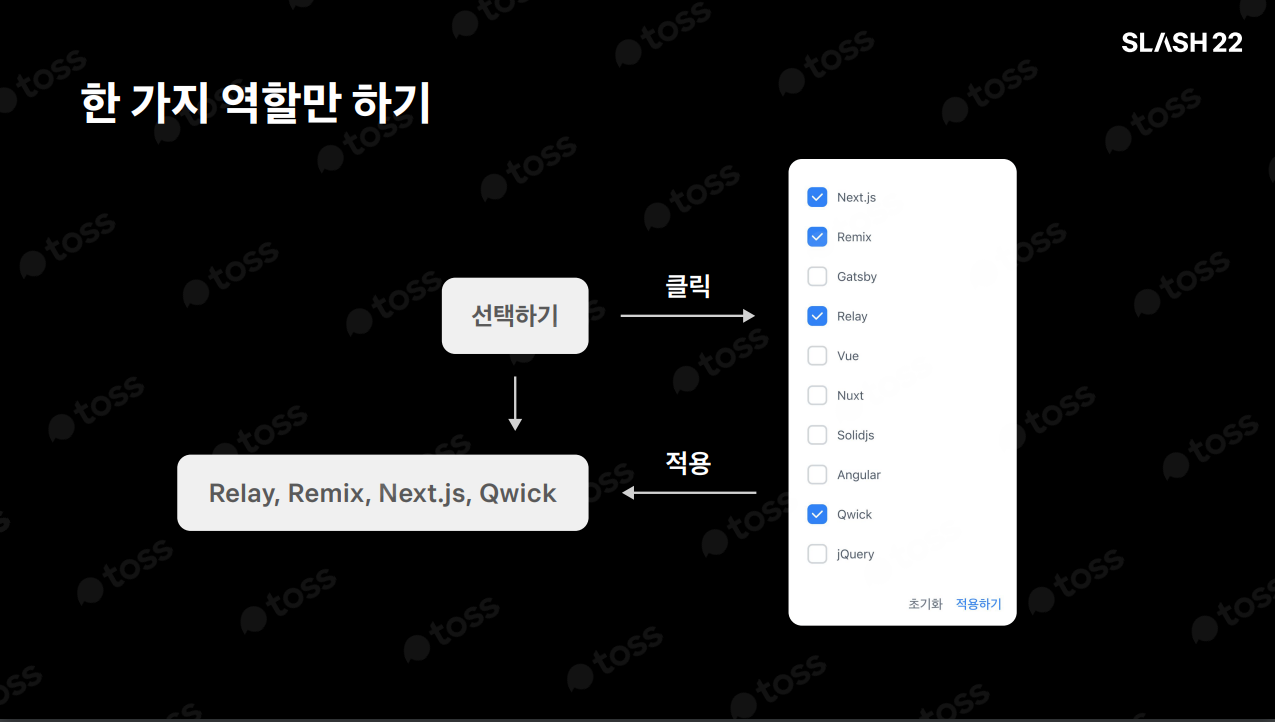
function FrameworkSelect({
	selectedFrameworks,
	onFrameworkChange,
	frameworks,
}: Props) {
	return (
		<Dropdown value={selectedFrameworks} onChange={onFrameworkChange}>
			<Dropdown.Trigger
				as={<Button>{String(selectedFrameworks ?? "선택하기")}</Button>}
			/>
			<Dropdown.Modal
				controls={
					<Flex>
						<Button type="reset">초기화</Button>
						<Button type="submit">적용하기</Button>
					</Flex>
				}
			>
				{frameworks.map((framwork) => {
					return <Dropdown.Item>{framework}</Dropdown.Item>;
				})}
			</Dropdown.Modal>
		</Dropdown>
	);
}
3. 도메인 분리하기
도메인을 포함하는 컴포넌트와 그렇지 않은 컴포넌트 분리하기
일반적인 인터페이스로 분리하기
// 도메인 맥락 제거
// - selectedFrameworks: string[];
// + value: string[]
// - onFramworkChange: (selcteds: string[]) => void;
// + onChange: (value: string[]) => void;
// - frameworks: Array<{ label: string }>;
// + options: Array>{ label: string }>- 컴포넌트의 역할을 이해하기 쉽다
function MultiSelect({
	value,
	onChange,
	options,
	valueAs = (value) => String(value ?? "선택하기"),
}: Props) {
	return (
		<Dropdown value={value} onChange={onChange}>
			<Dropdown.Trigger as={<Button>{valueAs(value)}</Button>} />
			<Dropdown.Modal
				controls={
					<Flex>
						<Button type="reset">초기화</Button>
						<Button type="submit">적용하기</Button>
					</Flex>
				}
			>
				{options.map(({label}) => {
					return <Dropdown.Item>{label}</Dropdown.Item>;
				})}
			</Dropdown.Modal>
		</Dropdown>
	);
}
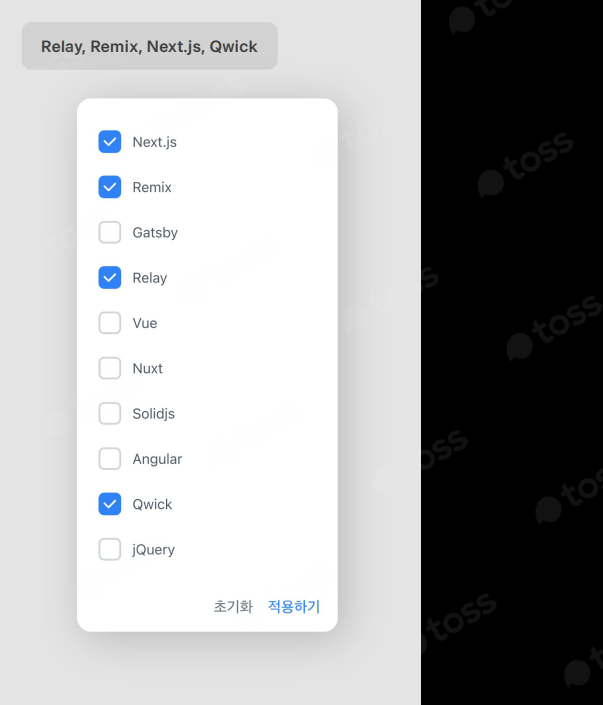
function FrameworkSelect() {
	const {
		data: { frameworks },
	} = useFrameworks();

	const [selected, change] = useState();

	return (
		<MultiSelect
			trigger={<Button value={selected.join()} />}
			value={selected}
			onChange={change}
			options={frameworks}
		/>
	);
}
Action Item
1. 인터페이스 먼저 고민하기
만들고자 하는 기능이 이미 모듈화 되어 있다고 가정
2. 컴포넌트를 나누는 이유에 대해 생각해보기
컴포넌트로 분리하면 실제로 복잡도를 낮추는가?
컴포넌트로 분리하면 재사용 가능한 컴포넌트인가?

이것저것... 차곡차곡...