iOS | UIview에서 Alert 띄우기(feat. present)
Intro
요즘은 customView를 활용해서 파일링 하는 연습을 하고 있다.
ViewController에 최소한의 것을 남기려고 덜어내는 중인데,
Alert을 띄우는 부분에서 사소한 문제가 발생했다.
Error
ViewController에서 사용했을 때는 문제가 되지 않았던 코드였다.
UIView에서 present 사용이 안된다고 하는것같다.
  alert.addAction(addAction)
  alert.addAction(cancelAction)

   self.present(alert, animated: true, completion: nil)
접근 - ( old way)
이 방법은 iOS 13.0에서만 사용되는 방법이라고 warning이 뜬다.
ViewController를 참조하는게 포인트인듯하다.
UIApplication.shared.keyWindow?.rootViewController?.presentedViewController?.present(alert, animated: true)해결
아래와 같이 코드를 추가하고 나서, Alert이 뜨는 걸 확인할 수 있었다.
- ViewController
UIView에 viewController를 전달
        view.addSubview(todoView)
todoView.viewController = self- UIView
UIViewController에 대한 참조
weak var viewController: UIViewController? alert.addAction(addAction)
alert.addAction(cancelAction)
self.viewController?.present(alert, animated: true, completion: nil)
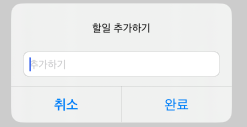
Next step
알렛이 나타나도록 문제는 해결했지만,
ViewController와 UIView 간의 상호참조가 일어나고 있어서
메모리 문제가 발생할 수 있다고 한다.
따라서 delegate 방식으로 ViewController에서 전달할수있도록 하는 방법을 찾아봐야겠다.

따로 연습까지... 대단하네요!
코딩 파이팅입니다!!