ib_write_bw without IPoIB
k8s 기반으로 구성된 GPU cluster에서 iboip (인피니밴드 네트워크카드에 ip를 할당하는 것) 설정이 불가한 경우, 성능 테스트를 하기 위한 방법.
ib_write_bw 수행 시 IPoIB가 필수인지 ?
- 결론적으로 ib_write_bw 수행을 위해 IPoIB가 필수인 것은 아님.
- RDMA는 IP 주소 체계 없이도 LID(Local ID)나 GUID 같은 InfiniBand 고유의 식별자를 통해 데이터를 주고받을 수 있기 때문.
- 단, 현실적으로 ib_write_bw 수행 시 IPoIB가 필수처럼 쓰이는 이유.
- ib_write_bw 실행 시, 데이터를 주고 받기 전에 핸드셰이크를 수행하는데 이 때 표준 TCP/IP 소켓을 사용.
- 이 때, IPoIB가 설정되어 있으면 IP주소를 통해 쉽게 서버 to 서버 통신이 가능.
- 핸드셰이크 과정에서만 TCP/IP를 사용할 뿐 실제 데이터 전송은 IPoIB를 거치지 않고 RDMA가 직접 처리하므로 성능 테스트가 가능.
기본 개념
- RDMA(원격 직접 메모리 접근, Remote Direct Memory Access)
- CPU 개입을 최소화하고 NIC(호스트 채널 어댑터, HCA)가 직접 원격 호스트의 메모리에 읽기/쓰기를 수행하는 기술.
- 지연(latency)이 매우 낮고 처리량(throughput)이 높아 대규모 분산 연산·스토리지·데이터베이스·MPI 등에 자주 쓰임.
- RDMA를 구현하기 위해서는 RDMA를 지원하는 네트워크 카드, 예를 들어 멜라녹스 Connect X 계열 등의 어댑터가 필요하다.
- infiniband에서는 물리적 링크 계층 프로토콜 + InfiniBand Verbs API 라는 상위 수준 프로그래밍 API를 통해 RDMA 기술을 구현.
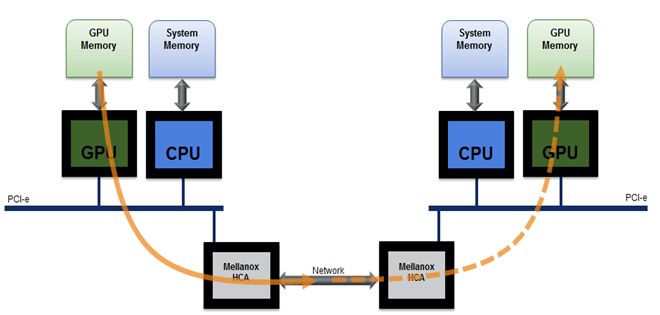
- HCA(Host Channel Adapter)
- 서버(호스트)가 InfiniBand 네트워크에 연결하기 위해 사용하는 네트워크 카드
- Ethernet NIC의 InfiniBand 버전이라고 생각하면 됨.
- LID(Local Identifier)
- InfiniBand 스위치가 각 포트에 부여하는 LAN의 MAC 주소 같은 지역 주소
- InfiniBand 서브넷(subnet) 내부에서만 유효한 주소
- IP와 달리 계층 구조가 없음 (Flat addressing)
- 스위치가 부팅 시 자동으로 배정
- IP 주소처럼 ping은 못하지만, RDMA 연결 시 LID 사용 가능
- GID(Global Identifier)
- 글로벌 IB 네트워크에서 사용되는 IPv6 기반 주소
- RoCE (RDMA over Converged Ethernet) 사용
- IB + IP 혼합 환경
- Multi-subnet 환경
- IPv6 기반 라우팅 필요
- Kubernetes + SR-IOV + RDMA 구성
- GPU Operator / Network Operator 설정 시에도 GID 필요할 때 많음
- iblinkinfo 나 ibnetdiscover 명령어를 통해 인피니밴드를 사용하면 따로 ip가 없어도 HCA를 통해 각 노드 간 통신이 됨을 확인할 수 있다. (특수한 네트워크 카드, 특수한 스위치가 필요)
- rdma 관련 성능 테스트
- 전송: ib_send_bw 및 ib_send_lat
- RDMA 읽기 : ib_read_bw 및 ib_read_lat
- RDMA 쓰기: ib_write_bw 및 ib_write_lat
- RDMA 원자 : ib_atomic_bw 및 ib_atomic_lat
테스트 방법
아래 테스트 예시는 ib 중 하나의 카드 대상으로 수행한 것으로 실제 테스트 시에는 전체 카드 대상으로 테스트를 수행.
- infiniband에 직접 ip 할당 없이 노드에 할당된 private ip 기반으로 성능 테스트 수행.
- ibv_rc_pingpong 옵션
- -d : device
- -g : gid_idx
- -i : ib_port (default 1)
root@master:~# ibv_rc_pingpong -d mlx5_0 -g 0 -i 1
libibverbs: Warning: couldn't load driver 'libvmw_pvrdma-rdmav34.so': libvmw_pvrdma-rdmav34.so: cannot open shared object file: No such file or directory
  local address:  LID 0x06d0, QPN 0x000051, PSN 0x868738, GID fe80::d894:2403:22:7f4c
  remote address: LID 0x05d6, QPN 0x00004d, PSN 0xca73b0, GID fe80::d894:2403:e6:376c
8192000 bytes in 0.01 seconds = 5487.40 Mbit/sec
1000 iters in 0.01 seconds = 11.94 usec/iter

root@compute:~# ibv_rc_pingpong -g 0 -d mlx5_0 -i 1 master
libibverbs: Warning: couldn't load driver 'libvmw_pvrdma-rdmav34.so': libvmw_pvrdma-rdmav34.so: cannot open shared object file: No such file or directory
  local address:  LID 0x05d6, QPN 0x00004d, PSN 0xca73b0, GID fe80::d894:2403:e6:376c
  remote address: LID 0x06d0, QPN 0x000051, PSN 0x868738, GID fe80::d894:2403:22:7f4c
8192000 bytes in 0.01 seconds = 5716.18 Mbit/sec
1000 iters in 0.01 seconds = 11.47 usec/iter- 각각 output 중에
remote address로 시작되는 부분이 뜨면 두 노드간 통신이 가능함을 의미한다.
ib_write test
- ib_write_bw 옵션
- -F : --CPU-freq Do not show a warning even if cpufreq_ondemand module is loaded, and cpu-freq is not on max.
- -report_gbits : Report Max/Average BW of test in Gbit/sec (instead of MiB/sec)
## master
root@master:~# ib_write_bw -F --report_gbits

************************************
* Waiting for client to connect... *
************************************
---------------------------------------------------------------------------------------
                    RDMA_Write BW Test
 Dual-port       : OFF		Device         : mlx5_0
 Number of qps   : 1		Transport type : IB
 Connection type : RC		Using SRQ      : OFF
 PCIe relax order: ON		Lock-free      : OFF
 ibv_wr* API     : ON
 CQ Moderation   : 1
 CQE Poll Batch  : 16
 Mtu             : 4096[B]
 Link type       : IB
 Max inline data : 0[B]
 rdma_cm QPs	 : OFF
 Data ex. method : Ethernet
---------------------------------------------------------------------------------------
 local address: LID 0x6d0 QPN 0x0053 PSN 0x9c4a79 RKey 0x1fff00 VAddr 0x007ed69fceb000
 remote address: LID 0x5d6 QPN 0x0051 PSN 0x6c70a5 RKey 0x1fff00 VAddr 0x0078e826451000
---------------------------------------------------------------------------------------
 #bytes     #iterations    BW peak[Gb/sec]    BW average[Gb/sec]   MsgRate[Mpps]
 65536      5000             360.66             354.73 		     0.676599
---------------------------------------------------------------------------------------

### client (compute)
root@compute:~# ib_write_bw -F --report_gbits master
---------------------------------------------------------------------------------------
                    RDMA_Write BW Test
 Dual-port       : OFF		Device         : mlx5_0
 Number of qps   : 1		Transport type : IB
 Connection type : RC		Using SRQ      : OFF
 PCIe relax order: ON		Lock-free      : OFF
 ibv_wr* API     : ON
 TX depth        : 128
 CQ Moderation   : 1
 CQE Poll Batch  : 16
 Mtu             : 4096[B]
 Link type       : IB
 Max inline data : 0[B]
 rdma_cm QPs	 : OFF
 Data ex. method : Ethernet
---------------------------------------------------------------------------------------
 local address: LID 0x5d6 QPN 0x0051 PSN 0x6c70a5 RKey 0x1fff00 VAddr 0x0078e826451000
 remote address: LID 0x6d0 QPN 0x0053 PSN 0x9c4a79 RKey 0x1fff00 VAddr 0x007ed69fceb000
---------------------------------------------------------------------------------------
 #bytes     #iterations    BW peak[Gb/sec]    BW average[Gb/sec]   MsgRate[Mpps]
 65536      5000             360.66             354.73 		     0.676599
---------------------------------------------------------------------------------------
multiple message sizes
- -a : --all Run sizes from 2 till 2^23
root@master:~# ib_write_bw -F --report_gbits -a

************************************
* Waiting for client to connect... *
************************************
---------------------------------------------------------------------------------------
                    RDMA_Write BW Test
 Dual-port       : OFF		Device         : mlx5_0
 Number of qps   : 1		Transport type : IB
 Connection type : RC		Using SRQ      : OFF
 PCIe relax order: ON		Lock-free      : OFF
 ibv_wr* API     : ON
 CQ Moderation   : 100
 CQE Poll Batch  : 16
 Mtu             : 4096[B]
 Link type       : IB
 Max inline data : 0[B]
 rdma_cm QPs	 : OFF
 Data ex. method : Ethernet
---------------------------------------------------------------------------------------
 local address: LID 0x6d0 QPN 0x0054 PSN 0x3509ab RKey 0x1fff00 VAddr 0x00747829dff000
 remote address: LID 0x5d6 QPN 0x0052 PSN 0x996dcf RKey 0x1fff00 VAddr 0x0073dd547ff000
---------------------------------------------------------------------------------------
 #bytes     #iterations    BW peak[Gb/sec]    BW average[Gb/sec]   MsgRate[Mpps]
 8388608    5000             371.05             370.50 		     0.005521
---------------------------------------------------------------------------------------

root@compute:~# ib_write_bw -F --report_gbits -a master
---------------------------------------------------------------------------------------
                    RDMA_Write BW Test
 Dual-port       : OFF		Device         : mlx5_0
 Number of qps   : 1		Transport type : IB
 Connection type : RC		Using SRQ      : OFF
 PCIe relax order: ON		Lock-free      : OFF
 ibv_wr* API     : ON
 TX depth        : 128
 CQ Moderation   : 100
 CQE Poll Batch  : 16
 Mtu             : 4096[B]
 Link type       : IB
 Max inline data : 0[B]
 rdma_cm QPs	 : OFF
 Data ex. method : Ethernet
---------------------------------------------------------------------------------------
 local address: LID 0x5d6 QPN 0x0052 PSN 0x996dcf RKey 0x1fff00 VAddr 0x0073dd547ff000
 remote address: LID 0x6d0 QPN 0x0054 PSN 0x3509ab RKey 0x1fff00 VAddr 0x00747829dff000
---------------------------------------------------------------------------------------
 #bytes     #iterations    BW peak[Gb/sec]    BW average[Gb/sec]   MsgRate[Mpps]
 2          5000           0.035122            0.034764            2.172740
 4          5000           0.070416            0.070410            2.200321
 8          5000             0.14               0.14   		     2.165351
 16         5000             0.28               0.28   		     2.172327
 32         5000             0.56               0.56   		     2.176900
 64         5000             1.12               1.12   		     2.188759
 128        5000             2.24               2.23   		     2.181238
 256        5000             4.70               4.58   		     2.238059
 512        5000             9.08               9.06   		     2.212612
 1024       5000             29.97              20.08  		     2.451476
 2048       5000             58.67              47.36  		     2.890909
 4096       5000             98.30              81.81  		     2.496628
 8192       5000             180.93             167.65 		     2.558118
 16384      5000             295.65             274.99 		     2.097979
 32768      5000             342.09             327.57 		     1.249574
 65536      5000             365.79             353.61 		     0.674459
 131072     5000             369.94             366.66 		     0.349677
 262144     5000             371.42             371.15 		     0.176976
 524288     5000             373.38             373.38 		     0.089020
 1048576    5000             370.67             368.36 		     0.043912
 2097152    5000             374.15             373.92 		     0.022287
 4194304    5000             373.84             373.75 		     0.011139
 8388608    5000             371.05             370.50 		     0.005521
---------------------------------------------------------------------------------------
IB Point to Point Latency Test
- 결과 값 중
Data ex. method : Ethernet이 Ethernet으로 표기되는데 이 글에 따르면 RDMA 테스트 시 초기 연결 설정은 이더넷을 통해 이루어지고, 실제 트래픽은 IB 포트를 통해 전송.
root@master:~# ib_write_lat -F --report_gbits

************************************
* Waiting for client to connect... *
************************************
---------------------------------------------------------------------------------------
                    RDMA_Write Latency Test
 Dual-port       : OFF		Device         : mlx5_0
 Number of qps   : 1		Transport type : IB
 Connection type : RC		Using SRQ      : OFF
 PCIe relax order: OFF		Lock-free      : OFF
 ibv_wr* API     : ON
 Mtu             : 4096[B]
 Link type       : IB
 Max inline data : 220[B]
 rdma_cm QPs	 : OFF
 Data ex. method : Ethernet
---------------------------------------------------------------------------------------
 local address: LID 0x6d0 QPN 0x0055 PSN 0x413e23 RKey 0x1ffcbb VAddr 0x0061685c796000
 remote address: LID 0x5d6 QPN 0x0053 PSN 0x45f3e7 RKey 0x1ffbba VAddr 0x00596dac3a7000
---------------------------------------------------------------------------------------
 #bytes #iterations    t_min[usec]    t_max[usec]  t_typical[usec]    t_avg[usec]    t_stdev[usec]   99% percentile[usec]   99.9% percentile[usec]
 2       1000          4.24           12.53        4.32     	       4.33        	0.10   		4.76    		12.53
---------------------------------------------------------------------------------------


root@compute:~# ib_write_lat -F --report_gbits master
---------------------------------------------------------------------------------------
                    RDMA_Write Latency Test
 Dual-port       : OFF		Device         : mlx5_0
 Number of qps   : 1		Transport type : IB
 Connection type : RC		Using SRQ      : OFF
 PCIe relax order: OFF		Lock-free      : OFF
 ibv_wr* API     : ON
 TX depth        : 1
 Mtu             : 4096[B]
 Link type       : IB
 Max inline data : 220[B]
 rdma_cm QPs	 : OFF
 Data ex. method : Ethernet
---------------------------------------------------------------------------------------
 local address: LID 0x5d6 QPN 0x0053 PSN 0x45f3e7 RKey 0x1ffbba VAddr 0x00596dac3a7000
 remote address: LID 0x6d0 QPN 0x0055 PSN 0x413e23 RKey 0x1ffcbb VAddr 0x0061685c796000
---------------------------------------------------------------------------------------
 #bytes #iterations    t_min[usec]    t_max[usec]  t_typical[usec]    t_avg[usec]    t_stdev[usec]   99% percentile[usec]   99.9% percentile[usec]
 2       1000          4.24           10.52        4.32     	       4.33        	0.10   		4.69    		10.52
---------------------------------------------------------------------------------------
IB Point to Point Latency Test(with message size grows)
root@master:~# ib_write_lat -F --report_gbits -a

************************************
* Waiting for client to connect... *
************************************
---------------------------------------------------------------------------------------
                    RDMA_Write Latency Test
 Dual-port       : OFF		Device         : mlx5_0
 Number of qps   : 1		Transport type : IB
 Connection type : RC		Using SRQ      : OFF
 PCIe relax order: OFF		Lock-free      : OFF
 ibv_wr* API     : ON
 Mtu             : 4096[B]
 Link type       : IB
 Max inline data : 220[B]
 rdma_cm QPs	 : OFF
 Data ex. method : Ethernet
---------------------------------------------------------------------------------------
 local address: LID 0x6d0 QPN 0x0056 PSN 0x5bf666 RKey 0x1800bf VAddr 0x0074cb23f1c000
 remote address: LID 0x5d6 QPN 0x0054 PSN 0x6cfd67 RKey 0x1827e6 VAddr 0x007b9cec7ff000
---------------------------------------------------------------------------------------
 #bytes #iterations    t_min[usec]    t_max[usec]  t_typical[usec]    t_avg[usec]    t_stdev[usec]   99% percentile[usec]   99.9% percentile[usec]
 2       1000          4.18           15.18        4.24     	       4.25        	0.08   		4.48    		15.18
 4       1000          4.12           6.06         4.24     	       4.24        	0.04   		4.36    		6.06
 8       1000          4.18           4.67         4.24     	       4.24        	0.00   		4.28    		4.67
 16      1000          4.14           5.48         4.24     	       4.25        	0.00   		4.34    		5.48
 32      1000          4.22           5.41         4.28     	       4.28        	0.00   		4.32    		5.41
 64      1000          4.18           9.17         4.27     	       4.28        	0.15   		5.09    		9.17
 128     1000          4.19           5.66         4.30     	       4.30        	0.04   		4.42    		5.66
 256     1000          5.34           7.38         5.40     	       5.42        	0.08   		5.88    		7.38
 512     1000          5.28           6.78         5.42     	       5.43        	0.04   		5.66    		6.78
 1024    1000          5.48           7.29         5.56     	       5.58        	0.04   		5.72    		7.29
 2048    1000          5.50           9.26         5.60     	       5.63        	0.11   		6.48    		9.26
 4096    1000          5.74           9.20         5.86     	       5.88        	0.13   		6.80    		9.20
 8192    1000          5.26           7.25         5.40     	       5.47        	0.05   		6.13    		7.25
 16384   1000          5.49           7.91         5.66     	       5.74        	0.07   		6.60    		7.91
 32768   1000          6.11           9.44         6.23     	       6.30        	0.10   		7.27    		9.44
 65536   1000          7.16           11.36        7.35     	       7.40        	0.17   		8.36    		11.36
 131072  1000          10.43          14.51        10.61    	       10.64       	0.14   		11.70   		14.51
 262144  1000          13.06          19.46        13.27    	       13.30       	0.37   		16.02   		19.46
 524288  1000          18.41          28.25        18.52    	       18.64       	0.90   		27.52   		28.25
 1048576 1000          29.24          48.30        29.37    	       29.48       	1.16   		30.91   		48.30
 2097152 1000          51.62          89.20        51.78    	       52.03       	1.71   		54.02   		89.20
 4194304 1000          97.22          171.64       97.46    	       97.55       	2.33   		98.64   		171.64
 8388608 1000          187.36         191.49       187.69   	       187.70      	0.06   		188.18  		191.49
---------------------------------------------------------------------------------------

root@compute:~# ib_write_lat -F --report_gbits -a master
---------------------------------------------------------------------------------------
                    RDMA_Write Latency Test
 Dual-port       : OFF		Device         : mlx5_0
 Number of qps   : 1		Transport type : IB
 Connection type : RC		Using SRQ      : OFF
 PCIe relax order: OFF		Lock-free      : OFF
 ibv_wr* API     : ON
 TX depth        : 1
 Mtu             : 4096[B]
 Link type       : IB
 Max inline data : 220[B]
 rdma_cm QPs	 : OFF
 Data ex. method : Ethernet
---------------------------------------------------------------------------------------
 local address: LID 0x5d6 QPN 0x0054 PSN 0x6cfd67 RKey 0x1827e6 VAddr 0x007b9cec7ff000
 remote address: LID 0x6d0 QPN 0x0056 PSN 0x5bf666 RKey 0x1800bf VAddr 0x0074cb23f1c000
---------------------------------------------------------------------------------------
 #bytes #iterations    t_min[usec]    t_max[usec]  t_typical[usec]    t_avg[usec]    t_stdev[usec]   99% percentile[usec]   99.9% percentile[usec]
 2       1000          4.18           6.41         4.24     	       4.25        	0.08   		4.47    		6.41
 4       1000          4.13           6.06         4.24     	       4.24        	0.04   		4.36    		6.06
 8       1000          4.18           4.66         4.24     	       4.24        	0.00   		4.28    		4.66
 16      1000          4.14           5.48         4.24     	       4.25        	0.00   		4.34    		5.48
 32      1000          4.20           5.40         4.28     	       4.28        	0.00   		4.34    		5.40
 64      1000          4.17           9.18         4.26     	       4.28        	0.15   		4.79    		9.18
 128     1000          4.18           5.68         4.30     	       4.30        	0.04   		4.42    		5.68
 256     1000          5.34           7.41         5.40     	       5.42        	0.08   		5.87    		7.41
 512     1000          5.30           6.78         5.42     	       5.43        	0.04   		5.64    		6.78
 1024    1000          5.48           7.28         5.56     	       5.58        	0.04   		5.72    		7.28
 2048    1000          5.52           9.22         5.60     	       5.63        	0.11   		6.50    		9.22
 4096    1000          5.79           9.20         5.85     	       5.87        	0.13   		6.81    		9.20
 8192    1000          5.26           7.27         5.40     	       5.47        	0.04   		6.15    		7.27
 16384   1000          5.54           7.89         5.67     	       5.73        	0.07   		6.44    		7.89
 32768   1000          6.12           9.27         6.23     	       6.30        	0.11   		7.16    		9.27
 65536   1000          7.15           11.27        7.35     	       7.40        	0.17   		8.36    		11.27
 131072  1000          10.37          14.36        10.61    	       10.64       	0.14   		11.69   		14.36
 262144  1000          13.06          19.56        13.25    	       13.29       	0.39   		15.58   		19.56
 524288  1000          18.38          28.43        18.52    	       18.64       	0.91   		27.59   		28.43
 1048576 1000          29.23          48.00        29.37    	       29.48       	1.11   		30.86   		48.00
 2097152 1000          51.62          88.98        51.79    	       52.01       	1.56   		54.01   		88.98
 4194304 1000          97.16          171.53       97.46    	       97.52       	1.46   		98.64   		171.53
 8388608 1000          187.35         191.51       187.68   	       187.69      	0.07   		188.20  		191.51
---------------------------------------------------------------------------------------
IPoIB 설정된 경우와의 차이
IPoIB를 사용할 때는 -R 옵션을 사용.
- -R
- rdma_cm을 통해 QP(Queue Pair)를 생성 및 연결하고 test.
- 이 경우 rdma_cm 라이브러리는 QP를 연결을 위해 IPoIB 인터페이스를 사용.
- 이 옵션은 두 노드 사이에 이더넷 연결이 없을 때 사용하며, 이 때IPoIB 인터페이스가 설정되어 있어야 함.
참고

Whatever you're not changing, you're choosing